

Digital Customer Journey Mapping: What It Is, How It Works, and How to Build One

By Md. Ariful Basher
May 20, 2026
Last Modified: May 20, 2026


A SaaS company was losing 40% of its trials before day seven. They ran surveys, tweaked the product, hired more support staff. Nothing moved. Then they mapped the actual journey and found one email, sent 18 hours after signup, that assumed the user had already completed setup. Most hadn’t. One email. Fixed in a day. Conversion recovered.
That’s what digital customer journey mapping actually does. It shows you exactly where the experience breaks, and most of the time, the break is somewhere nobody was looking. No amount of surveys or brainstorming sessions gets you there faster.
Most businesses are still flying blind between touchpoints, assuming the checkout is smooth because nobody complained, hoping the onboarding email lands. The gaps don’t announce themselves. They just quietly cost you conversions, loyalty, and revenue.
TL;DR
- A customer journey map is a visual of every interaction a customer has with your brand, from first discovery to post-purchase advocacy
- The five standard stages are: Awareness, Consideration, Decision, Retention, and Advocacy
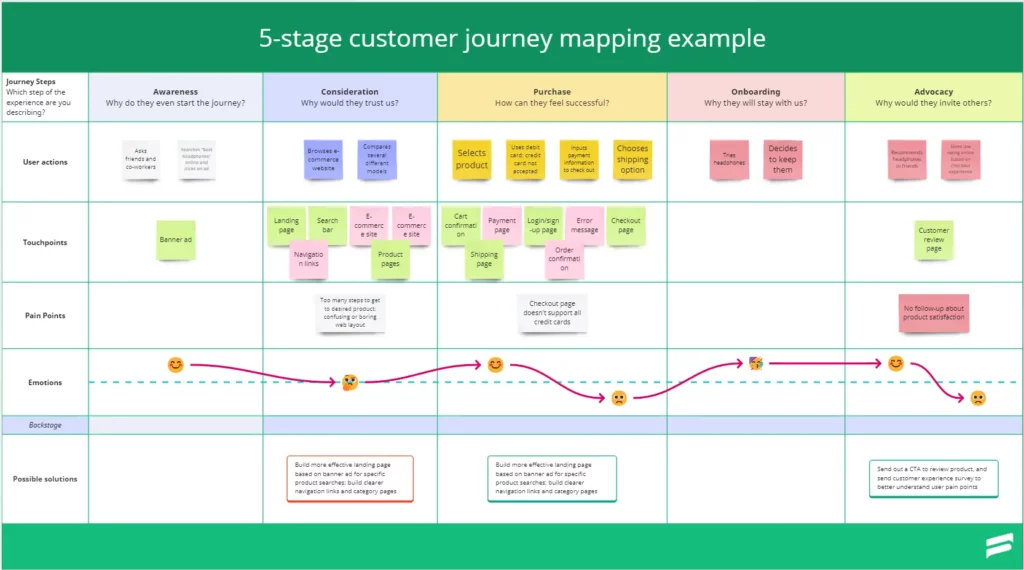
- Key components include personas, touchpoints, customer actions, emotions, pain points, and opportunities
- There are four types of maps: current state, future state, day-in-the-life, and service blueprint
- Building one takes six clear steps, goal setting, research, personas, touchpoints, emotions, and action
- The map is only useful if it’s grounded in real data, not assumptions
- Updated regularly, it becomes a shared source of truth across marketing, support, and product teams
What Is a Customer Journey Map?
A customer journey map is a visual representation of every step a customer takes when interacting with your brand, capturing their actions, thoughts, emotions, and pain points from the moment they first discover you to the point where they become an advocate (or quietly leave).
It’s not just a diagram. It’s a shift in perspective, from “here’s what we built” to “here’s what they actually experience.” That gap between the two? That’s where most businesses bleed.
A well-built map forces teams to look at the experience horizontally, across departments, instead of each team only seeing its own vertical. Marketing sees the top of funnel. Support sees the complaints. Product sees the feature requests. The journey map sees all of it together.
The 5 Stages of the Digital Customer Journey
Every customer follows a path, not always in a straight line, and not always consciously. But the stages are consistent enough that every business can map against them. A journey map covers the full relationship, which is why it connects so closely to customer lifecycle management as a long-term discipline.
1. Awareness
The customer realizes they have a problem or a need. They start looking for answers. This is where your content, your ads, your SEO, and your word-of-mouth either surface you or don’t. The job here isn’t to sell, it’s to be found, and to be relevant.
2. Consideration
They’ve found you. Now they’re evaluating. Comparing. Reading reviews. Watching demos. Asking friends. This stage is where trust is built or lost. A confusing pricing page, an unanswered product question, or a slow-loading comparison table can end the journey here.
3. Decision
They’ve made their choice, or they’re one nudge away from it. The checkout experience, the signup flow, the pricing clarity: all of it matters here. Cart abandonment sits at nearly 70% across industries, which means the decision stage is where most businesses lose the most money, silently. Most only discover the friction here after they check the analytics. By then, those customers are already gone.
4. Retention
The sale happened. But the journey isn’t over; it’s entering its most critical phase. How the customer experiences onboarding, how quickly they find value, how your support team handles their first problem, all of this determines whether they stay or churn. Businesses focused solely on acquisition and not retention are essentially filling a leaking bucket.
5. Advocacy
A happy customer who recommends your product is worth more than any ad spend. This stage is earned, not manufactured. It comes from consistently applying strong customer engagement practices at every prior stage. When customers reach advocacy, they restart the entire cycle for someone new, at zero cost to you.
A Real-World Example: How T-Mobile Used Journey Mapping to Stop Losing Customers
T-Mobile mapped the journey of customers who were calling to cancel their service. The map revealed something nobody had fully seen before: for many customers, that cancellation call was the first time they had ever spoken to a real human at the company. Every prior interaction had been automated, impersonal, or reactive.
That single insight reshaped their entire support model. They moved away from random call routing and introduced dedicated “Teams of Experts”, small groups paired with specific customers so the relationship felt continuous.
Churn dropped. Satisfaction scores climbed. The map didn’t tell them what to build. It showed them where the relationship was already broken.
This is what good digital customer journey mapping produces: a decision, not just a document. And usually the decision is simpler than anyone expected, because the problem was hiding in plain sight the whole time.
If you’re running a WordPress-based business, something like Fluent Support handles the support layer of this journey, keeping ticket context intact so customers never have to repeat themselves, which is one of the most common pain points journey maps surface at the Retention stage.
Key Components of a Digital Customer Journey Map
So what actually goes into one of these maps? Here are the components that separate a useful one from a wall decoration.
Customer Personas A persona is a research-based profile of a specific customer type, their goals, frustrations, behaviors, and motivations. Each map should focus on one persona. Mixing multiple personas into a single map produces a generic picture that’s useful to no one. If you serve different customer segments, build separate maps, understanding your customer segmentation models first makes this far easier.
Touchpoints These are every specific moment the customer interacts with your brand, your website, an ad, an email, a support chat, a delivery notification, a review prompt. Listing them all, across all channels, is usually the first moment teams realize how many interactions they’ve been ignoring.
Customer Actions What the customer physically does at each touchpoint: searches, clicks, reads, calls, compares, abandons. Actions are observable and measurable, which makes them the most grounding part of the map.
Thoughts and Emotions This is the human layer. What is the customer thinking at this moment? How do they feel? Frustrated by unclear shipping costs? Excited after a great demo? Confused by the checkout? Mapping emotions reveals the experiences customers describe in reviews and support tickets, before they get that far.
Pain Points Specific moments of friction, confusion, or disappointment. Some are explicit, customers tell you directly. Others are latent, surfaced only through behavioral data, session replays, or careful observation. Both matter.
Opportunities The output of the map. Where can the experience be meaningfully improved? Which pain points are high-frequency? Which stages have the biggest drop-off? Opportunities are what make the map actionable, they feed directly into efforts to improve the customer experience across your site and product.
Types of Customer Journey Maps
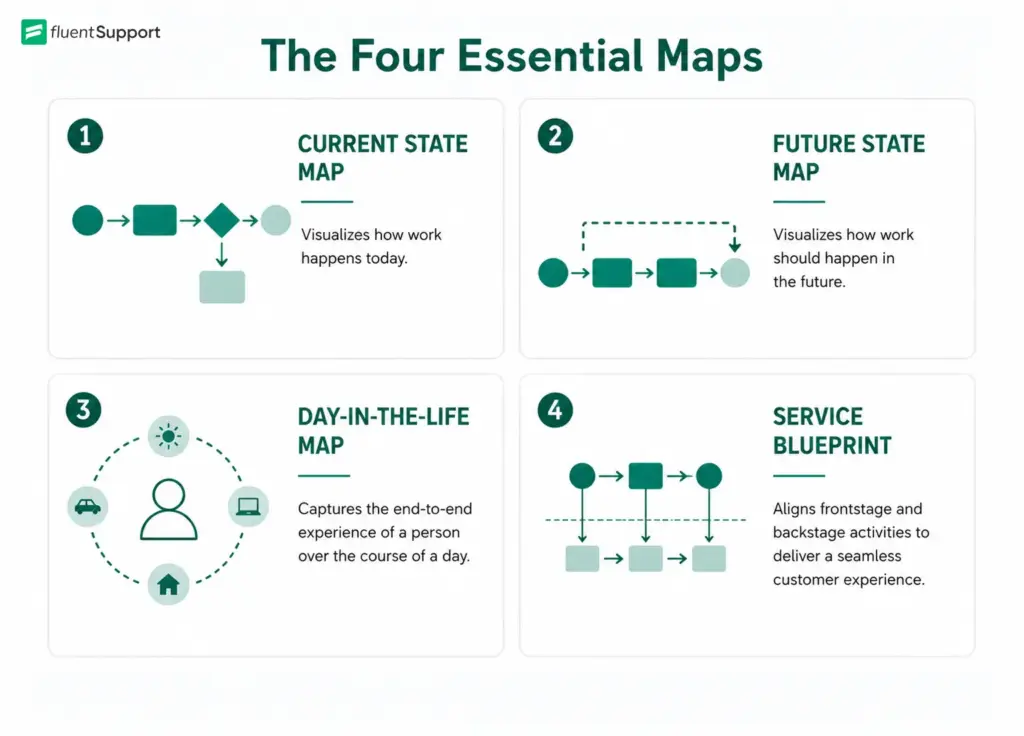
Not every digital customer journey mapping exercise has the same goal. Choosing the right type of map upfront saves a lot of wasted effort.
Current State Map The most common type. It documents the journey as it exists right now, the actual experience customers have today, friction and all. Start here if you’re trying to diagnose problems.
Future State Map A visualization of the ideal experience you want to create. Useful when planning a new product line, redesigning a checkout flow, or entering a new market. It gives teams something concrete to build toward.
Day-in-the-Life Map Zooms out from the brand interaction entirely and maps the customer’s broader daily context, what they’re doing, feeling, and dealing with before and after they encounter your product. Useful for identifying unmet needs that your product could address but currently doesn’t.
Service Blueprint The most detailed type. It layers internal processes, systems, and team responsibilities on top of the customer-facing experience. Helpful when pain points are caused by backstage failures, a delayed email, a manual approval step, a data handoff that drops information.
How to Build a Digital Customer Journey Map
Step 1: Define Your Goal
Before anything else, know why you’re mapping. Are you trying to reduce trial-to-paid drop-off? Improve post-purchase retention? Fix a spike in support tickets at onboarding? A map built around a vague goal produces vague output. Specific goals produce specific insights.
Step 2: Do Real Research
This is where most teams cut corners, and it’s the most expensive shortcut you can take. Gather data from customer interviews, support logs, your customer feedback loop, live chat transcripts, session recordings, and analytics.
The map should reflect what customers actually experience, not what you believe they experience. As researchers at Nielsen Norman Group put it, maps based on research are consistently more useful than maps built from assumptions.
Step 3: Build Your Persona
Create a detailed profile of the specific customer type this map covers. Include their role, their goals, their frustrations, and what they’re measuring success by. A WordPress store owner mapping the journey for first-time buyers needs a very different persona than one mapping enterprise repeat buyers.
Step 4: List Every Touchpoint
Go channel by channel, search, social, email, website pages, checkout flow, order confirmation, onboarding sequence, support interactions. Include every point of contact, even the indirect ones like review sites and community forums. You’ll often discover touchpoints you didn’t know were part of the experience.
Step 5: Map Actions, Emotions, and Pain Points
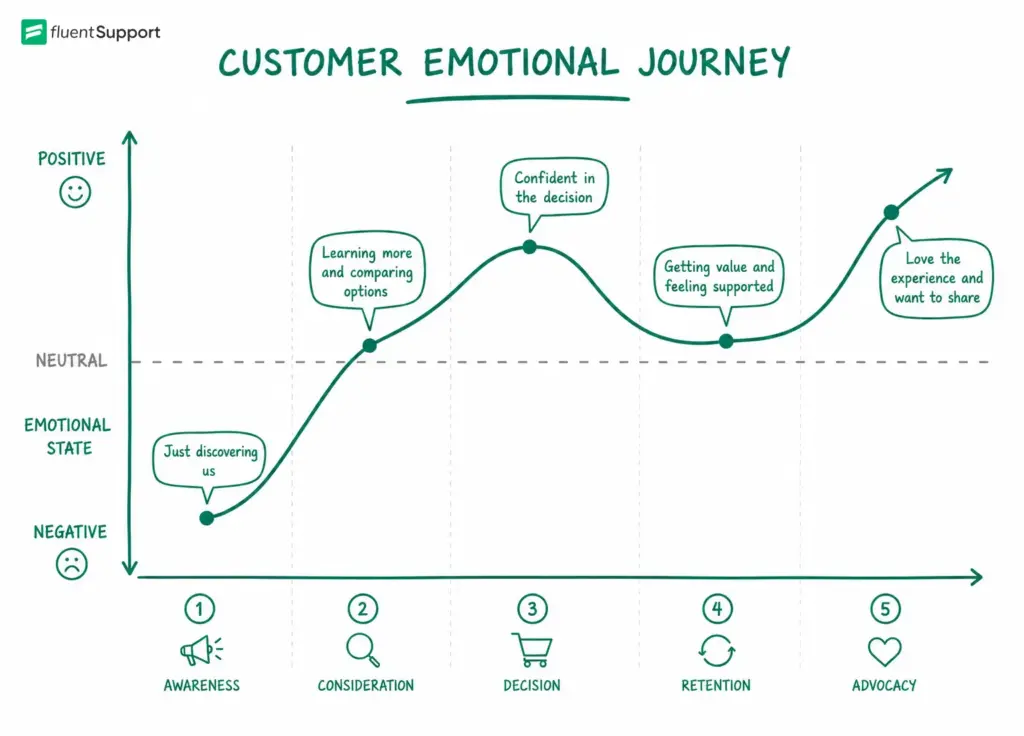
Walk the journey as your persona would. For each touchpoint, record what they do, what they think, and how they feel. Mark pain points clearly. This is the step that tends to generate the most “oh, we didn’t know that was happening” moments in cross-team workshops.
Step 6: Identify Opportunities and Assign Ownership
Look for patterns: where do emotions consistently dip? Where does behavior indicate confusion even when no one complains? Where are there gaps between what the customer expects and what they get?
Turn these into prioritized opportunities in your digital customer journey mapping, and assign each one to the team responsible for that part of the journey. Without ownership, nothing changes.
Customer Journey Mapping Template: What to Capture
The format of a customer journey mapping template matters less than whether it gets used. That said, a solid template covers these columns across each journey stage:
|
Stage |
Persona Actions |
Touchpoints |
Emotions |
Pain Points |
Opportunities |
|---|---|---|---|---|---|
|
Awareness |
Searches for plugin reviews |
Google, Reddit |
Curious, uncertain |
Too many options, unclear differentiators |
Stronger comparison content |
|
Consideration |
Visits site, reads docs |
Website, docs |
Interested but cautious |
No clear getting-started path |
Guided onboarding flow |
|
Decision |
Installs free version |
Plugin repo |
Excited, slightly overwhelmed |
Setup complexity |
In-product setup wizard |
|
Retention |
Uses product weekly |
Dashboard, emails |
Satisfied or frustrated |
Confusing settings page |
In-context help tooltips |
|
Advocacy |
Leaves review |
WordPress.org |
Proud, helpful |
Nothing prompts it |
Post-success review ask |
Customer Journey Mapping Template
Get your hand on to a sample customer journey mapping template for FREE. Map out your customer journey by analyzing touch points to understand your customer experience.
Tools that work well for this: Miro and FigJam for collaborative whiteboard mapping, UXpressia if you want a dedicated platform, Lucidchart for diagram-style outputs. HubSpot also offers a free downloadable template if you want a spreadsheet-based starting point.
When Should You Work With Customer Journey Mapping Consultants?
Most teams can run a basic journey mapping session internally, especially the first one. But there are situations where bringing in customer journey mapping consultants makes sense.
If your organization has siloed teams that struggle to agree on what the customer experience actually is, an outside facilitator can run the process more neutrally. If you need to map a highly complex, multi-channel journey across an enterprise product, consultants who do this professionally will structure it faster and more rigorously than most internal teams can.
And if you need to translate the map into a cross-departmental change program, not just a document, experienced consultants know how to drive adoption.
The risk of hiring too early is that you outsource the learning. The team that builds the map tends to understand the customer better than the team that receives it. That shared understanding is half the value.
The Mistakes That Make Maps Useless
Digital customer journey mapping fails for a handful of predictable reasons, and they’re worth naming plainly.
Building from assumptions rather than research produces a map that validates what you already believe. That’s comfortable and useless. The discomfort of real customer data is the point.
Mapping from the company’s perspective instead of the customer’s turns the exercise into a process documentation exercise. If a section is titled “we send the confirmation email” instead of “customer waits for confirmation and checks spam,” you’re already in the wrong frame.
Building one map for all customers. A first-time buyer and a returning bulk buyer have different journeys. Mapping them together produces something that accurately describes neither.
Treating it as a one-time project. Customer behavior shifts, product features change, new channels emerge. A 2022 McKinsey study found that consistent customer experience optimization drives up to three times higher shareholder returns compared to companies that don’t make it a priority. A journey map that isn’t revisited becomes a relic.
The Difference Between a Journey Map and a Buyer Journey Map
These two are often used interchangeably. They’re related but not the same.
A buyer journey map focuses specifically on the path to purchase, Awareness, Consideration, Decision. It stops when the transaction happens. A customer journey map covers the full relationship, including post-purchase onboarding, support interactions, and advocacy. For eCommerce KPI tracking and retention strategy, the customer journey map is the more complete tool. The buyer journey is useful for optimizing acquisition and conversion.
What Good Digital Customer Journey Mapping Actually Produces
Here’s what’s actually happening when a team commits to this properly: they stop guessing and start seeing. The eCommerce CRO improvements that move the needle, better onboarding, reduced checkout friction, smarter post-purchase communication, almost always trace back to someone actually mapping what customers experience, not what they’re supposed to experience.
It also changes how teams talk to each other. When marketing, product, and support all work from the same journey map, the customer stops being a concept and starts being a shared reference point. Decisions get easier. Priorities get clearer. Silos get cheaper to maintain.
A journey map won’t fix a bad product. But it will tell you exactly where a good product is being let down by a bad experience.
According to research cited by Adobe, 79% of companies that invest in customer journey maps report becoming more customer-centric as a result. That’s not a coincidence. The act of mapping forces you to look outward.
Digital customer journey mapping is not a one-time workshop or a slide deck that lives in a shared drive. It’s a practice. The businesses that mapped their customer journey five years ago are now optimising their fourth or fifth iteration. The ones that haven’t started are still guessing at the same problems. That gap doesn’t close on its own. For businesses serious about retention, loyalty, and growth, it’s a must.
Start off with a powerful ticketing system that delivers smooth collaboration right out of the box.
Related Articles
26 Best Ticketing System Software in 2026
The best ticketing system software in 2026 includes…Fluent Support 2.4.5: Remote Portal, New Workflow Triggers and more
Fluent Support 2.4.5 lets you run the customer…


Add your first comment to this post