
Customer Service Prompting Guide 101 for Support Agents

By Prosanjit Dhar
January 28, 2026
Last Modified: January 28, 2026


You use advanced AI tools, but are you actually getting the answers you need?
In practice, many customer service agents end up rewriting AI responses several times. Maybe it’s because the tone feels off, or the key facts are missing. And more often than not, the solution sounds generic.
However, the problem isn’t the AI tool itself. Rather, the real issue lies in the prompt used to guide it.
That’s where this guide is about. It shares simple and effective ways to write precise prompts so you can get more accurate responses and receive answers personalized to your needs.
If you’re curious about AI’s overall impact, check out the benefits of AI in customer service.
How to write effective prompts
To get better results from AI, you need clear prompts. But don’t worry, you do not need technical training to do it. Prompting is a communication skill you learn through practice.
A prompt works like a conversation. You tell the AI who to be and what to do. And, add details when the first response misses the mark. Then adjust until the output fits your goal. This mirrors how you work with a colleague or a co-worker.
Clear prompts reduce rewrites. Teams using structured prompts report fewer revisions and faster response times. For customer support, this means quicker replies and a more consistent tone.
Focus on these four pillars when you write a prompt:
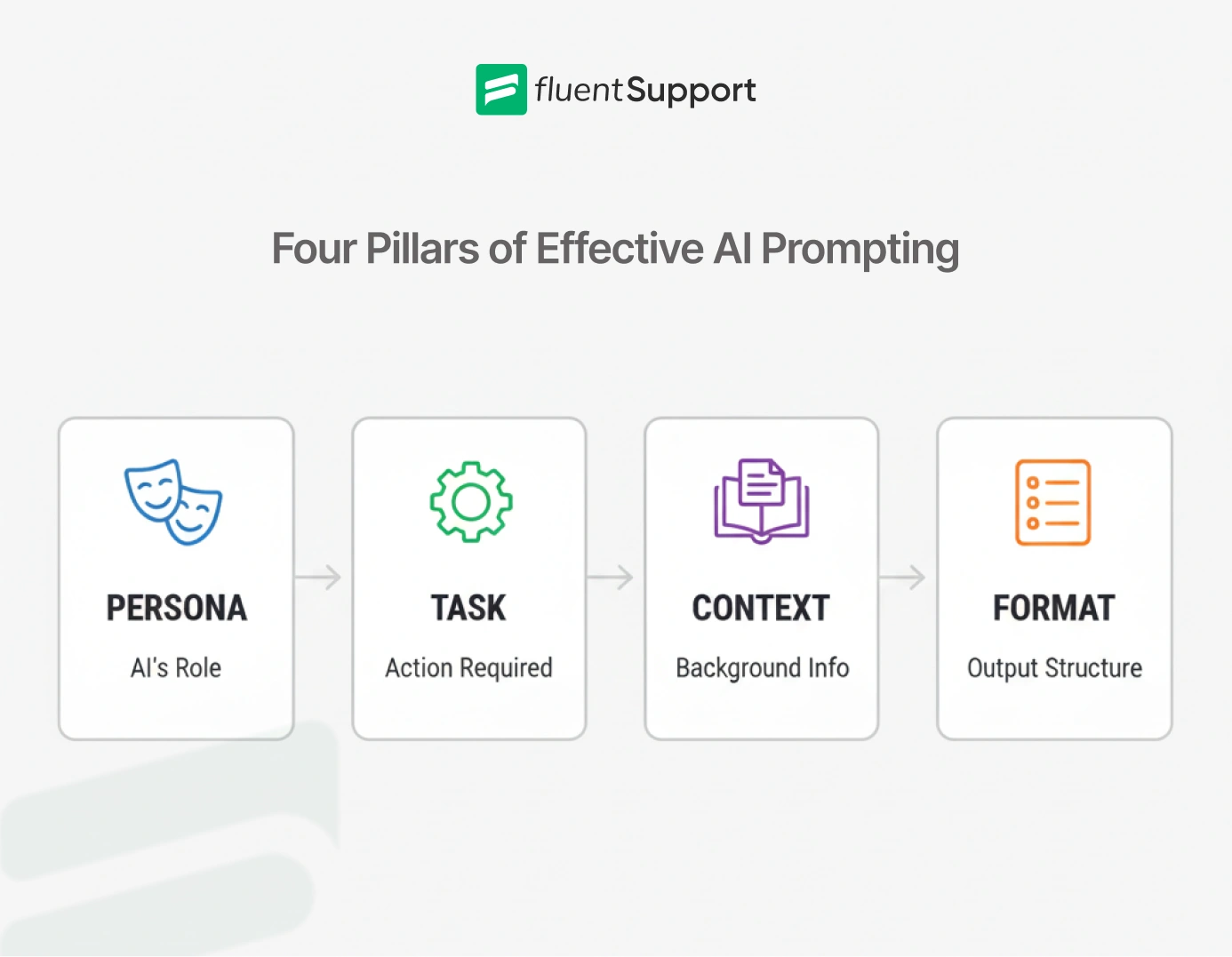
- Persona: Define the role you want the AI to play (empathetic support agent, technical troubleshooter).
- Task: State the exact action you want (write a reply, summarize a ticket, or analyze an error log).
- Context: Share the background information the AI needs (customer message, relevant policy text, or system logs).
- Format: Specify how the response should look (bullet points, polite email, or JSON block).
To refine your understanding of AI models behind these prompts, read Agentic AI vs. Generative AI.
Here is an example of a prompt using all four areas:
You are a program manager in [industry]. Draft an executive summary email to [persona] based on [details about relevant program docs]. Limit to bullet points.
Maintaining the right tone is key; see our customer service tone tips to improve your writing tone.
You don’t have to use all four every time, but including two or three dramatically improves results.
Quick tips to level up your prompting
These practices can boost your efficiency; learn more in our article on increasing agent productivity.
Next, focus on real scenarios you face daily in customer support. Each example explains why the issue is common and shows how a clear prompt improves results.
15+ tested customer service prompts for accurate AI answers
The examples show how to structure and refine prompts to produce clear, context-aware output. Support agents tested these prompts and improved them through repeated use.
Each version solves a real support issue instead of producing generic text.
1. Customers explain issues incompletely
Customers often describe problems without enough detail. They might say “everything is broken” without explaining what, when, or how.
This causes repeated follow-ups and slows resolution. A focused prompt lets you respond calmly while collecting the details needed to solve the issue.
Customer writes:
“Your app keeps crashing every time I try to upload files!! This is ridiculous, I’m losing work, and I pay for this!!!”
AI prompt:
You are an empathetic and professional customer support agent for a software product. Your tone is calm, understanding, and solution-oriented.
Task: Draft a reply that acknowledges the customer’s frustration, asks clarifying questions to diagnose the issue, and offers immediate next steps.
Context:
– Customer message: “Your app keeps crashing every time I try to upload files!! This is ridiculous, I’m losing work and I pay for this!!!”
– No additional details or logs provided yet.
Format:
– Start with empathy and acknowledgment.
– Reassure that we’re here to help.
– Ask 3-4 specific clarifying questions (device, OS, app version, file type/size, exact error message).
– End with a temporary workaround if applicable and promise quick resolution.
Keep the response concise, warm, and professional.
2. Customer message with scattered data
Technical tickets often include scattered information. Manually analyzing this data wastes time and risks missing patterns. You can use AI to identify the relevant causes faster and organize information clearly.
Scenario:
A user reports random API timeouts, but logs show varying error codes without a clear trigger.
AI prompt:
You are a senior technical support engineer with deep knowledge of our API platform.
Task: Analyze the provided error logs and suggest the most likely root cause plus troubleshooting steps.
Context:
– Customer reports: Intermittent 500 errors on endpoint /v1/projects
– Logs snippet: [paste relevant log lines here]
– Customer uses Python SDK version 2.4.1
– No recent deployment on our side
Format:
– Summary of the issue
– Most likely cause (with confidence level)
– Step-by-step troubleshooting for the customer
– Internal next steps if escalation is needed
3. Policy explanations with empathy
Explaining policies like refund limits can be sensitive as it’s connected with customer trust. You need to be firm and clear while staying empathetic.
Scenario:
Customer requests a refund outside the 30-day window, citing performance issues.
AI prompt:
You are a compassionate yet policy-compliant support agent for a subscription-based project management tool.
Task: Draft a polite email response explaining why the refund cannot be granted while maintaining goodwill and offering alternatives.
Context:
– Our refund policy: Full refund within 30 days of purchase; after that, no refunds, but we can offer account credit or extended features.
– Purchase date: 45 days ago.
– Customer complaint: Ongoing performance issues affecting team productivity.
Format:
– Greeting
– Empathy paragraph acknowledging their experience
– Clear policy explanation (reference the exact terms)
– 3 bullet-point alternative solutions (credit, dedicated troubleshooting session, feature roadmap update)
– Positive closing with offer for further help
4. First replies with personalized and detailed information
Initial responses set the tone for the entire interaction. But high ticket volumes lead to generic replies that overlook details and sound impersonal.
This frustrates customers and often requires follow-ups to correct.
Scenario:
A new ticket arrives about login failures right after a system update, but your quick draft misses acknowledging the update’s role.
AI prompt:
You are a proactive and detail-oriented support agent for our authentication service.
Task: Generate a comprehensive first reply that covers all key points from the customer’s message, while being engaging and thorough.
Context:
– Customer message: “Can’t log in since yesterday’s update. Error says ‘invalid credentials’ but password is correct!”
– Recent update: Rolled out yesterday, potentially affecting cached sessions.
Format:
– Personalized greeting
– Acknowledge the issue and any context (e.g., recent update)
– Confirm what you’ve understood
– Outline initial troubleshooting steps in 4-5 bullets
– Ask for any missing info
– Close with assurance of priority
5. Dealing with upset customers
Dealing with upset customers day in and day out can lead to burnout and result in replies that swing from overly apologetic to curt. This prompt can help maintain a consistent and empathetic voice without the emotional toll.
Scenario: A frustrated user escalates a minor bug into a major complaint, and you’re feeling drained from similar tickets.
AI prompt:
You are an unflappable, empathetic support specialist skilled in de-escalation for our collaboration software.
Task: Rewrite my draft response to ensure a consistently warm, supportive tone that validates emotions without over-apologizing.
Context:
– Original draft: [paste your rushed draft here]
– Customer’s tone: Highly emotional, threatening to cancel subscription over a UI glitch.
Format:
– Revised full response
– Highlight changes in brackets for my review (e.g., [added empathy here])
– Ensure tone is professional yet caring throughout
6. AI-Powered knowledge retrieval
Knowledge bases contain valuable information. Searching dense documents or linking related articles wastes time during live support.
You can use AI to summarize information and connect relevant articles quickly with this prompt.
Scenario: A query about integrating with third-party APIs requires pulling from multiple scattered KB entries.
AI prompt:
You are an expert knowledge base curator for our developer platform.
Task: Extract and summarize the exact steps to configure OAuth 2.0 client credentials flow from our documentation, connecting relevant articles.
Context:
– Relevant KB articles: @oauth-guide.pdf, @api-authentication-v3.docx, @third-party-integrations-kb [or paste excerpts]
– Customer is building a server-to-server integration
Format:
– Brief summary linking the articles
– Numbered step-by-step instructions
– Include required fields and common pitfalls
– Keep under 10 steps, highlight any prerequisites
7. Concise and easy-to-follow answers
Customers struggle with long or complex guides. So, they ask repeated questions.
You need to simplify instructions without removing important details. This prompt helps AI rewrite steps into concise and easy-to-follow directions for each customer.
Scenario: A user finds the default troubleshooting guide too jargon-heavy and lengthy for a simple sync error.
AI prompt:
You are a clear communicator specializing in user-friendly instructions for our data sync tool.
Task: Simplify and condense the standard step-by-step guide into an accessible version.
Context:
– Original guide: [paste or reference the full steps]
– Customer’s level: Beginner, non-technical user reporting sync failures.
Format:
– 5-7 simplified steps with plain language
– Bold key actions
– Add warnings for potential pitfalls
– End with a success verification tip
8. Simplify feature explanations
Customers struggle when feature explanations are unclear. You need to tailor explanations to the customer’s knowledge level. This prompt helps AI create clear, accurate, and user-friendly descriptions.
Scenario: A customer asks about advanced analytics filters but admits they’re new to the platform.
AI prompt:
You are a patient product educator for our analytics dashboard tool.
Task: Write a clear, step-by-step explanation of how to set up custom funnel reports.
Context:
– Customer asked: “How do I track user drop-off in the signup flow?”
– They have Pro plan access
Format:
– Brief overview of what funnel reports do
– 6-8 numbered steps with screenshots and references if possible
– Tips for common mistakes
– End with “Does this help, or would you like me to walk you through it in more detail?”
9. Repetitive and time-consuming follow-ups
After the first interaction, agents often need to follow up with customers to get more info or check on progress.
These follow-ups usually repeat the same kind of messages (“Did you try this? Any updates?”), which can be boring for agents and annoying for customers.
You can use AI to draft thoughtful and personalized follow-ups.
Scenario: It’s been 48 hours since suggesting a fix for a performance issue, and you need to check in without sounding automated.
AI prompt:
You are a diligent follow-up coordinator for our performance optimization service.
Task: Draft a personalized follow-up message to gauge if the issue is resolved.
Context:
– Original issue: Slow loading times
– Suggested fix: Clear cache and update browser
– Last interaction: 2 days ago
– Customer name: Alex
Format:
– Friendly greeting referencing prior chat
– Ask about resolution status
– Offer additional help options in bullets
– Gentle nudge for feedback
10. Clear escalations for faster resolution
Handing off to engineering or specialists requires precise summaries. Because vague escalations often lead to delays and miscommunications.
Scenario: A complex bug needs the dev team’s input, but your notes are scattered.
AI prompt:
You are a precise escalation specialist for our backend infrastructure team.
Task: Summarize the ticket for escalation, highlighting key details and reproduction steps.
Context:
– Ticket history: [paste chat logs]
– Suspected cause: Database query timeout
– Customer impact: Affects multiple users
Format:
– One-paragraph summary
– Bullet-point reproduction steps
– Attached data: Logs, screenshots
– Recommended priority level
11. Spotting recurring issues automatically
Single tickets may be part of a larger problem. Manually checking history takes time and can miss patterns.
Scenario: A report of dashboard glitches mirrors others you’ve seen vaguely.
AI prompt:
You are a support operations analyst.
Task: Search recent internal tickets and known issues for similar reports.
Context:
– Customer reports: “Dashboard widgets fail to load after 15 minutes of inactivity.”
– Product version: Web app v4.2.1
– Time frame: Last 30 days
Format:
– Number of similar reports
– Known workaround or fix status
– Recommended response language if it’s a known issue
12. Polished and clear agent responses
Time limits make it hard to catch awkward phrasing or missing details. Mistakes slip through even during final reviews.
Scenario: Your drafted reply to a billing query feels off. Maybe too formal or forgetting a key detail.
AI prompt:
You are a tone and completeness editor for customer communications in our billing software.
Task: Review and refine my response draft for clarity, appropriate tone, and completeness.
Context:
– Draft: [paste your response]
– Goal tone: Helpful and transparent
– Key info to include: Invoice details, payment options
Format:
– Revised response
– List of changes (e.g., “Added clarification on due date”)
– Score tone on a 1-10 scale for warmth
13. Bridging language gaps in support
Non-English messages or technical jargon make explanations harder. Tickets take longer, and both sides get frustrated.
This prompt can help you to bridge this gap.
Scenario: A customer from a non-English region describes an issue in broken English.
AI prompt:
You are a bilingual support agent (English and Spanish) for our international user base.
Task: Translate my draft response into simple, clear Spanish and suggest any tone improvements.
Context:
– Original English draft: [paste your draft]
– Customer’s primary language: Spanish
– Issue: Billing confusion
Format: Provide only the final Spanish version, ready to send.
14. Preventing AI misinformation
Hallucinations in AI outputs can erode trust, especially on technical facts. Prompts that ground responses in provided data reduce this risk.
Scenario: You need confirmation on a niche feature compatibility, but fear AI might fabricate details.
AI prompt:
You are a fact-checked technical advisor strictly limited to providing sources for our CRM platform.
Task: Answer based only on the given documentation—do not add unverified info.
Context:
– Query: “Is our API compatible with Salesforce v52?”
– Sources: @api-compatibility-guide.docx [or paste excerpts]
Format:
– Direct answer yes/no
– Quote relevant source sections
– If info is missing, say “Based on available docs, I recommend checking with engineering.”
15. Customer-friendly ticket closures
Ending tickets without warmth leaves customers feeling undervalued. This directly affects customer satisfaction and retention.
A polished close reinforces positive experiences.
Scenario: Issue resolved, but the standard “ticket closed” feels cold.
AI prompt:
You are a customer success specialist focused on building long-term relationships.
Task: Draft a friendly ticket closure message after resolving a billing discrepancy.
Context:
– Issue: Customer was double-charged last month; refund processed today.
– Customer has been with us for 2 years.
Format:
– Thank them for reporting the issue
– Confirm resolution
– Offer additional help
– End with a positive, relationship-building note
Putting all together
This guide gives you a solid foundation and ready-to-adapt prompts tailored to the real challenges customer support agents face daily.
You’ll notice different styles; some use brackets [ ] for placeholders, others are filled examples. All are meant as starting points. Customize them to your product, policies, and voice.
Start with a simple prompt and review the AI’s output.
With practice, you can spend less time drafting, troubleshooting, and searching and focus more on delivering clear, accurate, and helpful support.
Start with one prompt today and see how it speeds up your work and improves responses.
Start off with a powerful ticketing system that delivers smooth collaboration right out of the box.
Related Articles
Omnichannel Customer Support: The Guide for Support Teams
Omnichannel customer support means every channel, agent, and…Help Desk Software Wiki [Explained]
Learn what a help desk software wiki is,…

Leave a Reply