
Is Helpdesk Software Only for IT Teams?

By Md. Sajid Sadman
February 26, 2026
Last Modified: February 26, 2026


Helpdesk software has a reputation problem.
Most people hear “helpdesk” and immediately think of IT support. Password resets, software troubleshooting, hardware issues. The kind of requests that only technical teams handle.
That association makes sense historically. IT departments were the first to adopt helpdesk systems at scale. But the assumption that helpdesk software belongs exclusively to IT teams misses a much bigger picture.
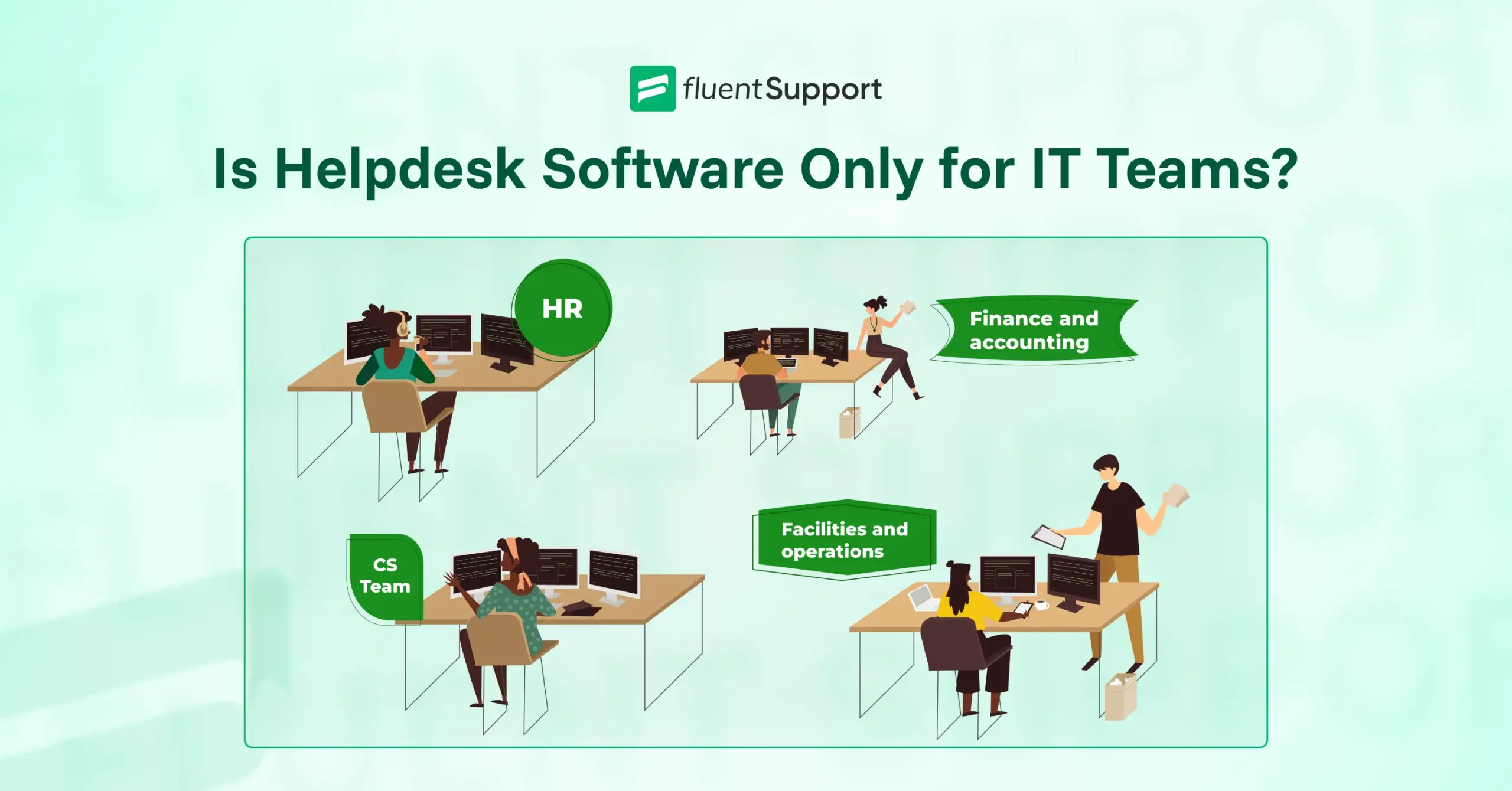
The reality is that helpdesk software works for any team that handles structured service requests. Customer service uses it. HR uses it. Facilities teams use it. Even finance and legal departments use it.
This blog explains what helpdesk software actually does, why the IT connection exists, where else these systems get used, and how to know if your team could benefit from one.
TL;DR
Is helpdesk software only for IT teams?
No. Helpdesk software works for any team that handles structured service requests. IT departments were early adopters, which created strong market association, but customer service, HR, facilities, finance, and legal departments all use helpdesk systems. The core capabilities (ticketing, automation, tracking, and reporting) apply to any service workflow, regardless of request type.
Why do people think helpdesk software is just for IT?
IT teams adopted helpdesk systems first in the 1990s and 2000s to manage technical support at scale. Vendors marketed primarily to IT departments. The word “helpdesk” itself refers to IT support in many organizations. Terms like “incident management” come from IT frameworks. That historical connection created the perception that helpdesk software belongs exclusively to technical teams.
What departments actually use helpdesk software?
Customer service teams manage external support tickets. HR departments handle employee requests like time-off, benefits questions, and onboarding. Facilities teams track maintenance and equipment issues. Finance processes expense reimbursements and invoice questions. Legal manages contract reviews and compliance requests. Any team handling regular service requests can benefit from systematic organization.
What makes helpdesk software work across different departments?
Centralized inboxes capture requests from multiple channels in one place. Automation routes tickets and triggers actions without manual work. SLAs set response time expectations and track compliance. Reporting shows team performance and request patterns. Internal notes keep collaboration organized. These capabilities support any structured service workflow, whether the tickets involve IT problems, HR questions, or facilities repairs.
How do you know if your team needs helpdesk software?
Look for signs like requests getting lost across scattered channels, inconsistent response times, team members duplicating work, inability to answer basic workload questions, new hires struggling without documentation, and requesters complaining about lack of status updates. When evaluating systems, focus on customization options, channel support matching your reality, relevant reporting metrics, approval workflow capabilities, and simplicity that drives adoption.
What helpdesk software actually does
Before we talk about who uses helpdesk software, we should clarify what it actually does.
At its core, helpdesk software organizes incoming requests and helps teams respond to them systematically.
The basic job of a helpdesk system
A helpdesk system receives requests from people who need help with something. Those requests get converted into tickets. Each ticket represents one issue or question that needs resolution.
The system tracks each ticket from the moment it arrives until someone marks it resolved. During that time, the ticket moves through whatever process the team uses to handle that type of request.
That process might involve assignment to the right person, escalation to someone with specialized knowledge, communication back and forth with the requester, collaboration with other team members, and documentation of what was done to solve the problem.
The helpdesk system keeps all of that organized in one place instead of scattered across email threads, chat messages, and verbal conversations that nobody else can see.
How ticketing systems organize requests?
Ticketing creates structure around what would otherwise be chaos.
Without a ticketing system, requests arrive through whatever channel someone chooses. Email, chat, phone calls, walk-ups to someone’s desk. Each request competes for attention based on how loud it is, not how important it is.
Tickets change that dynamic. Every request becomes visible in a shared queue. Teams can see what needs attention, who’s working on what, and what’s been waiting longest. Priority levels help surface urgent issues. Assignment rules route requests to the right people automatically.
The system creates accountability because nothing disappears into someone’s personal inbox where the rest of the team can’t see it.
That organizational structure matters just as much for HR onboarding requests as it does for IT password resets. The type of request changes, but the need for structure stays constant.
Why people think helpdesk equals IT?
The association between helpdesk software and IT departments runs deep. That connection exists for real reasons, not just perception.
The historical connection to technical support
IT departments were early adopters of helpdesk systems because they faced a specific scaling problem.
As companies grew and technology became central to operations, IT teams couldn’t keep up with support requests using email and spreadsheets. They needed a better way to track who needed help with what, prevent requests from getting lost, and measure how quickly issues got resolved.
Helpdesk software solved those problems. IT teams started implementing these systems in the 1990s and 2000s, long before other departments considered similar tools.
That head start created strong market association. Vendors marketed their products primarily to IT departments. Most case studies featured technical support use cases. The terminology itself reflected IT priorities.
For years, if you searched for helpdesk software, you found tools designed specifically for managing technical incidents, tracking IT assets, and handling service requests related to hardware and software.
How terminology creates confusion
The word “helpdesk” itself reinforces the IT connection.
In many organizations, “the helpdesk” refers specifically to the IT support team. Employees call the helpdesk when their computer stops working or they need software installed. That internal language makes it difficult to imagine the same type of system serving other functions.
Even the terminology inside helpdesk software reflects IT origins. Terms like “incident management” and “service catalog” come from IT service management frameworks. They make perfect sense to technical teams but sound foreign to everyone else.
This creates a circular problem. People assume helpdesk software is for IT because IT uses helpdesk software because vendors marketed helpdesk software to IT because IT was the primary customer.
Breaking that cycle requires recognizing that the underlying capabilities of helpdesk software apply far beyond technical support.
Beyond IT: Where helpdesk software gets used
Helpdesk software shows up in departments that have nothing to do with IT. The specific requests these teams handle look different, but the operational challenge stays the same. They need to organize incoming requests, respond systematically, and track outcomes.
Customer service teams
Customer service departments handle external support requests from paying customers. Questions about orders, complaints about products, requests for refunds, problems with accounts.
These teams often use helpdesk software branded as “customer service software” or “support ticketing systems,” but the underlying mechanics work the same way IT helpdesk systems do.
Customers submit requests through email, live chat, phone calls, or web forms. Those requests become tickets. Agents work through their assigned tickets, communicate with customers, escalate complex issues, and close tickets when problems get resolved.
The system tracks response times, measures customer satisfaction, and generates reports on ticket volume and resolution rates. All the same organizational structure that IT teams rely on, applied to customer-facing support instead of internal technical issues.
HR departments
HR teams handle a constant stream of internal requests from employees. Time-off requests, benefits questions, payroll issues, policy clarifications, onboarding tasks, offboarding checklists.
Traditionally, HR managed these requests through a combination of email, phone calls, and in-person visits. That approach works until the company grows beyond a certain size. Then requests start falling through cracks, response times become inconsistent, and nobody has visibility into what’s actually happening.
Helpdesk software gives HR teams the same organizational structure IT and customer service teams use. Employee requests become tickets. HR staff can see everything in one queue, assign requests based on expertise, set priority levels for time-sensitive issues, and track how long different types of requests typically take to resolve.
Some HR teams use this for specific workflows like onboarding, where each new hire generates multiple tasks that need completion in a specific order. The helpdesk system tracks progress through those steps and alerts HR when something gets stuck.
Facilities and operations
Facilities teams manage physical spaces and equipment. Broken printers, HVAC problems, requests for conference room setup, security badge issues, parking permit requests, maintenance scheduling.
These requests used to arrive through email, phone calls, or someone walking up to a facilities manager’s desk. Critical issues competed with routine requests for attention. Nothing was documented systematically.
Helpdesk software brings order to that environment. Employees submit facilities requests through a portal. Each request becomes a ticket with details about the problem, location, and urgency. Facilities staff can prioritize based on impact, assign work to the right technician, and track completion.
The system also creates a maintenance history. When equipment breaks repeatedly, that pattern becomes visible in the ticket data. Facilities managers can use that information to make better decisions about repairs versus replacement.
Finance and accounting
Finance departments handle internal requests related to expenses, invoices, budget approvals, vendor payments, and account reconciliations.
In larger organizations, these requests come from employees across multiple departments. Tracking them through email leads to delays, duplicate work, and questions about who’s responsible for what.
Some finance teams use helpdesk software to manage these workflows. Expense reimbursement requests become tickets that move through approval chains. Invoice processing requests get assigned to the right accountant. Budget questions get logged and tracked to resolution.
The system provides visibility into how many requests finance is handling, where bottlenecks occur, and which types of requests take longest to resolve. That data helps finance leaders make better decisions about staffing and process improvements.
Legal and compliance
Legal departments receive requests for contract reviews, legal opinions, compliance guidance, and policy interpretation. In companies with dedicated legal teams, these requests can overwhelm the department if not managed systematically.
Helpdesk software helps legal teams triage incoming requests, track workload, and manage expectations about turnaround time. Contract review requests become tickets with clear deadlines. Urgent legal questions get flagged for immediate attention. Routine policy questions can be answered using knowledge base articles instead of requiring attorney time.
The ticketing system also creates an audit trail. When compliance questions arise later, legal teams can show exactly what guidance was provided and when.
What makes helpdesk software useful across departments
The reason helpdesk software works for so many different types of teams comes down to a set of core capabilities that apply to any structured service workflow.
Centralized inbox for all requests
Every helpdesk system provides a single place where all requests arrive, regardless of how they were submitted.
A customer service team might receive requests through email, live chat, phone calls, web forms, and social media. An HR team might get requests through email, an employee portal, and direct messages. A facilities team might receive requests through email, phone calls, and a maintenance request form.
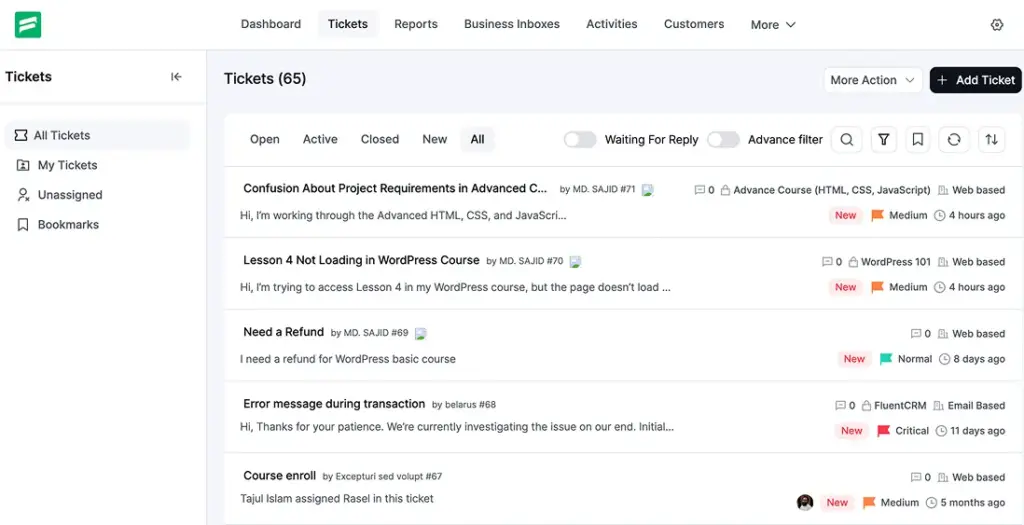
The helpdesk system captures all of those channels and converts everything into tickets in one shared queue. Nobody needs to check five different places to see what needs attention. The team sees everything in one view.
This centralization prevents requests from getting lost. It also makes workload visible. Managers can see exactly how many requests are pending, who’s working on what, and where backlogs are forming.
Check out Fluent Support’s centralized inbox where all tickets from email and the portal page come together.
Automation that reduces manual work
Helpdesk systems automate repetitive tasks that would otherwise consume staff time.
When a new ticket arrives, the system can automatically assign it to the right person based on request type, route it to the appropriate department, set priority based on keywords, send an acknowledgment to the requester, and apply relevant tags.
When someone updates a ticket, the system can automatically notify other team members who need to know, escalate if response time exceeds a threshold, trigger follow-up actions, and update status fields.
These automations work regardless of whether the tickets involve IT problems, HR questions, or facilities requests. The underlying logic stays the same. If this condition is true, then perform this action.
Teams that handle high request volumes save significant time through automation. Tasks that used to require manual sorting, assignment, and status updates happen automatically.
If you’re looking for a system that handles this kind of automation, Fluent Support’s workflow automation lets you set up these rules without technical expertise.
SLAs that set clear expectations
Service level agreements define how quickly different types of requests should be handled. Helpdesk software enforces those commitments systematically.
An IT team might commit to responding to critical system outages within 15 minutes and resolving password reset requests within two hours. A customer service team might commit to first response within one hour for all ticket types. An HR team might commit to processing time-off requests within 24 hours.
The helpdesk system tracks time against those targets automatically. It alerts staff when tickets are approaching their deadline. It flags violations when tickets exceed SLA thresholds. It generates reports showing SLA compliance rates over time.
This capability matters for any team that wants to maintain consistent service quality. Without systematic tracking, teams handle urgent requests but let routine requests sit for days. SLAs create accountability across the entire queue.
Reporting that shows team performance
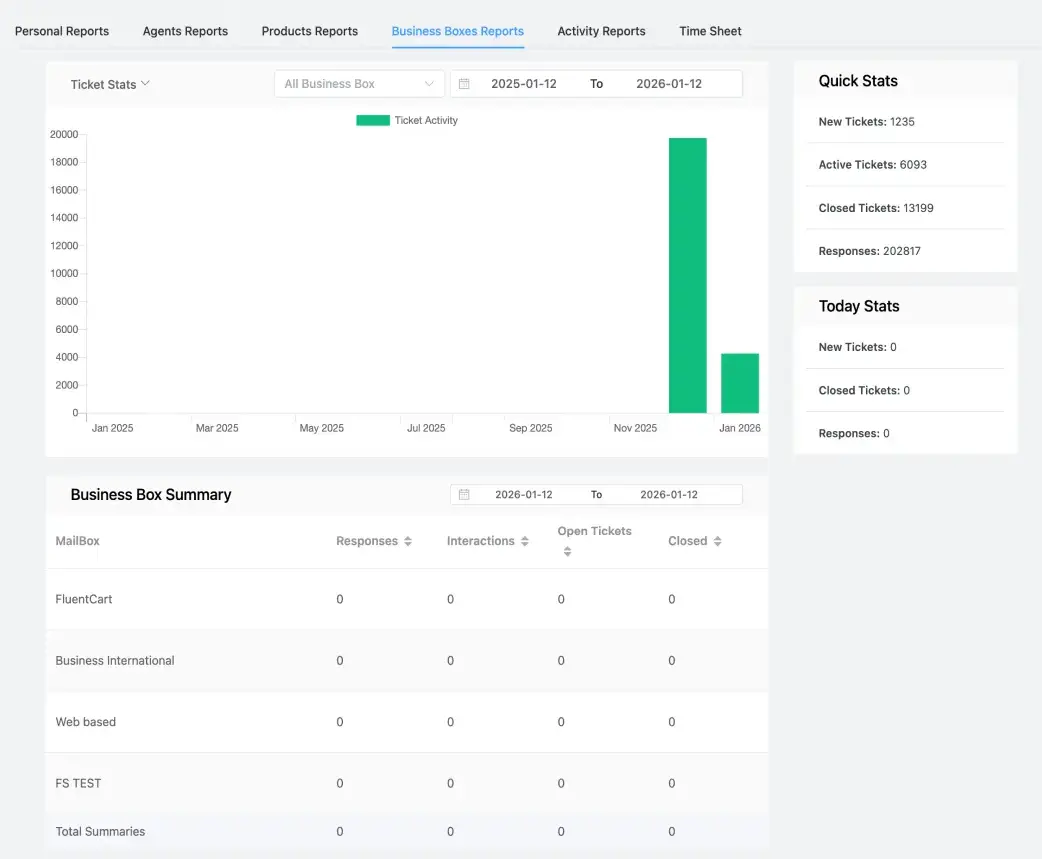
Helpdesk systems generate data about request volume, response times, resolution times, backlog size, and individual agent performance.
That reporting helps teams answer important operational questions. Are we getting more requests than we can handle? Which types of requests take longest to resolve? Who on the team is handling the most tickets? Where are requests getting stuck?
These questions apply equally to IT support, customer service, HR, facilities, and any other department handling structured requests. The metrics that matter might vary slightly, but the need for operational visibility stays constant.
Teams use this data to make better decisions about staffing, process improvements, and resource allocation. Without the reporting, those decisions get made based on gut feeling instead of actual patterns.
Most modern helpdesk systems provide this kind of operational visibility through reporting dashboards:
Internal notes and collaboration features
Most tickets require input from multiple people before they can be resolved. Someone needs to gather additional information, escalate to a subject matter expert, coordinate with another department, or get approval from a manager.
Helpdesk systems provide internal notes and collaboration features that keep all of that communication attached to the ticket. Team members can discuss the issue privately without the requester seeing those internal conversations. Everyone involved can see the full context without digging through email threads.
This collaboration capability works the same way whether a ticket involves troubleshooting a technical problem, processing an HR request, or coordinating a facilities repair. The ability to work together on a shared record of what’s happening and what’s been tried makes the team more efficient.
These capabilities work together to support any team that handles structured service requests. The specific requests change, but the operational needs stay consistent. Any department that receives regular requests, needs to respond systematically, and wants to track outcomes can benefit from these features.
The difference between IT helpdesk and general helpdesk
While helpdesk software works across departments, different types of helpdesk systems emphasize different capabilities based on their primary use case.
IT helpdesk characteristics
IT helpdesk software typically includes features specific to managing technical support.
Asset management tools track hardware and software inventory. When someone submits a ticket about a laptop problem, the IT team can immediately see what model it is, when it was purchased, what software is installed, and what previous issues have been reported.
Integration with monitoring tools allows the helpdesk system to automatically create tickets when servers go down or systems report errors. IT teams learn about problems before users even report them.
Remote access tools let technicians take control of a user’s computer to troubleshoot and fix issues without requiring the user to describe what they’re seeing.
Knowledge bases in IT helpdesk systems often include technical documentation, troubleshooting guides, and solutions to common problems. The content assumes technical literacy.

Customer service helpdesk characteristics
Customer service helpdesk software emphasizes features that improve external customer communication.
Multi-channel support brings together email, live chat, phone, social media, and messaging apps into one unified inbox. Customer service teams need to meet customers wherever they prefer to communicate.
Customer history and context are central features. When a customer contacts support, agents immediately see previous tickets, purchase history, account status, and any notes from past interactions.
Satisfaction surveys automatically follow ticket resolution to measure how customers feel about the support experience. Customer service teams track satisfaction scores as a key performance metric.
Self-service portals allow customers to find answers, track their ticket status, and resolve common issues without requiring agent time.
Internal service desk characteristics
Internal service desk software serves multiple departments within an organization, not just IT or customer service.
Service catalogs organize different types of requests by department and category. Employees can browse available services, understand what information is needed to submit each type of request, and submit requests through guided forms.
Approval workflows route certain requests through management chains. A request for new equipment might require approval from a direct manager and a department head before procurement processes it.
Cross-department routing ensures requests that require input from multiple teams get handled efficiently. A new hire might trigger automated workflows that create tasks for IT, HR, and facilities simultaneously.
The internal focus means less emphasis on multi-channel communication and more emphasis on workflow automation and departmental coordination.
How to know if your team needs helpdesk software
Not every team needs helpdesk software. Small teams handling low request volumes manage fine with email and spreadsheets. But certain patterns signal when a more structured system would help.
Signs your department could benefit
Your team probably needs helpdesk software if you’re experiencing these problems:
Wrapping up
Helpdesk software stopped being an IT-only tool years ago.
The capabilities that help IT teams manage technical support work just as well for HR handling employee questions, customer service managing tickets, facilities tracking maintenance, or finance processing approvals.
The common thread is structure. When requests scatter across channels and get handled inconsistently, teams struggle. Helpdesk software brings organization through ticketing, automation, tracking, and reporting.
If your team handles regular service requests and experiences lost requests, inconsistent response times, duplicated work, or invisible workload, a helpdesk system would help. It doesn’t need to be complex or expensive. It just needs to match how your department works.
The IT association is historical, not functional. Any team managing structured service workflows can benefit from the same tools IT departments have used for decades.
Start off with a powerful ticketing system that delivers smooth collaboration right out of the box.
Related Articles
Fluent Support 2.1.0: Agent Groups, Agent Signatures, and Cloud File Storage
Fluent Support 2.1.0 is here! This is a…The Ritz-Carlton Gives Employees $2,000 to Spend on You
Discover how Ritz-Carlton’s $2,000 rule, based on customer…




Leave a Reply