

HTTP Error 431: What It Means and How to Fix It

By Md. Sajid Sadman
March 16, 2026
Last Modified: March 16, 2026


You are trying to load a page and instead you get a blank screen with “431 Request Header Fields Too Large.” No explanation, no next step, just an error code staring back at you.
This guide explains exactly what it means and how to fix it, whether you are a visitor or the one running the site.
| Field | Details |
| Error Code | HTTP 431 Request Header Fields Too Large |
| Error Type | Client-Side HTTP Error |
| Defined In | RFC 6585 |
| Who Sees It | Visitors hitting the site and developers/admins on the server side |
| Common Causes | Oversized cookies, too many request headers, long URLs, misconfigured server limits |
| Browser Display | Chrome / Firefox / Edge: 431 Request Header Fields Too Large |
TL;DR
What is HTTP Error 431?
It is a client-side HTTP error that occurs when the server refuses to process a request because the header data being sent by the browser is too large. The server is not down. It is simply rejecting an oversized request.
What causes it?
The most common causes are accumulated cookies, long or complex URLs, too many request headers, and server-side header limits configured too low. On the technical side, oversized authentication tokens and redirect loops that progressively stack headers can also trigger it.
How do visitors fix it?
Start by clearing browser cookies and cache. If that does not work, try loading the page in incognito mode. If it loads there, the issue is tied to your main browser session. If not, disable your browser extensions one by one to find the one injecting extra headers.
How do developers and site owners fix it?
The fix depends on where the problem is coming from. You can increase the header size limit in Node.js, Nginx, or Apache. You can also audit your application for oversized cookies, large authentication tokens passed in headers, or unnecessary custom headers added through middleware.
How do you stop it from happening again?
Keep cookies small and use server-side sessions for large data. Monitor header sizes during staging, audit third-party scripts regularly, and document your server limit configurations so debugging is faster when issues come up later.
What Is HTTP Error 431?
HTTP Error 431 means the server refused to process a request because the header data sent by the browser was too large. The server looked at what was coming in, decided it exceeded its limit, and sent back a 431 response instead of loading the page.
This error was formally defined in RFC 6585 in 2012. It is a client-side HTTP error, which means the problem originates from the request being sent, not from the server being down or unavailable.
The key thing to understand is that HTTP requests carry more than just a URL. They carry cookies, authentication tokens, user-agent strings, and other header fields. When all of that data adds up to more than the server is configured to accept, you get a 431.
HTTP 431 is not a vague server crash. It is a specific rejection. The server is telling you exactly what went wrong: the request headers were too large to process.
While fixing a 431 is straightforward once you know the cause, there are several other errors that can show up just as unexpectedly. These are some of the most common ones worth knowing about. Bookmark them for future reference.
HTTP Error 400 Bad Request
HTTP Error 404 Not Found
HTTP Error 502 Bad Gateway
ERR_CONNECTION_RESET
ERR_CONNECTION_REFUSED
ERR_CONNECTION_TIMED_OUT
Your Connection is Not Private
What Causes HTTP Error 431?
There are a few specific things that push request headers over the server’s limit. Let’s discuss each of them.
Too Many or Oversized Cookies
Cookies are stored in the request header and sent to the server on every single request. If a site has been accumulating cookies over time, particularly from third-party scripts, ad trackers, or analytics tools, the combined size can exceed the server’s limit without anyone noticing until the 431 shows up.
This is one of the most common causes for visitors hitting this error on sites they have visited many times before.
Long or Complex URLs
The request URI is part of the header. Extremely long URLs, especially those with many query parameters, can push the total header size beyond the accepted limit. This happens often in search-heavy or filter-heavy web applications.
Too Many Request Headers
Some applications, especially those using authentication tokens, API keys, or custom middleware, attach multiple headers to every request. Each one adds to the total size. If the cumulative header count or size crosses the server’s threshold, the 431 gets triggered.
Server-Side Header Limits Set Too Low
Sometimes the issue is not the request itself but the server configuration. Node.js, for instance, defaults to an 8KB header limit (increased to 16KB after v14.11). Nginx and Apache have their own defaults. If those limits are set conservatively, even normal-sized requests can trigger a 431.
Alright, if you are on the developer or technical side, these two additional causes are worth knowing.
Large or Malformed Authentication Tokens
JWT tokens in particular can get very large when they carry a lot of claims or are poorly structured. When passed in the Authorization header, an oversized JWT alone can trigger a 431. This is a very common scenario in modern web apps and API-heavy setups.
Redirect Loops Adding Headers
When a server is stuck in a redirect loop, some setups progressively append headers with each redirect cycle. By the time the final request hits the server, the accumulated headers exceed the limit.
Just a heads up: If you are working on customer support and looking for a better way to manage incoming requests, Fluent Support is a WordPress helpdesk plugin worth checking out. It brings all your customer conversations into one place so nothing gets missed.
How to Fix HTTP Error 431 as a Visitor
If you are visiting someone else’s website and hitting this error, you cannot change the server. But you can reduce the size of what your browser is sending. Here is how.
Step 1: Clear Browser Cookies and Cache
This is the first thing to try. When cookies and cached data pile up over time, the data your browser sends with every request grows larger. Clearing them brings that size back down and resolves the 431 in most cases.
We will walk through this using Microsoft Edge. The process looks nearly identical in other browsers, so use this as your guide.
Steps using Microsoft Edge:
- Open Edge and click the three-dot menu at the top-right corner.
- Select Settings from the dropdown. In the left sidebar, choose Privacy, search, and services.
- Under Clear browsing data, click Choose what to clear.
- You can also get there directly by typing this in the address bar: edge://settings/clearBrowserData
- Set the Time range to All time so everything gets cleaned out.
- Check Cookies and other site data and Cached images and files.
- Hit Clear now and close the browser. Reopen Edge and try loading the page again.
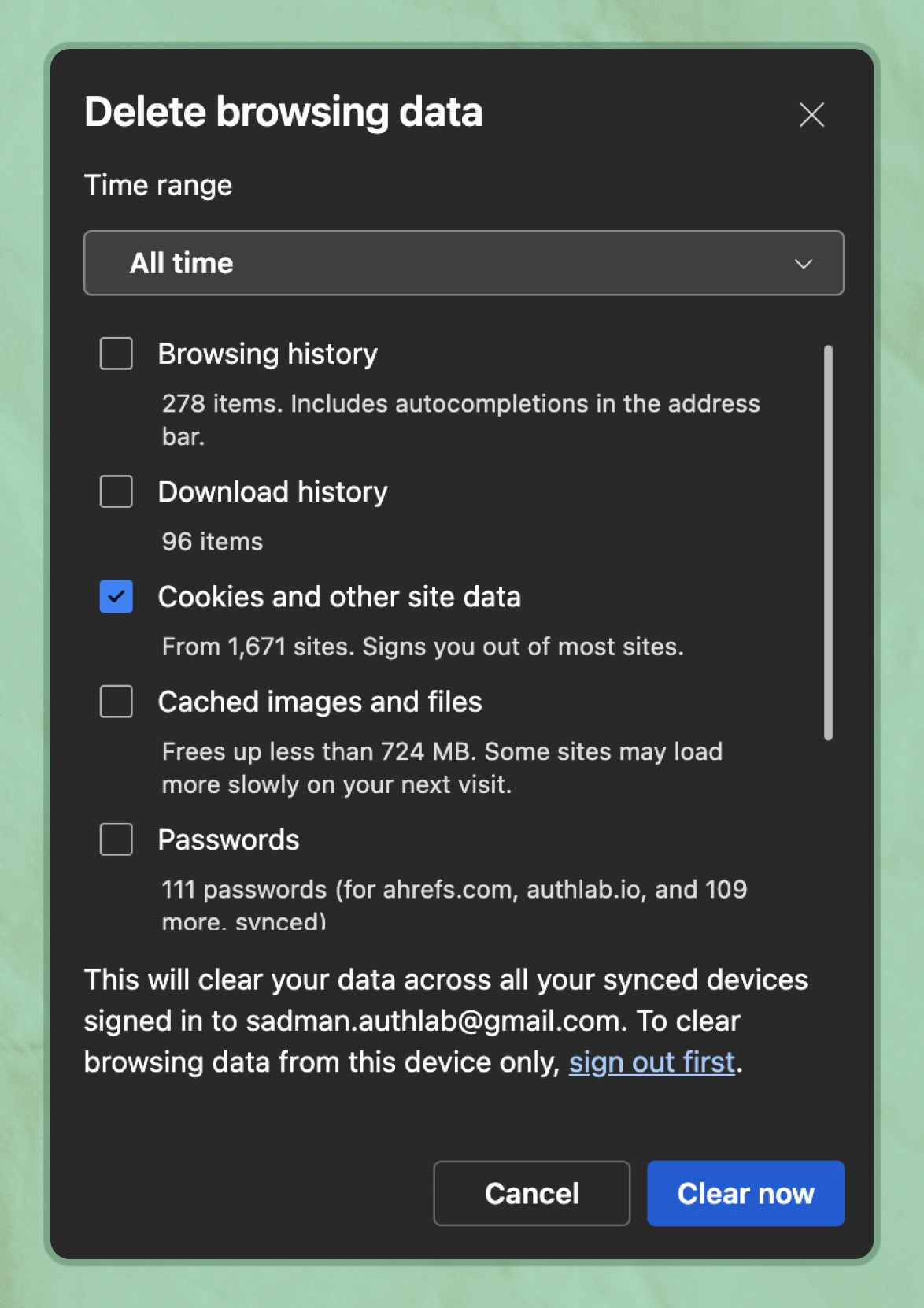
For Chrome, Firefox, or Safari, the steps are nearly the same. Head into Settings, look for Privacy or History, and find the option to clear cookies and cached data.
One thing to note: Clearing cookies will log you out of most websites. Keep your passwords handy before you do this.
After clearing everything, reload the page and check if the error is gone.
Step 2: Try a Different Browser or Incognito Mode
Opening the site in an incognito or private window strips away all stored cookies and extensions. If the page loads there, the problem is tied to accumulated data in your main browser session.
If incognito works, go back to your main browser and do a full cache and cookie clear as described in Step 2.
Step 3: Disable Browser Extensions
Some extensions inject additional headers into every request your browser sends. Ad blockers, privacy tools, and certain developer extensions are common culprits, and when those extra headers push the total size over the server limit, a 431 is the result.
Let’s turn them off temporarily and see if that makes a difference.
We are walking through this using Google Chrome. A quick look around the settings menu will get you there.
Steps using Google Chrome:
- Open Chrome and click the three-dot menu at the top-right corner.
- Select Extensions. You can also jump straight there by typing this in the address bar: chrome://extensions
- You will see all your installed extensions listed here.
- Toggle off each one by clicking the blue switch next to it until it turns gray.
- Close Chrome completely and reopen it.
- Try loading the page again.
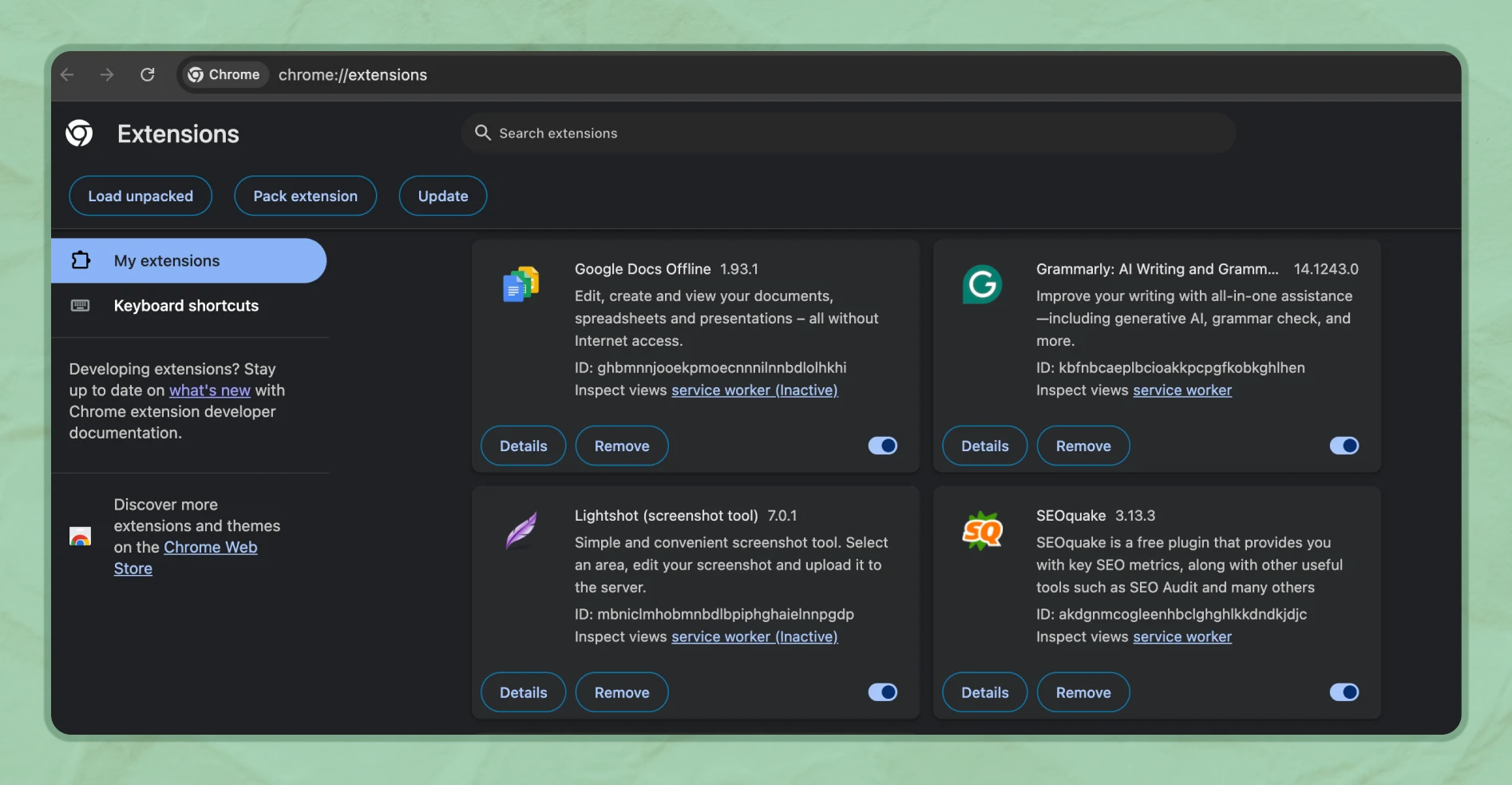
If the error is gone, one of those extensions was the problem. Turn them back on one at a time, refreshing the page after each one, until the error comes back. That is your culprit.
Tip: Once you find the extension causing the issue, you can either remove it or simply keep it turned off when visiting that particular site.
How to Fix HTTP Error 431 as a Developer or Site Owner
If users are reporting this error on your site, the fix lives on your end. Let’s discuss each solution based on where the problem is coming from.
Increase the Header Size Limit in Node.js
If your application runs on Node.js and you are seeing 431 errors, the default header limit may be too low for your use case. You can increase it when starting your server.
// Increase max header size to 32KB
node –max-http-header-size=32768 server.js
// Or set it programmatically
const http = require(‘http’);
const server = http.createServer({ maxHeaderSize: 32768 }, app);
⚠️ Be cautious with this setting. Increasing the limit too aggressively can open your server to header-based denial of service attacks. Set it to the minimum that resolves the issue.
Adjust Header Limits in Nginx
In Nginx, the relevant directives are large_client_header_buffers and client_header_buffer_size. Add or update these in your nginx.conf file.
http {
client_header_buffer_size 4k;
large_client_header_buffers 8 16k;
}
After editing, reload Nginx with sudo nginx -s reload and test the affected routes.
Adjust Header Limits in Apache
In Apache, use the LimitRequestFieldSize and LimitRequestFields directives inside your httpd.conf or .htaccess file.
LimitRequestFieldSize 16384
LimitRequestFields 200
Restart Apache after making changes. On most Linux systems that is sudo systemctl restart apache2.
Audit and Reduce Cookie Size on Your Application
If your application sets cookies, review what is being stored. Large session tokens, JSON payloads stored in cookies, or multiple overlapping cookies from third-party integrations all add up fast.
Move large data to server-side sessions and store only a session identifier in the cookie. This keeps the cookie small and the header clean.
Review Custom Headers in Your Application
Go through your middleware and API integrations and audit every custom header being attached to outgoing requests. Remove any that are not strictly necessary. If you are passing large authentication tokens in headers, consider shortening them or using a more compact encoding.
How to Prevent HTTP Error 431 Going Forward
Fixing the error once is good. Making sure it does not come back is better. Let’s discuss the habits and configurations that keep 431s away.
- Keep cookies lean: Store only what is necessary in cookies. Use server-side sessions for anything larger than a simple identifier.
- Monitor header sizes in staging: Before deploying, test your application’s request headers under realistic conditions. Tools like browser DevTools Network tab make this easy.
- Set sensible server limits and document them: Whatever limits you configure on Nginx, Apache, or Node.js, document them. This makes debugging faster when issues arise later.
- Audit third-party scripts regularly: Third-party analytics, tracking pixels, and ad scripts often set their own cookies. Periodic audits prevent silent cookie accumulation.
- Use token compression where possible: If your app passes JWT tokens or API keys in headers, review whether they can be shortened or restructured without compromising security.
Frequently Asked Questions
It is technically a client-side error because it is triggered by the size of the request being sent. However, the fix often lives on the server side, where header limits can be adjusted to accommodate legitimate requests.
Yes, if search engine crawlers encounter 431 errors when trying to access your pages, those pages may not get indexed properly. It is worth checking your server logs for 431 responses affecting bot traffic.
No. HTTP 413 means the request body was too large. HTTP 431 is specifically about the request headers being too large. Different parts of the request, different error codes.
Cookie accumulation is usually the reason. Each visit to a site can add cookies, and over time the total size of cookies being sent in the header can exceed the server’s limit. Clearing site cookies almost always resolves this for visitors.
Wrapping Up
HTTP Error 431 is one of the more precise errors you will encounter. The server is not confused or overloaded. It is telling you exactly what happened: the request headers were too large to process.
For visitors, clearing cookies and browser cache solves it almost every time. For developers, the fix depends on whether the limit needs to be raised on the server or whether the application needs to send leaner headers in the first place.
Either way, once you know what is causing it, the path forward is straightforward.
Start off with a powerful ticketing system that delivers smooth collaboration right out of the box.
Related Articles
Fluent Support 2.4.7: Ticket Filters, 5x Faster Tickets and Smart Customer Search
Fluent Support 2.4.7 brings a Ticket Filters sidebar…Customer Success Best Practices for Small Teams
In this blog, we’ve discussed customer success in…






Add your first comment to this post