

HTTP Error 503: What It Means and How to Fix It

By Uttam Kumar Dash
April 29, 2026
Last Modified: April 29, 2026


Seeing an HTTP error 503 can be frustrating. Instead of the page you expected, you get a vague message: “503 Service Unavailable.” It offers no clear reason, no timeline, and no immediate fix. This common server-side error affects users, site owners, and support teams alike.
In this blog, we’ll explain what HTTP error 503 means, its most common causes, how to fix it, and what it can mean for your SEO.
TL;DR
- HTTP 503 means the server is temporarily unable to handle requests
- Causes include traffic spikes, maintenance, plugin conflicts, firewall issues, and stopped app pools
- Website owners have more fix options than visitors
- Short-lived 503s have minimal SEO impact; persistent ones can hurt rankings
- Using a Retry-After header helps signal search engines during downtime
What is HTTP error 503?
HTTP error 503, formally called “503 Service Unavailable,” is a server-side response code that tells the client the server cannot process the request right now. It is not a permanent failure. The server is up and reachable but unable or unwilling to serve content at that moment.
According to the MDN Web Docs, this status code indicates the server is not ready to handle the request, most commonly because it is overloaded or undergoing maintenance.
The spec also recommends including a Retry-After header to give clients an estimated recovery time.
It sits in the 5xx family of HTTP status codes, which all indicate server-side problems. Unlike a 404 (resource not found) or a 400 (bad request), a 503 puts the responsibility squarely on the server, not the user’s request.
Common variations of the 503 error
The message looks slightly different across browsers and hosting setups, but they all mean the same thing:
- 503 Service Unavailable
- 503 Service Temporarily Unavailable
- HTTP Error 503
- HTTP Server Error 503
- Error 503 Service Unavailable
- “There’s a problem with your content delivery network”
The wording changes. The root cause category does not.
What causes a 503 error?
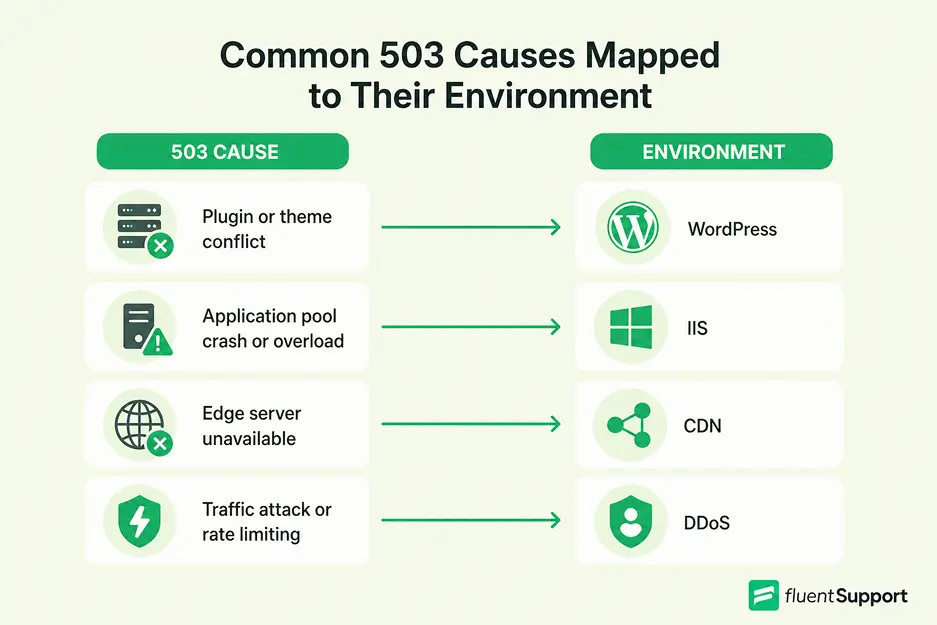
1. Server overload
The most common cause. When a server receives more requests than it can handle simultaneously, it starts rejecting new ones with a 503. This happens during traffic spikes, product launches, viral content moments, or poorly timed marketing campaigns.
Reddit discussions show this pattern repeatedly. One developer tracking weekly 503s on a WordPress site traced the problem to a scheduled newsletter that fired every Wednesday, spiking database usage until the server buckled.
2. Scheduled maintenance
Servers are sometimes taken offline intentionally for updates or configuration changes. A well-configured server will return 503 during this window and ideally include a Retry-After header so crawlers and users know when to return.
3. Stopped or crashed application pool
In IIS (Internet Information Services) environments, a stopped or paused application pool is one of the most frequent triggers. Stack Overflow discussions confirm this is the most common cause in Windows/IIS setups.
The application pool may stop because of an expired identity password, a configuration error, or repeated worker process failures.
4. Plugin or theme conflicts
In WordPress environments, a faulty plugin or poorly coded theme can exhaust server memory or CPU, triggering a 503.
WordPress’s Heartbeat API, which maintains a live browser-to-server connection for autosaving and notifications, is also a known culprit when multiple users are logged in simultaneously.
5. CDN or firewall misconfiguration
Content delivery networks distribute traffic across multiple servers. A misconfigured CDN or an overly strict firewall rule can block legitimate traffic or create routing loops that cause 503 responses.
This can happen after an update to CDN settings or firewall rules without adequate testing.
6. DDoS attacks
Attackers deliberately flood a server with fake traffic to overwhelm it. The result is identical to an organic traffic spike from the server’s perspective, but the source is malicious. The server drops incoming requests to protect itself.
How to fix a 503 error as a website owner
These are ordered from least disruptive to most involved.
1. Restart the server or application pool
Sometimes a simple restart clears a temporary resource bottleneck. In IIS, go to Application Pools in IIS Manager, right-click your pool, and select Start or Recycle. Check the identity settings while you are there.
An outdated password on the pool identity is a frequent cause of repeated restarts.
2. Check your error logs
Before changing anything, look at the logs. Apache and Nginx both write error logs that show what happened and when. In WordPress, you can enable WP_DEBUG and check the debug log.
In IIS, check C:\Windows\System32\LogFiles\HTTPERR for recent entries. The log entries around the time the error appeared will usually point directly at the problem.
3. Disable plugins or themes
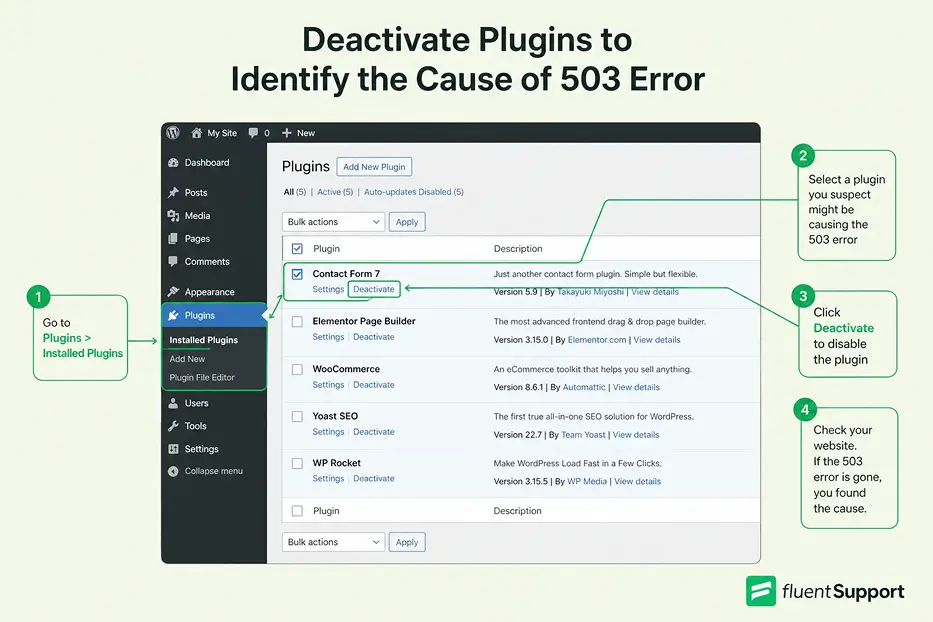
In WordPress, deactivate all plugins, then re-enable them one at a time and reload the page after each one. If the 503 disappears after disabling a specific plugin, you have found the culprit. If you cannot access the dashboard because of the error, use your hosting provider’s file manager to rename the plugins folder. This forces WordPress to deactivate all plugins automatically.
The same logic applies to themes. Switch to a default WordPress theme like Twenty Twenty-Four to test whether your current theme is causing the conflict.
4. Slow down the WordPress Heartbeat API
Rather than disabling the Heartbeat API completely, which removes autosave and live notifications, install the Heartbeat Control plugin and reduce the frequency. This brings server load down without breaking site features.
5. Deactivate your CDN temporarily
Pause or disable your CDN through your hosting dashboard, then reload the site. If the error disappears, the CDN configuration is the problem. Contact your CDN provider before re-enabling it.
6. Review firewall settings
Ask your hosting provider or review your Web Application Firewall (WAF) settings for overly broad blocking rules. A rule intended to stop bad traffic may be catching legitimate requests too.
7. Upgrade your hosting plan
If the 503 occurs consistently during peak traffic and you are on shared hosting, you may have hit a hard resource ceiling. Upgrading to a VPS or dedicated hosting plan gives you more CPU and memory headroom.
How to handle a 503 as a visitor
As a visitor, your options are limited because the problem is server-side. But there are a few practical steps:
- Wait and refresh. Many 503 errors resolve within seconds to a few minutes if they are caused by a temporary overload. Press F5 or reload the page after a brief pause.
- Clear your browser cache. Cached data can sometimes serve a stale error page even after the server has recovered. Clear your cache and cookies, then try again.
- Try a different browser or device. This rules out local browser extensions or settings causing the issue.
- Check the site’s status. Tools like Downdetector or IsItDownRightNow can tell you whether the problem is widespread or just affecting you.
Note: If none of these help, the issue is on the server side and requires the website owner to fix it.
The SEO impact of a 503 error
A 503 tells search engine crawlers like Googlebot to come back later. This is the intended behavior for temporary outages. According to Google’s own guidance, a short-lived 503 causes no lasting SEO harm. The crawler notes the status, waits, and tries again.
The risk comes with duration. If a 503 persists for hours or days, crawlers may begin to de-index the affected pages. A site that consistently returns 503 during scheduled crawls will see ranking drops.
Two practices reduce this risk significantly. First, include a Retry-After response header that tells crawlers exactly when to return. Second, monitor uptime so you know when 503s occur and for how long.
Technical customer support teams often field questions about SEO drops after an outage. Understanding the connection between server availability and crawl behavior is genuinely useful context for those conversations.
503 vs. related error codes
A few comparisons worth knowing:
- 503 vs. 500: Both are server-side. A 500 Internal Server Error is a generic catch-all for unspecified server failure. A 503 is specific: the service is temporarily unavailable. The 503 implies the problem is recoverable.
- 503 vs. 502: A 502 Bad Gateway occurs when one server receives an invalid response from another server it depends on. The 503 comes from the server itself.
- 503 vs. 429: If requests from a specific client are being rate-limited, the correct code is 429 Too Many Requests. A 503 should not be used for rate limiting.
Wrapping up
HTTP error 503 is a temporary condition, but “temporary” covers a wide range. It might last two seconds during a traffic spike or two days following a botched server update. The response is the same: identify the cause, apply the appropriate fix, and monitor to confirm recovery.
For website owners, the checklist is clear: check logs first, test plugins and themes, review CDN and firewall settings, and upgrade resources if the problem is recurring. For visitors, patience and a page refresh solve most cases.
If you work in technical support, this is one of those errors you will explain more than once. Knowing the difference between a stopped IIS application pool and a WordPress plugin overload, or between a 503 and a 502, makes those conversations faster and more useful.
FAQ
How long does a 503 error typically last?
It varies widely. A traffic spike might resolve in under a minute. Maintenance windows can run for hours. A misconfiguration may persist until someone manually fixes it. There is no standard duration.
Is a 503 error the visitor’s fault?
No. It is entirely server-side. The visitor’s request was valid. The server was simply unable to respond at that moment.
Can a 503 error hurt my Google rankings permanently?
Not from a brief outage. Persistent 503s lasting multiple days, especially during scheduled Googlebot crawls, can cause ranking drops and de-indexing. Using the Retry-After header reduces the risk during planned downtime.
What is the difference between 503 and 504?
A 504 Gateway Timeout is a communication problem between servers, typically when a proxy or load balancer does not receive a timely response from an upstream server. A 503 comes from the server itself being unable to handle the request.
Related Articles
Fluent Support 2.4.7: Ticket Filters, 5x Faster Tickets and Smart Customer Search
Fluent Support 2.4.7 brings a Ticket Filters sidebar…Customer Success Best Practices for Small Teams
In this blog, we’ve discussed customer success in…



Add your first comment to this post