


Proactive Customer Support: Moving From Reactive Support to Prevention

By Md. Sajid Sadman
April 16, 2026
Last Modified: May 7, 2026


Customer support is traditionally a reactive industry. Most teams wait for a user to find a problem, open a ticket, and wait for a reply. This cycle creates friction and high effort for the customer. It also forces support teams into a constant state of firefighting, where they only react to the loudest problems.
Proactive customer support changes this dynamic. Instead of waiting for the fire, you look for the smoke. It involves identifying potential issues through data and behavior, then acting before the user feels the need to ask for help.
TL;DR
What is proactive customer support?
Proactive customer support means solving problems before customers ask for help. Instead of waiting for tickets, teams use customer data and behavior signals to detect friction early and guide users before issues escalate.
How is it different from reactive support?
Reactive support starts after a problem is reported, while proactive support starts before or during the issue. In reactive systems, the customer carries the effort to find and report the problem, whereas proactive systems shift that responsibility to the company to identify and resolve friction early.
Why does reactive support break at scale?
Reactive support grows linearly with your user base, meaning more users directly lead to more tickets, higher pressure on agents, and unpredictable workload spikes. This creates a constant firefighting environment where teams are stuck responding instead of improving the system.
What changes when you go proactive?
Proactive support breaks the link between user growth and ticket volume by resolving issues before they turn into tickets. This leads to fewer incoming requests, more stable workloads, faster resolutions, and a smoother overall customer experience.
What are the core pillars of proactive support?
The core pillars include behavioral signal monitoring, preemptive communication, contextual self-service, automated incident response, and customer health tracking. Together, these systems help teams detect friction points and resolve them before customers need to reach out.
What are the real business benefits?
Proactive support reduces ticket volume, stabilizes team workload, and improves operational efficiency. It also builds customer trust, increases retention, and allows support teams to focus on high-impact issues instead of repetitive queries.
How can you start implementing it today?
Start by analyzing your existing ticket data to identify repetitive issues that could be prevented. Then implement simple proactive systems like onboarding guidance, incident notifications, and contextual help to address those issues before customers ask.
What is the real shift behind proactive support?
Proactive support is not just a tactic, it is a shift in how support is designed and delivered. Instead of reacting to problems, teams build systems that anticipate and prevent them, making support more scalable and efficient.
So what is Proactive Customer Support?
Proactive customer service is anticipating and addressing customer needs before they arise. It involves taking the initiative to resolve issues, provide information, or offer solutions before the customer even asks. By using customer data and behavioral signals, support teams can identify obstacles and preemptively notify users of errors or provide guidance during high-friction tasks.
To build a proactive system, you must implement these five core pillars:
- Behavioral Signal Monitoring: Tracking where users stall or encounter errors in real-time.
- Preemptive Communication: Sending alerts about known issues before the user reports them.
- Contextual Self-Service: Placing specific help articles on the pages where they are most needed.
- Automated Incident Response: Setting up systems to notify users of service interruptions immediately.
- Customer Health Tracking: Monitoring usage patterns to identify accounts at risk of churn.
The Core Difference Between Reactive and Proactive Support
Reactive support is driven by the customer. The customer carries the burden of effort. They must identify the problem, navigate to your support page, and explain the situation. This creates a linear relationship between your user base and your ticket volume. As you get more users, you must hire more agents to handle the incoming messages.
Proactive support shifts the burden of effort to the company. By using systems to monitor the product environment, you identify the friction first. When you reach out to a user to tell them a bug is already being fixed, you eliminate the need for that user to ever open a page. This breaks the linear link between user growth and ticket volume.
| Feature | Reactive Support | Proactive Support |
|---|---|---|
| Primary Trigger | Customer reaches out with an issue. | System detects a signal or friction point. |
| Effort Burden | High for the customer. | High for the company (initially). |
| Timing | Post-incident (after the problem occurs). | Pre-incident (before or during the event). |
| Scalability | Hard; ticket volume grows with users. | Easier; systems handle mass notifications. |
| Customer Sentiment | Frustration and relief. | Appreciation and professional trust. |
| Workload | Unpredictable surges. | Controlled and scheduled communication. |
Teams typically struggle with reactive support because it is unpredictable. You cannot control when a hundred people will message you at once. Proactive support allows you to control the narrative. You decide when and how to communicate, which leads to a more stable workload for your team.
Operational Benefits of Moving First
Transitioning to a proactive model is a strategic shift that changes the unit economics of your support department. When you move first, you gain control over your team’s most valuable asset: time.
- Decoupling Growth from Headcount: Reactive teams must hire linearly as their user base grows. Proactive systems allow you to handle an increase in users without a corresponding increase in staff by automating the resolution of common friction points.
- Stabilizing the Surge Effect: Reactive support is at the mercy of external events. Proactive communication, like a status banner during an outage, flattens the ticket spike, preventing your inbox from becoming unmanageable during a crisis.
- Improving Customer Lifetime Value (CLV): Customers who receive help before they ask for it develop a higher level of professional trust. This reduces churn rates, particularly in SaaS environments where silence often precedes a cancellation.
- Higher Resolution Accuracy: When a team is reactive, they are often rushed. When you are proactive, you have the time to craft the perfect response or documentation once, then deliver it to thousands of users automatically.
- Data-Driven Workforce Management: By monitoring proactive signals, managers can predict when a high-volume period is coming. This allows for better scheduling and prevents agent burnout (Aberdeen Group).
Just a heads up: All these benefits sound great on paper. But they only happen when your support system is built for it. Fluent Support gives you automation, workflows, and real-time control to make proactive support actually work.
5 Ways to Implement Proactive Support Today
Implementing these strategies requires a shift in how you view your support tools. They are not just mailboxes; they are listening devices.
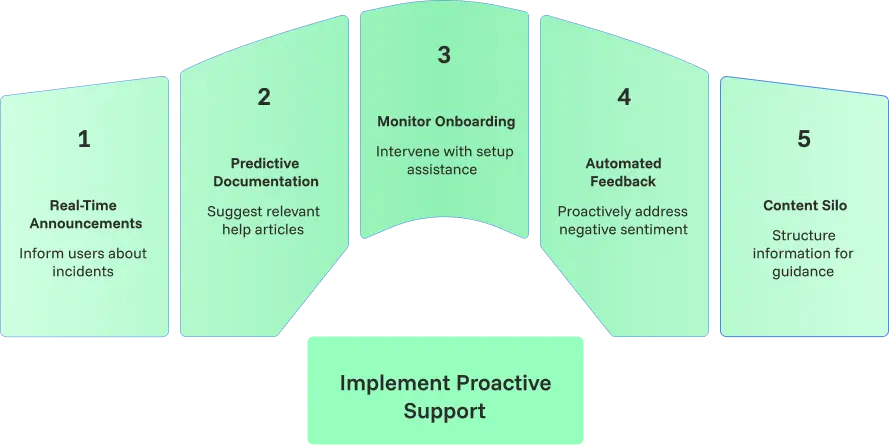
Use Real-Time Incident Announcements
Internal transparency is the foundation of proactive incident management. When a server goes down or a bug is confirmed, the first instinct is often to hide it until it is fixed.
This is a mistake.
Using a public status page or a banner inside your app tells the user you are already working on it. This stops the “Is it just me?” tickets from flooding your inbox.
Deliver Predictive Documentation
Contextual help reduces the time spent searching for answers. Generic knowledge bases are hard to search. Predictive documentation uses the user’s current URL to suggest three specific articles. If a user is on the Integrations page, your help widget should show integration guides, not your refund policy. This provides the answer before the question is even typed.
Monitor Onboarding Friction
Early intervention prevents user abandonment. If a user signs up for a SaaS product but does not complete the setup within 24 hours, they are likely stuck. A calm, teacher-like reach-out asking if they need help with that specific step is proactive. It shows you are paying attention to their success, not just their subscription.
Leverage Automated Feedback Loops
Negative sentiment signals an opportunity for proactive recovery. Monitoring sentiment shifts is key to prevention. If a long-term customer suddenly gives a low rating on a minor ticket, it often signals a larger frustration. Reaching out immediately to discuss their overall experience can prevent a cancellation before it happens.
Build a Comprehensive Content Silo
Structured information prevents the initial need for support contact. A content silo organizes information so that every question leads naturally to the next logical step. By structuring your documentation this way, you guide the reader through a complete learning path. This reduces the how-to queries because the reader feels guided and confident in their own ability to use the product.
Practical Examples from Real Support Environments
To move from theory to operations, you must look at how proactive support manifests in daily workflows. These examples represent common patterns observed in high-performing support teams.
- The Usage Gap Intervention: A new user signs up for a WordPress plugin but has not activated their license key after 48 hours. An automated, helpful email is sent with a 30-second video showing exactly where to paste the key. This prevents a “Why isn’t this working?” ticket.
- The Shadow Outage Notification: Internal monitoring detects a 15% increase in API latency for a specific region. A contextual banner is placed on the user dashboard for that specific region. This stops hundreds of users from opening the same ticket to report the slowness.
- The Failed Payment Buffer: A customer’s recurring subscription payment fails due to an expired card. Instead of cutting access, the system sends a notification explaining that the account remains active for 3 days to allow for a card update. This maintains professional goodwill.
- The Predictive Search Delivery: A user spends more than 2 minutes on the SMTP Settings page without making a change. A small help widget pops up offering the Top 3 SMTP Troubleshooting Steps. The user finds the fix themselves without needing a human agent.
- The Shipping Delay Preemption: A logistics partner flags a weather delay for a specific batch of orders. An automated message is sent to those specific customers explaining the new timeline before the original delivery date passes. This drastically reduces WISMO queries (SQM Group).
Wrapping Up
Transitioning to proactive customer support is a deliberate operational move that prioritizes long-term efficiency over short-term “firefighting.” By following the system of identifying signals, preparing preemptive responses, and delivering contextual documentation, you move the burden of effort away from the customer and onto your systems.
This approach does more than just lower ticket counts; it builds a reputation for professional credibility. When a reader or customer feels guided and informed before they have to ask a question, they develop a level of trust that reactive support simply cannot match. Start small by identifying your highest-volume repetitive tickets and build your first proactive trigger this week.
Start off with a powerful ticketing system that delivers smooth collaboration right out of the box.
Frequently Asked Questions (FAQ)
What is the first step to becoming proactive?
The first step is auditing your current ticket data to identify “support debt.” You must find the top three repetitive questions that could have been answered by a simple notification, an automated email, or a better-placed help article. Once identified, you can build the specific automated triggers to address them.
Does proactive support require more staff?
No, proactive support usually requires better systems rather than more people. Once the automated triggers and monitoring tools are set up, they handle the work of dozens of manual agents. This operational shift allows your current staff to be more efficient and focus on complex troubleshooting.
How do you measure the ROI of proactive service?
The primary metric for ROI is the “ticket deflection rate.” This is the measurable decrease in volume for specific categories (like shipping or setup) after a proactive measure was implemented. You should also track the Customer Effort Score (CES), as proactive support typically leads to a significant reduction in the effort a user must exert.
Is proactive support the same as automated support?
Automation is a tool used within proactive support, but they are not the same. Automated support can still be reactive (like an auto-responder after a ticket is opened). Proactive support is a strategy that uses automation to reach out before the customer initiates a ticket.
Can proactive support feel intrusive to the customer?
It only feels intrusive if it is irrelevant. When the reach-out is based on a real friction point—like an account error or a confirmed service delay—it is seen as professional and helpful. The key is to ensure every proactive message provides an immediate solution or valuable update.
Related Articles
Fluent Support 2.4.7: Ticket Filters, 5x Faster Tickets and Smart Customer Search
Fluent Support 2.4.7 brings a Ticket Filters sidebar…Customer Success Best Practices for Small Teams
In this blog, we’ve discussed customer success in…



Add your first comment to this post