

4 Best Ticketing System for Small Business

By Md. Sajid Sadman
December 22, 2025
Last Modified: January 21, 2026


Small businesses don’t need complicated helpdesk software. They just need a ticketing system that keeps support organized from day one.
The right tool should help your team track messages, respond faster, and stay in control as your customer base grows. But choosing the right one gets difficult when most other blogs show a list of ten to twenty different tools.
That kind of list only creates overwhelm. It doesn’t help you decide what actually works.
So, we listed only the four most essential options. Two are WordPress plugins, and two are SaaS tools. Explore them and choose the one that fits your small business setup the best.
TL;DR
Best ticketing system for small businesses (WordPress category)
If your business runs on WordPress, using a plugin-based ticketing system can save you time and money. Everything stays inside your dashboard, setup is quick, and you don’t have to manage another external tool.
Here are the two WordPress options that work best for small teams.
1. Fluent Support
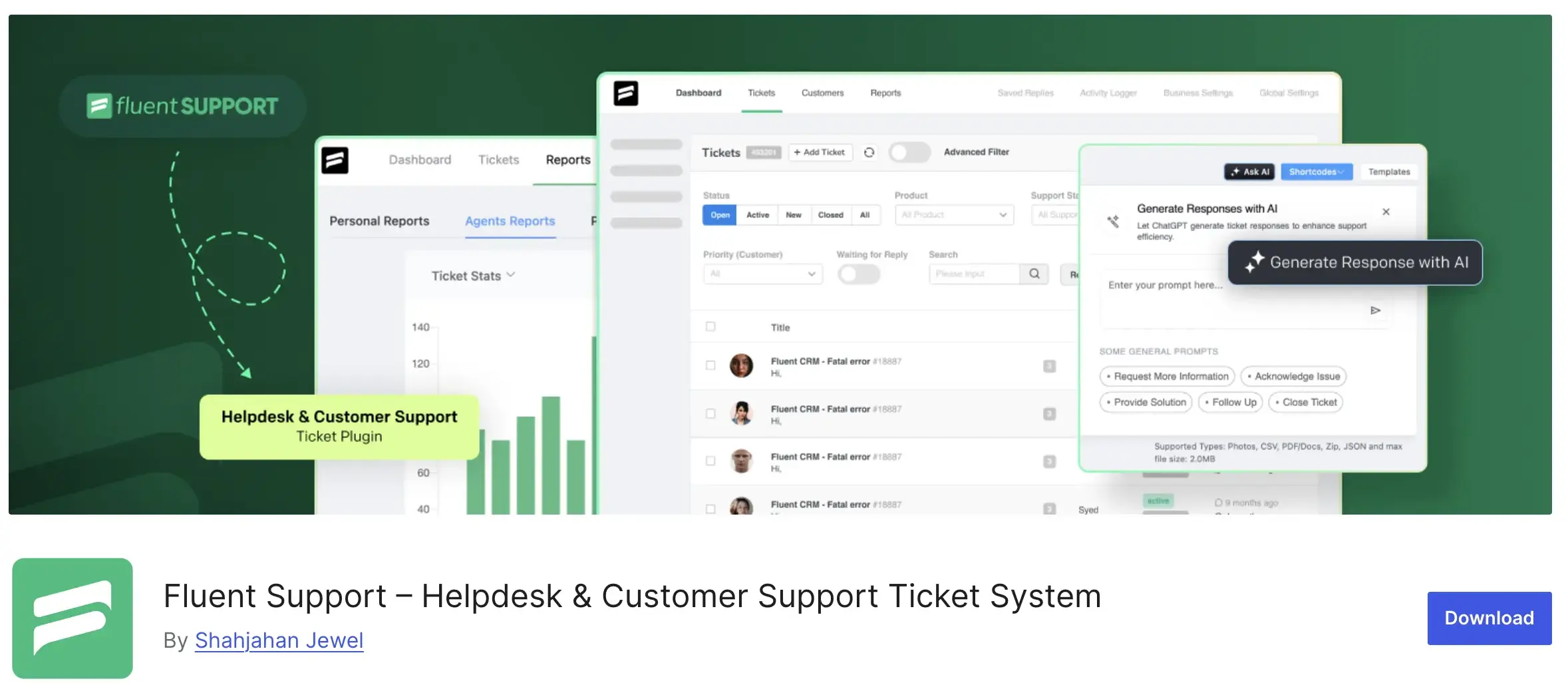
Fluent Support is a dedicated helpdesk plugin built for WordPress users who want full control over customer support. It runs entirely inside your WordPress site, giving your team a fast and organized ticketing system without relying on external SaaS platforms.
The plugin is built for small businesses that want a predictable workflow.
You get a clean inbox, quick navigation, automation rules, email piping, collision detection, internal notes, and other core features that keep support moving smoothly.
Everything loads quickly because Fluent Support is optimized for performance across modern WordPress setups.
Fluent Support also works seamlessly with several WordPress tools such as WooCommerce, Fluent Forms, EDD, FLuentCRM, membership plugins, and popular LMS platforms.
When those integrations are enabled, you can see customer activity like orders, course purchase details, customer details directly inside the ticket view. This helps your support agents respond with context without switching between multiple tools.
For small businesses, one of the biggest advantages is pricing. There are no per-agent fees. You pay once per year and onboard your entire support team without increasing your cost when you add new agents.
Notable features of Fluent Support
Pricing
Fluent Support offers a straightforward pricing structure that keeps things affordable for small businesses.
There are no per-agent fees, so you can add your whole team without increasing your cost.
The plugin now includes a Free plan, which is helpful for small businesses that want to set up a basic support workflow before upgrading.
The paid plans are:
- Single Site License – $129 per year
Best for small businesses running one website. - Agency License – $249 per year
Suitable for teams managing support across multiple client sites. - 50 Sites License – $399 per year
Ideal for large agencies or businesses operating several brands.
Each license includes all core features such as ticket management, automation workflows, email piping, internal notes, performance tools, and integrations.
You also get updates and priority support for the duration of your license.
For most small businesses, the Free plan and Single Site license are the best fit.
They give you everything you need to run an organized support workflow without stretching your budget.
Verdict for small businesses
Fluent Support is a reliable choice for small businesses that want a fast, organized, and affordable ticketing system inside WordPress. It delivers the core tools needed for smooth customer support without adding extra complexity to your workflow.
The Free plan is strong enough to get started, and the Single Site license gives most small teams everything they need to manage support confidently.
If your business runs on WordPress and you want predictable costs with room to grow, Fluent Support fits that setup very well.
You’ve seen how Fluent Support fits the needs of a small business. Explore it further and see how it can simplify your support workflow.
2. JS Help Desk

JS Help Desk is a WordPress support ticketing plugin that gives small businesses a self-hosted helpdesk system inside their website. It lets visitors and logged-in users submit tickets from the front end, and your support team manages them from the WordPress dashboard.
Importantly, it supports unlimited tickets and unlimited agents in both free and paid versions, so your support workflow doesn’t hit artificial limits.
One standout capability is guest tickets, which allow users to create support requests without needing an account. This reduces barriers for customers and can improve response rates for small teams.
JS Help Desk provides ticket submission forms, email notifications, and basic ticket management out of the box.
For advanced functionality, the plugin offers a range of paid add-ons that extend its capabilities. These add-ons include agent roles, private internal notes, time tracking, ticket auto-close rules, help topic organization, and WooCommerce integration.
The modular nature of JS Help Desk means you can start with the core free features and add only the tools your business needs. This flexibility makes it a practical choice for small teams that want to build a support system at their own pace.
Notable features
Pricing
JS Help Desk offers a free version with basic ticketing features, which can be useful if you want to test the system before investing.
Paid plans use a simple yearly pricing model for a single site:
- Basic – $49/year
Includes 11 premium add-ons. - Standard – $69/year
Includes 20 premium add-ons. - Professional – $99/year
Includes 36 premium add-ons, including AI-powered tools and advanced workflow options.
All paid plans include one year of updates, priority support, and a 14-day money-back guarantee.
You can also start with the free plan, which offers limited features but helps you begin your support workflow before upgrading.
Verdict for small businesses
JS Help Desk is a practical choice for small businesses that want a simple, self-hosted support system inside WordPress.
It keeps the workflow straightforward and gives you the flexibility to add more features as your support needs grow.
The free version helps you get started, and the paid plans give you multiple ways to expand your helpdesk based on the add-ons you need.
But keep in mind that JS Help Desk uses a tiered pricing model, while a Fluent Support Single Site license includes all features without requiring multiple upgrades.
Best Ticketing System for Small Businesses (SaaS Category)
If you’d rather use a support tool that runs separately from your website, SaaS helpdesks might fit your workflow better.
You access everything from a dedicated platform instead of managing it inside WordPress.
In this section, you’ll find two reliable SaaS tools that offer a straightforward way to manage customer support without tying anything to your site and yes, each can be a strong fit for your small business.
1. Freshdesk

Freshdesk is a SaaS helpdesk platform built for businesses that want a reliable support system outside WordPress. It gives you a dedicated space to manage customer conversations across email, chat, phone, and social channels from one unified dashboard.
For small businesses, this makes support feel more organized, especially when messages start coming in from different places at once.
The platform is powered by Freddy AI, which helps teams work faster by summarizing conversations, suggesting replies, translating messages, and automatically routing tickets to the right agent.
Small teams benefit the most here because AI reduces manual work, cuts down response time, and helps agents understand customer context without digging through long ticket threads.
Freshdesk also brings structure to your support workflow from day one. You get clear ticket statuses, automated assignments, internal notes, and SLAs to keep everything moving.
If you want to deflect repetitive questions, the built-in knowledge base and AI chat tools give customers quick answers without creating extra tickets.
Another important point for small businesses is scalability.
Freshdesk works whether you have one agent or an entire team. You can start with the free plan, then move into advanced automation, analytics, and AI tools when you’re ready.
Trusted by over 70,000 businesses worldwide, Freshdesk gives you a dependable, ready-to-use support hub that stays separate from your website. It’s a solid choice if you want a clean and centralized helpdesk without managing any infrastructure.
Notable features of FreshDesk
- Unified ticketing workspace
Brings customer messages from email, chat, social channels, and web forms into one organized dashboard. - Freddy AI assistance
Helps agents with conversation summaries, reply suggestions, translations, and context understanding for faster resolutions. - AI-powered ticket routing
Automatically classifies and assigns tickets based on rules, past patterns, and agent skill sets. - Self-service tools
Includes a knowledge base and customer portal that help users find answers without opening a ticket. - Workflow automation
Automates repetitive tasks like assigning priorities, updating statuses, or sending follow-ups. - Team collaboration tools
Offers internal notes, shared ownership, and collision detection so agents don’t duplicate work. - Parent-child ticketing
Connects related issues and dependencies, helping teams manage complex requests more clearly. - SLA and escalation management
Tracks deadlines and escalates overdue tickets to maintain service quality. - Analytics and reporting
Provides insights on ticket volume, agent performance, response times, and customer satisfaction. - Integrations marketplace
Connects with tools like Slack, Teams, Shopify, Google Workspace, Mailchimp, and many others. - Mobile app support
Lets agents manage tickets and respond to customers from iOS and Android devices.
Pricing
Freshdesk offers a free plan that supports basic ticket management and is suitable for very small teams or those just starting with a helpdesk.
For more advanced support needs, Freshdesk uses a per-agent, yearly or monthly pricing model with multiple paid tiers:
Growth starts at 15 dollars per agent per month
Includes a shared inbox, ticketing, a customer portal, SLA management, standard reports, and dashboards.
Pro starts at 49 dollars per agent per month
Adds advanced workflows, stronger automation, custom roles, CSAT surveys, and more detailed reporting tools.
Enterprise starts at 79 dollars per agent per month
Provides enterprise-level capabilities like skill-based routing, custom objects, AI-powered features, and advanced analytics.
Each plan unlocks more tools for ticket handling, automation, and analytics as you move up.
Choosing a tier depends on how much automation, reporting, and scale your team needs.
Freshdesk’s pricing structure is flexible, letting you begin with a free plan and upgrade as your support requirements grow.
Verdict for small businesses
Freshdesk is a strong option if you want a helpdesk that runs independently from your website and gives your team a clear, structured workspace from day one. It brings all customer conversations into one place and uses AI to help your agents work faster with less manual effort.
The free plan is a comfortable starting point, and the paid tiers let you add more automation and reporting as your support needs grow. If you prefer a SaaS helpdesk that scales smoothly and stays easy to manage, Freshdesk is a reliable choice.
2. Zoho Desk
Zoho Desk is a cloud-based helpdesk that brings all your customer conversations into one organized space. If your customers reach you through email, chat, phone, or social media, Zoho Desk turns each of those messages into trackable tickets so your team can manage everything from a single dashboard.
One of the reasons small businesses consider Zoho Desk is its connection to the wider Zoho ecosystem. If you already use tools like Zoho CRM, Zoho Books, or Zoho Inventory, the support view becomes more powerful. Your agents can see customer history, billing details, and past interactions without switching tabs, which helps them respond faster and with better context.
Zoho Desk also leans heavily on automation and AI. Its assistant, Zia, can analyze sentiment, tag tickets, predict ticket volume, and help route issues to the right agent. For routine questions, you can use self-service portals and knowledge base articles to reduce simple tickets before they even reach your inbox.
As your support operations grow, Zoho Desk adapts. You can organize tickets across multiple channels, add structured workflows, build automated processes, and use reports to understand where your team needs improvement. Everything runs in the cloud, so you don’t have to manage any installation or maintenance.
Zoho Desk works best for teams that want a flexible support tool with strong customization and deeper automation. If your business already runs on Zoho apps, the experience feels even smoother because everything connects naturally.
Notable features of Zoho Desk
Omnichannel ticketing
Collects customer messages from email, chat, phone, web forms, and social media in one workspace so your team stays organized across channels.
AI-powered assistance with Zia
Supports agents with sentiment analysis, automated ticket tagging, reply suggestions, and anomaly detection to highlight issues that need attention.
Workflow automation
Automates repetitive actions like assigning tickets, updating statuses, escalating overdue issues, and sending routine follow-ups.
Blueprint process designer
Lets you map out your full support process visually so agents follow a consistent step-by-step workflow for every resolution.
Knowledge base and self-service portal
Allows customers to find answers on their own through articles and FAQs, reducing simple tickets and improving response speed.
Custom dashboards and reporting
Gives insights into ticket trends, agent performance, customer satisfaction, and workload with pre-built and custom reports.
Team collaboration tools
Includes internal notes, agent collision detection, private chat feeds, and shared ticket ownership to streamline teamwork.
Multi-brand support
Enables you to support multiple brands with individual help centers, separate styling, and brand-specific knowledge bases.
Mobile apps and Zoho Radar
Lets agents respond to tickets on the go while managers track real-time performance and SLA metrics from mobile devices.
Strong integration ecosystem
Connects smoothly with Zoho CRM, Books, Inventory, and popular third-party tools like Slack, Microsoft Teams, Shopify, Jira, and Salesforce.
Pricing
Zoho Desk offers a flexible pricing model with one free plan and four paid tiers. Each plan adds more automation, AI, and customization features depending on your support needs.
Free plan
0 dollars per agent per month.
Supports email ticketing for up to three users and includes a help center, basic SLAs, and mobile apps.
Express plan
7 dollars per user per month (billed annually).
Includes email, social media, web forms, direct assignment, workflows, custom domain, multi-level escalations, ticket timeline, and contact management.
Standard plan
14 dollars per user per month (billed annually).
Includes everything in Express plus business messaging, instant messaging, community forums, generative AI, work modes, knowledge base, self-service widget, customer happiness ratings, and custom reports.
Professional plan
23 dollars per user per month (billed annually).
Includes everything in Standard plus telephony, Blueprint workflows, multiple departments, round-robin assignment, custom lookup fields, multilingual help center, parent-child ticketing, custom actions, and webhooks.
Enterprise plan
40 dollars per user per month (billed annually).
Includes everything in Professional plus AI agents, Answer Bot, Zia AI assistant, live chat, guided conversations, skill-based assignment, multi-level IVR, multi-brand help center, custom modules, and sandbox access.
Zoho Desk’s pricing lets small businesses start with the free or Express plan and upgrade as their support load increases.
Verdict for small businesses
Zoho Desk is a strong fit if you want a helpdesk that grows with your business and gives you more structure as your support needs get complex. It brings all your customer conversations into one organized system and gives you access to automation, reporting, and AI tools that make everyday support work easier. The platform becomes even more valuable if your business already uses Zoho products, since everything connects smoothly and your agents get more context with less effort.
The free plan and Express plan make it possible to start small, but Zoho Desk’s real strength appears as you move into the higher tiers where automation, AI, and customization become more powerful. If you’re looking for a scalable support platform with flexibility, depth, and strong integrations, Zoho Desk is a dependable option for small teams building a long-term support system.
Wrapping up
Choosing a ticketing system shouldn’t feel overwhelming. Small businesses just need a tool that keeps support organized, improves response times, and makes the day-to-day easier for both customers and agents.
That’s why this guide focused on only four options that actually matter.
Fluent Support and JS Help Desk are great if you want something inside WordPress.
Freshdesk and Zoho Desk work better if you prefer a standalone SaaS platform.
Each tool comes with its own strengths, so the right choice depends on how your business runs today and how you want to grow your support operations in the future.
Explore the one that fits your workflow and get your support system running smoothly from the start.
Start off with a powerful ticketing system that delivers smooth collaboration right out of the box.
Related Articles
Omnichannel Customer Support: The Guide for Support Teams
Omnichannel customer support means every channel, agent, and…Help Desk Software Wiki [Explained]
Learn what a help desk software wiki is,…





Leave a Reply