

Introducing FluentPlayer: The Video Player for WordPress Built to Convert

By Md. Sajid Sadman
June 29, 2026
Last Modified: July 13, 2026


Your WordPress site measures almost everything. You know which forms convert, which emails get clicked, and which pages keep people around. Then there is the video, the one spot where all that insight goes dark.
A visitor watches your course preview or product demo, and you get back a single vague view count. You can’t tell where they lost interest, whether they cared, or what they wanted next.
FluentPlayer was built to close that gap. By the end of this post, you’ll know why WPManageNinja built it, every feature it ships with, how it fits the rest of your stack, and how the free and Pro versions compare.
FluentPlayer is now available. Check out the Earlybird Lifetime Deal and get lifetime access today.
| FluentPlayer is a native video player for WordPress that lets people take action without leaving the video, because it is built inside the same Fluent ecosystem as Fluent Forms, FluentCRM, and FluentCommunity. |
TL;DR
- FluentPlayer is a native video player for WordPress from WPManageNinja that lets viewers fill out forms, capture their email, or pay without ever leaving the video.
- WPManageNinja built it to close the visibility gap, since video was the one channel you could not measure while forms, email, and pages all gave you data.
- It is made for course creators, marketers and agencies, Fluent ecosystem users, and website owners who treat video as part of their workflow.
- The standout feature is Interactive Layers, which place forms, email capture, CTAs, hotspots, ads, and shortcodes at any timestamp with conditional targeting.
- It plays from self-hosted files, YouTube, Vimeo, audio, BunnyCDN, Mux, and HLS, all through one consistent player.
- Launch pricing starts with a one-time Lifetime Deal, with Personal, Freelancer, Studio, and Agency plans available.
- It connects natively to FluentCRM, Fluent Forms, and FluentCommunity, so leads flow into your funnel in real time with no third-party bridge.
- It also brings a full analytics dashboard, playlists, timed content, subtitles, chapters, and remember playback.
- Switching from Presto Player is simple, and a built-in migration brings your media and settings across with it.
Why WPManageNinja Made FluentPlayer
WPManageNinja never set out to build a video player. The team spent more than a decade making analytics-first tools for small businesses, things like Fluent Forms, FluentCRM, FluentCommunity, and FluentCart, and a video player did not fit that picture.
What changed was a pattern they could not unsee. They kept meeting creators who poured time and money into tutorials, demos, and course lessons, tracked every email and conversion around them, and still had no real idea how the videos themselves performed.
The same lesson surfaced across every product the team shipped: people do not just want tools that work, they want tools that show whether they are working.
Video was the one piece that never caught up, still stuck in plain playback while everything else got smarter.
So the team set out to build the player WordPress should have had years ago, one that treats video like forms and email, with the kind of data you can actually act on.
They built it because it needed to exist, not because the company needed another product to sell.

We built FluentPlayer to solve a crucial problem that almost every content creator, course provider, and membership site owner faces: a lack of insight into video engagement.
ShahJahan Jewel, CEO of WPManageNinja
Who FluentPlayer Is For
FluentPlayer is built for people who treat video as an active part of their workflow, not a passive block on the page. Four groups get the most out of it.
Power Up Your Videos with FluentPlayer’s Advanced Features
Why Basic Video Embeds Fall Short
Standard YouTube and Vimeo embeds are great at hosting, but they were never built for control, engagement, or conversion on your own site. Here is how a basic embed compares to FluentPlayer.
| Capability | Basic Embed | FluentPlayer |
| Custom branding | No | Yes |
| Video chapters | YouTube only | Yes |
| Video playlists | Limited | Yes |
| Dynamic content in video | No | Yes |
| In-video forms | No | Yes |
| Email capture | No | Yes |
| CTA overlays | No | Yes |
| Clickable hotspots | No | Yes |
| Lazy loading | Heavy iframe | Yes |
| Timed content | No | Yes |
| Media tagging | No | Yes |
| Video analytics | External only | Yes |
| Ad-free playback | No | Yes |
| Data ownership and privacy | No | Yes |
| Audio for podcasting | No | Yes |
| Remember playback position | No | Yes |
What’s Inside FluentPlayer
FluentPlayer is a complete player out of the box, and it grows into a full video platform once you reach Pro. Here is every part of it, grouped by what it helps you do.
Interactive Layers
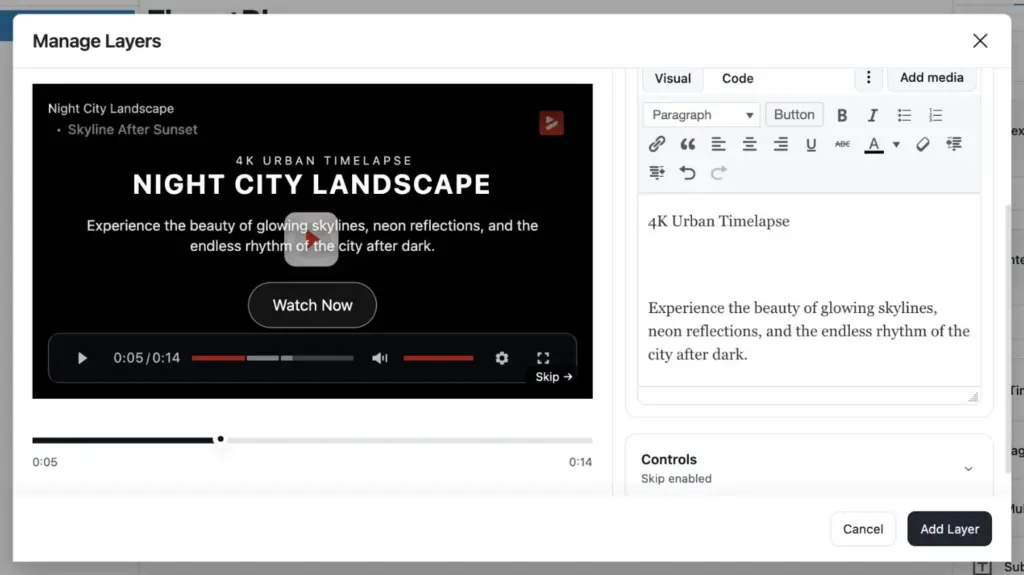
Interactive Layers are the reason FluentPlayer feels different from any other player. A layer is a working element you drop onto the video at a specific timestamp, and you decide the exact moment it appears and how long it stays before it hides again.
The free version ships with a Fluent Forms layer and an email capture layer. Pro adds four more: CTA banners that push a single click, clickable hotspots that point to a resource, ad layers that run a promotion, and shortcode layers that place any WordPress shortcode inside the video.
Conditional Rules for Layers
On Pro, every layer carries its own conditional rules. You build them with a simple Field, Operator, and Value setup, the same logic you know from Fluent Forms, and you can match any rule or all of them.
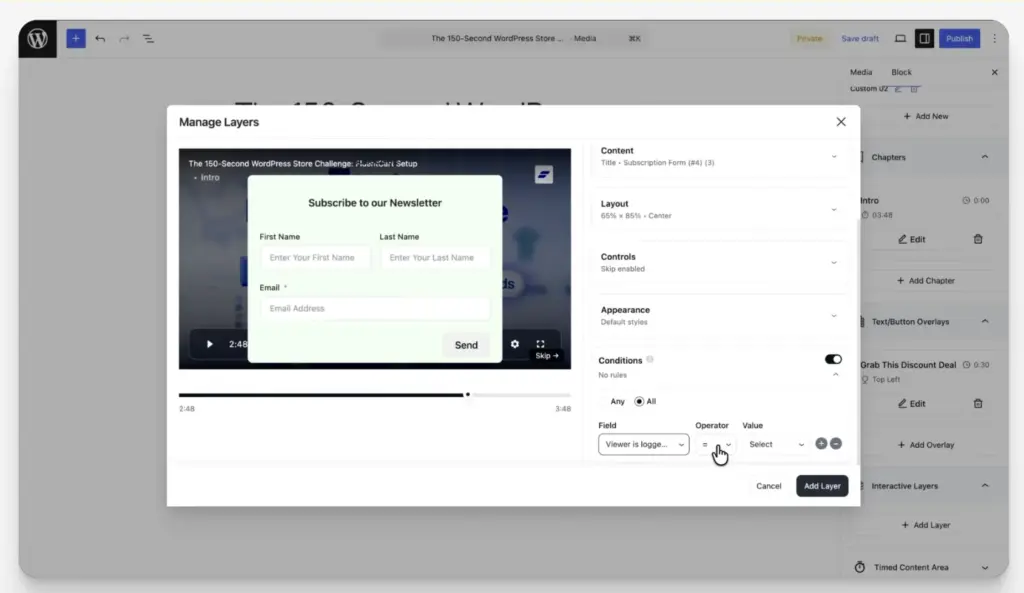
So you decide who sees a layer instead of showing the same offer to everyone. You can trigger a layer based on whether a viewer is logged in, sits in a specific CRM tag or list, arrived from a campaign link, or has already submitted the form once. A first-time visitor sees the opt-in, while a known contact gets a course offer instead.
In-Video Forms and Payments
Instead of pushing a viewer to a separate page to subscribe or register, the form opens inside the player at the moment you choose. Because Fluent Forms supports payment fields, that same in-video form can take money for a course or a webinar seat.
Every submission lands in FluentCRM in real time, tagged and ready for an automation. Both plugins share one codebase, so the lead arrives instantly without a third-party bridge or a manual import.
Timed Content
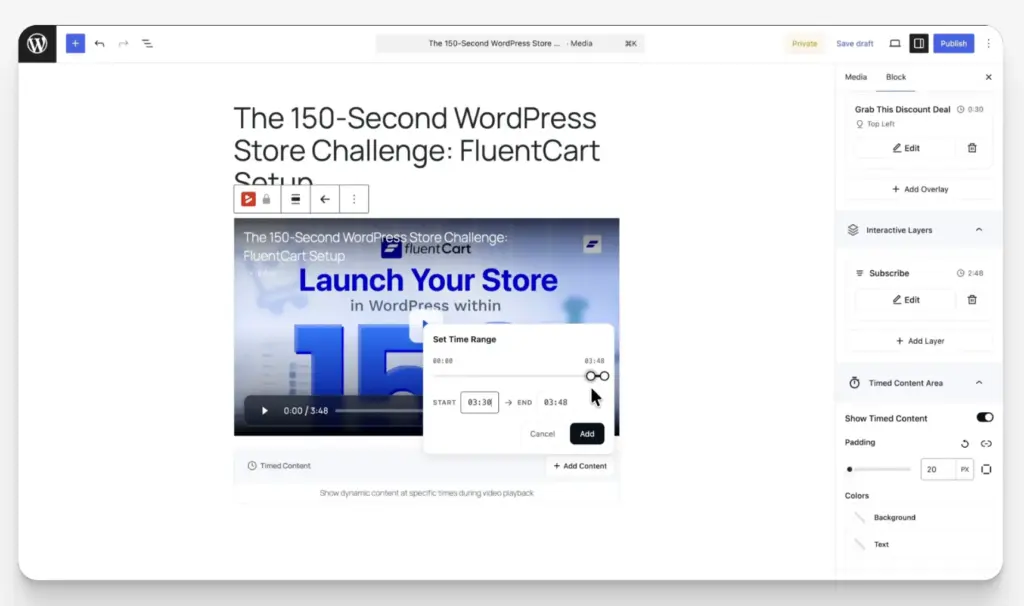
Timed Content is one of the more unusual Pro features, and it has no real equal in other players. It renders a WordPress block region below the player that changes as the video plays.
You set a time range, and the content for that range appears in sync with the video. Any WordPress block works there, whether that is a form, a button, or a simple text block tied to a single moment.
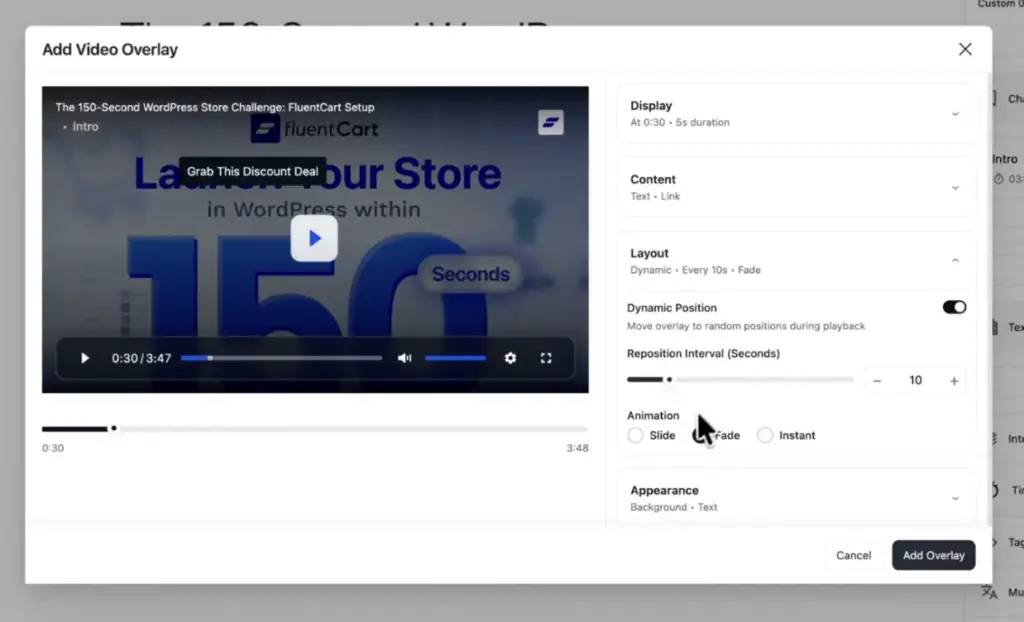
Action Bar and Overlays
A Smart Action Bar sits below the player as a custom, clickable strip that drives engagement and clicks toward whatever you choose. Title overlays come free, so you can label a video right on the frame.
Pro adds text and button overlays that appear inside the video at the right moment, which keeps a call to action tied to what is happening on screen.
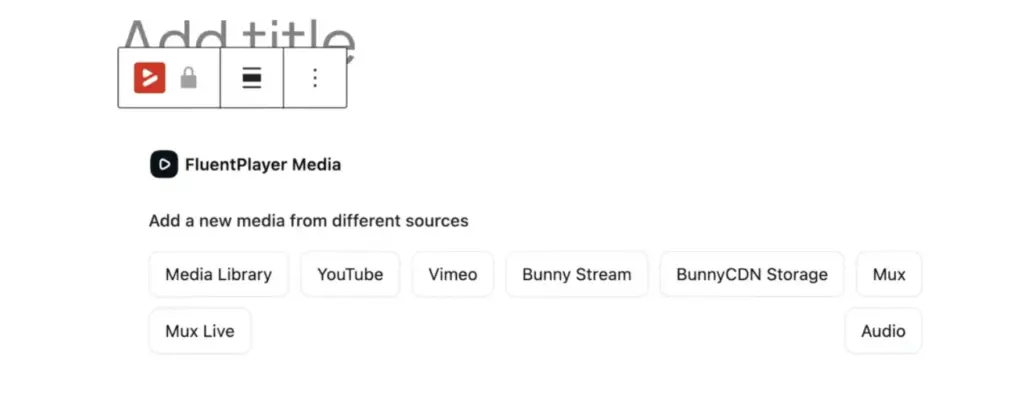
Play Different Source
The free version plays self-hosted files from your media library, YouTube, Vimeo, and audio files, all through one consistent player. Pro extends that to BunnyCDN Stream, BunnyCDN Storage, Mux, external URLs, Cloudflare R2, Cloudflare Stream, Gumlet Video, Gumlet Stream, and HLS streaming for high-traffic libraries.
Video Chapters
Chapters break a long video into labeled sections, the same way YouTube chapters work, so viewers can jump straight to the part they want. You add each one with a start time and a title, and FluentPlayer ends each chapter automatically when the next one begins.
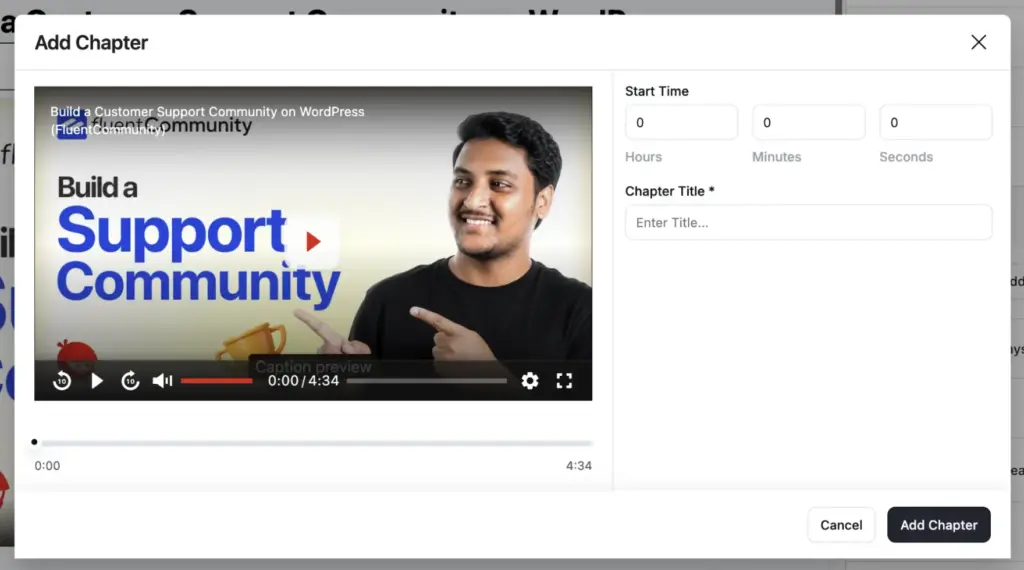
For a tutorial or a long lesson, that turns one daunting video into a clear structure people can actually scan and navigate.
Player Presets and Custom Branding
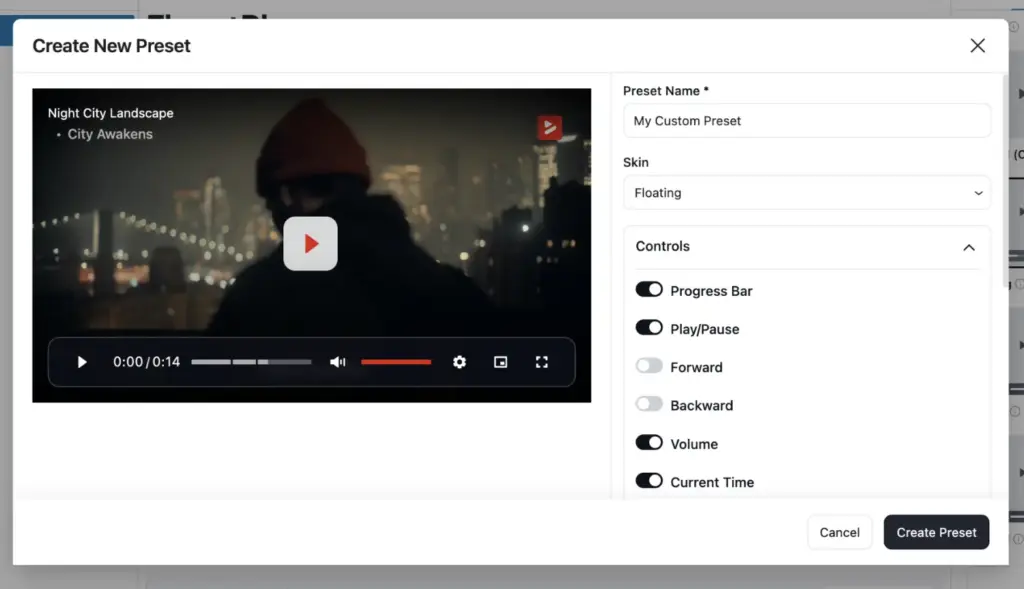
FluentPlayer ships with six presets in the free version: Default, Modern, Simple, Minimal, Standard, and Floating. Pro adds an Ambient preset and lets you build and save your own custom presets to reuse across pages.
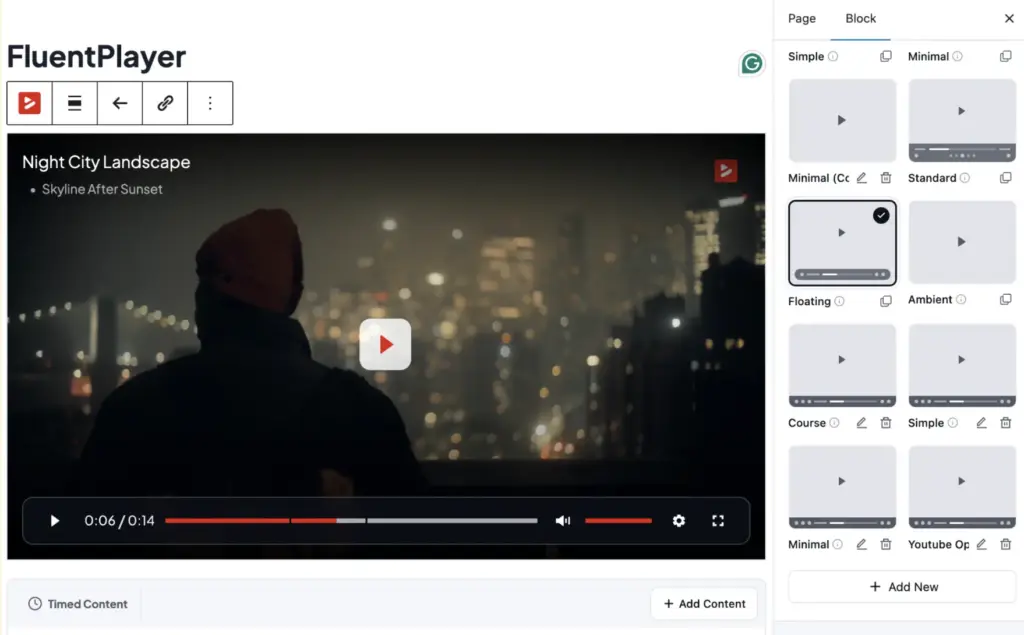
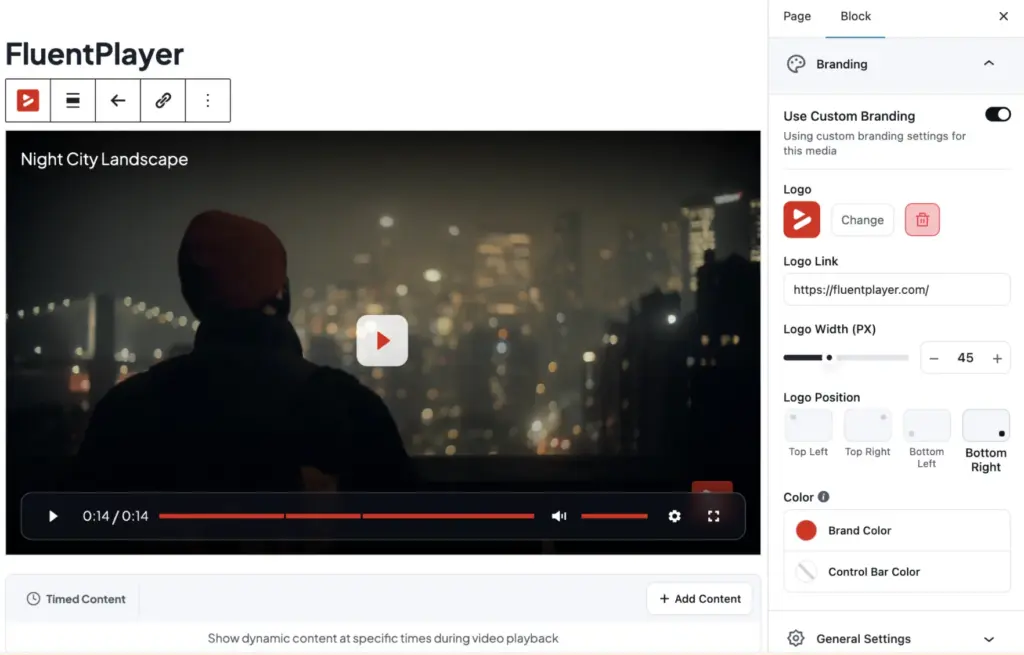
Branding is free as well. You can set your logo, a brand color, and a control bar color, choose a poster image, set the aspect ratio, and add a title overlay, so the player looks like part of your site.
Playback Controls
FluentPlayer gives you the behaviors viewers expect.
You can set autoplay or muted autoplay, play inline on mobile so the video stays in the page instead of jumping to fullscreen, and choose what happens when it ends, either reset to the start or loop.
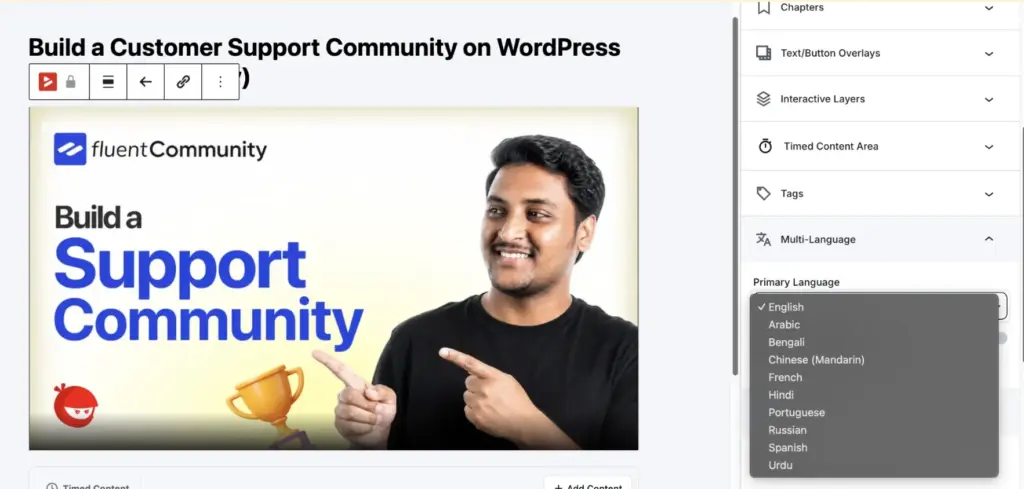
Viewers also get picture-in-picture, speed control, subtitles, multiple audio languages, and touch gestures like double-tap to skip ten seconds.
A Dynamic Load JS setting defers the heavier player scripts until the video is needed, which protects your page speed when a video sits below the fold. Remember Playback Position, a Pro behavior, resumes a long video from the exact second the viewer left, so course students can finish across several sessions.
Subtitles and Languages
Language switching for the player interface is free.
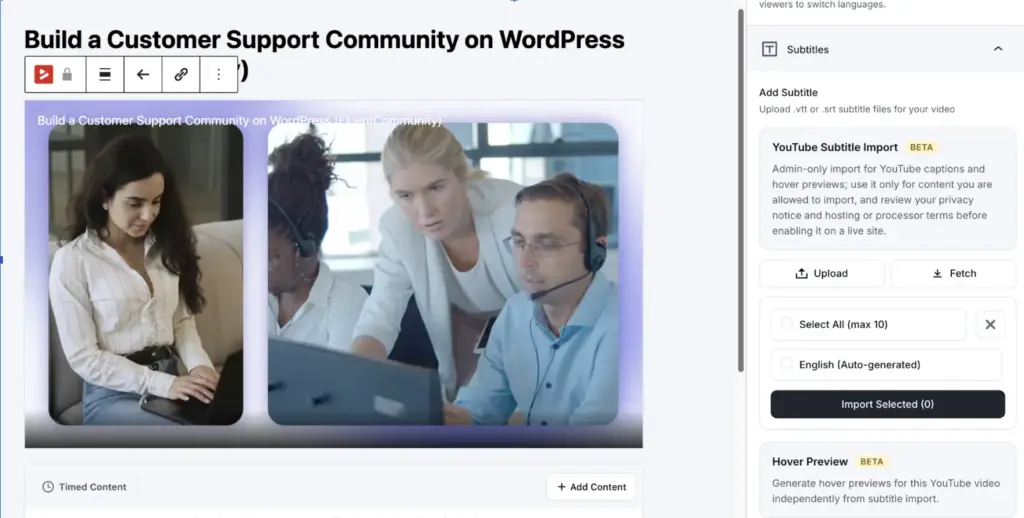
Pro adds custom subtitle tracks and a YouTube subtitle import, so you can caption a video without retyping anything.
Video Playlists
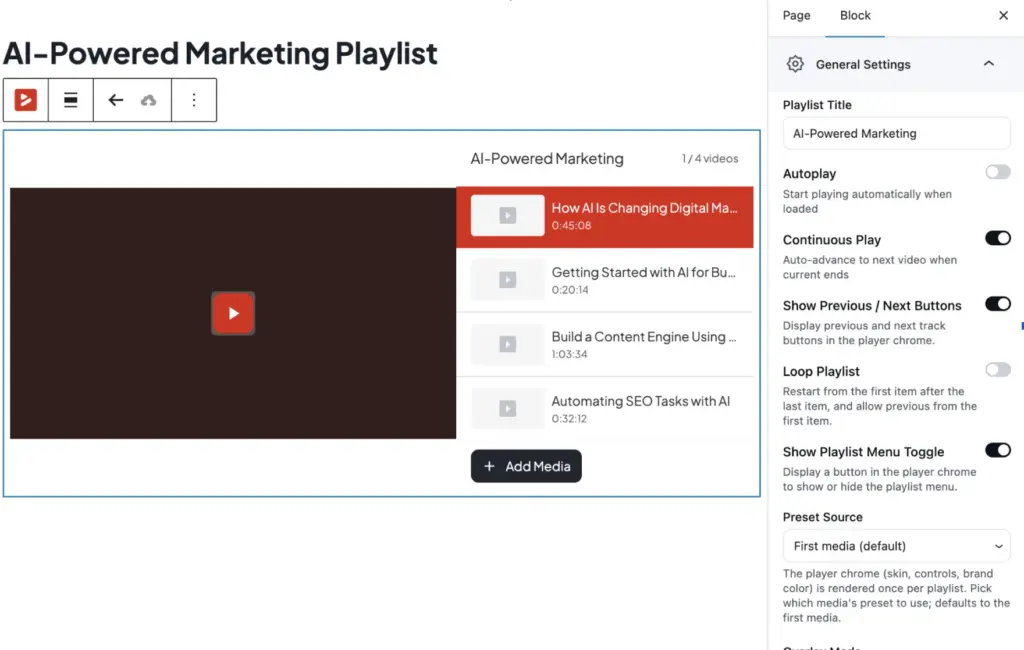
Playlists arrive with Pro. You can group videos into a standard or grid layout, turn on autoplay and auto-advance, and let viewers pick up where they left off. From there you can style the color, border, typography, and box shadow so the playlist matches your site instead of a default look.
Media Tagging
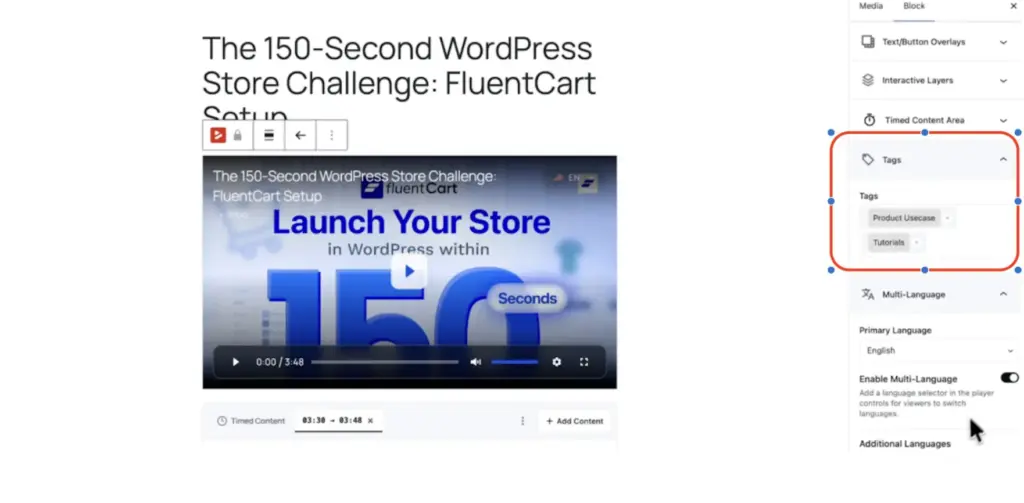
Media tagging also comes with Pro, and it keeps a growing library under control. You can tag and sort videos right in the media table, which turns a long, messy list into something you and your viewers can actually navigate as the catalog grows.
Video Analytics
Pro analytics answer what every other player leaves open, which is what people do once the video starts. The dashboard shows views, unique viewers, average watch time, and completion rate per video, plus an audience retention graph that marks the exact second viewers drop off.
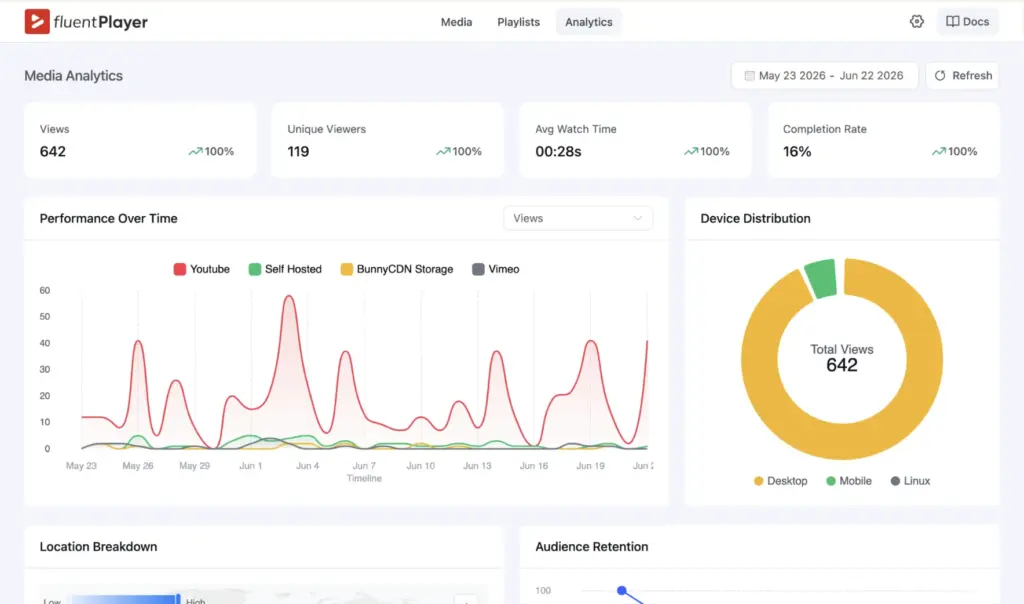
You also get new versus returning viewers, top videos, top users, device distribution, and a location breakdown. All of it is stored in your own WordPress database, not on an outside platform.
Block Editor and Shortcodes
FluentPlayer adds a native Gutenberg block, and every player also generates a shortcode for the classic editor and page builders. You can drop a video into a post in a few clicks without touching code.
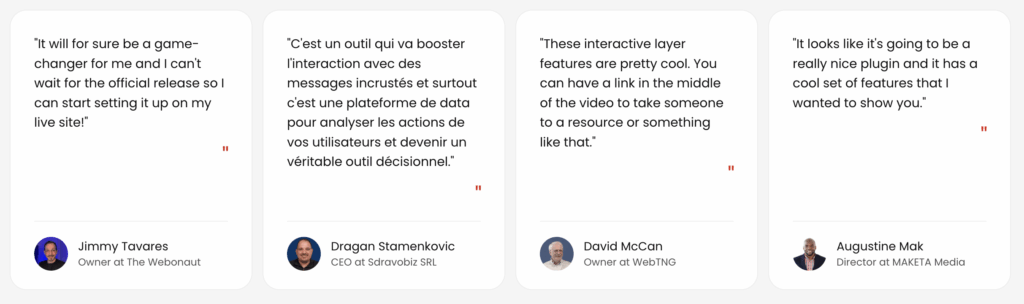
What Real Users Say About FluentPlayer
FluentPlayer is already in the hands of creators, marketers, and agency owners across the WordPress space.
Here is what a few of them had to say.
Integration Options
FluentPlayer connects to the tools you already run, and the connectors split across three jobs.
Hosting and Delivery
YouTube and Vimeo are free, so you can pull hosted video into FluentPlayer and keep one consistent player across every source. Pro adds BunnyCDN, Mux, HLS, Cloudflare R2, Cloudflare Stream, Gumlet Video, Gumlet Stream, etc.
and Webhooks for premium delivery and custom workflows.
Sales and Lead Capture
FluentCRM, Fluent Forms, and FluentCommunity are all free, since they come from the same team. Mailchimp, LearnDash joins on Pro, so you can push captured emails straight into your existing lists.
Reporting and Analytics
Google Analytics is available on Pro, so you can fold video performance into your wider site data.
Built to Work Seamlessly With the Fluent Ecosystem
Other players reach your tools through a third-party bridge that adds delay and breaks easily. FluentPlayer shares a codebase with the products you may already run, so the connection is native and instant.
For a membership or course business, video and community run as one system instead of two platforms patched together.
FluentPlayer Lifetime Pricing
| Plan | Best For | Pricing |
|---|---|---|
| Personal (1 Site) | For your own site & a side project. | $199 one-time lifetime license |
| Freelancer (5 Sites) | Covers today’s clients, and next year’s. | $399 one-time lifetime license |
| Studio (25 Sites) | For growing studios & multi-brand sites. | $599 one-time lifetime license |
| Agency (50 Sites) | One license for every client, forever. | Monthly: $89 × 9 monthsOne-time: $799 lifetime license |
Note: Every plan includes lifetime priority support, all the features, and future updates.
FluentPlayer Free vs Pro
Free is a real, no-restriction player you can run forever. Pro is the upgrade you reach for once you want analytics, playlists, advanced layers, and premium hosting. Here is how the two line up.
| Feature | Free | Pro |
| Video sources | Self-hosted, YouTube, Vimeo, audio | + BunnyCDN, Mux, URL, HLS, Cloudflare R2, Cloudflare Stream, Gumlet Video, Gumlet Stream |
| Player presets | 6 built-in | + Ambient + custom |
| Custom branding | Yes | Yes |
| Interactive layers | Forms, email capture | + CTA, hotspot, ad, shortcode |
| Conditional rules | Yes | |
| Timed content | Yes | |
| Video chapters | Yes | Yes |
| Subtitles | Yes + YouTube import | |
| Remember playback | Yes | |
| Video playlists | Yes + tagging | |
| Video analytics | Full dashboard | |
| Integrations | FluentCRM, Forms, Community | + Mailchimp, Webhooks, GA, LearnDash |
Why It’s Worth Switching From Presto Player
Presto Player is a solid, established plugin, and it helped shape what a video player for WordPress should be. The catch is that it was built around playback and LMS use, so it was never designed to tie your videos to your marketing stack. FluentPlayer is, and that one difference changes what your video can do for your business.
- Ask at the moment they are hooked: a viewer is easiest to convert mid-video, while they are engaged. FluentPlayer drops in-video forms with payment, hotspots, and even a FluentBooking calendar with shortcode at that exact moment, none of which Presto Player offers.
- Let the funnel run itself: every email and form submission inside your video flows straight into FluentCRM, tagged and ready for your next sequence. Fluent Forms and FluentCRM are native to FluentPlayer, so the lead arrives without a manual export or a third-party connector.
- Design playlists that pull people back: FluentPlayer adds grid playlists with custom typography, colors, and spacing that match your site, which is exactly where Presto stops short.
Moving over is the easy part. FluentPlayer includes a one-click migration that imports your existing Presto media, along with per-video colors, thumbnails, YouTube settings, and even your past email submissions, so you do not rebuild a thing.
Learn how to migrate from Presto Player to FluentPlayer in a single click.
Wrapping Up
You now have the full picture of what a modern WordPress video player can do for your site. The smartest first step is small, which is to install the free version from the WordPress.org directory and put one interactive layer on a video that already gets traffic.
Watch what changes when people can act without leaving the screen. That single shift is the moment video stops being a quiet dead end and starts earning its place on the page.
FluentPlayer is now available. Check out the Earlybird Lifetime Deal and get lifetime access today.
Related Articles
Fluent Support 2.4.7: Ticket Filters, 5x Faster Tickets and Smart Customer Search
Fluent Support 2.4.7 brings a Ticket Filters sidebar…Customer Success Best Practices for Small Teams
In this blog, we’ve discussed customer success in…


Add your first comment to this post