


What Is Shared Hosting? A Complete Beginner’s Guide

By Md. Sajid Sadman
August 16, 2026
Last Modified: August 12, 2026


Every new website starts with the same question. Where does it actually live? If you’re launching a first blog or a small business site, a dedicated server sounds expensive and a cloud platform sounds complicated. Shared hosting exists for exactly that gap.
It puts your website on the same physical machine as hundreds of others, splits the cost accordingly, and hands the technical upkeep to the provider. That trade keeps the price low, but it comes with real limits once a site grows past a certain point. Knowing where those limits sit ahead of time can save you a painful migration later, especially if you’re planning to scale a store or a content site over the next year or two.
In this blog, we will break down what shared hosting actually is, how it works behind the scenes, its real advantages and drawbacks, and how to tell if it still fits a growing website.
Key Takeaways
- Shared hosting puts many websites on one physical server. Each site draws from the same shared pool of CPU, RAM, storage, and bandwidth.
- The provider handles server maintenance, security patches, and hardware, while you manage files and settings through a control panel.
- It’s the cheapest hosting option, usually priced between $2 and $15 a month.
- Performance can dip when other sites on the same server use heavy resources, an effect known as the noisy neighbor problem.
- VPS, cloud, and dedicated hosting are the natural next steps once a site outgrows shared hosting.
What Is Shared Hosting?
Shared hosting is a type of web hosting where multiple websites run on the same physical server and draw from the same pool of CPU, RAM, storage, and bandwidth.
According to Wikipedia’s definition, a shared web hosting service places many websites on one server connected to the internet, and that’s exactly what keeps the cost low enough for beginners and small businesses.
Each website gets its own account, complete with separate files, databases, and settings, even though the underlying hardware is shared. The hosting provider manages the operating system, server software, and physical infrastructure.
You manage everything above that layer through a control panel, without ever needing to touch server administration.
Shared hosting isn’t a new idea.
In the early days of the web, launching a site almost always meant renting an entire server, since there was no other option, and that put website ownership well out of reach for most individuals and small businesses.
Hosting companies eventually built the account isolation and resource management tools needed to safely split one server across hundreds of separate customers, and that shift is what turned running a website from an expensive, technical undertaking into something almost anyone could set up in a few clicks.
A typical shared hosting account includes:
- Web space: Storage for your website files, images, and databases.
- Bandwidth: The amount of data your site can transfer to visitors each month.
- Email hosting: Mailboxes tied to your site’s own domain name.
- Control panel access: A dashboard, usually cPanel or a similar tool, for managing files, domains, and installed apps.
How Does Shared Hosting Work?
Every time someone visits a site on shared hosting, the request follows the same basic path, no matter how many other websites share that server.
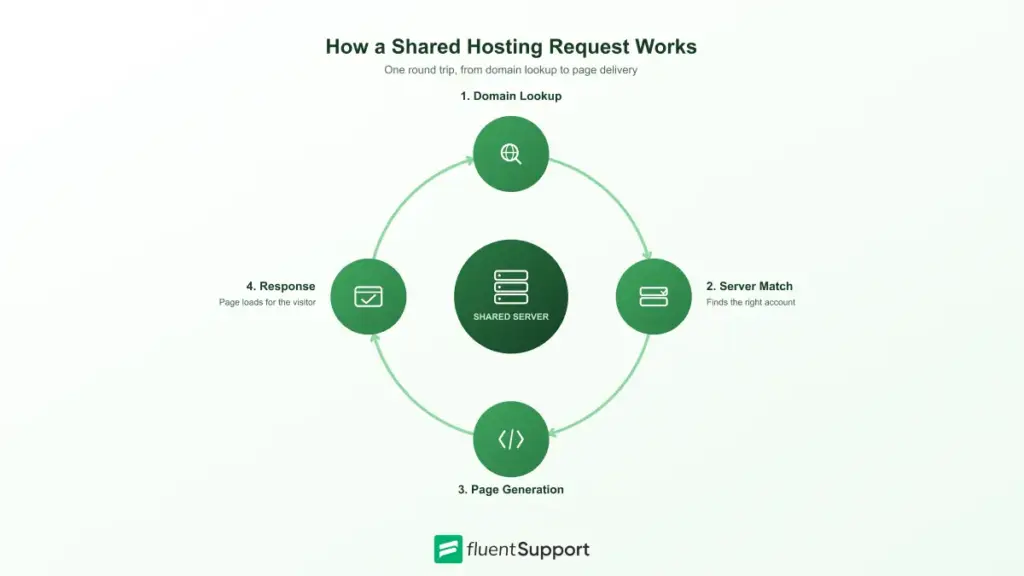
The Request Journey
- Domain lookup: The browser asks the Domain Name System which server hosts the requested domain.
- Server match: The web server software checks the request and matches it to the correct hosting account.
- Page generation: The server reads the site’s files and runs any dynamic code needed to build the page.
- Response delivery: The finished page gets sent back to the visitor’s browser to load.
How Resources Get Shared
Here’s the part most beginners get wrong. The server doesn’t permanently split its CPU, RAM, and storage into equal pieces for every account.
Instead, it allocates resources based on demand in real time, while enforcing limits so no single site can hog everything. That balance is what lets hundreds of independent websites run on one machine without one of them dragging the others down.
If a plan’s limits get exceeded, the platform typically throttles that account rather than letting it destabilize the whole server.
In practice, that can look like a temporary resource limit error, a noticeably slower response time until usage drops back down, or, in rarer cases, a brief suspension until the cause gets resolved.
Most providers use a technology called CloudLinux, or something similar, to enforce these limits at the account level.
In practice, that means your website gets a guaranteed floor of resources even during busy periods, while still sharing the server’s total capacity. Think of it as a compromise built for predictability rather than raw speed.
Is Shared Hosting Secure?
Shared hosting is reasonably secure for most everyday use, though the security model works a bit differently than on a private server.
Every account is isolated through separate file permissions, database credentials, and operating system level controls, which is what stops one customer from browsing another customer’s files directly.
That isolation isn’t absolute, though. Because every account still runs on the same underlying hardware and software stack, a serious vulnerability in the shared environment can, in rare cases, put multiple accounts at risk at once.
It’s a trade-off worth understanding rather than worrying over. For a personal blog or a small business site, a reputable provider with regular patching and malware scanning is normally more than enough protection.
You’ll find a useful comparison floating around Reddit threads on the topic: shared hosting gets described as renting an apartment, where the building is secure but a neighbor’s problem can occasionally bleed over, while dedicated hosting is closer to owning a standalone house. Neither one is inherently unsafe.
The real difference is how much of the surrounding risk sits outside your own control.
Benefits of Shared Hosting
The advantages of shared hosting explain why it’s still the most common starting point for new websites.
- Low cost: Server expenses get split across every account on the machine. That split is what keeps monthly prices well below other hosting types.
- No server management: The provider handles updates, security patches, and hardware maintenance so you don’t have to.
- Beginner-friendly tools: A control panel lets you manage a website without any command line experience.
- Fast setup: Most providers can have a new account live within minutes of signup.
- Built-in extras: Free SSL certificates, email hosting, and one-click app installers come standard on most plans.
Drawbacks of Shared Hosting
The same setup that keeps shared hosting cheap also limits what it can handle.
- Limited resources: CPU, RAM, and storage are capped, and a site that outgrows those limits will slow down.
- Inode limits: Every file on your account, whether it’s an image, an email, or a small cache file, counts as one inode, and most shared plans cap the total number allowed. It’s possible to hit that ceiling and start seeing errors even while storage space technically still has room to spare.
- The noisy neighbor effect: Heavy traffic on another account on the same server can affect everyone else’s performance.
- Weaker isolation: Accounts are separated at the operating system level, but a vulnerability in the shared environment can still carry wider risk than on an isolated server.
- No root access: You can’t install custom server software or change low-level configuration.
- Scaling ceiling: High-traffic or resource-heavy sites eventually need more headroom than shared hosting offers.
Who Should Use Shared Hosting?
Shared hosting fits any project where cost and simplicity matter more than raw performance.
A concrete example makes this easier to picture. Say you’re a food blogger who publishes two or three recipes a week, pulls in a few thousand visitors a month, and runs a handful of standard WordPress plugins.
That’s a textbook shared hosting user. The traffic is real but predictable, and nothing about the site demands dedicated resources.
- New websites: Sites with little to no traffic history don’t need dedicated resources yet.
- Blogs and portfolios: Content-focused sites with moderate, predictable traffic run comfortably on shared plans.
- Small business sites: A company page or local service site rarely pushes server limits.
- Early-stage online stores: A small storefront with a modest catalog can often start on shared hosting before it needs more room.
Growth tends to be the deciding factor. A store built with an ecommerce plugin like WooCommerce or FluentCart can outgrow shared hosting fast once checkout traffic and product catalogs increase.
When that happens, the slowdown usually shows up first at checkout, which is your clearest signal that it’s time to move up.
Signs It’s Time to Move Off Shared Hosting
A shared plan tends to give warning signs before it actually fails. Watching for these early keeps a migration planned instead of forced on you at the worst possible moment.
- Frequent resource warnings: Regular emails or dashboard alerts about CPU or memory limits mean your account is already at capacity.
- Slower load times under normal traffic: A site that used to load quickly but now lags, even without a traffic spike, is competing harder for shared resources.
- Checkout or database timeouts: Ecommerce sites that see failed transactions during busy periods are hitting a resource ceiling, not a coding bug.
- Need for custom software: Any requirement for a specific server module, custom PHP configuration, or root access outgrows what shared hosting allows.
- Growing traffic trend: Steady month over month growth, rather than a one-time spike, is the strongest signal your current plan won’t hold for long.
How Much Does Shared Hosting Cost?
Shared hosting is priced lower than any other hosting type, with most providers charging somewhere between $2 and $15 a month depending on the plan and contract length.
Here’s the catch.
The advertised price rarely tells the whole story. Renewal rates often jump well above the introductory offer once the first term ends, sometimes doubling or tripling the first-year price. Other cost factors include how many websites a plan allows, whether email hosting is included, and whether backups and SSL certificates come standard or cost extra. Reading the renewal pricing before you sign up can save you an unpleasant surprise a year later.
A quick example makes the math concrete.
Say a plan is advertised at $2.50 a month, but that rate only applies to the first 12 months of a longer signup term. After that, renewal rates commonly jump to $8 to $10 a month.
Over four years, that’s the difference between roughly $120 if the promotional rate had somehow held the whole time and closer to $350 once realistic renewal pricing kicks in for the remaining three years.
Multiplying the monthly rate by the full renewal term, not just the promotional period, gives you a far more honest picture of what you’ll actually pay.
Shared Hosting vs Other Hosting Types
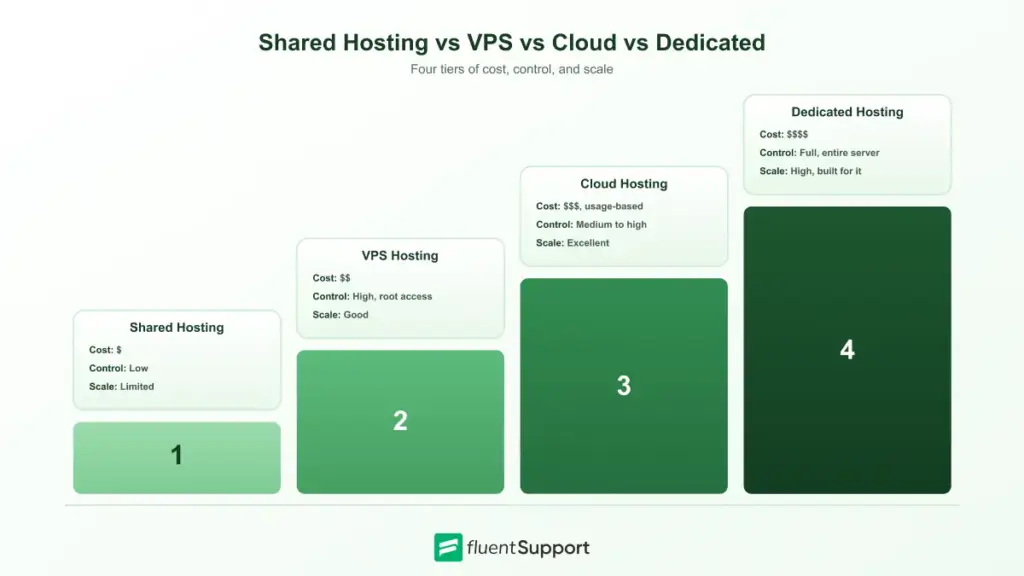
Shared hosting is one option among several, and the right choice depends on how much control and performance your website actually needs.
Shared Hosting vs VPS Hosting
A VPS hosting plan divides a physical server into multiple virtual servers. Each account gets dedicated resources and root access instead of drawing from a shared pool.
It costs more than shared hosting but offers steadier performance and far more configuration control, making it the natural next step once a site outgrows a shared plan.
Shared Hosting vs Cloud Hosting
Cloud hosting spreads a website across a network of connected servers instead of one physical machine.
That structure makes it easier to handle sudden traffic spikes and scale resources up or down, usually with usage-based pricing instead of a flat monthly fee.
Shared Hosting vs Dedicated Hosting
Unlike shared server hosting, dedicated hosting gives your website an entire physical server to itself.
It delivers the highest performance and full control, but at a price point built for large sites and resource-heavy applications rather than a first website.
Shared Hosting vs WordPress Hosting
WordPress hosting isn’t really a separate tier of infrastructure. It’s usually a shared or VPS plan configured specifically for WordPress, with the software pre-installed, automatic core and plugin updates, and caching tuned for WordPress out of the box.
Standard shared hosting runs WordPress just as well through a one-click installer, but WordPress-specific plans trim the initial setup and often add support staff who know WordPress in more depth.
For a simple site, standard shared hosting is normally enough. If your business leans heavily on WordPress and needs faster support on WordPress-specific issues, the extra tuning might be worth the higher price.
Does Shared Hosting Affect SEO?
Shared hosting doesn’t directly hurt search rankings, but two side effects deserve your attention. Page speed is a confirmed ranking factor, and a server under heavy load from other accounts can slow response times enough to matter, especially on mobile.
A shared IP address is the other consideration. Every site on that server uses the same IP.
If another account gets flagged for spam, the shared reputation can occasionally affect email deliverability more than it affects your search visibility.
In practice, this risk stays low as long as you pick a reputable provider that actively monitors for abuse and isolates problem accounts quickly.
How to Choose a Shared Hosting Provider
This is the decision that actually matters. Every point covered so far is background, but the specific provider you pick determines whether shared hosting feels fast and reliable or slow and frustrating.
A good plan should hold up under real traffic, not just look good on a pricing page.
- Uptime guarantee: Look for at least 99.9 percent in the provider’s actual terms, not just marketing copy, since that limits downtime to under nine hours a year. Anything lower starts to show up as real, noticeable outages.
- Server technology: SSD or NVMe storage, an updated PHP version, and server-side caching affect load times far more than the sticker price does. Two plans priced identically can perform very differently underneath.
- Data center location: Pick a location close to where your actual visitors are. A well-built server on the wrong continent still adds noticeable delay for your audience.
- Storage and bandwidth: Confirm the plan covers your current needs with room for growth.
- Security features: Malware scanning, firewalls, and account isolation reduce shared-server risk.
- Control panel software: cPanel and Plesk are the two most common options, and both make day to day management straightforward.
- Backup policy: Automatic backups make recovering from a mistake or attack far less stressful. Check how often backups run and how far back you can restore.
- Support quality: Responsive support matters most when something breaks outside business hours.
- Upgrade path: A provider that also offers VPS or cloud hosting makes it easier to move up without switching platforms entirely.
- Money-back guarantee: A real trial period, typically around 30 days, lets you test actual performance and support quality before you’re locked into a longer commitment.
None of this is fully visible from a pricing page alone. It’s worth doing a bit of homework before you commit.
Message the provider’s live chat with a real technical question and see how fast and how knowledgeable the answer actually is. Read a handful of detailed recent reviews instead of trusting the star rating by itself, and get the renewal price in writing before signing up for anything advertised at an introductory rate.
Wrapping Up
Shared hosting solves a specific problem well. It gets your website online fast, keeps costs low, and takes server management off your plate entirely.
That same setup has a ceiling, though. Once traffic, catalog size, or performance needs grow past what a shared server can comfortably handle, moving to VPS or cloud hosting stops being optional and becomes the only way to keep your site fast and stable.
Start off with a powerful ticketing system that delivers smooth collaboration right out of the box.
FAQ
Shared hosting means multiple websites run on the same physical server and share its CPU, RAM, storage, and bandwidth.
Yes, most shared hosting plans support WordPress through one-click installers, though high-traffic WordPress sites eventually need more dedicated resources.
Yes, most providers let you upgrade directly to VPS, cloud, or dedicated hosting without changing platforms or losing existing data. Many offer a one-click migration tool or a support-assisted transfer, and downtime is usually minimal if you plan the DNS change ahead of time.
Depending on the provider, you might see a temporary resource limit error, slower load times, or in rare cases a brief suspension until usage drops. Most reputable hosts warn you before taking any serious action.
Free hosting typically comes with ads, storage caps, and no custom domain, while shared hosting is a paid service with a proper domain, more storage, and better support.
It can, for small stores with light traffic, but most ecommerce sites outgrow shared hosting once order volume and catalog size increase.
It depends on the plan. Entry-level plans often cap out at one to three websites, while higher tiers frequently allow unlimited websites on the same account.
Many providers include a free domain for the first year on annual plans, though it usually renews at the standard domain price afterward.
Related Articles
Fluent Support 2.4.7: Ticket Filters, 5x Faster Tickets and Smart Customer Search
Fluent Support 2.4.7 brings a Ticket Filters sidebar…Customer Success Best Practices for Small Teams
In this blog, we’ve discussed customer success in…






Add your first comment to this post