

IVR Meaning: What Interactive Voice Response Really Means

By Md. Sajid Sadman
August 11, 2026
Last Modified: August 11, 2026


“Press one for sales, press two for support.”
Most people have heard this line so many times that they barely notice it anymore. Behind that familiar prompt sits a piece of technology that routes millions of calls every day without a single human agent picking up the phone.
For businesses that handle hundreds or thousands of calls, understanding the IVR meaning behind that automation is not a luxury. It is the difference between a support line that scales and one that collapses under its own call volume.
The term shows up everywhere from banking hotlines to food delivery apps, yet most people only know it as the voice on the other end of the line. Understanding what sits behind that voice helps businesses decide whether the technology fits their own support strategy.
In this blog, we will break down what IVR actually means, how it works behind the scenes, the different types businesses use, what it costs, and where it fits into modern customer support.
Key Takeaways
- IVR stands for Interactive Voice Response, an automated phone system that routes calls using voice or keypad input.
- It works through recorded prompts, keypad tones, or natural language recognition.
- Common types include touch-tone, directed dialog, and natural language IVR.
- Costs vary widely depending on whether the system is cloud based, on premise, or bundled into a phone platform.
- Businesses use it to cut costs, offer round the clock support, and route calls faster.
- A poorly designed IVR menu frustrates callers more than it helps them.
What Does IVR Mean?
IVR stands for Interactive Voice Response. It is an automated telephone system that lets callers interact with a business through voice commands or keypad presses instead of speaking to a live agent right away. The system typically opens with a recorded greeting, offers a set of menu options, and routes the caller based on their input.
The term covers a wide range of setups, from a single recorded menu at a small clinic to a multi-layered routing system at a national bank. What stays constant is the goal: let callers get an answer or reach the right person without tying up a live agent for every request.
Picture a customer calling an online retailer the week before a major sale. Every agent is already on a call, but the system answers within two rings and asks whether the customer wants order status, returns, or billing help. The customer says “order status,” and the IVR pulls the tracking number straight from the store’s database and reads it back, all before a human ever touches the call.
That single interaction is what the definition above looks like in practice.
A typical IVR system handles the following:
- Call greeting: A recorded message welcomes the caller and states the available options.
- Menu navigation: Callers respond by voice or by pressing keys on their phone.
- Call routing: The system directs the caller to the right department, agent, or automated task.
- Self-service tasks: Some IVRs let callers check balances, track orders, or pay bills without an agent.
IVR differs from an auto attendant, which mainly forwards calls to extensions. IVR goes further by collecting input and completing actions on its own.
How Does IVR Work?
An IVR system connects telephony with computing through computer telephony integration, known as CTI.
This lets the system answer calls automatically and respond based on caller input, whether that input comes from a keypad or spoken words. The same underlying setup works over traditional phone lines and modern VoIP networks, which is why cloud based IVR has become so common.
The Call Flow
A typical IVR interaction follows a simple, repeatable sequence from the moment the phone starts ringing to the moment the caller reaches an answer:
- Caller dials in: The IVR answers automatically and plays a greeting.
- Menu prompt: The system lists options such as billing or support.
- Input capture: The caller responds by voice or keypad tone.
- Routing or resolution: The call moves to an agent, department, or self-service task.
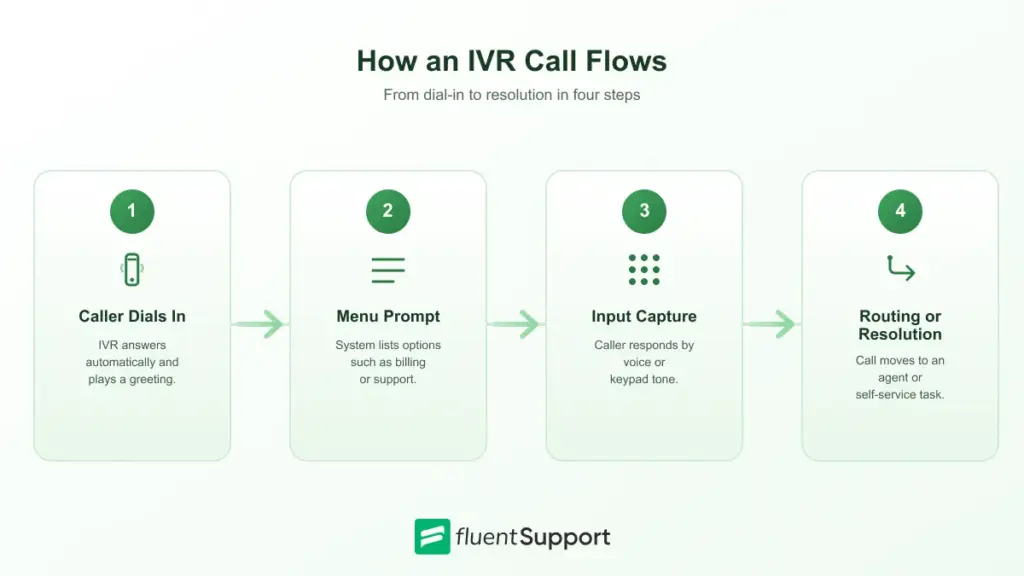
Applied to the retailer example above, the flow looks like this:
the greeting confirms the caller reached the right company, the menu prompt asks whether they want order status, returns, or billing, the input capture reads back the order number pressed or spoken, and the routing step either plays the tracking details aloud or transfers the caller to an agent if the order needs manual review.
Core Components
Behind every IVR interaction sit a few essential pieces of infrastructure that make the automation possible:
- Application server: Hosts the IVR software and processes caller input.
- Telephony network: Connects calls through traditional phone lines or VoIP.
- Database: Supplies the account or order information the system needs to respond.
Why CTI Matters
Computer telephony integration is what separates a basic answering machine from a working IVR system.
Without it, a recorded greeting can play, but the system cannot look up an account, confirm an order, or decide where to send the call next.
CTI lets the phone system talk to business software in real time, which is what makes self-service tasks like balance checks or appointment confirmations possible without an agent on the line.
Types of IVR Systems
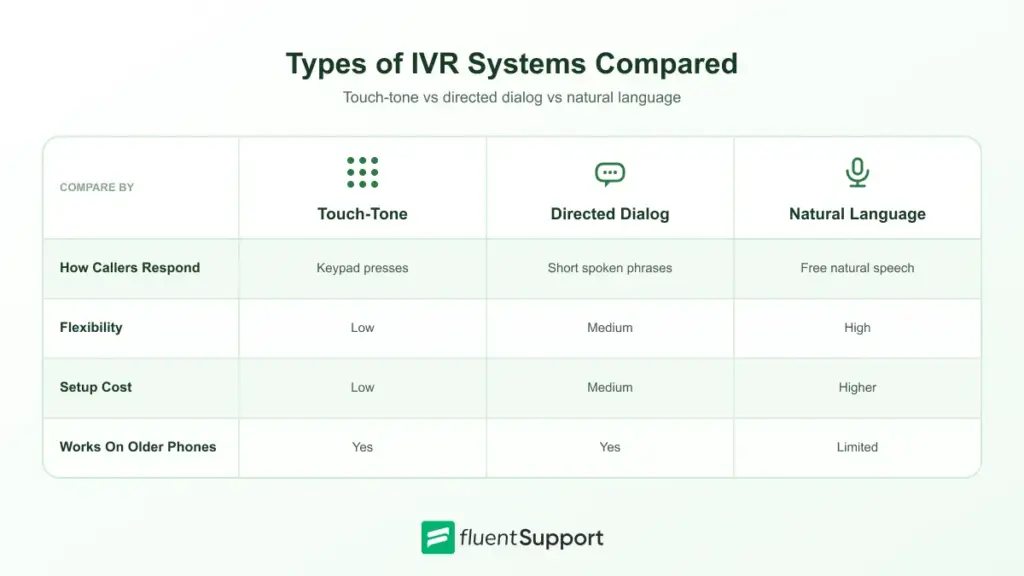
Not all IVR systems work the same way. Businesses choose a type based on call volume, budget, and how much flexibility callers need.
- Touch-tone IVR: Callers press keypad numbers to select options, the most basic and widely used format, and it works even on very old handsets.
- Directed dialog IVR: The system asks specific questions and expects short spoken answers like “billing” or “support,” which keeps the interaction structured.
- Natural language IVR: Callers speak freely and the system uses speech recognition to understand intent, which feels closer to a normal conversation.
Touch-tone systems remain common because they are simple to build and cheap to maintain. Natural language IVR costs more but reduces caller frustration since people do not need to memorize a menu structure. Many businesses start with touch-tone and move toward natural language as call volume and budget grow.
How Much Does IVR Cost?
IVR pricing depends heavily on how the system is deployed. A small business using a cloud phone platform often gets basic IVR bundled into a monthly plan, while a large contact center building a custom natural language system can face setup fees on top of ongoing licensing.
- Bundled cloud IVR: Included in many business phone or contact center subscriptions at little to no extra cost.
- Custom built IVR: Requires development time and licensing fees, usually justified by very high call volume.
- Natural language add-ons: Cost more than touch-tone menus because of the speech recognition technology involved.
- Ongoing maintenance: Menus need updates whenever products, departments, or hours change, and someone with system access has to make each edit.
Scale changes the picture more than any single feature does. A five person clinic usually pays nothing beyond its existing phone bill, since basic IVR ships as a checkbox setting inside most cloud phone plans. A contact center handling thousands of calls a day often negotiates a separate line item for natural language processing, since that layer needs ongoing model training and support that a bundled plan does not cover.
Before committing to a plan, it helps to ask what happens outside the advertised tier. Some providers charge extra for advanced routing rules, multilingual prompts, or detailed call analytics, which can change the real cost significantly.
Choosing the Right IVR for Your Business
The right choice usually comes down to call volume, budget, and how much self-service callers actually want. A clinic handling a few dozen calls a day rarely needs the same system as a bank processing thousands of transactions daily.
Testing a system with real call scenarios before a full rollout catches problems that specs and product demos rarely reveal.
Just a heads up: choosing the right IVR gets a call to the right place, but picking the right helpdesk matters just as much. That’s where the ticket, order history, and past conversations actually live once the call ends. Fluent Support keeps all of that attached to one ticket automatically. Agents already have the full picture before they reply.
Benefits of IVR
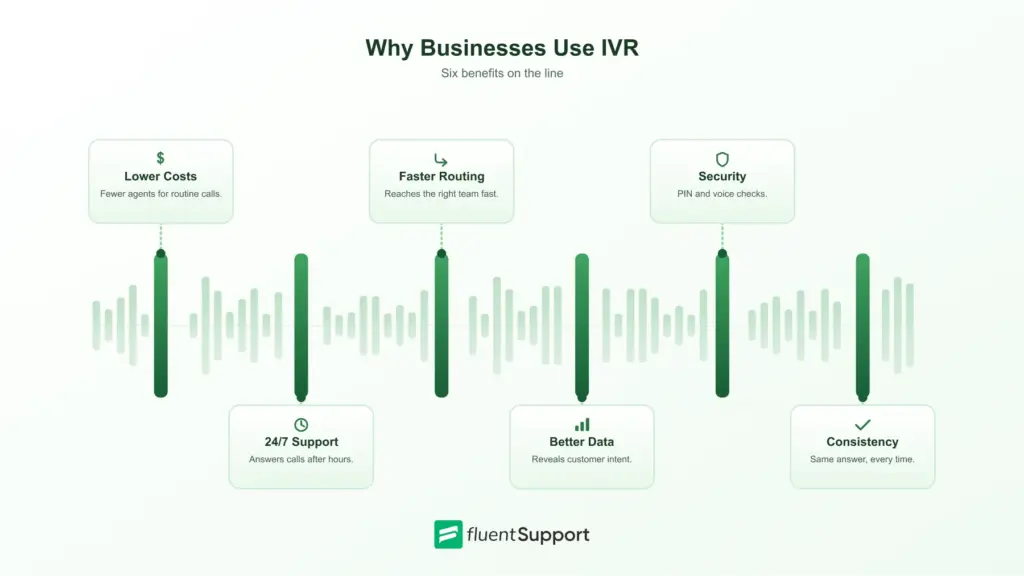
IVR brings several practical advantages to businesses that rely heavily on phone support:
- Lower operational costs: Automating repetitive calls reduces the need for a large support team.
- Round the clock availability: Callers can get basic answers even outside business hours.
- Faster call routing: Callers reach the right department without waiting on hold for a transfer.
- Better data collection: Every call generates data on customer intent and common questions.
- Stronger security: Some systems verify identity through PIN codes or voice recognition before sharing sensitive details.
- Consistent experience: Every caller hears the same accurate information regardless of who or what answers the call.
IBM points out that automating routine calls lowers operational costs and wait times for contact centers while improving overall customer satisfaction.
Common Challenges
IVR can create real friction when it is poorly implemented. A few issues show up most often across deployments:
- Overcomplex menus: Long lists of options make callers give up before finding what they need.
- Long hold times: Even automated systems can leave callers waiting if agent queues are backed up.
- Impersonal experience: A recorded voice cannot read frustration or adjust tone the way a person can.
- Outdated menus: Options that no longer match current products or departments confuse returning callers.
Research from menu design studies shows most callers report dissatisfaction with their IVR experience, and the root cause is usually the menu design rather than the technology itself.
IVR Best Practices
A well designed IVR menu does more work than an expensive one. A few habits separate systems that help callers from systems that frustrate them.
- Keep menus short: Limit top level options to four or five choices so callers do not lose track.
- Offer an agent escape: Always give callers a way to reach a person, especially for urgent issues.
- Test with real callers: Menu logic that makes sense internally often confuses first time callers.
- Review call data regularly: Abandonment points in the menu usually point to confusing wording or missing options.
IVR Metrics Worth Tracking
A working IVR system needs regular review, not a one time setup. A handful of metrics show whether the menu is actually helping callers or quietly pushing them away.
- Containment rate: The percentage of calls resolved without ever reaching a live agent.
- Abandonment rate: How many callers hang up before completing the menu, often a sign of confusing prompts.
- Average handling time: How long calls take from greeting to resolution or transfer.
- First contact resolution: Whether the caller’s issue gets solved without a callback or repeat call.
A quick way to see these numbers in action: if a business receives 1,000 calls in a week and 650 resolve inside the IVR without ever reaching an agent, the containment rate for that week works out to 65 percent. Watching that number move after a menu change is one of the fastest ways to tell whether the change actually helped or just moved the friction somewhere else.
Tracking these numbers over time makes it easier to spot which menu options need trimming, reordering, or removing altogether.
Where Businesses Use IVR
IVR fits almost any industry that receives repetitive phone requests. The specific tasks change from one sector to another, but the underlying goal stays the same.
- Banking: Checking balances, reporting fraud, or confirming transactions without waiting for a teller.
- Healthcare: Scheduling appointments, sending reminders, or collecting pre-visit information.
- Retail: Tracking orders, processing returns, or answering shipping questions.
- Travel: Confirming bookings, checking flight status, or managing reservations.
- Telecom: Handling plan changes, billing questions, and basic troubleshooting without an agent.
- Customer service: Routing tickets, answering FAQs, and reducing wait times for support teams.
A regional bank, for example, might route every incoming call through a PIN verification step before offering balance or transfer options, while a healthcare clinic skips authentication entirely and jumps straight to appointment scheduling, since the information at stake carries far less risk.
The value comes from freeing up staff time for the calls that actually need a human, while routine requests get handled automatically.
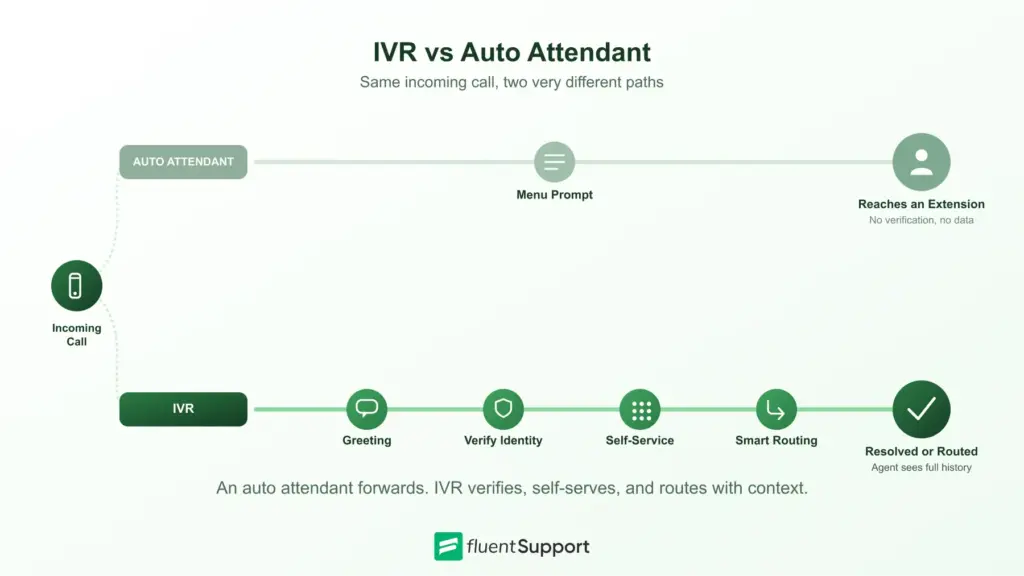
IVR vs Auto Attendant
Auto attendants and IVR often get confused because both answer calls automatically. An auto attendant is simpler. It plays a directory and forwards calls to the right extension, similar to a digital receptionist that only knows how to point people in a direction.
IVR does more. It can collect account numbers, verify identity, complete transactions, and route calls based on caller responses. Businesses that need self-service options beyond simple call forwarding usually need IVR rather than a basic auto attendant, especially once call volume grows past what a small team can answer directly.
Picture two law firms handling the same call. One uses an auto attendant. The caller hears “for Sarah, press one, for the front desk, press two,” and nothing more. The other uses IVR. The caller can say “I need to reschedule my consultation,” and the system checks the calendar before transferring the call with the appointment details already pulled up. Callers at the second firm spend less time repeating themselves once a human finally picks up.
The Future of IVR: AI and Natural Language
Traditional IVR relies on fixed menus and keypad input, but that is changing. Natural language processing now lets callers describe what they need in their own words instead of navigating a rigid tree of options.
This shift matters because it removes one of the biggest sources of caller frustration, the feeling of being trapped in a menu that does not match the reason for the call.
As speech recognition keeps improving, more businesses are testing conversational IVR that can ask follow-up questions and hand off richer context to a live agent when needed.
The technology still works best paired with a clear path to a human, since not every caller wants to talk to a machine.
Adoption is uneven across industries right now. Larger contact centers with the budget for custom development tend to move first, while smaller teams often wait until natural language options become a standard, low-cost feature inside their existing phone platform.
Standard IVR vs AI IVR vs AI Agents
Not every automated phone system works the same way, and the differences matter when a business is choosing what to build or buy:
- Standard IVR: Routes callers using pre-programmed menus and keypad input, with no real understanding of what the caller means, only which button they pressed.
- AI IVR: Uses natural language understanding to figure out intent before routing. Callers can explain their request instead of picking from a list.
- AI agents: Goes further by resolving simple requests on its own, such as account questions or order status, and only hands off to a human when the issue needs judgment.
A contact center breakdown from Dialpad frames the distinction clearly: “standard IVR routes callers, AI IVR understands what they are asking for, and AI agents can resolve the request without escalating it at all”.
IVR in Modern Support Workflows
Phone support rarely stands alone anymore. Many support teams route calls into a broader ticketing system so that calls, emails, and chats land in one shared queue instead of staying scattered across separate tools.
When a call becomes a ticket, agents can see the full history of a customer’s request no matter which channel it started on, which matters most during busy periods when calls, chats, and emails all spike together.
This kind of automated ticket routing becomes more valuable as call volume grows, since it keeps support teams from manually sorting requests that arrive through multiple channels.
Consider a subscription box company fielding calls about a delayed shipment. The IVR collects the order number and logs a ticket automatically, tagged as a shipping delay, before any agent picks up the phone.
By the time an agent answers, they already have the order history and delay reason pulled together through workflow automation instead of starting the conversation from zero.
For smaller teams still relying on email or a shared inbox, this kind of channel consolidation often matters more than the IVR system itself. The phone menu only helps if the request it generates ends up somewhere an agent can act on it quickly.
Wrapping Up
Every “press one” prompt represents a system built to save time, for the business and the caller. IVR meaning goes beyond a simple definition. It reflects how companies handle scale, whether that means routing a bank customer to fraud support or connecting an online shopper to order tracking.
Getting IVR right means balancing automation with a clear path to a human agent when callers need one. The businesses that manage that balance turn a phone menu into a genuine advantage rather than a source of complaints, and the ones that skip that balance usually hear about it in their customer feedback.
Whether a business is setting up its first simple menu or moving toward natural language recognition, the same principle holds. Every layer of automation should make the caller’s next step obvious, not harder to find.
Start off with a powerful ticketing system that delivers smooth collaboration right out of the box.
FAQs
What does IVR stand for?
IVR stands for Interactive Voice Response, an automated phone system that routes calls based on caller input.
How do you set up an IVR system?
Most business phone or contact center platforms include setup tools that let you record greetings, build menus, and assign routing rules without custom coding.
Is IVR the same as an auto attendant?
No. An auto attendant mainly forwards calls to extensions, while IVR can collect information, verify identity, and complete self-service tasks.
What is the difference between IVR and IVRS?
IVRS is simply another way of writing Interactive Voice Response System. Both terms refer to the same technology.
Does IVR work with VoIP phone systems?
Yes. IVR works with both traditional phone networks and VoIP systems, and most modern cloud contact centers run IVR entirely over VoIP.
How long should an IVR menu be?
Most callers lose patience after four or five options. Keeping the top level menu short and pushing detailed choices into a second layer only when needed helps prevent that drop-off.
Can small businesses use IVR?
Yes. Many cloud phone providers include basic IVR in their standard plans, which makes it accessible even for teams without a dedicated contact center.
Can IVR record calls?
Many IVR platforms support call recording as an add-on feature, though availability and storage limits vary by provider and pricing tier.
Does IVR replace live agents entirely?
No. IVR handles routine, predictable requests well, but complex or emotional issues still need a live agent who can adapt to the conversation.
Related Articles
Fluent Support 2.4.7: Ticket Filters, 5x Faster Tickets and Smart Customer Search
Fluent Support 2.4.7 brings a Ticket Filters sidebar…Customer Success Best Practices for Small Teams
In this blog, we’ve discussed customer success in…


Add your first comment to this post