
What is Helpdesk Ticketing System and How Does It Work?

By Md. Sajid Sadman
December 5, 2025
Last Modified: December 5, 2025


Support quality depends on predictability. When a customer sends a message, that interaction should follow a clear, structured path, not rely on chance or guesswork. Unpredictable service is a workflow problem, not a customer problem.
A helpdesk ticketing system fixes this by enforcing an organized process every single time. No matter where a message comes from, it enters the same structured flow until it reaches a complete resolution.
In this guide, you will learn what a helpdesk ticketing system is and see exactly how the entire process works, step by step. We’ll break down each stage in a simple, practical way so you can visualize how the system keeps support clean and consistent from start to finish.
TL;DR
What is a helpdesk ticketing system?
A helpdesk ticketing system is the tool that turns every customer message into a structured, trackable ticket. Instead of letting emails, chats, and form submissions scatter across different places, the system collects everything into one organized workflow.
Each request becomes a ticket that shows the issue, the customer’s details, the full conversation history, the priority level, and who is responsible for handling it. Nothing gets lost. Nothing depends on memory. Every interaction follows a predictable path.
The system also keeps internal actions visible. Agents can add notes, update statuses, assign tasks, and review past interactions without leaving the ticket. This reduces back and forth inside the team and keeps conversations clean for the customer.
In simple terms, a helpdesk ticketing system gives your support team structure. It makes every request easier to manage, every response more accurate, and every resolution faster.
How does a helpdesk ticketing system work?
A helpdesk ticketing system may look simple from the outside, but behind it, every customer request moves through a structured, step-by-step path. That path is what keeps support predictable, organized, and easy to manage as your conversations grow.
In this section, we’ll walk through that journey one step at a time so you can clearly see how a ticket becomes organized, assigned, worked on, and resolved inside a real helpdesk system.
Note: To make each step easy to visualize, we’ll use screenshots from Fluent Support as practical examples along the way.
1. The customer submits a request
Every ticket begins the same way: a customer reaches out for help. The channel does not matter: email, live chat, support forms, social messages, or your support portal.
The moment they send that message, the ticketing system captures it automatically.
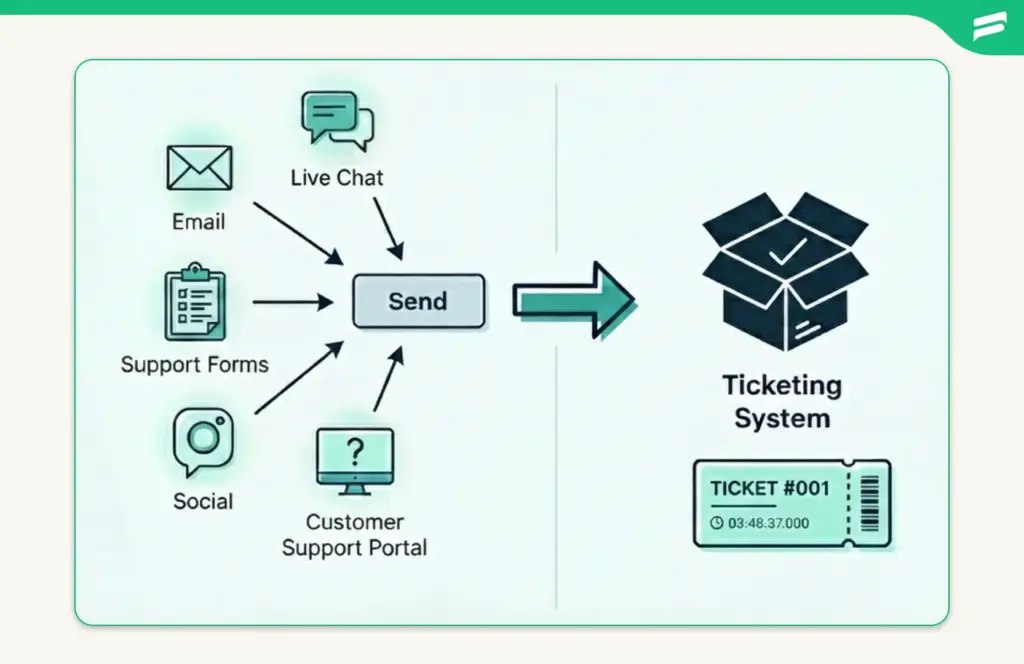
Instead of letting it sit in an inbox or get buried under other conversations, the system funnels the request into a structured workflow. This removes the risk of missed emails, forgotten chats, or delayed replies. The customer’s message instantly becomes the starting point of a trackable support journey.
2. The system creates a ticket
Once the message is captured, the helpdesk automatically converts it into a support ticket. This ticket becomes the official record of the customer’s request.
At this stage, the system assigns essential details such as:
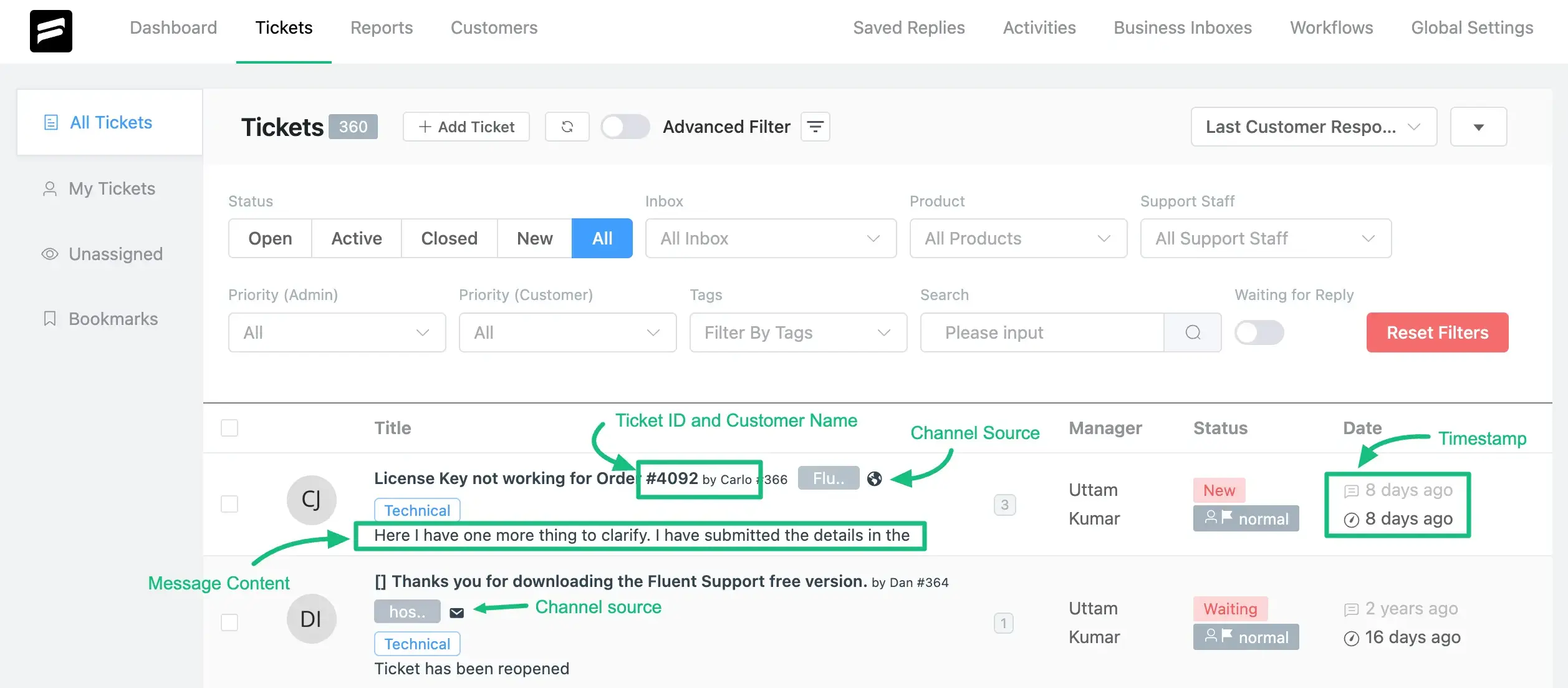
This is where unstructured communication becomes structured. Instead of a loose message floating around, you now have a clearly defined ticket that can be tracked, managed, and resolved without losing context.
3. The ticket gets categorized and prioritized
Once the system creates the ticket, the next step is sorting. Every request needs to land in the right bucket so the team instantly knows what it is about and how urgent it is.
This usually includes:
- Category: Billing, technical issue, login problem, feature request
- Priority: High, medium, or low
- Tags: Quick identifiers that add context like “refund,” “bug,” or “VIP customer”
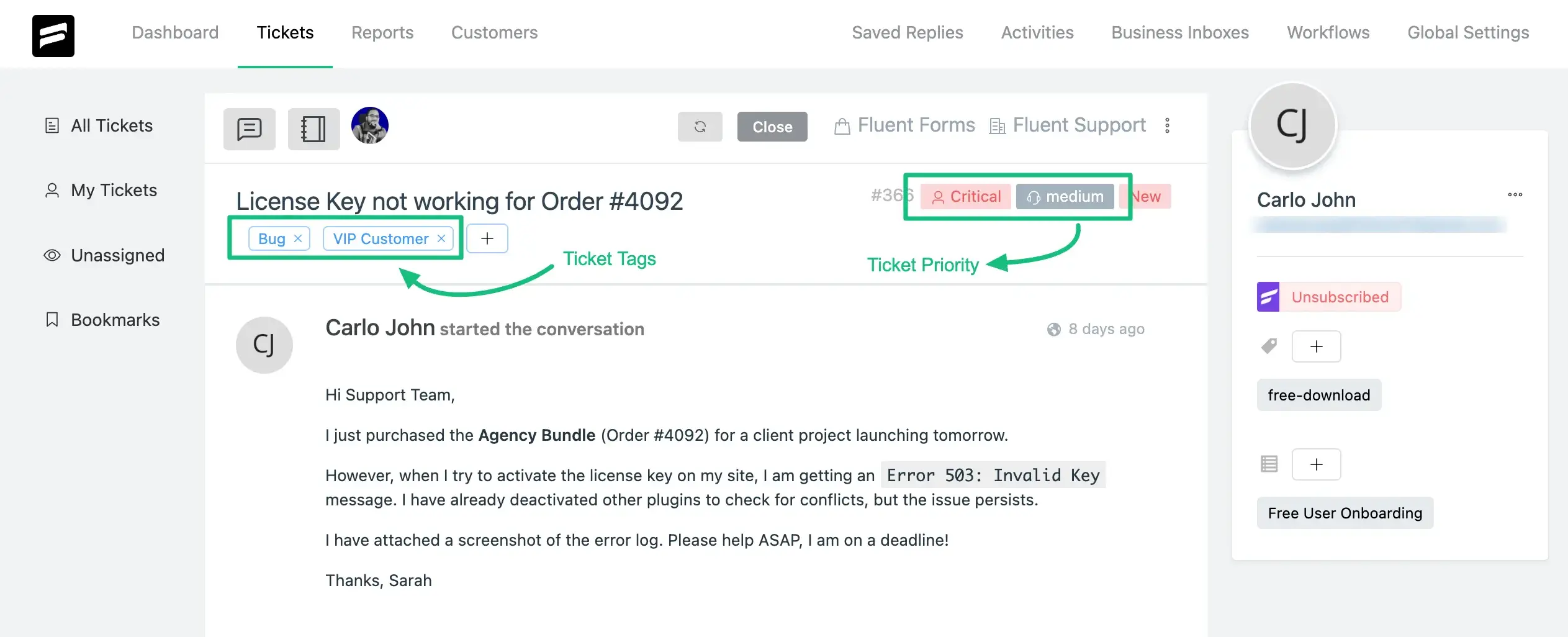
Categorization helps the system stay organized. Prioritization helps your team work smarter. When dozens of tickets arrive at once, this simple structure ensures the most critical issues rise to the top instead of waiting behind routine requests.
If you want a deeper look at using tags to classify and route tickets more accurately, this detailed guide is worth checking out
4. The ticket is assigned to the right agent or team
Once a ticket is categorized, the system decides who should handle it. This is where the assignment comes in. Each request needs a clear owner so nothing waits in limbo.
Assignments can happen in two ways:
Automatically: Based on rules like category, keywords, customer type, workload, or department (with workflow automation option).
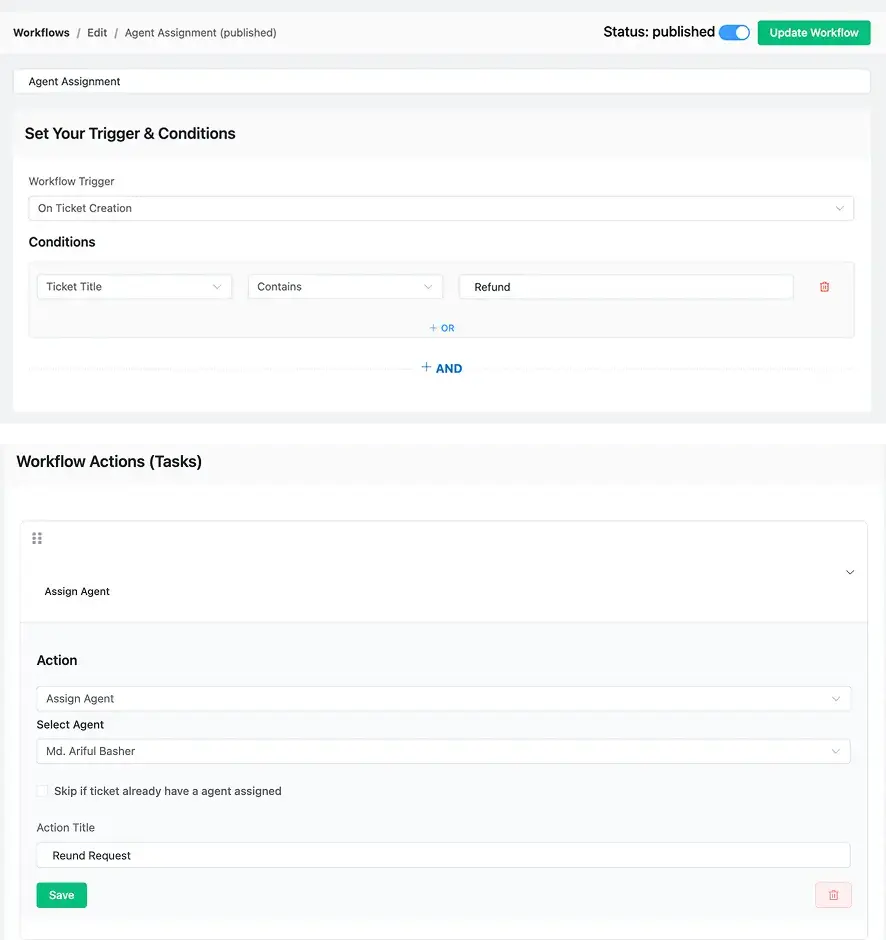
Just a heads up: If you want to see how robust, real-world automation is structured, check out Fluent Support’s workflow automation system. It shows the powerful logic required to scale support effortlessly.
Manually: When an agent or manager chooses the best person for the issue
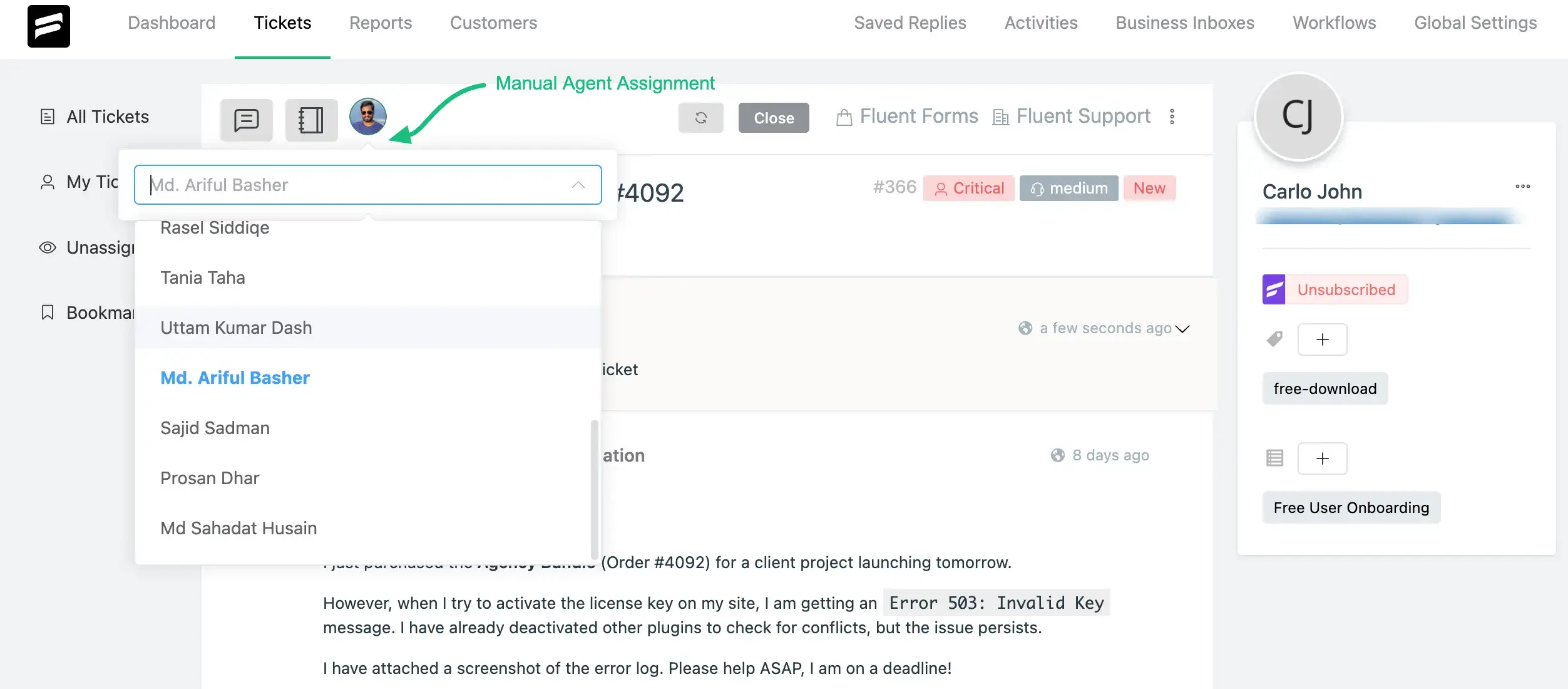
The goal is simple. Every ticket should land on the desk of the person most qualified to solve it. That means technical bugs go to tech experts, billing questions go to finance-related agents, and VIP customers go to priority teams.
Clear ownership keeps work moving. It also prevents two agents from replying to the same customer or, worse, nobody replying at all.
5. The agent works on the ticket with full context
Once the ticket is assigned, the agent opens it and sees everything they need in one place. No digging through old emails. No asking teammates for missing details.
A complete ticket view includes:
This context is what makes the workflow smooth. The agent instantly understands the issue, what has already been said, and what needs to happen next. It removes guesswork and prevents customers from repeating themselves.
With everything in front of them, the agent can:
This step is the “action stage” of the ticketing system. It is where problems are actually solved, backed by full visibility and zero confusion.
6. The ticket is resolved and closed
Once the agent provides the final solution, the ticket moves into the resolution stage. This is where the system wraps up the conversation and records the outcome.
The agent updates the ticket with:
After that, the ticket is officially closed. But the workflow doesn’t end there.
The helpdesk ticketing system even send an automatic follow-up asking the customer for feedback so your team can measure satisfaction and improve over time.
The closed ticket then becomes part of your support history. It stays searchable and auditable and helps guide better decisions in the future. And if a ticket is a duplicate or not needed long-term, agents can delete it to keep the workspace clean and organized.
Want a system that makes ticket handling this smooth? Fluent Support brings structure and clarity to every request so your team always knows exactly what to do next. See how it works.
Additional steps that complete the ticketing workflow
A helpdesk ticketing system does more than move a ticket from creation to closure. There are extra actions happening around the workflow that keep conversations connected and teamwork running smoothly. These steps do not always appear on the surface, but they shape how consistent and reliable your support process feels.
Here are two important parts of the workflow that strengthen the overall experience.
I. Team collaboration happens behind the scenes
Not every ticket can be solved by one agent. Some issues need billing approval, technical investigation, or a senior rep’s judgment. A helpdesk ticketing system supports all of this collaboration quietly in the background, without exposing any internal discussion to the customer.
Agents can:
This keeps the workflow structured and ensures every handoff is smooth. Anyone who opens the ticket sees exactly what was discussed, what actions were taken, and what still needs to be done. This reduces mistakes, saves time, and gives the customer a seamless experience, even when multiple people work behind the scenes to solve the issue.
II. The ticket reopens when the customer sends a new reply
A conversation is not always finished just because a ticket is marked “closed.” Customers often return with a follow-up question, added information, or a new concern. A helpdesk ticketing system handles this naturally by reopening the ticket the moment a new reply arrives.
Here is what happens automatically:
This prevents your team from losing track of renewed conversations and keeps all related messages inside one continuous thread. Instead of starting from scratch or creating multiple tickets for the same issue, your team simply picks up right where things left off.
It also helps customers feel acknowledged, since their follow-up is treated as part of the original issue, not a brand new problem they must re-explain.
III. The ticket feeds into reporting and continuous improvement
After a ticket is closed, it becomes part of your helpdesk’s historical data. This data is more than just storage. It powers the reporting and insights that help teams improve support quality over time.
The system collects information such as:
- Volume of tickets handled
- Average response and resolution times
- Most common issue types
- SLA performance
- Agent productivity and workload patterns
- Customer satisfaction trends
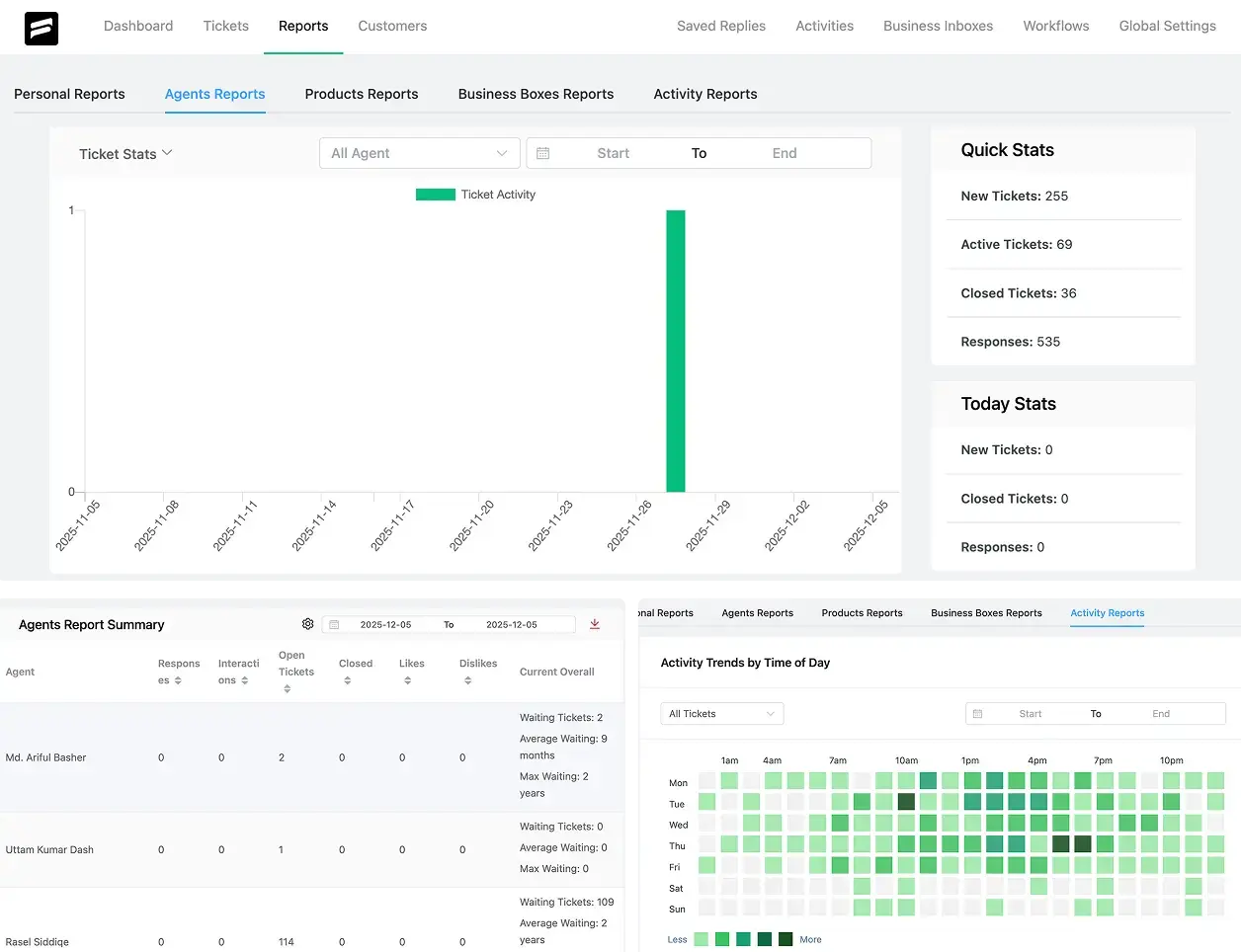
These insights help managers understand what is working and what needs attention. They reveal bottlenecks, highlight training needs, and show which processes slow the team down.
Teams can also trace recurring issues back to product bugs, unclear documentation, or gaps in internal processes. This turns every resolved ticket into a small piece of guidance that steadily improves your entire support operation.
Over time, this continuous feedback loop makes your support faster, more consistent, and more predictable.
Wrapping up
By now, you have seen how a helpdesk ticketing system brings structure to support. Every message follows a clear path. Every agent knows where to look. Every customer gets a more reliable experience. That predictable workflow is what makes support easier to manage and easier to scale.
A system like this keeps conversations organized, reduces mistakes, and gives your team the confidence to handle any volume of requests. It also lays the foundation for better decisions, stronger teamwork, and a smoother customer journey.
If you want your support to feel more consistent and future-ready, a helpdesk ticketing system is the place to start. Find the one that fits your needs and build your operations on a workflow you can trust.
Start off with a powerful ticketing system that delivers smooth collaboration right out of the box.
Related Articles
Fluent Support 2.1.0: Agent Groups, Agent Signatures, and Cloud File Storage
Fluent Support 2.1.0 is here! This is a…The Ritz-Carlton Gives Employees $2,000 to Spend on You
Discover how Ritz-Carlton’s $2,000 rule, based on customer…







Leave a Reply