

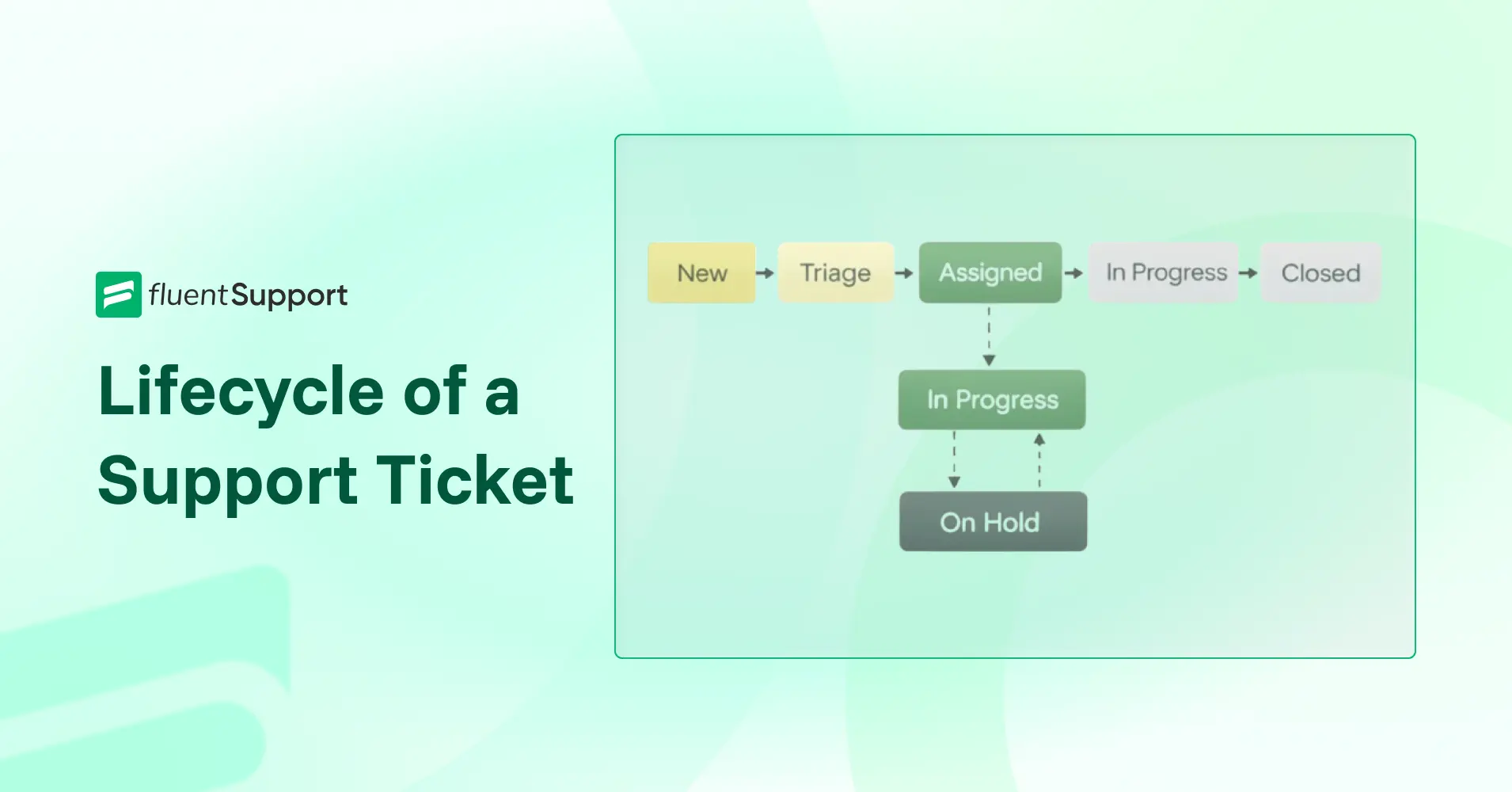
What is the Lifecycle of a Support Ticket?

By Md. Sajid Sadman
January 2, 2026
Last Modified: June 5, 2026


Every customer issue follows a path. It starts when a request comes in and ends when the problem is fully resolved.
That path is called the support ticket lifecycle.
Understanding this lifecycle helps support teams stay organized, avoid missed tickets, and respond with clarity instead of guesswork. It also shows where delays happen and why some tickets get stuck longer than they should.
In this guide, you’ll see how a support ticket moves through each stage and what actually happens at every step in real support workflows.
TL;DR
Q: What is a support ticket lifecycle?
A support ticket lifecycle is the structured path a customer issue follows from creation to closure, with clear stages that define ownership, action, and progress at every step.
Q: Why does the ticket lifecycle matter in real support teams?
Because without a clear lifecycle, tickets move randomly. That leads to delays, duplicate replies, stalled issues, and reactive support instead of controlled workflows.
Q: What are the core stages in a support ticket lifecycle?
Most support teams follow these stages: ticket creation, triage and prioritization, assignment, in progress, pending or on hold, resolution, and closure.
Q: Where do ticket lifecycles usually break?
They break when teams skip triage, keep all tickets in one open state, misuse pending statuses, assign tickets without clear ownership, close tickets too early, or ignore closed ticket data.
Q: Why do small lifecycle gaps cause bigger delays over time?
Because unclear stages hide stalled tickets, delay urgent issues, and force teams to react to follow-ups instead of managing work intentionally.
Q: How does a disciplined ticket lifecycle improve support operations?
It gives agents clarity on what to work on, helps managers see bottlenecks early, and shows customers visible progress even when issues take time to resolve.
Q: What’s the biggest takeaway from understanding the ticket lifecycle?
Support works best when tickets move with structure. Lifecycle discipline turns chaos into control and allows support teams to scale without losing quality.
What is the lifecycle of a support ticket?
The lifecycle of a support ticket is the complete sequence of stages a customer request goes through, from creation to final closure.
It typically includes stages such as New or Created, triage and prioritization, assignment, in progress or investigation, pending or on hold, resolved, and closed.
This lifecycle ensures every support issue is tracked, worked on systematically, confirmed by the customer, and then archived properly.
In simple terms, the ticket lifecycle explains what happens to a support request at every step.
It shows where the ticket stands right now. And what the support team needs to do next.
A newly created ticket needs review. An assigned ticket needs action. A pending ticket is waiting for information. A resolved ticket is ready for confirmation.
Without a defined lifecycle, tickets move without structure. Some get delayed. Some get answered twice. Some get forgotten.
With a clear lifecycle, every ticket has a purpose at each stage. Agents know what to work on. Managers know what needs attention.
That’s why the support ticket lifecycle matters.
It keeps support organized, predictable, and scalable as your ticket volume grows.
The key stages of a support ticket lifecycle
A support ticket does not move randomly from one status to another. Each stage exists to control flow, responsibility, and response quality.
When these stages are clearly defined, tickets move forward with purpose. When they are not, delays, confusion, and missed follow-ups become common.
Here’s how each stage works in practice.
1. Ticket creation (new)
This is the point where a customer issue officially enters your support system.
A ticket is created when a customer submits a request through email, a form, chat, or another support channel.
At this stage, no agent has taken action yet.
The purpose of this stage is capture, not resolution. The system needs to store the issue with basic details like the requester, subject, message, and source.
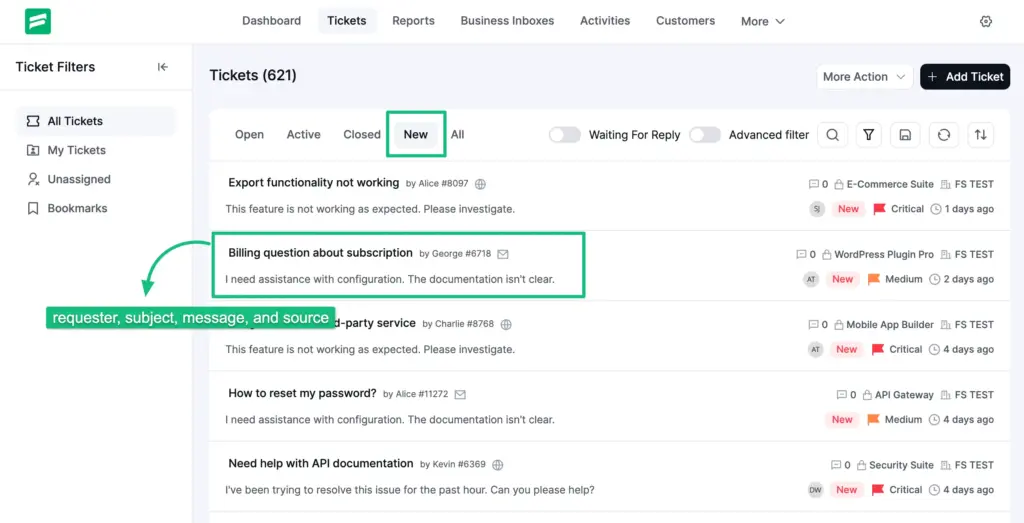
If ticket creation fails or lacks structure, issues never reach the team properly. That’s how requests get lost before support even begins.
2. Triage and prioritization
Once a ticket exists, it must be evaluated. This stage answers three critical questions:
Tickets are categorized, tagged, and given a priority level such as low, medium, or high.
Some systems also attach product, department, customer type, or additional information at this point.
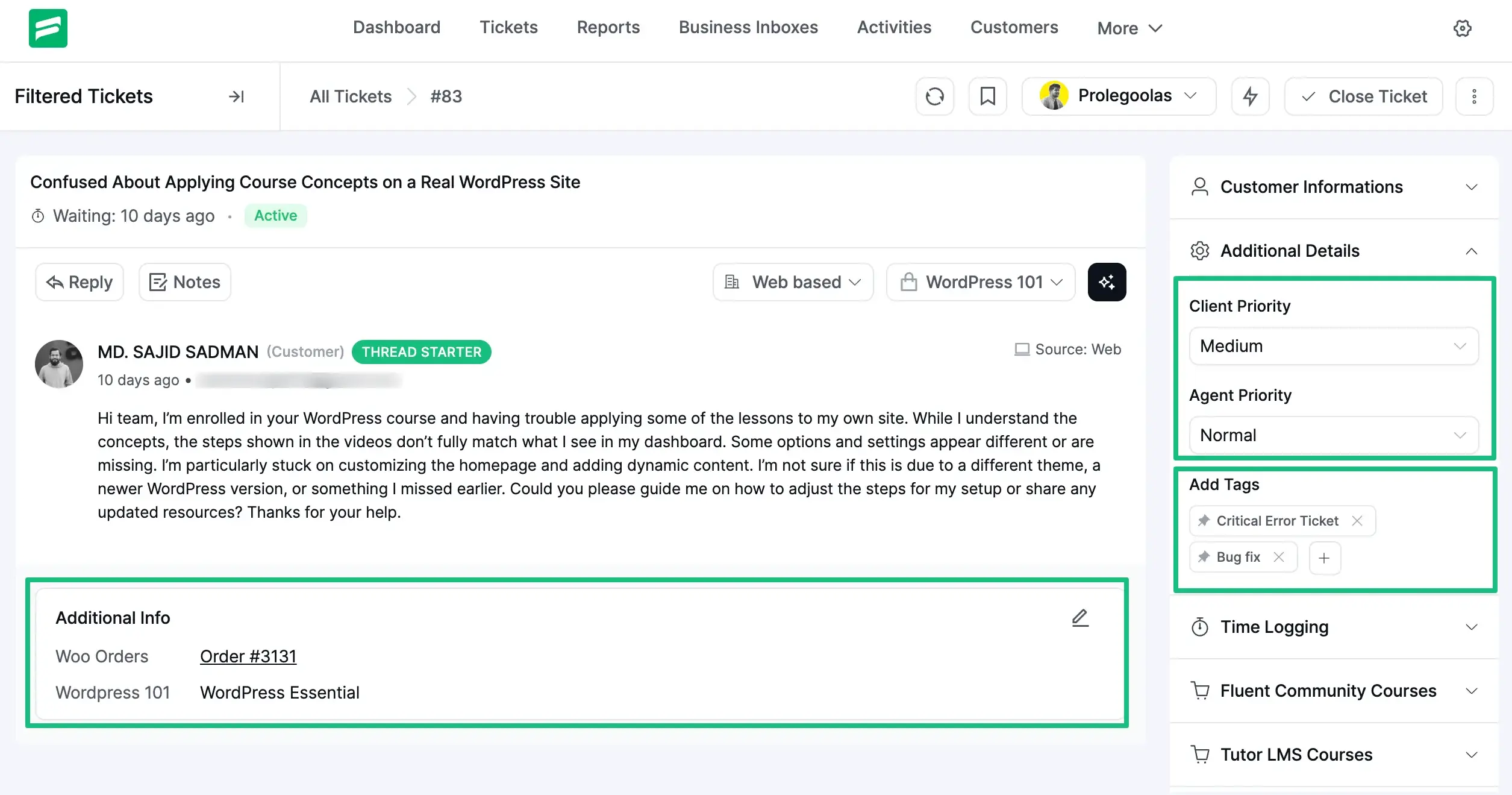
Proper triage prevents serious issues from waiting behind routine questions. Without it, support teams react instead of responding strategically.
In modern support workflows, this stage is often assisted by automation. Many teams now use AI-powered triage to analyze ticket content, detect intent, suggest categories, and route tickets automatically using natural language processing.
This reduces manual sorting, speeds up response time, and ensures urgent issues reach the right team faster without relying solely on human review.
3. Assignment
After prioritization, the ticket must be owned.
Assignment connects the ticket to a specific agent or team based on expertise, availability, or workload. This removes ambiguity.
Once assigned, the responsibility is clear. Someone is accountable for moving the ticket forward.
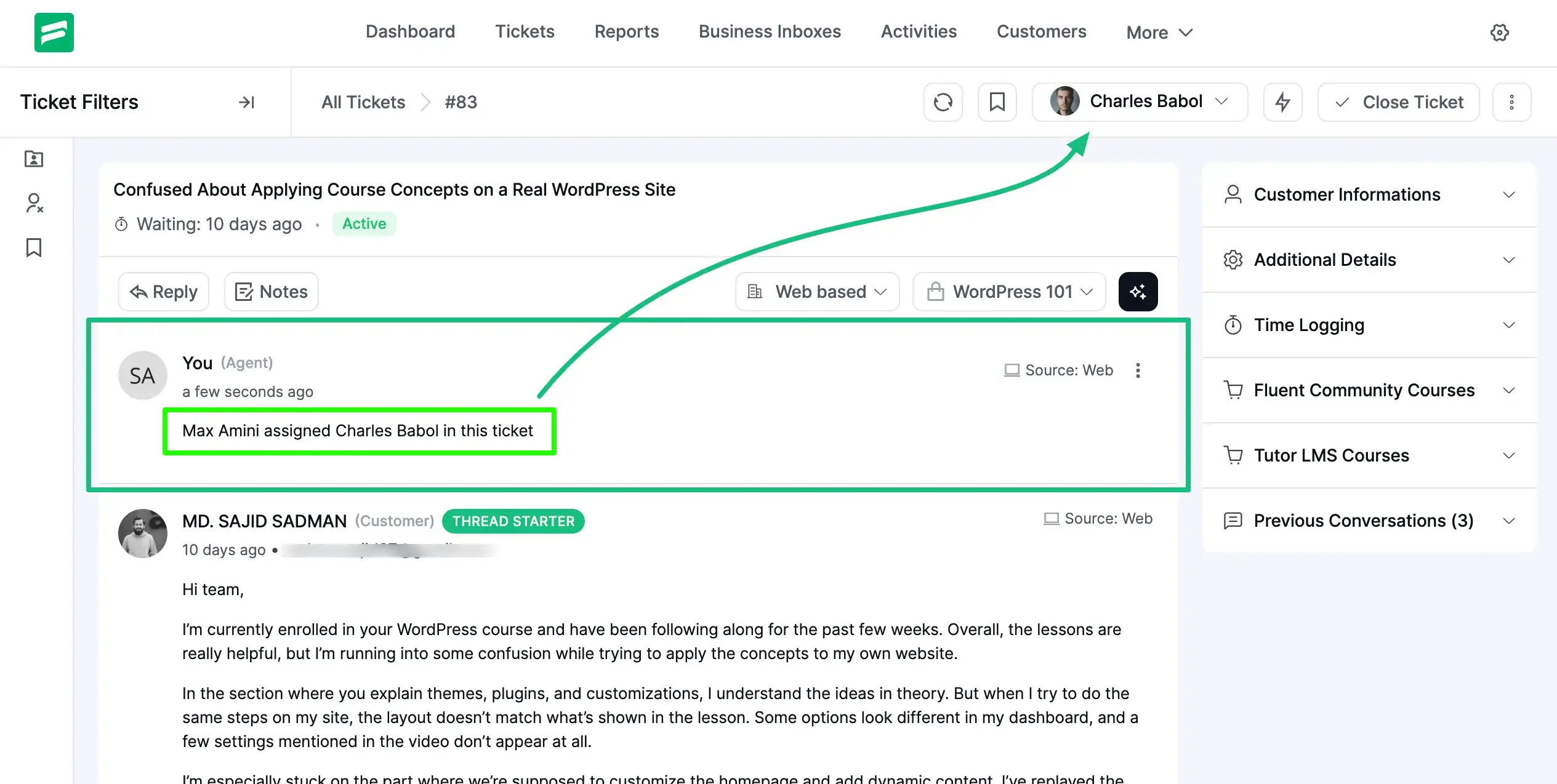
Unassigned tickets are one of the most common causes of delayed responses. This stage exists to prevent that.
4. In progress (investigation)
This is where actual support work happens.
The assigned agent reviews the issue, checks customer context, investigates the cause, and starts working toward a solution. They may troubleshoot, test scenarios, or consult internal documentation.
The ticket remains in this stage as long as the agent is actively working on it. Internal notes and updates usually happen here.
A clear “in progress” stage helps teams distinguish between active work and waiting states.
5. Pending or on hold
Not every ticket can move forward immediately.
Sometimes the agent needs more information from the customer. Other times, the issue depends on another team or external action.
In these cases, the ticket moves to a pending or on-hold state.
This stage is important because it explains why the ticket is not progressing. It prevents tickets from appearing stalled when they are actually waiting.
Without a proper pending stage, teams lose visibility into blocked tickets.
6. Resolution (solved)
At this stage, the agent believes the issue has been fixed. The solution is applied, and the response is shared with the customer. From the support team’s perspective, the work is complete.
However, the ticket is not closed yet.
This stage exists to allow confirmation. If the solution does not fully resolve the issue, the ticket can move back to in progress without reopening a new request.
7. Closure
Closure marks the official end of the ticket lifecycle.
The ticket is closed after customer confirmation or after a defined period with no further response. No more actions are expected.
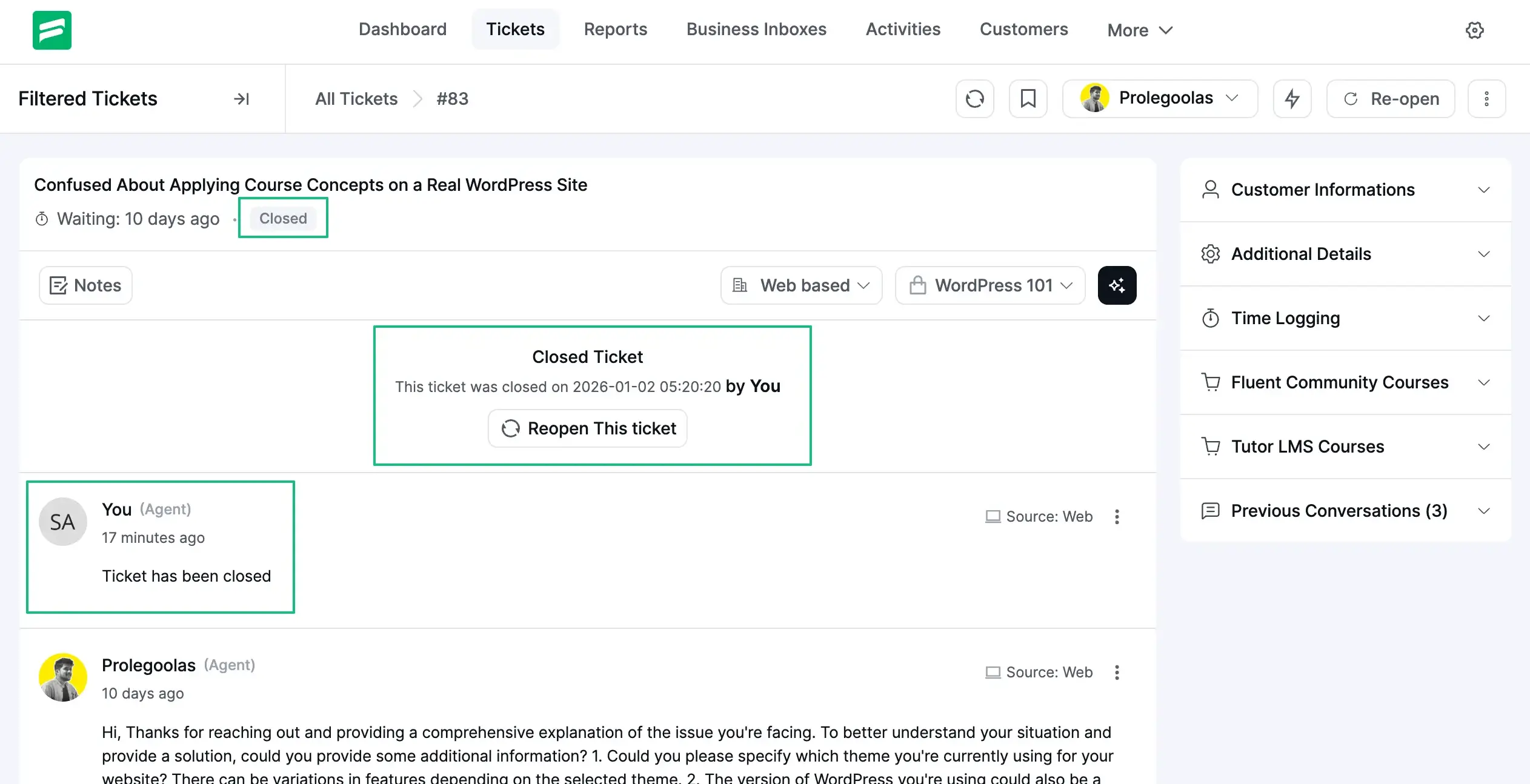
Closed tickets are archived but remain valuable. They are used for reporting, audits, training, and identifying recurring issues.
A clear closure process keeps your system clean and your data reliable.
If you want a ticketing setup that clearly reflects these stages, keeps ownership visible, and helps your team work with structure instead of reacting to follow-ups, Fluent Support is worth a closer look.
It’s built to handle real support workflows, not just collect messages.
Why the support ticket lifecycle matters?
When support starts to feel messy, the problem is rarely the team. It’s usually the lack of structure behind the tickets.
Without a clear ticket lifecycle (and obviously without a proper support ticket system), requests come in, get replied to, get paused, and then… no one is quite sure what happens next. Some tickets move fast. Others sit untouched. Customers follow up, agents scramble, and things feel reactive.
A defined lifecycle fixes that.
It gives every ticket a clear position at all times. Not just open or closed, but what stage it is actually in and why.
For agents, this removes guesswork. They know which tickets need action, which ones are waiting, and which ones are done. No second-guessing. No duplicated replies.
For managers, it brings visibility. You can immediately see where work is piling up, which stages cause delays, and where the team needs support. That’s almost impossible when tickets don’t follow a consistent flow.
It also changes how customers experience your support.
Instead of feeling ignored, customers can see progress. Received. Being worked on. Waiting for input. Resolved.
That transparency builds trust, even when an issue takes time to fix.
Most importantly, a clear ticket lifecycle makes support scalable. As volume grows, the process holds. You’re not relying on memory or heroics. You’re relying on structure.
That’s why the lifecycle matters. Not because it sounds process-driven, but because it’s what keeps support calm, predictable, and under control as your business grows.
The most common ways support ticket lifecycles go wrong
Most support teams don’t struggle because they lack tools or effort.
They struggle because the ticket lifecycle is loosely defined, inconsistently followed, or misunderstood in day-to-day work.
This section breaks down the mistakes that quietly slow teams down, create confusion, and lead to repeated follow-ups. Not in theory, but in real support operations.
1. Treating every active ticket the same
One of the most common lifecycle problems appears when teams keep all tickets in a single open state until they are closed. At first glance, this feels simple and manageable.
In reality, it removes visibility. There is no clear way to tell which tickets are actively being worked on, which ones are waiting for information, and which ones have stalled completely. Everything looks busy, even when progress has slowed.
When teams lose this visibility, they stop managing tickets proactively and start reacting to follow-ups instead.
2. Skipping proper triage early on
Another frequent issue happens immediately after ticket creation. Requests are handled in the order they arrive rather than by urgency or impact. Without triage, critical issues wait behind routine questions, and high-impact problems receive delayed attention.
Support agents remain active, but response quality becomes inconsistent. Over time, this creates frustration for customers who expect serious issues to be addressed first, regardless of when they submitted their request.
3. Unclear ownership after assignment
Assignment alone does not guarantee progress.
In many teams, a ticket is assigned, but responsibility remains vague. One agent assumes another will take it forward. A manager assumes it is already being worked on. The ticket sits longer than expected, not because no one cares, but because ownership at that stage was never clearly established.
A healthy lifecycle removes this ambiguity by making responsibility obvious at every step.
4. Misusing the pending stage
The pending stage is designed to explain why work has paused. It may be waiting on customer input, internal confirmation, or an external dependency.
In practice, it often turns into a holding area where tickets quietly disappear. They are marked pending without context, reminders, or follow-up expectations. From the customer’s perspective, this feels like silence.
From the team’s perspective, it creates blind spots that delay resolution unnecessarily.
5. Closing tickets before true resolution
Some teams close tickets as soon as a response is sent. While this may improve short-term metrics, it damages trust. Customers reopen tickets because the issue was not fully resolved.
Resolution and closure serve different purposes. One confirms that a solution has been provided. The other confirms that the problem is truly finished. When those steps are rushed or combined, repeat work becomes inevitable.
6. Ignoring closed tickets entirely
Once a ticket is closed, many teams never look at it again. This is one of the most overlooked lifecycle failures. Closed tickets contain valuable insights. They reveal recurring issues, slow stages, process gaps, and training needs.
Ignoring them ensures that the same problems will continue to resurface, regardless of how hard the team works.
Note: None of these mistakes come from bad tools or lazy teams. They come from lifecycle discipline that was never clearly defined or consistently followed. Fixing that discipline is often the difference between support that feels chaotic and support that feels under control.
Wrapping up
By this point, you’ve seen how a support ticket is meant to move, where that movement usually breaks down, and why those breaks cause more damage than they first appear.
This isn’t about memorizing stages or using the “right” labels. It’s about running support with intention instead of reacting to follow-ups and pressure.
When tickets move with structure, teams don’t guess. They act with clarity.
When that structure is missing, even experienced teams end up firefighting the same issues again and again.
The real value of understanding the ticket lifecycle is control.
If you apply what you’ve read here, support stops feeling scattered. You start seeing patterns instead of noise. And small issues stop turning into long-running problems.
That’s the difference a disciplined ticket lifecycle makes.
Start off with a powerful ticketing system that delivers smooth collaboration right out of the box.
Related Articles
Fluent Support 2.4.7: Ticket Filters, 5x Faster Tickets and Smart Customer Search
Fluent Support 2.4.7 brings a Ticket Filters sidebar…Customer Success Best Practices for Small Teams
In this blog, we’ve discussed customer success in…





Add your first comment to this post