

Fluent Support 2.4.7: Ticket Filters, 5x Faster Tickets and Smart Customer Search

By Shahjahan Jewel
October 23, 2026
Last Modified: October 23, 2026


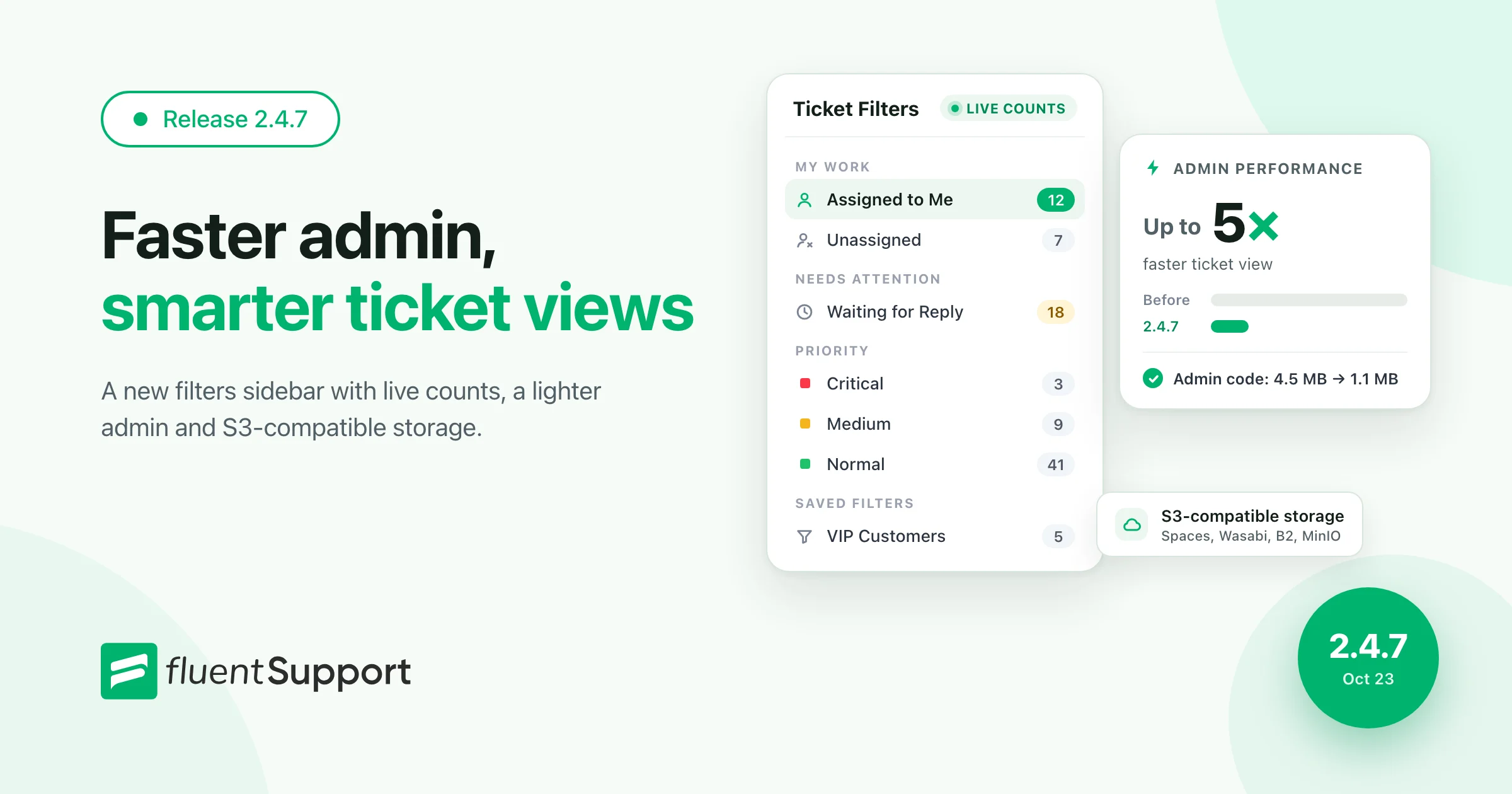
Hey Folks. Fluent Support 2.4.7 has landed! This release is about speed and focus. A new Ticket Filters sidebar puts every queue one click away, with a live count on each. Tickets also open up to 5 times faster, and the admin downloads 73% less code.
You also get a redesigned Customers screen with smart search and an admin that works on phones. Dark Mode is reworked, and the Customer Portal ticket list is lighter. Pro adds S3-Compatible Storage for DigitalOcean Spaces, Wasabi, Backblaze B2 and MinIO. Let’s walk through it.
Ticket Filters With Live Counts
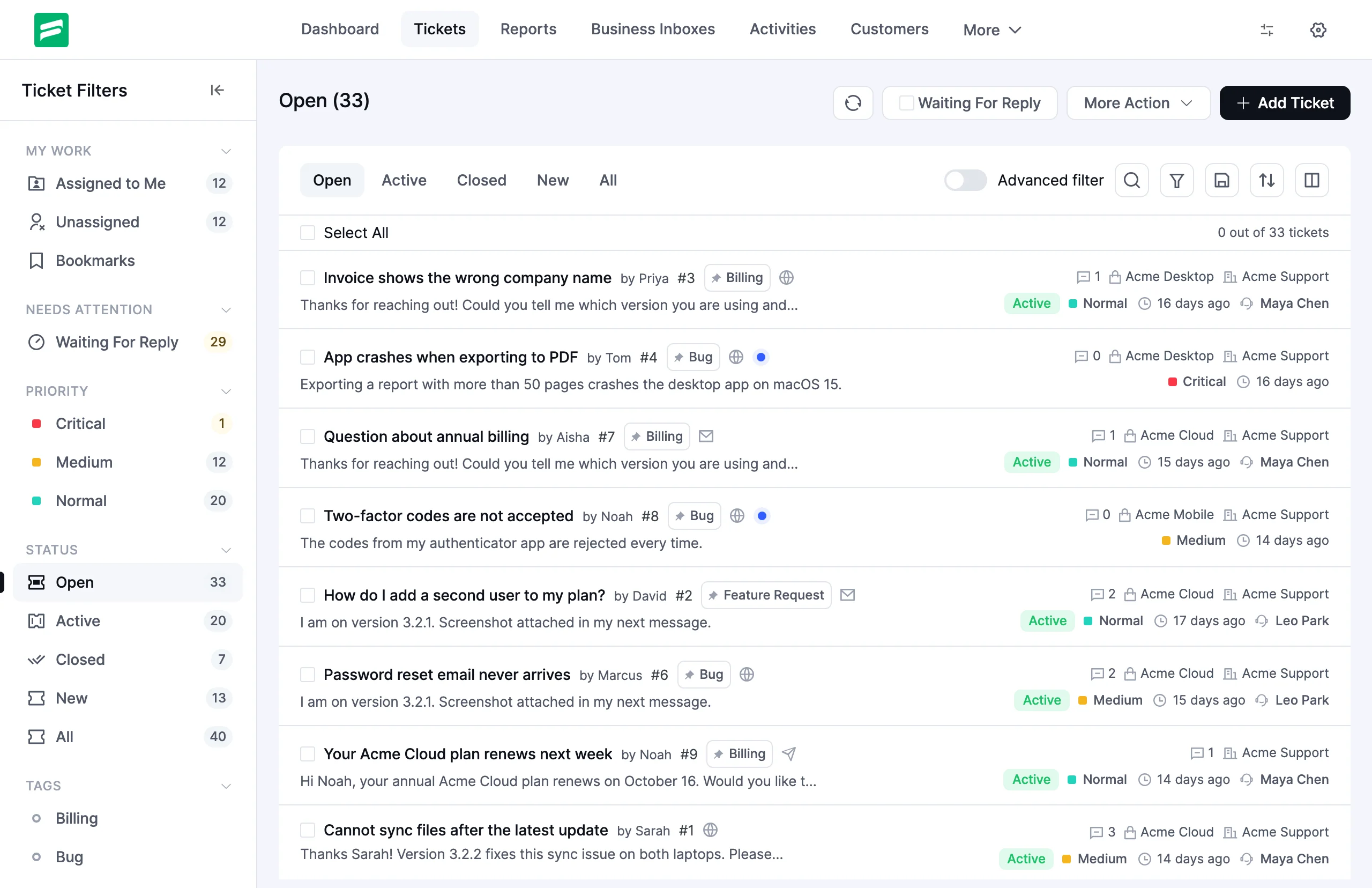
The ticket list now opens with a Ticket Filters sidebar. It groups your queue into the places you check every day, and every view shows a live count.
- My Work: Assigned to Me, Unassigned and Bookmarks
- Needs Attention: tickets waiting for your reply
- Priority: Critical, Medium and Normal
- Status: Open, Active, Closed, New and All
- Saved Filters and Tags: your own views, one click away
Counts follow each agent’s access. An agent who sees only their assigned tickets never sees numbers for tickets they can’t open. Need more room for the list? Collapse the sidebar. The Ticket Views guide covers every view.
Switch Views From a Single Ticket
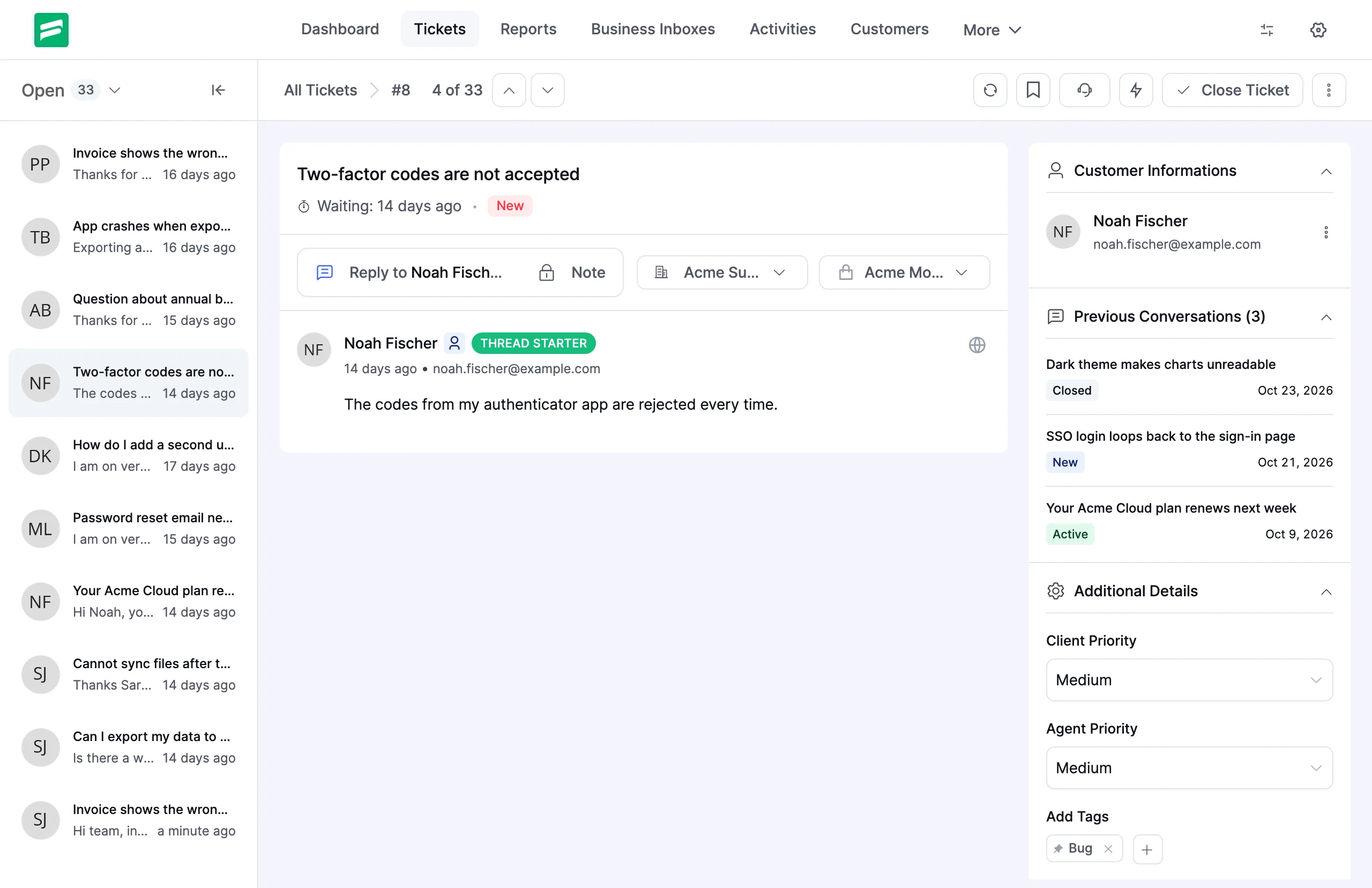
You no longer need to go back to the list to change queues. The single ticket screen has its own view switcher. It also shows where you are in the list, such as “4 of 33”.
The previous and next buttons follow the view you picked, across list pages too. Work through a whole queue without leaving the ticket screen.
Up to 5x Faster Ticket View
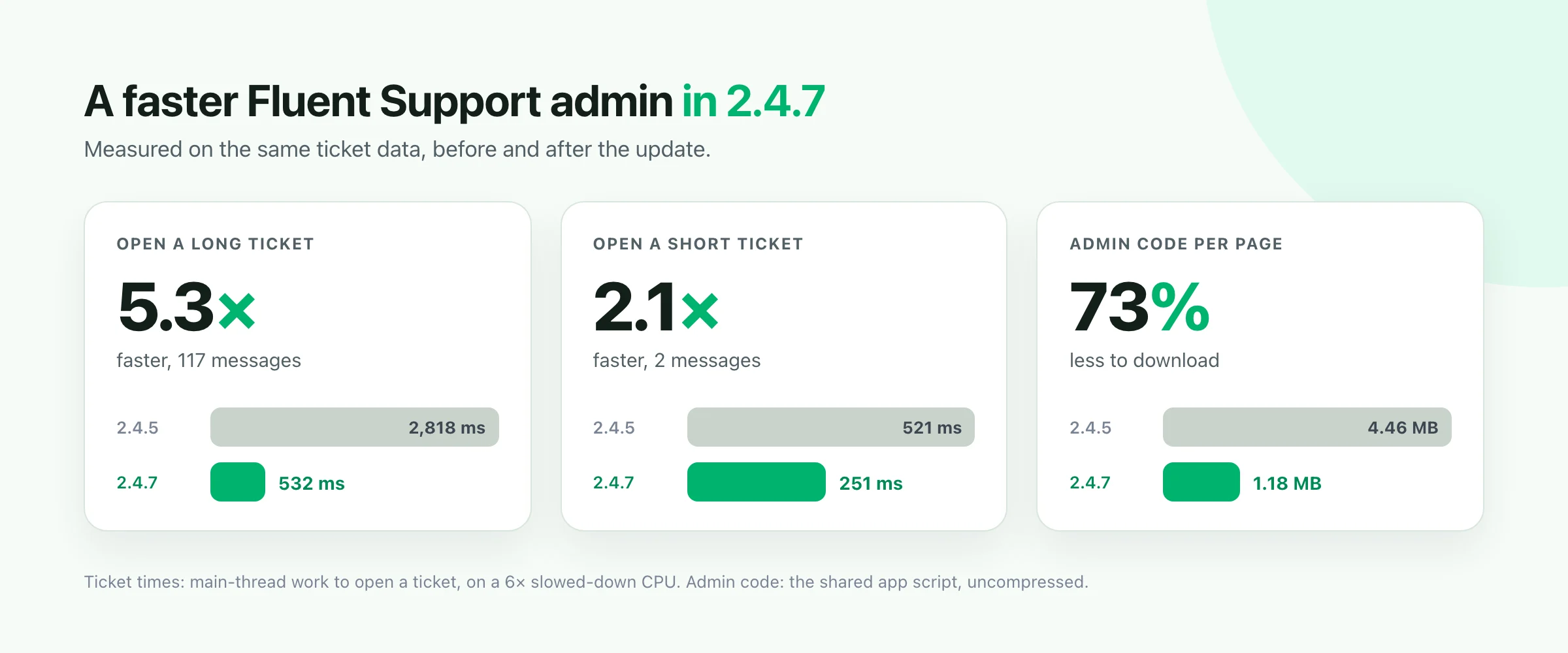
Speed was a big focus for this release. A long ticket with 117 messages now opens with 532 ms of browser work instead of 2,818 ms. That is 5.3 times faster. A short ticket opens about twice as fast.
The admin also loads only the code each page needs. Before, every admin page downloaded the whole app: 4.46 MB of scripts. Now the shared app is 1.18 MB, and each page adds a small file of its own. That is 73% less code to download, and you notice it most on phones and slow connections.
Tickets and the single ticket view load in the background, and report charts load only on the Reports page. We measured the ticket times on a slowed-down CPU, the way a modest laptop or phone runs. If a tab stays open while you update the plugin, the admin reloads once and picks up the new version.
A Redesigned Customers Screen With Smart Search
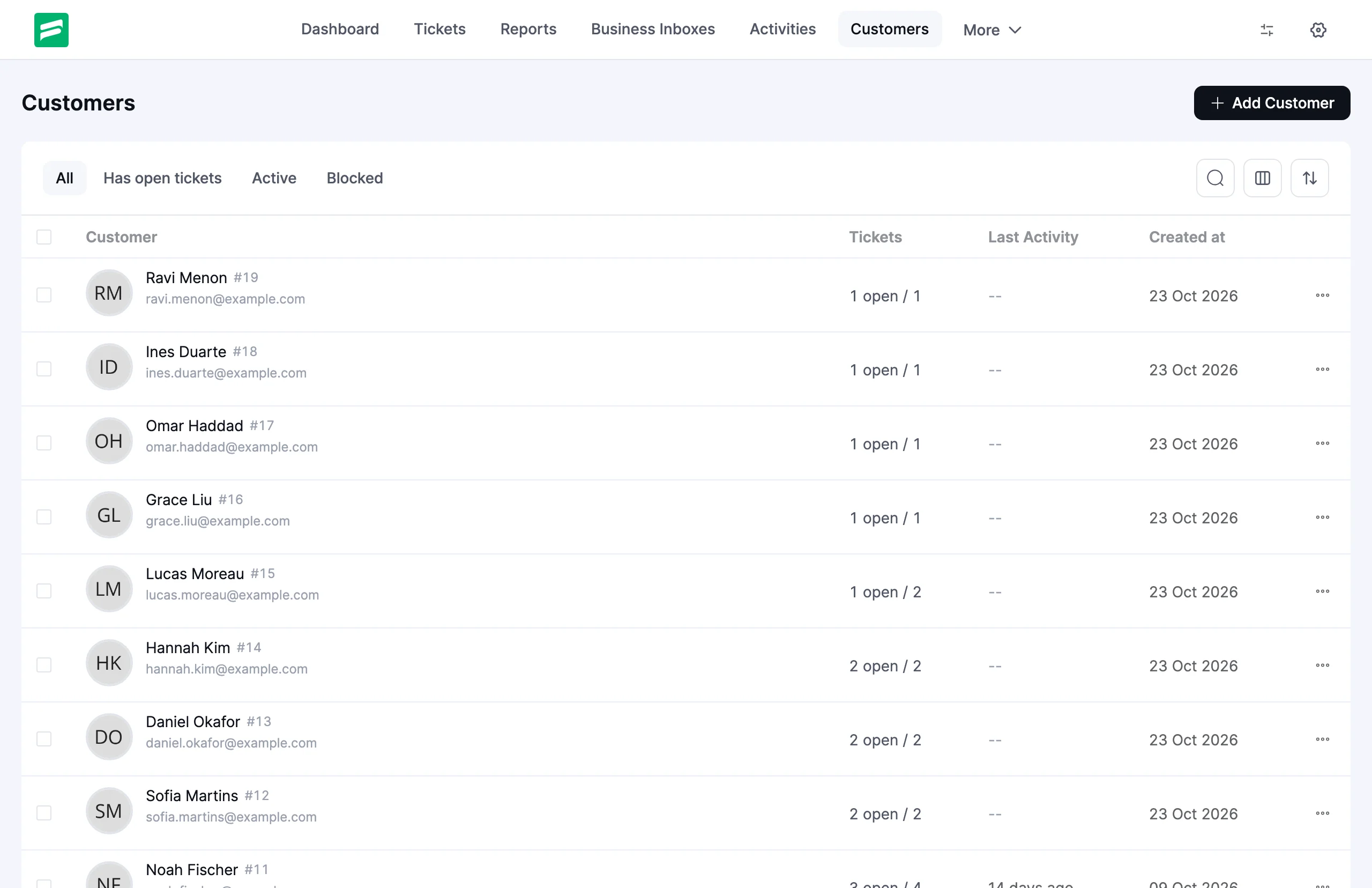
We rebuilt the Customers list and the customer profile from the ground up. The list now has view tabs, a column toggle, sorting and a bulk bar to block or unblock many customers at once.
The headline here is smart search. Type a name, an email or a customer ID like #42. You can also search one field at a time. Type / in the search box to pick a field from a menu.
city:Berlin
tickets:>2
status:blocked
created:2026-05
Results can rank by best match, so the customer you want sits at the top. A built-in tips dialog shows every supported field, and the customer search guide explains each one.
Customer Profile
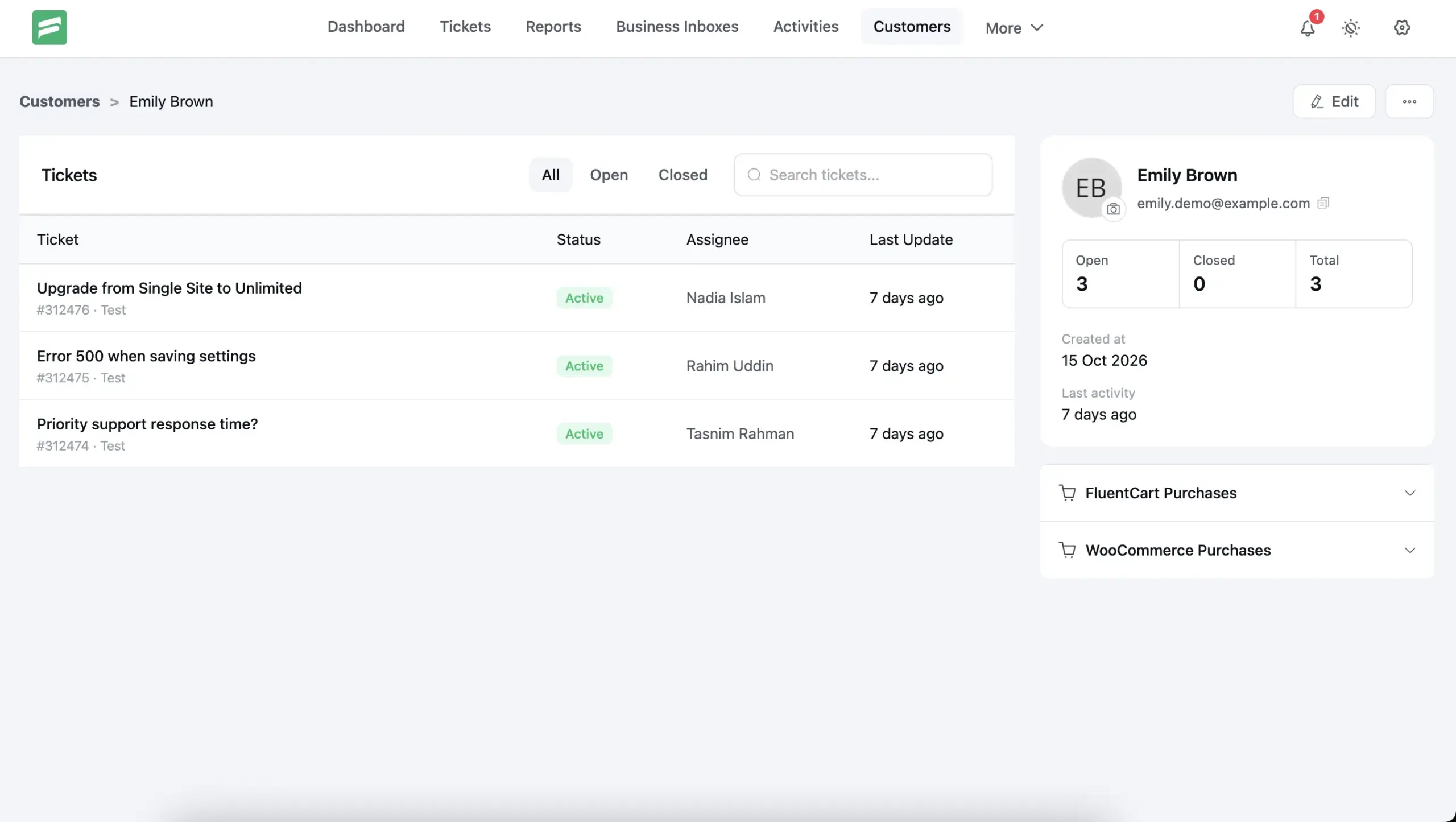
The profile page now shows the customer’s ticket stats and open tickets at a glance. A ticket table lists their history, and an edit dialog keeps changes quick.
Fluent Support on Phones and Tablets
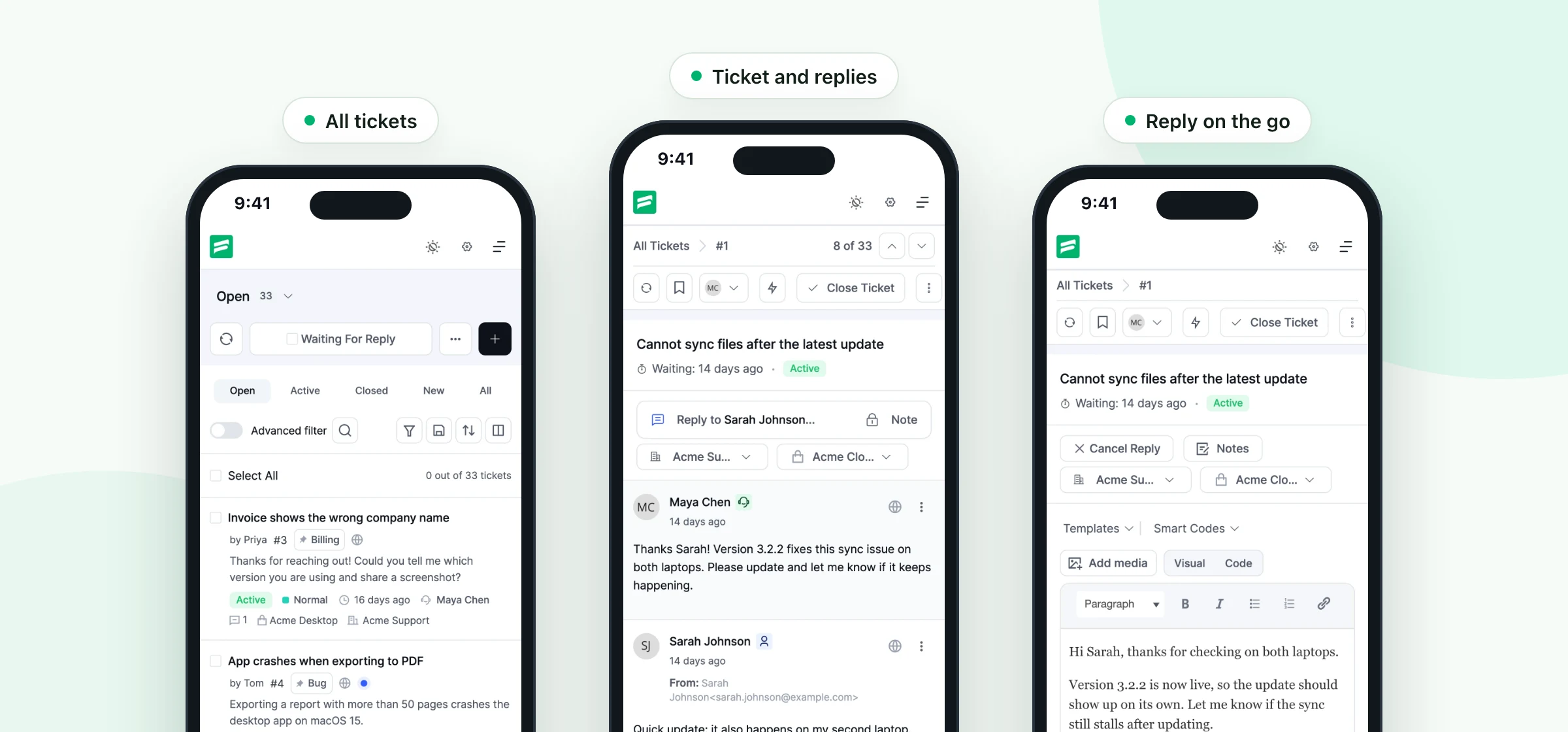
Support doesn’t stop when you leave your desk. The ticket list, the single ticket view and the rest of the admin now fit phones and tablets.
Reports, settings and the other admin pages got the same treatment. Answer a ticket from your phone in a few taps.
Dark Mode, Reworked
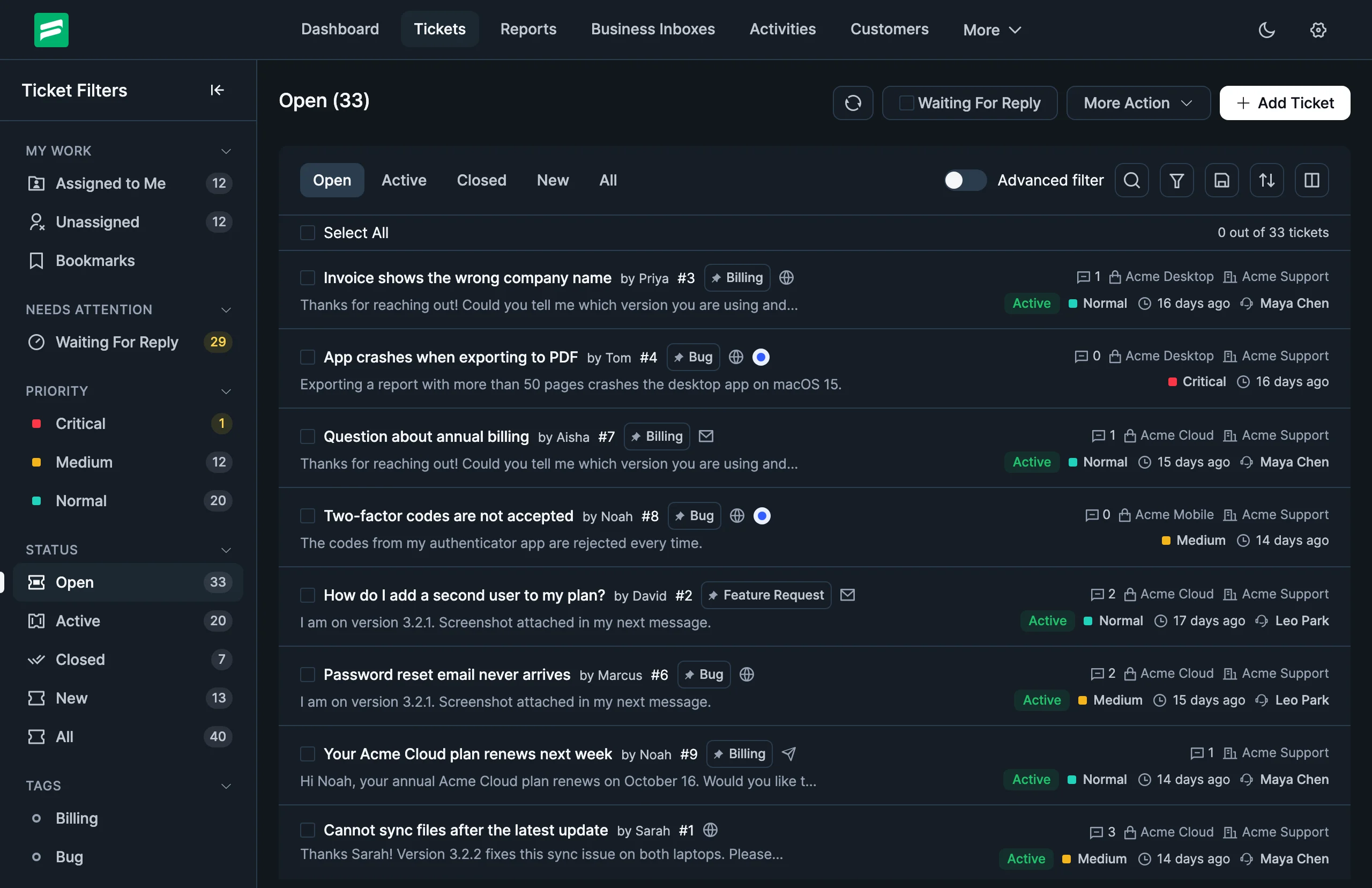
We rebuilt Dark Mode across the whole plugin. It brings a new palette, icons that follow the theme and readable contrast on every screen.
Dark Mode uses the shared Fluent theme switch, so it matches your other Fluent plugins.
S3-Compatible Storage (Pro)
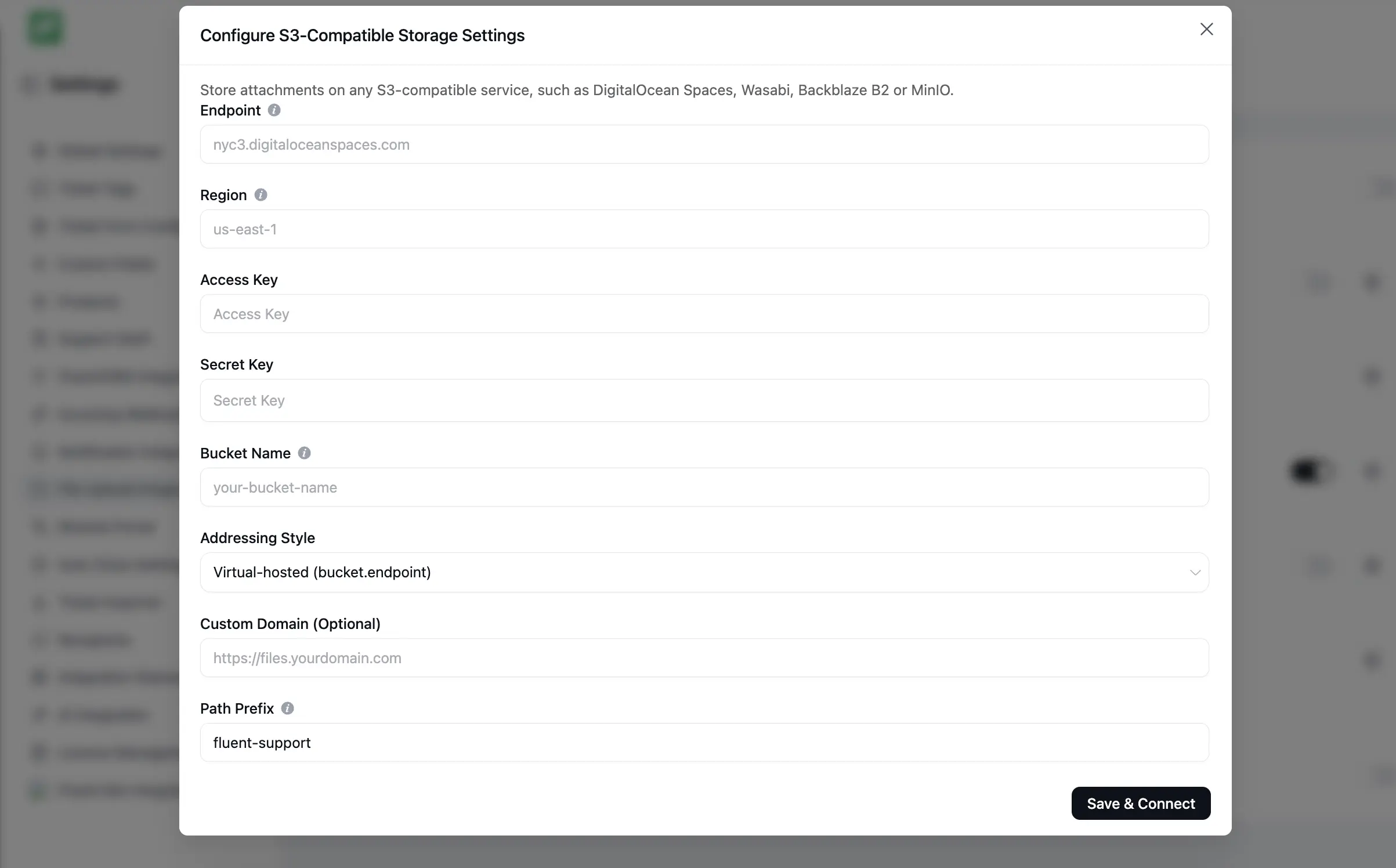
Many teams already keep their files with a provider other than Amazon. With S3-Compatible Storage, Fluent Support Pro can store ticket attachments with any provider that speaks the S3 API. It sits next to the existing Amazon S3 and Cloudflare R2 options.
Setup
Open the file storage settings and choose S3-Compatible. Enter your provider’s endpoint, such as nyc3.digitaloceanspaces.com, then add your access key, secret key and bucket name. Leave the region empty and Fluent Support detects it from the endpoint.
You can also pick the addressing style your provider needs, add a custom domain and set a path prefix for uploaded files. Keep your bucket private. Fluent Support serves every file through short-lived signed links.
Prefer to keep keys out of the database? Define them in wp-config.php instead:
define('FLUENT_SUPPORT_S3C_ENDPOINT', 'nyc3.digitaloceanspaces.com');
define('FLUENT_SUPPORT_S3C_ACCESS_KEY', 'your-access-key');
define('FLUENT_SUPPORT_S3C_SECRET_KEY', 'your-secret-key');
define('FLUENT_SUPPORT_S3C_BUCKET', 'your-bucket');
Your endpoint must be a public address. To use a MinIO server on a private network, allow it with the fluent_support_pro/storage_allow_private_endpoint filter. The S3-Compatible Storage guide walks through every setting.
Private and Reliable Remote Storage
We rebuilt remote storage across every provider in this release. Fluent Support now keeps Dropbox and Google Drive files private instead of sharing them by public link. It also deletes remote files in the background when you delete a ticket.
Files in Amazon S3, Cloudflare R2 and S3-compatible storage remember the connection that holds them. Change a bucket, region or key, or disconnect, and older files keep working. Files from remote storage now reach your customers’ inboxes reliably too. Files over the size limit go out as links that stay valid for 30 days.
Using Dropbox? Uploads now need the files.content.read permission. If your Dropbox app lacks it, Fluent Support keeps new files on your server and shows a notice. Turn the permission on in your Dropbox app, then reconnect Dropbox once.
A Lighter Customer Portal Ticket List
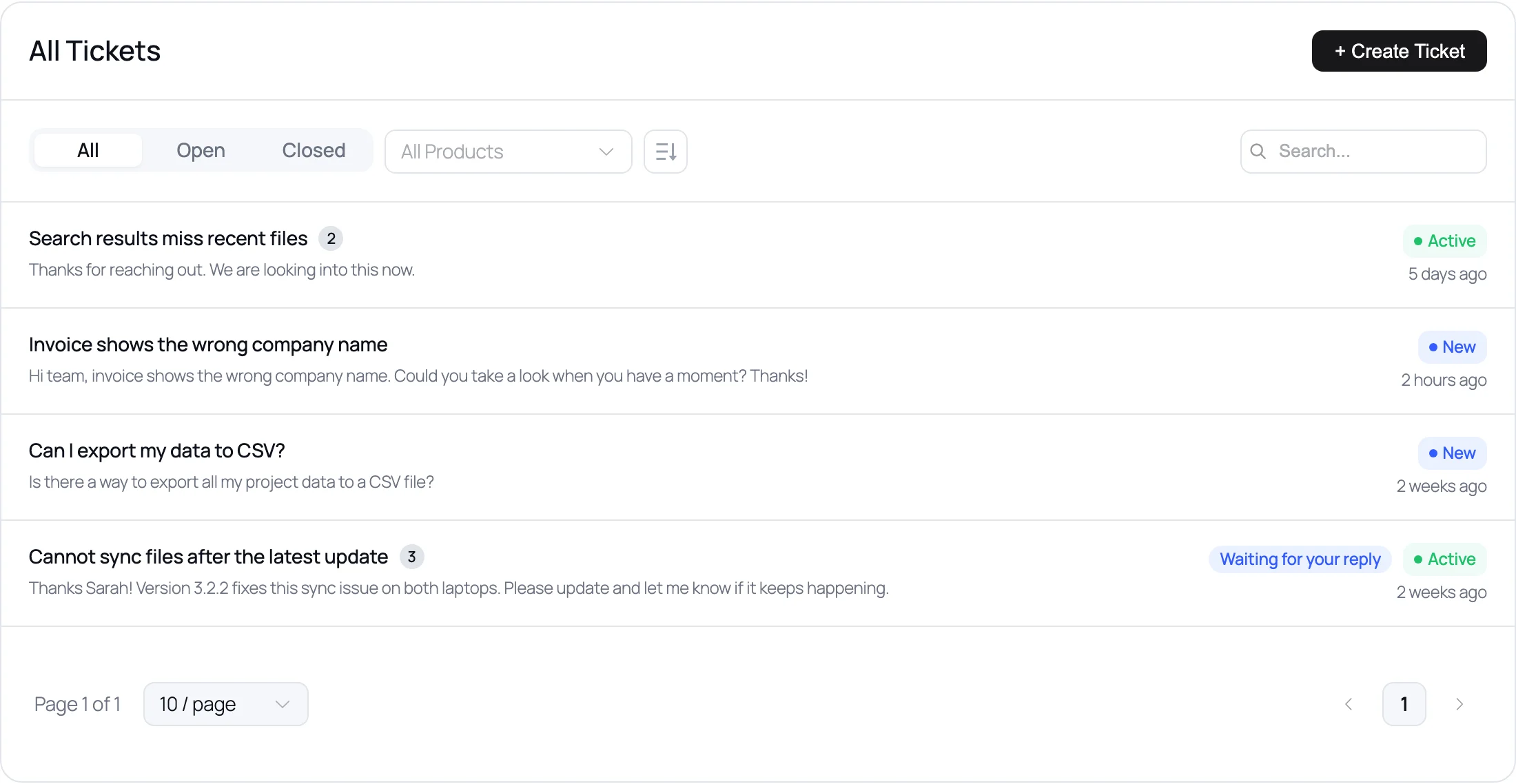
The Customer Portal now lists tickets as clean rows that work well on phones. Each row is one link and shows the reply count, status, date and the “Waiting for your reply” badge.
Empty lists now say why they are empty and offer a way back, such as Clear search or View all tickets. The list also stays on screen while it reloads, so it no longer flashes.
Heads-Up for Custom Portal Styles
The portal ticket list is no longer a table. If your theme or custom CSS styled the old table, those rules no longer match.
- The ticket list was an Element Plus table (
.el-table). It is now.fs_ticket_list_wrap>.fs_ticket_list>.fs_ticket_item. - Each row is a
.fs_ticket_linkwith.fs_ticket_main(title, reply count and excerpt) and.fs_ticket_meta(status and.fs_ticket_date). - The portal no longer sets the
--el-table-*CSS variables. - The logout dropdown in the portal header is now a plain Log Out button (
.fs_logout_btn).
If you use the default portal styles, there is nothing to do. If you customized the ticket list, open your portal page after updating and move your rules to the new classes.
More Improvements
Accurate portal block preview. The Customer Portal block in the editor now matches what your customers see on the front end.
Current AI models. The AI settings now list current Claude, OpenAI and Gemini models. A new Default option follows the recommended model, so your site moves forward without re-saving settings.
Better AI reply drafts (Pro). Drafts now answer the latest message first and stay short. They also reply in your customer’s language.
Compact activity rows. Ticket activity now shows as one-line rows. Automatic and workflow closes read as system events, so you can tell them apart from agent actions.
Refreshed ticket sidebar widgets. Previous Conversations, Watchers and the FluentCart, WooCommerce and EDD purchase widgets got a cleaner design.
Restyled dashboard. The dashboard stat cards and widgets have a new look, and Agent Performance gains a Load more button.
Flyout sidebars. Collapsed settings and reports sidebars open as a flyout when you hover over them.
For Developers
This release adds three filters and a new MCP tool. The get-ticket-views tool and the queue views in get-support-context give AI agents the same views your team sees.
fluent_support/ai_default_model
fluent_support/ticket_close_activity_source
fluent_support/storage_drivers
Bug Fixes and Stability
HTML-only piped emails (Pro). Emails that arrive with HTML only now show as formatted content instead of raw markup.
Greek and other special characters. Piped emails no longer save Greek and other HTML5-only characters as entity text.
Reply editor. We fixed issues with saved drafts in the reply editor.
Wide images. Large screenshots in a ticket now fit the conversation instead of getting cut off.
Customer Portal Dark Mode. The portal now shows Dark Mode correctly inside FluentCommunity.
Your Helpdesk Is Faster. Your Store Can Be Too.
Most of you run your store on WooCommerce. FluentCart is our store plugin, built the same way as Fluent Support: light, fast, and with the important features built in instead of sold as paid extensions.
- What you can sell: physical products, downloads, subscriptions, software licenses and bundles
- Checkout: on-page checkout, order bumps, coupons and dynamic pricing
- Multi-currency: new in FluentCart 2.0. Show prices and take payments in your customer’s own currency
- Tax: built-in VAT with EU OSS, reverse charge and invoices
- Easy switch: the WooCommerce migrator moves your products, customers and orders
More than 9,000 stores run on FluentCart now, and we charge no platform fee. It also works with Fluent Support, so you see each customer’s orders right in the ticket.
Lifetime plans close for good on October 30. After that, FluentCart is yearly only. Lifetime starts at $249.
Closing Thoughts
Fluent Support 2.4.7 helps your team find the right ticket faster and open it faster too. Find any customer in seconds, and work from any device. With S3-Compatible Storage, your attachments can live with the provider you already trust.
Update today, open your ticket list and try the new Ticket Filters. As always, we’d love to hear what you think.
If 2.4.7 makes your day a bit easier, a quick review on WordPress.org helps us a lot. It helps other support teams find Fluent Support too.
Happy supporting!
Full Changelog
Fluent Support
- Added: Ticket list sidebar views with live counts (My Work, Needs Attention, Priority, Status, Saved Filters, Tags)
- Added: Redesigned Customers list and profile with smart search, sorting and bulk block/unblock
- Added: “Default” AI model option that follows the recommended model
- Improved: Faster admin; each page loads only its own code (about 73% less to download)
- Improved: Dark Mode reworked across the plugin
- Improved: Admin and Customer Portal now fit phones and tablets
- Improved: Redesigned ticket activity, sidebar widgets and dashboard cards
- Fixed: Reply editor issues with saved drafts
- Fixed: Wide images in a ticket getting cut off
- Note: The Customer Portal ticket list is now a plain list (
.fs_ticket_list,.fs_ticket_item) instead of a table, and the logout menu is a button. If your theme or custom CSS styled the old table markup, please review it
Fluent Support Pro
- Added: S3-compatible storage: DigitalOcean Spaces, Wasabi, Backblaze B2 and MinIO
- Improved: Remote storage keeps Dropbox and Google Drive files private and delivers email attachments reliably
- Improved: AI reply drafts are shorter and in the customer’s language
- Fixed: Piped emails showing raw HTML or entity text for some characters
- Note: Dropbox users may need to reconnect once to grant the new read permission
Related Articles
Customer Success Best Practices for Small Teams
In this blog, we’ve discussed customer success in…26 Best Ticketing System Software in 2026
The best ticketing system software in 2026 includes…



Add your first comment to this post