


What Is Two-Factor Authentication (2FA)? Everything You Need to Know

By Uttam Kumar Dash
June 25, 2026
Last Modified: June 25, 2026


Passwords get stolen every day. They get phished, guessed, leaked in data breaches, and reused across dozens of accounts. A strong password is a good start, but it is no longer enough on its own.
Two-factor authentication exists to fix exactly that. It is one of the most widely recommended security measures in cybersecurity, yet many people still do not fully understand what it is, how it works, or when they need it.
In this blog, we will cover what two-factor authentication (2FA) means, how it works step by step, the types and real-world examples, how it compares to MFA and two-step verification, whether it can be hacked, and how to enable it for your accounts and WordPress sites.
Key Takeaways
- Two-factor authentication (2FA) requires two distinct verification steps to log into an account
- The three factor categories are something you know, something you have, and something you are
- Common 2FA methods include SMS codes, authenticator apps, push notifications, hardware tokens, and biometrics
- 2FA reduces risk from phishing, stolen passwords, and brute-force attacks significantly
- All 2FA is a form of MFA, but MFA can use three or more factors
- Two-step verification uses two steps but may rely on the same factor type, so it is not always true 2FA
- WordPress site owners can enable 2FA easily using FluentAuth
What Is Two-Factor Authentication (2FA)?
Two-factor authentication, commonly written as 2FA, is a security method that requires a user to verify their identity using exactly two distinct types of credentials before gaining access to an account or system.
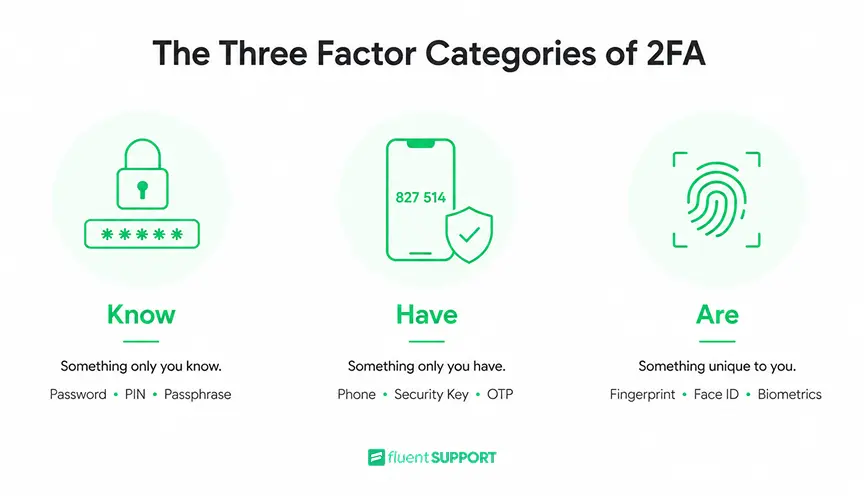
Instead of relying on just a password, 2FA adds a second layer of proof. The two factors must come from different categories: something you know (like a password), something you have (like a phone or security key), or something you are (like a fingerprint or face scan). Only when both are verified does access get granted.
The core idea is simple. A stolen password alone cannot unlock an account if the attacker also needs a second factor they do not possess.
How Does Two-Factor Authentication Work?
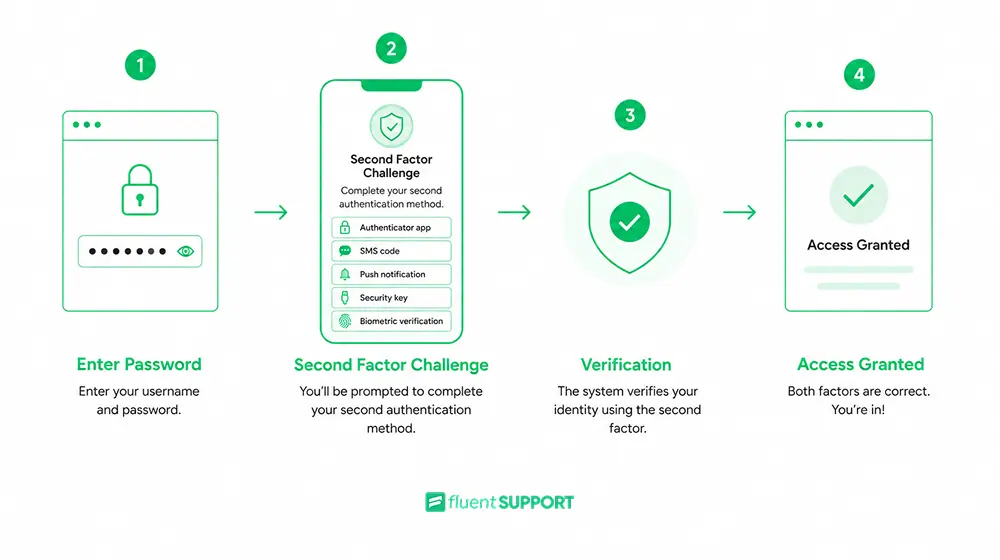
Step 1: Enter Your Primary Credentials
You enter your username and password as usual. That is the first factor: something you know. The system accepts it and prompts you for a second step.
Step 2: Complete the Second Verification
Depending on which method is configured, you might receive a time-sensitive code via SMS, open an authenticator app to read a generated code, tap “Approve” on a push notification, or use a fingerprint scan. The system verifies the second factor.
Step 3: Access Is Granted
Once both factors are accepted, the system lets you in. If either factor fails, access is denied regardless of whether the other one was correct.
One key detail is timing. Most codes from authenticator apps expire within 30 to 60 seconds. That short window makes intercepted codes nearly useless by the time an attacker could act on them.
What Is a 2FA Code?
A 2FA code is the short, temporary string used during the second verification step. These are typically called one-time passwords, or OTPs.
Most 2FA codes are 6 digits long and expire within 30 to 60 seconds. They are either sent to your phone via SMS or generated locally by an authenticator app using a time-based algorithm called TOTP.
Each code is unique and short-lived, so it cannot be reused even if intercepted.
Types of Two-Factor Authentication Methods
Not all 2FA methods carry the same level of security. Here is how the most common ones compare:
1. SMS-Based 2FA
A one-time code is sent to your registered phone number via text. Widely used and easy to set up, but it is the least secure option available. NIST’s identity guidelines (SP 800-63B-4) formally classify SMS OTP as a “restricted authenticator” due to vulnerabilities like SIM swapping and network interception.
2. Authenticator Apps
Apps like Google Authenticator or Microsoft Authenticator generate time-based codes locally on your device without needing a network connection. Each code expires in 30 to 60 seconds. More secure than SMS because nothing transmits over an interceptable network.
3. Push Notifications
The app sends an approval prompt directly to your phone. You tap “Approve” or “Deny.” Simple and fast, though susceptible to MFA fatigue attacks where attackers flood users with requests hoping for an accidental approval.
4. Hardware Tokens
Physical USB security keys (like YubiKey) that plug into a device or tap via NFC. Very difficult to intercept remotely. A strong choice for high-security environments.
5. Biometrics
Fingerprint scans, facial recognition, or iris scans. These qualify as the “something you are” factor. Increasingly standard on mobile devices and laptops as a fast, frictionless second factor.
6. Magic Login Links
A secure, time-limited URL sent to a verified email inbox. Common in passwordless flows where the email account itself serves as the possession factor.
| Method | Security Level | Requires Device | Best For |
| SMS Codes | ⭐⭐☆☆☆ | ✅ Yes | Casual users and basic account protection |
| Authenticator Apps | ⭐⭐⭐⭐☆ | ✅ Yes | Most users seeking strong everyday security |
| Push Notifications | ⭐⭐⭐⭐☆ | ✅ Yes | Fast, convenient logins across devices |
| Hardware Security Keys | ⭐⭐⭐⭐⭐ | ✅ Yes | High-security accounts, businesses, and administrators |
| Biometric Authentication | ⭐⭐⭐⭐☆ | ✅ Yes | Mobile devices, laptops, and password-free experiences |
| Magic Login Links | ⭐⭐⭐☆☆ | ✅ Yes (Email Access) | Passwordless logins and low-friction authentication |
Examples of Two-Factor Authentication
Real-world 2FA is everywhere once you know what to look for:
- You log into your bank, enter your password, and the bank sends a six-digit code to your phone to complete login
- You sign into Gmail from a new device and Google asks you to approve the login from your existing phone
- You use an ATM, which requires your card (something you have) and your PIN (something you know): a physical-world version of 2FA
- A developer logs into GitHub, enters their password, then opens their authenticator app for the TOTP code
- A company employee logs into a corporate VPN and must approve a push notification on their work phone before access is granted
Benefits of Two-Factor Authentication
The primary benefit is clear: even if your password is stolen, an attacker still cannot get in without the second factor.
According to the Verizon 2025 DBIR, “stolen credentials are behind roughly 88% of basic web application attacks.” Passwords remain the weakest link. 2FA directly neutralizes most credential-based attacks.
Beyond that core protection, here is what 2FA brings:
- Phishing resistance: Even if a user enters their password on a fake site, the attacker lacks the second factor and cannot complete the login.
- Brute-force blocking: Even automated bots that guess passwords correctly cannot proceed without a code that expires in seconds.
- Compliance support: Standards like GDPR, HIPAA, PCI DSS, and ISO 27001 are easier to meet when 2FA is part of your access controls.
- Better breach detection: Every failed second-factor attempt is a visible signal. Security teams can detect anomalous login patterns earlier.
- Lower breach impact: Even when one credential is leaked, the second factor keeps the account protected.
Is 2FA Secure?
Two-factor authentication is significantly more secure than passwords alone. But it is not completely unbreakable.
Some attack methods that can bypass or exploit 2FA:
- SIM swapping: Attackers convince a phone carrier to transfer a victim’s number to a SIM they control, then intercept SMS codes.
- MFA fatigue attacks: Repeated push notification requests are sent to a user until they accidentally tap “Approve” out of frustration.
- Account recovery exploits: Some platforms allow password resets via email without requiring 2FA, which creates a bypass route.
- Real-time phishing: Sophisticated phishing pages relay credentials and codes simultaneously to the real site before the code expires.
The practical takeaway: SMS-based 2FA is far better than no 2FA. Authenticator apps and hardware keys are better than SMS. Combining 2FA with login monitoring and strong account recovery policies produces the best overall protection.
Two-Factor Authentication vs. Two-Step Verification
These terms get used interchangeably, but there is a real difference.
True 2FA requires two factors from two different categories. A password (knowledge) plus a phone code (possession) qualifies. The categories must be distinct.
Two-step verification means any login process with two steps, but those steps might rely on the same category. A password followed by a security question is two steps, but both are knowledge factors. That makes it two-step verification, not true 2FA.
Two-step verification can still improve security over a single password. It just does not carry the same protection level, because a single attack method like phishing can compromise both factors at once.
2FA vs. MFA
Two-factor authentication is a specific form of multi-factor authentication (MFA). The distinction is in how many factors are used:
- 2FA: exactly two factors from two different categories
- MFA: any authentication using two or more factors
All 2FA is MFA. Not all MFA is limited to two factors.
Organizations with higher security needs often move beyond 2FA to require three or more factors: a password, a hardware token, and a biometric scan, for example. This matters most in environments handling financial data, healthcare records, or privileged system access.
For most everyday use cases, 2FA offers strong, practical security without excessive friction.
| Feature | 2FA (Two-Factor Authentication) | Two-Step Verification | MFA (Multi-Factor Authentication) |
| Definition | Uses exactly two different authentication factors. | Uses two verification steps, which may use the same factor type. | Uses two or more authentication factors. |
| Number of Factors | Exactly 2 | Usually 2 steps | 2 or more |
| Requires Different Factor Types? | ✅ Yes | ❌ Not always | ✅ Yes |
| Example | Password + Authenticator App | Password + Security Question | Password + Security Key + Fingerprint |
| Security Level | High | Moderate | Very High |
| Best For | Personal accounts, business logins | Basic account protection | Enterprise, financial, and high-security systems |
How to Enable Two-Factor Authentication
The setup process varies by platform but follows a consistent pattern:
- Go to your account’s Security or Account Settings
- Find the option labeled Two-Factor Authentication, Two-Step Verification, or Login Security
- Choose your second factor: authenticator apps are recommended over SMS
- For apps, scan the QR code shown on screen during setup
- Save your backup codes somewhere secure: these recover your account if you lose your device
For Google, Microsoft, Facebook, and most major platforms, the option lives in account security settings. Many platforms now prompt or require 2FA at account creation.
2FA for WordPress Sites: How FluentAuth Helps
WordPress powers over 40% of websites on the internet. That scale makes it a high-value target for brute-force and credential attacks. The default WordPress login has no built-in 2FA, rate limiting, or audit logging.
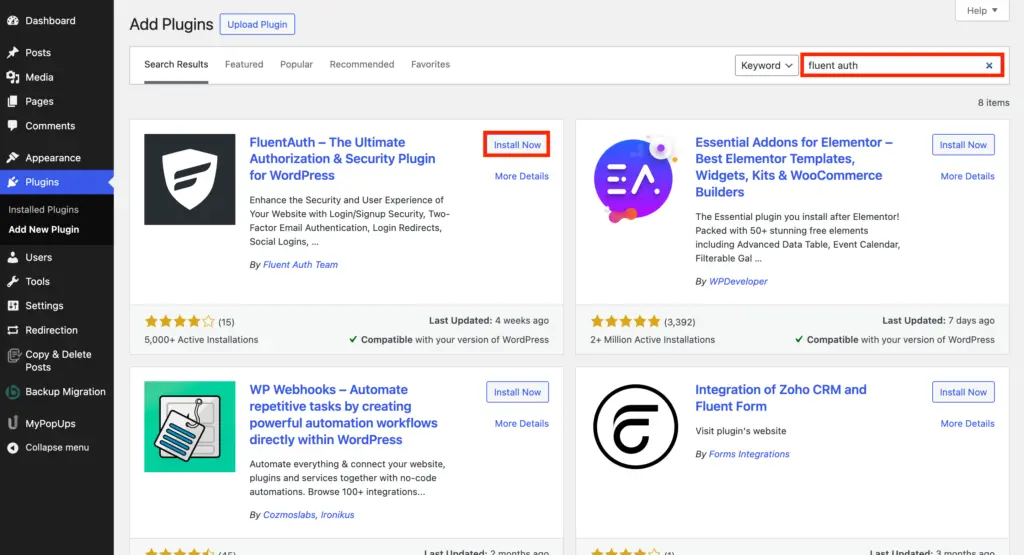
FluentAuth is a free WordPress security plugin from the WPManageNinja team: the same people behind FluentCRM, Fluent Forms, and Fluent Support. It handles the entire authentication layer for WordPress without adding bloat. Here is what it covers for WordPress security:
- Two-Factor via email: Enable 2FA only for high-level roles like Administrator or Editor. When a covered role logs in, a verification email goes out before access is granted.
- Magic login links: Users log in via a secure, time-limited URL sent to their email inbox. No password required.
- Limit login attempts: Block an IP after it exceeds a set number of failed attempts within a time window. Brute-force attacks stop at the infrastructure level.
- Social login: Allow login via GitHub, Google, or Facebook. The social account acts as the possession factor.
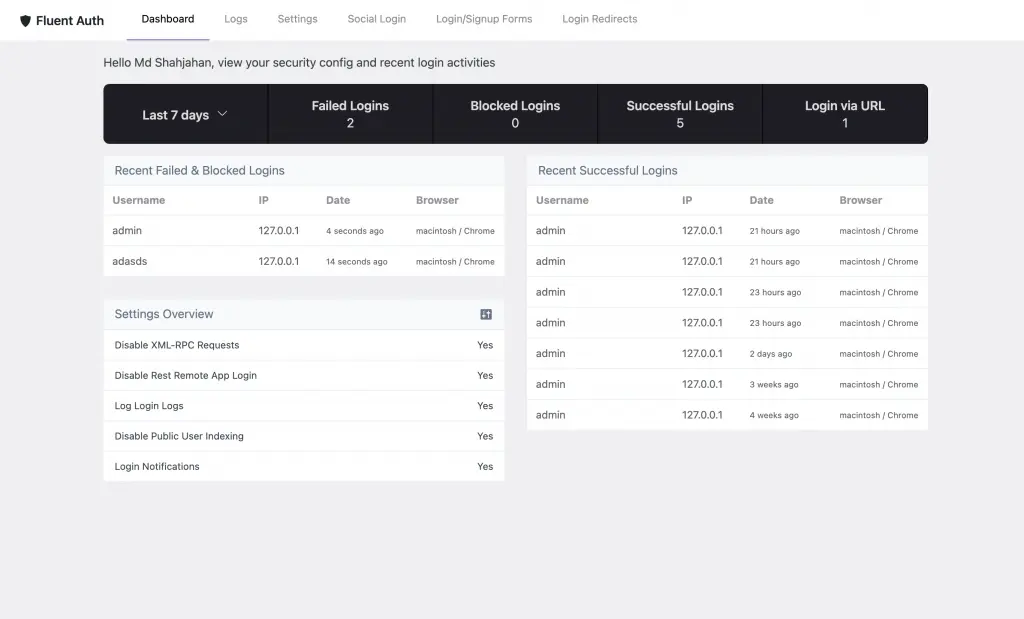
- Audit logs: Every login attempt is logged with timestamp and method. Admins can see exactly who logged in and how.
- Security notifications: Get email alerts when a high-level user logs in or when repeated failed attempts hit your site.
- XML-RPC disabling: One toggle blocks one of the most commonly exploited WordPress attack surfaces.
Install FluentAuth from the WordPress plugin repository and follow the setup guide to configure it in minutes.
Common Problems with 2FA
- Lost device: Always store backup codes during setup and register a second device where possible. If your phone is your second factor and you lose it, backup codes are your only route back in.
- Expired code: TOTP codes expire every 30 to 60 seconds. If the code fails, request a fresh one or check that your device clock is synced correctly.
- No mobile signal: SMS-based 2FA will not work without cell service. Authenticator apps generate codes offline, so they are a more reliable choice.
- App reinstalled without backup: Reinstalling an authenticator app without saving configurations will lock you out of your 2FA setup. Most apps support encrypted backups, so enable that option.
Wrapping Up
Two-factor authentication is a second lock on your accounts that makes stolen passwords nearly useless. Whether you are an individual protecting email or a business securing a site with customer data, enabling 2FA is one of the highest-return security steps you can take.
For WordPress sites specifically, FluentAuth handles 2FA, brute-force protection, magic login, and audit logging in one free plugin. It is built for WordPress and does not slow your site down. The setup takes less time than a password reset.
Want a system that makes ticket handling this smooth? Fluent Support brings structure and clarity to every request so your team always knows exactly what to do next. See how it works.
Frequently Asked Questions
Is OTP the same as 2FA?
Not exactly. An OTP (one-time password) is a type of second factor used within 2FA. It is the code you receive or generate during the verification step. OTP is one component of 2FA, not 2FA itself.
What is a two-factor authentication method?
A 2FA method is the specific technique used to verify the second factor. Common methods include SMS codes, authenticator app codes, push notifications, hardware tokens, and biometric scans.
Can 2FA be hacked?
It is far harder to breach than passwords alone, but not impossible. SIM swapping, real-time phishing, and MFA fatigue attacks can sometimes bypass it. Using an authenticator app or hardware key instead of SMS significantly reduces these risks.
What is the difference between 2FA and MFA?
2FA uses exactly two authentication factors from two different categories. MFA is the broader term for any system using two or more factors. Every 2FA system is technically MFA, but MFA can require three or more factors.
Related Articles
Fluent Support 2.4.7: Ticket Filters, 5x Faster Tickets and Smart Customer Search
Fluent Support 2.4.7 brings a Ticket Filters sidebar…Customer Success Best Practices for Small Teams
In this blog, we’ve discussed customer success in…







Add your first comment to this post