

Error Code 520: What It Means and How to Fix It

By Uttam Kumar Dash
July 20, 2026
Last Modified: July 20, 2026


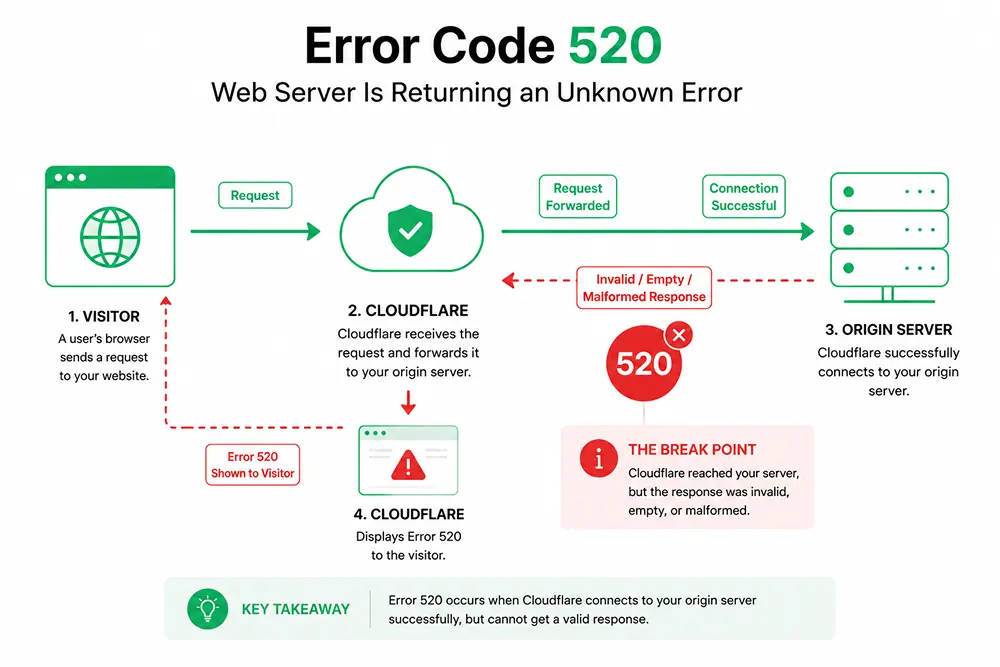
Error code 520 shows up as “Web server is returning an unknown error” on any site that runs behind Cloudflare. It means Cloudflare reached your server but got back a response it could not read.
If you run a website, this error can appear at the worst possible moment, right when traffic peaks or a deploy goes out. If you are just a visitor, it can look like the whole internet broke for you and nobody else.
In this blog, we will break down what causes error 520, how to fix it from both sides, and how it differs from other Cloudflare error codes.
Key Takeaways
- Error 520 means Cloudflare got an empty or broken response from your origin server.
- It is not a standard HTTP code. Cloudflare created it specifically for this scenario.
- Common causes include server crashes, blocked Cloudflare IPs, oversized headers, and bad HTTP/2 setup.
- Visitors can clear cookies, switch browsers, or wait a few minutes before trying again.
- Site owners should check server logs, whitelist Cloudflare IPs, and review header size.
- The fix depends on the origin server. Cloudflare is only the messenger here.
What Is Error Code 520
Error code 520 is a Cloudflare-specific status that appears when the origin server sends back an empty, unknown, or malformed response.
Unlike error codes such as 502 or 503, it is not part of the official HTTP standard. You will sometimes see it written as http 520, 520 status code, or 520 error code. All three point to the same Cloudflare specific message.
The Cloudflare docs describe it plainly: the origin server returned an empty, unknown, or unexpected response. In simple terms, your server picked up the connection and then sent back nothing useful. This can happen because of a crash, a firewall block, or a response that breaks Cloudflare’s formatting rules.
Common Causes of Error 520
Error 520, sometimes labeled cloudflare error 520 or just cloudflare 520, almost always traces back to a handful of repeat offenders on the origin side.
- Server crashes: Server crashes happen when a PHP process runs out of memory or hits a fatal error mid request. That leaves Cloudflare with nothing coherent to relay.
- Blocked Cloudflare IPs: Blocked Cloudflare IPs occur when a firewall or security plugin rejects Cloudflare’s requests, so the origin never replies properly.
- Oversized headers: Oversized headers appear when cookies or custom headers push past Cloudflare’s size limit, currently capped at 128 KB.
- HTTP/2 mismatches: HTTP/2 mismatches happen when a server announces HTTP/2 support but does not actually honor the protocol once Cloudflare connects.
- Empty responses: Empty responses occur when the server closes the connection before it sends a status code or response body.
How to Fix Error 520
Most Error 520 issues are server-side, but these simple checks are worth trying before contacting the site owner.
For Visitors
If error 520 shows up while you are just browsing, the problem sits on the site’s server, not your device. A few checks are still worth trying.
- Clear cookies: Clear cookies for that specific site since a bloated cookie file can trip Cloudflare’s header limit.
- Switch browsers: Switch browsers or try an incognito window to rule out a corrupted local cache.
- Check your VPN: Check your VPN status, since some proxy setups get flagged differently by the origin server.
- Wait it out: Wait it out for a few minutes. The site owner is likely already fixing a server side crash.
For Site Owners
If your own site is throwing error 520, start with the origin server, since that is where the fault lives.
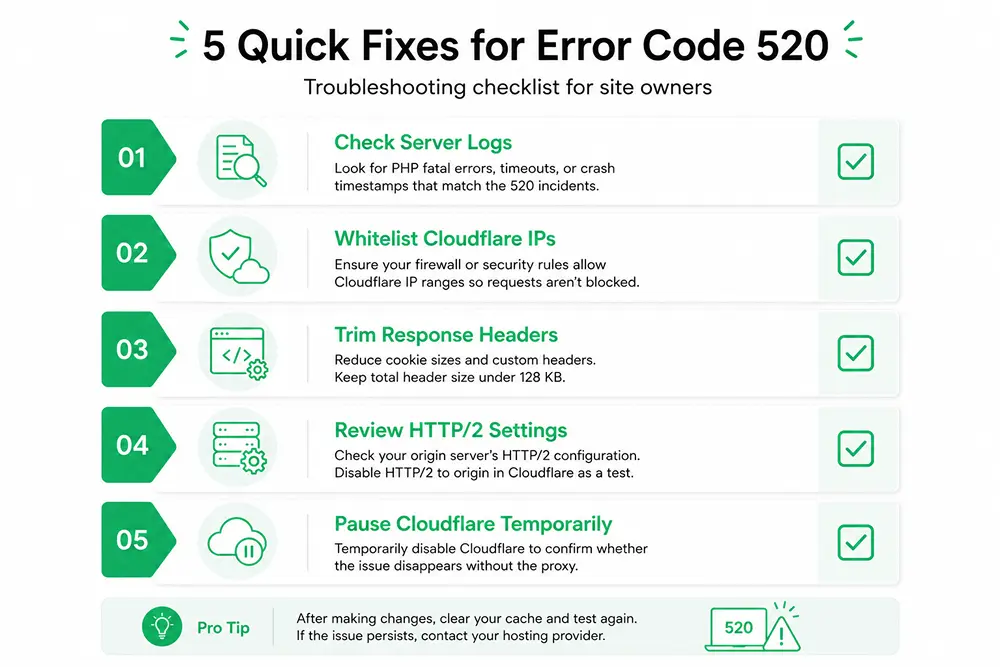
- Check server logs: Check server logs for PHP fatal errors or crash timestamps that line up with the 520 reports.
- Whitelist Cloudflare IPs: Whitelist Cloudflare IPs in your firewall so legitimate proxy requests never get silently dropped.
- Trim response headers: Trim response headers and cookies if a HAR file shows you are close to the size limit.
- Review HTTP/2 settings: Review HTTP/2 settings at the origin, or disable HTTP/2 to origin in Cloudflare’s Speed settings as a quick test.
- Pause Cloudflare temporarily: Pause Cloudflare temporarily to confirm whether the issue disappears once the proxy is out of the picture.
Error 520 vs Other Cloudflare Errors
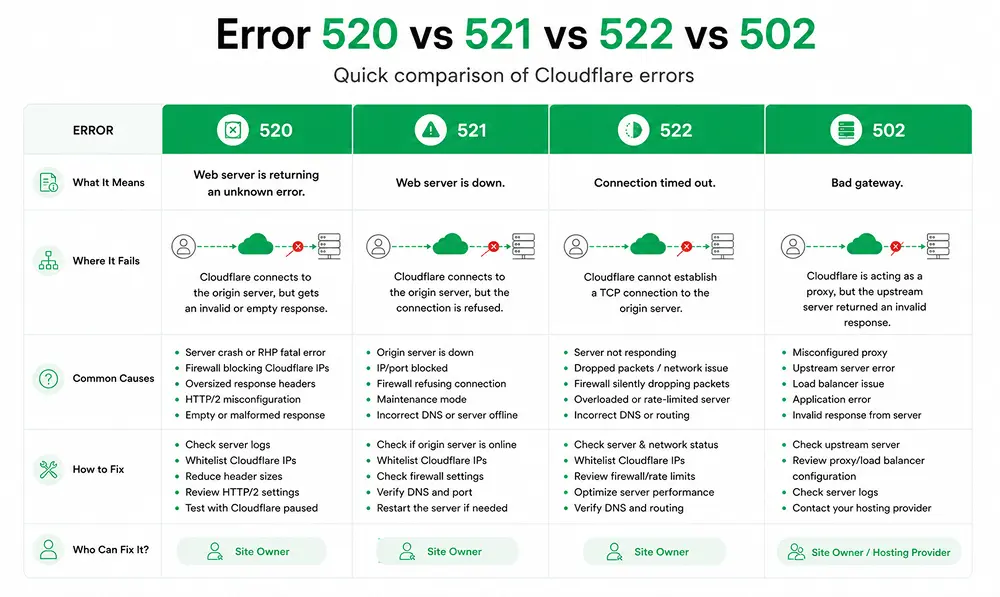
Error 520 gets mixed up with Cloudflare’s other 5xx codes fairly often, so it helps to separate them clearly.
- Error 520: Error 520 means Cloudflare connected fine, but the response it got back was empty or broken.
- Error 521: Error 521 means the origin server refused the connection outright, often because it is offline.
- Error 522: Error 522 means Cloudflare could not even establish a TCP connection before it timed out.
- 502 error: A 502 error is a standard HTTP code that usually points to a misconfigured proxy or upstream server, separate from Cloudflare’s own numbering.
The core difference is simple: connection success versus connection failure versus a bad response.
How to Prevent Error 520
A little prevention goes a long way toward keeping error 520 out of your logs for good.
- Monitor resources: Monitor resources like CPU and memory so a slow leak gets caught before it crashes your server.
- Keep IP lists current: Keep IP lists current by updating your Cloudflare allowlist whenever Cloudflare publishes new ranges.
- Raise timeout limits: Raise timeout limits on your server above 300 seconds to match Cloudflare’s own connection timeout.
- Update PHP regularly: Update PHP regularly, since outdated versions and plugins are a frequent trigger for mid request crashes.
Wrapping Up
Error 520 is annoying, but it is rarely permanent. The message is really Cloudflare’s way of saying it could not make sense of what your server sent back.
For visitors, a refresh or a cleared cache often solves it. For site owners, the fix lives in the error logs, the firewall rules, or the header sizes on your origin server. Once that root cause gets addressed, the error goes away and stays away.
A stable site keeps support conversations moving, and that matters as much as the fix itself.
FAQs
Is error 520 the same as my site being down?
Not exactly. Your server is reachable. It just sent Cloudflare a response that Cloudflare could not process, so the effect looks similar to visitors even though the cause is different.
Does error 520 affect SEO?
Persistent 520 errors can lower crawl rates and delay indexing, since search engines treat repeated 5xx responses as a signal the page is unreliable.
Can Cloudflare cause error 520 on its own?
Rarely. The error almost always originates at the origin server. Checking Cloudflare’s status page first can rule out a platform wide incident.
How long does error 520 usually last?
It depends on the cause. A crashed process can recover in minutes, while a firewall block or header issue stays until someone fixes the configuration.
Want a system that makes ticket handling this smooth? Fluent Support brings structure and clarity to every request so your team always knows exactly what to do next. See how it works.
Related Articles
Fluent Support 2.4.7: Ticket Filters, 5x Faster Tickets and Smart Customer Search
Fluent Support 2.4.7 brings a Ticket Filters sidebar…Customer Success Best Practices for Small Teams
In this blog, we’ve discussed customer success in…



Add your first comment to this post