

Is “AI Brain Fry” Burning Out Your Support Team?

By Prosanjit Dhar
March 18, 2026
Last Modified: March 30, 2026


Imagine you’ve just equipped your customer support team with the best AI tools money can buy. On paper, your agents should be less stressed, more productive, and finally free to focus on the conversations that actually need a human touch.
But three months in, your best agents are exhausted. Response times are slipping. Escalations are up. And a couple of your most experienced people have quietly started looking for other jobs.
This might sound familiar in the coming days, or it might already be happening now.
According to a landmark new study by Boston Consulting Group (BCG), published in Harvard Business Review in March 2026.
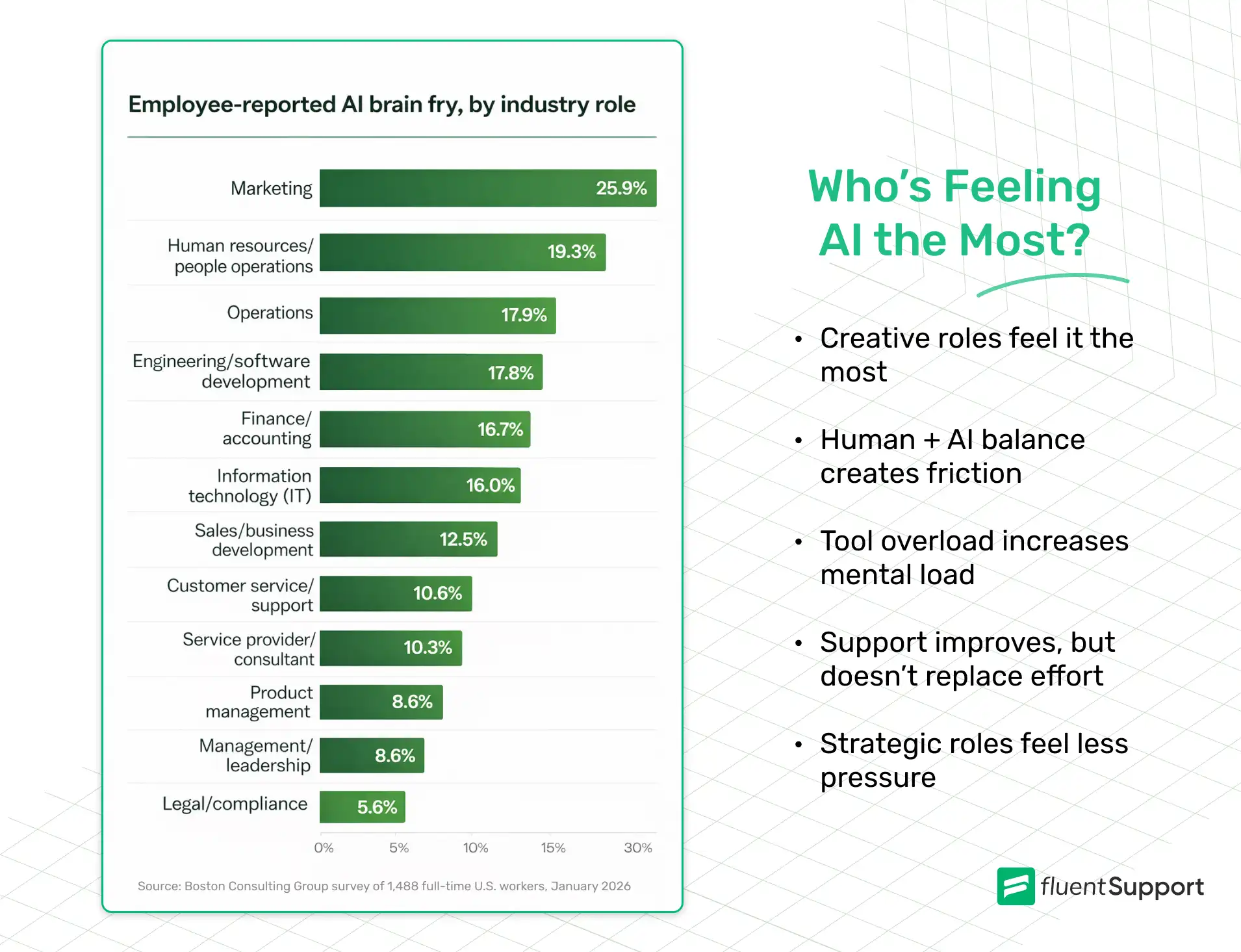
It could be something researchers are calling “AI brain fry”. A distinct form of acute cognitive exhaustion caused specifically by the intensive oversight and management of AI tools.
And if you run a customer support team, your agents may be sitting right at the center of it.
Key takeaways for Support Team Leaders
- “AI brain fry” is acute cognitive exhaustion from AI oversight. Distinct from traditional burnout and triggered specifically by managing AI tools
- Customer support agents are particularly vulnerable because their core work is AI oversight, such as monitoring bots, reviewing suggestions, and verifying outputs.
- Productivity peaks at 3 AI tools; beyond that, cognitive load outweighs the benefits.
- AI brain fry leads to 39% more major errors and 39% higher intent to quit, both critical risks for support teams.
- The fix is not less AI; it is better-designed workflows that eliminate toil instead of adding oversight burden.
- Managers who openly discuss AI with their teams reduce brain fry scores by 15%.
- Organizations that value work-life balance have 28% lower mental fatigue, so this should be actively reinforced.
What is “AI Brain Fry”?
AI brain fry is defined as mental fatigue resulting from excessive use, interaction with, or oversight of AI tools beyond one’s cognitive capacity.
The BCG study surveyed 1,488 full-time US workers across industries and found that 14% of AI users had experienced it. Workers described it as a “buzzing” sensation, mental fog, difficulty focusing, slower decision-making, and headaches.
One senior engineering manager described it as,
Feeling like having “a dozen browser tabs open in my head, all fighting for attention.”
Crucially, AI brain fry is not the same as burnout.
Burnout is a slow-burning and emotional state of chronic workplace stress. It builds over months and is tied to how you feel about your job overall.
“AI brain fry” is what happens when your working memory, attention systems, and executive control are pushed past their limits in a single session. The good news is that when you step away, it goes away. But the bad news is that if your team is experiencing it regularly, the business costs are severe.
When using AI leads to “Brain Fry”?
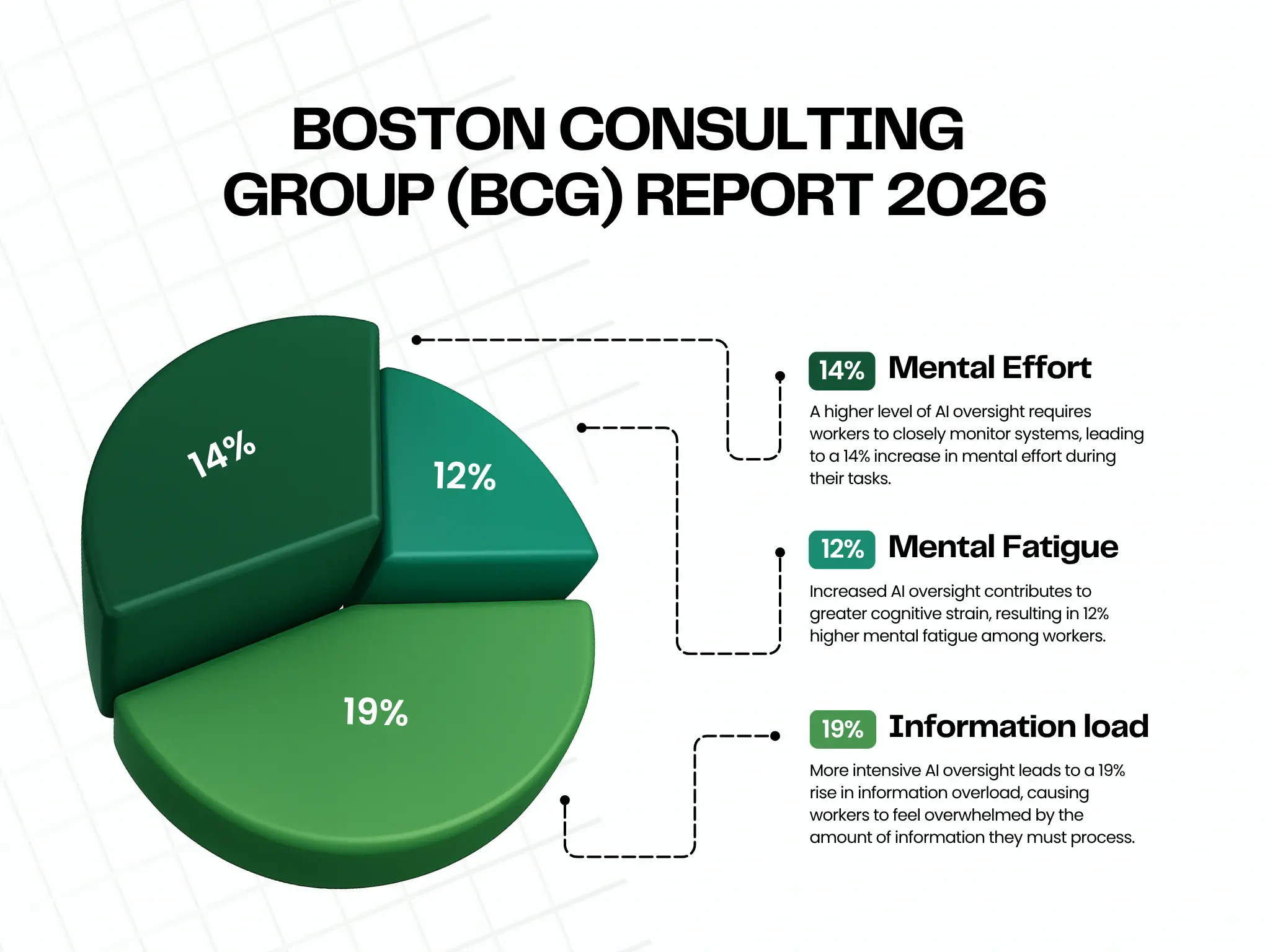
The BCG study found that the most mentally taxing form of AI engagement is oversight. That means actively monitoring AI outputs rather than just using AI to replace tasks.
Workers doing heavy AI oversight reported:
Now think about what a modern AI-assisted support agent actually does all day.
They’re not just having one conversation at a time. Instead, they’re simultaneously:
- Monitoring AI chatbot conversations to decide when to step in.
- Review and edit AI-generated reply suggestions before sending.
- Verifying that AI-drafted responses are factually correct and on-brand.
- Handling the complex escalations that the AI couldn’t resolve.
- Switching between multiple tools like helpdesk, chatbot dashboard, CRM, knowledge base, and sentiment tracker
Every single one of these tasks is a form of AI oversight. In many cases, they’re becoming quality inspectors on a production line that never stops.
Carl Hendrick, writing about the BCG research in his Substack newsletter, put it well:
“The work looks like oversight. What it actually requires is a form of sustained, expert, hypervigilant attention that human cognition was simply not designed to sustain.”
The “Workslop” problem in customer support
There’s another layer to this that’s specific to customer support work: the problem of workslop.
Workslop, a term coined by researchers at Stanford, refers to AI-generated content that looks finished and polished but is actually hollow or inaccurate.
In customer support, workslop shows up when:
- An AI suggests a reply that’s technically fluent but factually wrong about your product.
- A chatbot gives a confident-sounding answer that doesn’t actually solve the customer’s problem.
- AI-generated macros get used without review, sending generic responses to highly specific issues.
The cruel irony of workslop is that it doesn’t announce its own inadequacy. It arrives formatted, confident, and complete-looking. That means your agent has to read every AI output with genuine suspicion, searching for the subtle error hiding inside an otherwise coherent response. That’s exhausting in a way that’s very different from simply writing a reply yourself.
As Hendrick writes, this places an evaluation burden on the human that is
“Heavier than it might initially appear.”
The agent is not correcting an obvious gap. Instead, they’re assessing something that presents itself with the authority of a finished product.
The three-tool cliff: How many AI tools are too many?
One of the most actionable findings from the BCG study involves the relationship between the number of AI tools in use and productivity.
Researchers found a striking pattern:
- 1 tool → Decent productivity gains
- 2 tools → Significant productivity gains
- 3 tools → Peak productivity
- 4+ tools → Productivity drops sharply
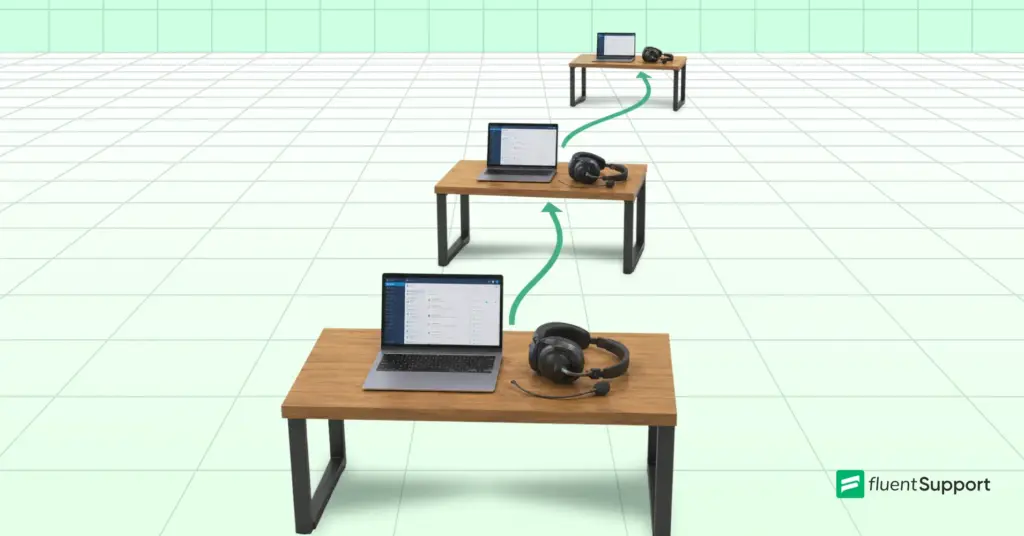
They called it the “three-tool cliff.” After three AI tools, the multitasking overhead outweighs the productivity benefits. Workers aren’t doing more; they’re just managing more, starting more, stopping more, and governing more output simultaneously.
For customer support teams, this is a real and immediate risk. It’s easy to accumulate AI tools quickly. Before long, your agents are toggling between five or six AI systems per conversation, and the cognitive overhead is invisible until it isn’t.
Ask yourself:
How many AI tools are each of your agents actively interacting with per shift? If the answer is four or more, you may already be past the cliff.
The business cost of ignoring this
AI brain fry isn’t just a well-being issue. It carries hard business consequences that should matter to every support team leader.
The BCG study found that workers experiencing AI brain fry:
- Make major errors 39% more frequently than those who don’t.
- Experience 33% more decision fatigue.
- Are 39% more likely to actively intend to quit.
In customer support, where error rates directly affect customer satisfaction scores, and where agent turnover is already one of the industry’s most persistent problems, these numbers should set off alarm bells.
Think about what a 39% increase in error frequency looks like in practice. Wrong refunds, incorrect product information, missed SLA commitments, unresolved escalations. And a 39% increase in intent to quit among your heaviest AI users means the very agents who are most engaged with your AI stack are the ones most likely to walk out.
The BCG study makes this point directly:
“In many cases, employees using AI with high intensity are today’s superstars, talent whom the company must retain.”
Signs your support team may be experiencing “AI Brain Fry”
Because AI brain fry is different from traditional burnout, the signals can be easy to miss in a standard check-in or team meeting. Here’s what to watch for.
In performance metrics:
- Slower average handle times despite having more AI assistance.
- More escalations despite AI being designed to reduce them.
- Increase in minor errors like wrong ticket routing, copy-paste mistakes, and skipped fields.
- Drop in CSAT scores that can’t be explained by product issues.
In agent behavior:
- Re-reading the same ticket or AI suggestion multiple times before acting.
- Second-guessing decisions they would previously have made confidently.
- Impatience or irritability with customers or colleagues, especially mid-shift.
- Agents report feeling busy but unproductive when managing tools rather than helping customers.
In conversations:
- Agents saying things like “I spend more time checking the AI than I do actually talking to customers.”
- Complaints about not knowing when they’re “done” reviewing an AI response.
- A sense that the AI is creating more work, not less.
If you’re hearing or seeing more than two or three of these, it’s worth investigating further.
What managers and team leaders can do
The good news from the research is that AI brain fry is both preventable and treatable. And that organizational and managerial actions have a measurable impact.
1. Redesign workflows, don’t just add AI on top
The biggest mistake support teams make is layering AI tools onto existing processes without rethinking those processes.
The BCG study found that when teams embed AI deeply into collective workflows, such as treating it as a shared team capability rather than an individual’s personal tool, cognitive burden drops significantly.
In practice, this means:
- Which parts of the support journey does AI genuinely handle end-to-end?
- Which parts still need human judgment?
Draw clear lines between them and design your workflow around those lines, rather than asking agents to figure it out conversation by conversation.
2. Set a tool limit and stick to it
Given the three-tool cliff finding, it’s worth auditing your AI stack deliberately.
For each AI tool your agents use, ask:
Is this actively reducing cognitive load, or is it adding to the oversight burden?
If an agent can’t clearly answer, “This tool saves me time and mental effort,” it may be adding to the problem.
Consider setting a soft limit: agents should not be actively managing more than three AI tools per shift. Anything beyond that requires a workflow redesign.
3. Be explicit about what AI is for and what it isn’t
The BCG study found that when organizations communicate clearly about AI’s role, mental fatigue scores are lower. When they don’t, ambiguity itself becomes a stressor.
For support teams, this means being explicit:
- Is the AI chatbot supposed to handle a query completely, or is it supposed to gather information and route?
- Are AI-suggested replies a starting point for editing, or a final draft that just needs approval?
- Is the agent responsible for every word in an AI-assisted response, or only for what they change?
Ambiguity in these expectations forces agents to invent their own rules, which is cognitively exhausting and leads to inconsistency.
4. Talk to your team and make it safe to do so
The BCG study found that workers whose managers actively answered their questions about AI had 15% lower mental fatigue scores. Simply being available and engaged makes a measurable difference.
But there’s a complication specific to customer support: agents may fear that admitting they’re struggling with AI tools signals that they’re not keeping up.
Especially in a climate where AI efficiency is being used to justify headcount decisions. Leaders need to actively counteract this by separating the conversation about AI usage from performance evaluation.
Make it explicitly safe to say:
“I’m finding this tool adds more work than it saves.”
That feedback is operationally valuable. It helps you redesign workflows that actually work.
5. Use AI to eliminate toil, not just to scale volume
The BCG study found something hopeful: when AI is used to genuinely replace repetitive, low-value tasks, burnout scores drop 15%, and workers feel more socially connected. The mechanism seems to be that freed-up time gets reinvested in energizing, human-centered work.
In customer support, the most natural targets for this kind of AI use are: ticket tagging and routing, template-based responses to truly common queries, internal summarization of long ticket threads before handoff, and after-contact work like logging and categorization.
If your AI is successfully handling these tasks end-to-end, your agents will feel the relief. The problem is when “AI assistance” really means “AI generates a draft and the human does all the verification work.”
That’s not a relief. That’s just the same work with extra steps.
6. Measure outcomes, not AI activity
One of the most damaging practices the BCG study highlights is incentivizing AI usage itself, rather than actual outcomes.
For customer support, this translates to: don’t reward agents for using AI on every ticket. Reward them for resolution quality, CSAT, first-contact resolution, and customer effort scores.
If an agent gets a better outcome by typing a reply themselves, that should be completely fine. The goal is customer satisfaction, not AI utilization rates.
A note on the positive side
It would be wrong to frame all of this as an argument against AI in customer support. The research is clear that AI, deployed thoughtfully, can meaningfully improve agent wellbeing and reduce the emotional exhaustion that causes traditional burnout.
When AI genuinely absorbs the worst parts of the job, agents get time back for the conversations that matter. Those tend to be more complex, more human, and more satisfying. Agents who work this way report feeling more engaged and more socially connected to their teams.
The distinction the research makes is important: the problem is not AI itself.
The problem is AI that expands the scope of oversight without eliminating any of the underlying work.
Wrapping up
“AI brain fry” is real, it’s spreading, and it’s hitting the workers who are doing the most to embrace AI tools, including, very likely, some of your best support agents.
The BCG study is clear that the difference between AI that empowers and AI that overwhelms is not how much AI a team uses. It’s how intentionally leaders design the human role within it.
For customer support teams specifically, that means auditing your AI stack honestly, setting clear expectations about what oversight actually looks like, protecting your agents’ cognitive capacity as carefully as you protect their schedule, and using AI to eliminate toil rather than simply multiply workload.
Your support agents are already doing one of the cognitively demanding jobs in your company. That’s holding emotional space for frustrated customers while solving complex problems in real time.
Adding AI oversight on top of that, without redesigning the work, is a recipe for the exact burnout you were trying to prevent.
Get the design right, and AI becomes the relief it was always supposed to be.
Start off with a powerful ticketing system that delivers smooth collaboration right out of the box.
Related Articles
Customer Service Channels Explained: Types, Metrics, and How to Choose
A deep breakdown of the customer service channels…Customer Success Team: Roles, Structure, and How to Build One
A customer success team proactively helps customers reach…

Leave a Reply