
Why Are My Emails Going to Spam? Reasons and How to Fix Them

By Uttam Kumar Dash
May 15, 2026
Last Modified: May 15, 2026


You set up SPF, DKIM, and DMARC. Your subject line is clean. Your content is not salesy at all. And still, your emails are going to spam. It is one of the most disorienting deliverability problems because nothing looks obviously wrong, yet something clearly is.
The truth is that spam filters today are far more layered than most senders realize. They evaluate your domain reputation, engagement signals, sending patterns, list quality, and content structure all at once. Missing the mark on any one of them can quietly push your emails into the spam folder, even when everything else looks fine.
In this blog, we will walk through every real reason your emails might be landing in spam, how each fix works step by step, and what you need to maintain over time to stay in the inbox.
TL;DR
- Authentication is necessary but not sufficient on its own
- Sender reputation, list quality, and engagement rates are equally critical
- Content structure, HTML quality, and sending volume patterns all affect spam scoring
- Gmail and Yahoo now enforce one-click unsubscribe and stricter spam rate thresholds
- Most deliverability problems have a root cause that compounds over time — fix the foundation first
What spam filters are actually evaluating
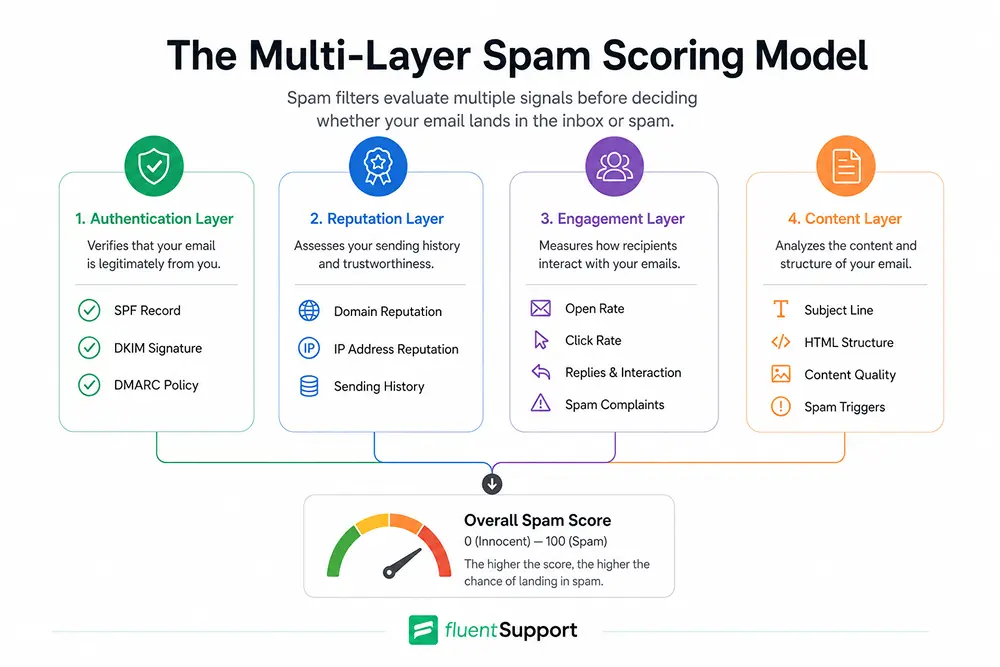
Spam filters are not simple keyword detectors. Gmail, Outlook, Yahoo, and other providers use multi-signal algorithms that assign a score to each incoming email. If that score crosses a set threshold, the email goes to spam regardless of your intent.
According to Statista, “nearly 45.6% of all emails worldwide were identified as spam in 2023.” That number climbed above 46.8% by December 2024. Spam filters have tightened dramatically in response to this volume, and legitimate senders now regularly get caught in rules designed for bad actors.
The signals these filters evaluate include your sending domain reputation, IP address history, whether your authentication records are properly configured, how recipients engage with your emails, whether you have clean list hygiene, and whether your content or formatting resembles known spam patterns. All of it runs together. That is why a technically clean email can still land in spam if your domain reputation is weak or your engagement rates have dropped.
Why are my emails going to spam?
The reasons fall into distinct categories. Understanding which one applies to you is the first step toward fixing it.
1. Authentication Is missing or misconfigured
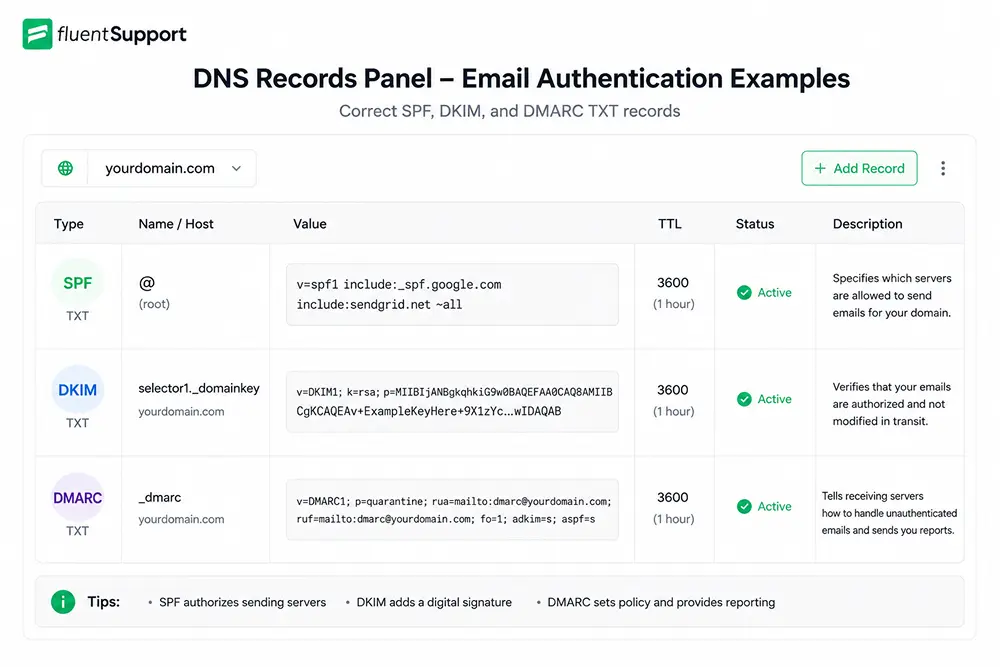
Email authentication is the technical baseline every sender needs before anything else matters. Three protocols work together to establish your legitimacy with receiving mail servers.
SPF (Sender Policy Framework) defines which IP addresses are authorized to send mail on behalf of your domain. DKIM (DomainKeys Identified Mail) adds a cryptographic signature to your outgoing emails that proves they were not altered in transit.
DMARC (Domain-based Message Authentication, Reporting, and Conformance) ties the two together and tells receiving servers what to do when either check fails — reject the message, quarantine it, or let it pass.
When any of these records are missing, incorrectly formatted, or in conflict with each other, spam filters flag the email almost immediately. Missing DMARC alone is enough to cause consistent spam folder placement, even when your content is perfectly fine.
How to fix it, step by step:
- Step 1: Log into your domain registrar or DNS provider and check whether SPF, DKIM, and DMARC TXT records exist for your sending domain.
- Step 2: Use a free tool like Google Postmaster Tools or MXToolBox to verify that each record is correctly configured and passing checks.
- Step 3: If DMARC is missing, add a basic record starting with a p=none policy, which monitors without blocking, then move to p=quarantine and eventually p=reject once you have confirmed all legitimate mail streams are authenticated.
- Step 4: After any changes to your DNS records, re-test using MXToolBox to confirm the records propagated correctly.
- Step 5: Repeat this verification process whenever you change email service providers or add a new sending tool.
As Google’s Neil Kumaran stated when announcing Gmail’s new 2024 requirements, “Starting in 2024, we’ll require bulk senders to authenticate their emails, allow for easy unsubscription and stay under a reported spam threshold.” Authentication is no longer optional at any sending volume.
2. Weak sender reputation
Your domain and sending IP both carry a reputation score that mail providers track over time. This score is built from your cumulative sending history, including bounce rates, spam complaint rates, engagement levels, and whether your sending volume is consistent.
A brand-new domain starts with no reputation at all, which is why new senders often struggle with deliverability even when doing everything correctly. A domain that has previously sent to poor-quality lists, generated complaints, or been associated with spam activity can develop a damaged reputation that takes months to repair.
If you are using a shared IP address through your email service provider, you also inherit some of the reputation of other senders on that same IP. This is one reason why reputable ESP infrastructure matters.
How to fix it, step by step:
- Step 1: Set up Google Postmaster Tools for your sending domain to monitor your Gmail-specific domain reputation score.
- Step 2: Check your domain and IP against public blocklists using MXToolBox or MultiRBL to see whether you appear on any known spam databases.
- Step 3: If your reputation is poor, stop all large-volume sends immediately and focus on sending small batches only to your most engaged subscribers.
- Step 4: Gradually increase volume as your engagement metrics improve, which signals to mail providers that your emails are wanted.
- Step 5: Maintain this gradual, consistent sending pattern going forward, since sudden spikes after quiet periods look like compromised account behavior.
3. High bounce rates
Every hard bounce, which occurs when an email address does not exist, sends a negative signal to mail providers. A pattern of high hard bounces tells spam filters that you are not maintaining your list, and that behavior is strongly associated with purchased lists and scraping tactics.
Even a bounce rate above 2% starts to damage your sender reputation meaningfully. Most professional email programs aim to keep hard bounces below 0.5%.
How to fix it, step by step:
- Step 1: Run your existing list through an email verification tool before your next send to identify invalid addresses.
- Step 2: Remove every hard bounce immediately after it occurs. Do not send to a hard-bounced address again.
- Step 3: Implement double opt-in for all new sign-ups so that unverified or mistyped addresses never make it onto your active list.
- Step 4: Monitor your bounce rate report after every campaign and investigate any sudden increases, since a spike often indicates a form abuse problem or a data import issue.
- Step 5: Review your email management practices across your team to ensure list hygiene is treated as an ongoing process rather than a one-time cleanup.
4. Low recipient engagement
This is the reason most senders overlook, and it is increasingly the deciding factor for Gmail placement. Mail providers track how recipients interact with your emails. When a large portion of your list consistently ignores your emails, never opens them, never clicks anything, and never replies, those engagement signals tell spam filters that your emails are not wanted.
Over time, consistent low engagement pushes your emails further into spam or the promotions tab. The filter is not judging your content in isolation. It is comparing your emails to what that specific recipient typically engages with, which means personalization and relevance matter far more than generic broadcast messaging.
How to fix it, step by step:
- Step 1: Segment your list and identify subscribers who have not opened or clicked any email in the past 90 days.
- Step 2: Send a re-engagement campaign to that segment. Ask them directly whether they still want to receive your emails.
- Step 3: Remove anyone who does not respond to the re-engagement campaign within a reasonable window. A smaller, engaged list delivers better inbox placement than a large, disengaged one every time.
- Step 4: Improve the relevance of your content by sending based on subscriber interest, behavior, or purchase history rather than blasting the entire list with every send.
- Step 5: Monitor your open rates, click rates, and spam complaint rates after every send using your email platform’s analytics.
5. Spam trigger words and content issues
Content is still a factor, though modern spam filters weigh it less heavily than reputation signals. Certain patterns in your subject line, preview text, or email body can push your spam score up enough to cause placement issues, especially with smaller mail servers and corporate inboxes that still rely heavily on content filtering.
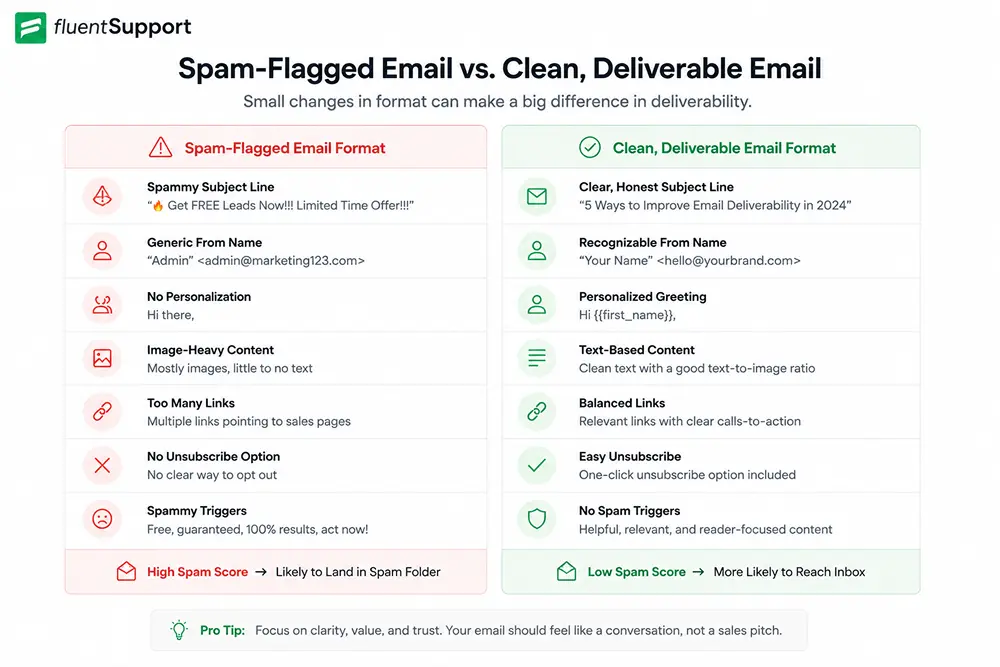
Subject lines with all-caps words, multiple exclamation marks, or aggressive sales phrases like “ACT NOW,” “LIMITED TIME,” or “100% FREE” are among the fastest ways to trigger a filter. The same applies to misleading preview text, excessive links, and emails that are almost entirely images with very little actual text.
Broken or messy HTML is another content-layer trigger. Sloppy code is a known pattern in spam because bad actors do not take the time to clean their markup. Even legitimate senders using poorly formatted templates can get flagged as a result.
How to fix it, step by step:
- Step 1: Review your subject line and preview text for aggressive promotional language. Write copy that is specific and honest rather than urgency-driven.
- Step 2: Aim for a text-to-image ratio of roughly 60% text and 40% images. Do not send emails that are entirely image-based.
- Step 3: Add descriptive alt text to every image in your email.
- Step 4: Remove URL shorteners like bit.ly from all email links. Use your own domain for tracking links instead.
- Step 5: Use a tested email template with clean HTML. Run your email through an HTML validator before sending and check rendering across multiple clients if possible.
- Step 6: Avoid attaching files to marketing emails. If you need recipients to download something, host it on your website and link to it.
6. No unsubscribe option
A missing or broken unsubscribe link is both a legal violation and a direct deliverability risk. When recipients cannot easily opt out, they hit the spam button instead. Each spam report damages your sender reputation and increases the likelihood that future emails land in spam for everyone on your list.
The CAN-SPAM Act requires a clear, working unsubscribe mechanism in every commercial email. GDPR adds further requirements for EU recipients, including documented consent and prompt removal.
Beyond compliance, Google’s official 2024 sender requirements now mandate one-click unsubscribe for all bulk senders sending to Gmail. Unsubscribe requests must be processed within two days. Yahoo has implemented equivalent requirements.
How to fix it, step by step:
- Step 1: Add a visible, clearly worded unsubscribe link to the footer of every commercial email you send.
- Step 2: Implement the List-Unsubscribe header in your email’s technical setup so that Gmail and other providers can surface the unsubscribe option directly in their interface.
- Step 3: Process unsubscribe requests within 48 hours. Do not continue sending to any address after they have requested removal.
- Step 4: Audit your templates to confirm the unsubscribe link actually works. Broken links are treated the same as a missing link by spam filters.
7. Sudden volume spikes
Sending a few hundred emails one week and tens of thousands the next is a classic spam signal. Mail providers expect gradual, consistent growth in sending volume. A sudden spike suggests either a compromised account or mass spam activity, and filters respond accordingly.
This matters most when you are launching a new campaign to a previously unused segment, switching to a new email service provider, or sending to a purchased or imported list for the first time.
How to fix it, step by step:
- Step 1: Plan any volume increase gradually. A safe approach is to increase your daily sending volume by no more than 20% to 30% per week.
- Step 2: If you are migrating to a new sending infrastructure, warm up the new domain or IP by sending first to your most engaged subscribers in small batches.
- Step 3: Monitor your spam complaint rate and bounce rate closely during any volume ramp-up.
- Step 4: Schedule your campaigns in advance so that sending volume is spread across days rather than concentrated in a single blast.
8. Unprotected sign-up forms
Form abuse is an underappreciated but real cause of spam problems. Bots and automated scripts will fill out unprotected forms with fake, invalid, or recycled email addresses.
Those addresses then generate hard bounces or trigger spam traps on your first send, which damages your reputation quickly.
How to fix it, step by step:
- Step 1: Add CAPTCHA verification or honeypot fields to all sign-up forms to prevent bot submissions.
- Step 2: Implement rate limiting on form submissions to block repeated submissions from the same IP address in a short window.
- Step 3: Enable double opt-in for all forms. This ensures that only real people with access to the submitted email address end up on your active list.
- Step 4: Monitor your list for unusual sign-up spikes, which can indicate an active bot attack on your forms.
9. Sending from a free domain
Using a Gmail, Yahoo, or Hotmail address to send business or marketing emails is a significant deliverability risk. Free domains cannot be properly authenticated for bulk sending the same way a custom domain can, and receiving mail servers treat them with suspicion at any meaningful volume.
Google and Yahoo’s 2024 sender requirements explicitly address this. Bulk sending from a free domain is likely to result in rejection or consistent spam folder placement.
How to fix it, step by step:
- Step 1: Register a custom domain for your business if you do not already have one.
- Step 2: Set up a professional email address on that domain as your primary sending address.
- Step 3: Configure SPF, DKIM, and DMARC records for the custom domain before sending any campaigns.
- Step 4: Make sure the “From” name and address are consistent across all your emails so recipients recognize who is sending.
10. Being listed on a blocklist
If your sending domain or IP address appears on a public email blocklist, your messages may be blocked outright or automatically filtered to spam on any mail server that queries that list.
Blocklisting can happen because of previous poor sending behavior, because you shared an IP with a bad actor, or because your domain was spoofed in a phishing campaign without your knowledge.
How to fix it, step by step:
- Step 1: Check your domain and sending IP regularly against blocklists using MXToolBox or MultiRBL. Check at minimum once per month and after any deliverability incident.
- Step 2: If you find yourself listed, do not submit a removal request immediately. First identify and fix the root cause, whether that is a compromised account, poor list hygiene, or high complaint rates.
- Step 3: Once the underlying issue is resolved, submit a delisting request to the blocklist operator. Most major lists have a self-service removal process.
- Step 4: After removal, monitor your deliverability closely for two to four weeks to confirm the issue does not recur.
The role of List quality in everything
Almost every deliverability problem traces back to list quality at some level. Sending to addresses that did not opt in, keeping inactive subscribers, ignoring bounce data, and failing to process unsubscribes all create conditions that trigger spam filters repeatedly.
A clean, permission-based list with strong engagement signals is the most reliable foundation you can build. Just follow the email list management guide to keep a list healthy over time, including handling bounces, managing inactive contacts, and running proper re-engagement campaigns.
For teams handling high volumes of customer email, structured workflows also matter. Using a system like an email ticketing system helps support teams manage customer conversations in an organized way, which reduces the risk of sending patterns that appear spammy to mail providers due to inconsistent volume or disorganized routing.
Transactional emails go to spam too
A common misconception is that transactional emails, such as order confirmations, password resets, and account notifications, are immune to spam filters. They have better deliverability on average because they are expected and triggered by user action.
But they can still go to spam if your domain reputation is poor, your authentication is broken, or the email content resembles a phishing template.
The best practice is to separate your transactional and marketing email streams using different subdomains. For example, use mail.yourdomain.com for marketing campaigns and notify.yourdomain.com for transactional messages.
This isolation ensures that a spike in spam complaints from a marketing campaign does not drag down the delivery of your critical transactional messages. Many support and product teams handle this using email piping to route replies and notifications cleanly through their infrastructure without mixing streams.
Quick reference: spam fix checklist
- Use this after diagnosing your specific issue to confirm you have covered each area:
- Verify that SPF, DKIM, and DMARC records are all present, correctly configured, and passing checks.
- Remove hard bounces immediately after every send and keep your bounce rate below 0.5%.
- Add a working one-click unsubscribe link to every commercial email.
- Process all unsubscribe requests within 48 hours.
- Remove or suppress subscribers who have not engaged in the past 90 days.
- Audit your subject lines and email body for spam trigger words, all-caps text, and misleading copy.
- Replace URL shorteners with tracking links on your own domain.
- Check your HTML for broken markup before every send.
- Check your domain and IP against blocklists at least once per month.
- Increase sending volume gradually rather than in sudden spikes.
- Add CAPTCHA or honeypot protection to all sign-up forms.
- Send from a custom domain with full authentication, never a free email service.
Wrapping up
Emails going to spam is almost never caused by a single obvious mistake. It is usually a combination of signals, any one of which alone might not cause a problem, but together push your emails past the spam threshold.
Authentication is where to start. List quality is where to sustain progress. Engagement is what separates senders who recover from those who never fully do.
Work through each reason methodically, prioritize the ones that apply to your situation, and track your metrics over time. Deliverability rewards consistency more than any single fix.
Want a system that makes ticket handling this smooth? Fluent Support brings structure and clarity to every request so your team always knows exactly what to do next. See how it works.
FAQs
How do I check if my emails are going to spam without asking recipients?
Use seed testing tools to send your email to a network of test accounts across multiple providers and track placement. You can also use Google Postmaster Tools for Gmail-specific spam rate data. Many ESPs offer inbox placement testing built into their platform.
Does changing the subject line stop emails from going to spam?
The subject line is one content signal among many. A cleaner subject line helps, but if your domain reputation or authentication is broken, changing the subject line alone will not fix inbox placement. Address the technical and reputation issues first.
Why are my emails going to spam in Gmail but not Outlook?
Gmail and Outlook use different spam scoring algorithms with different thresholds and priorities. Gmail places heavy weight on engagement signals and has strict spam rate limits under its 2024 sender requirements.
Outlook prioritizes IP reputation and content filters more heavily. Check Google Postmaster Tools for your Gmail-specific domain reputation and spam rate data.
How long does it take to fix email deliverability issues?
Authentication fixes are immediate. Reputation recovery depends on how damaged the reputation is. Minor issues can resolve in a few weeks.
Significant damage from high complaint rates or blocklisting may take two to three months of consistent, clean sending before inbox placement fully normalizes.
Why are my outreach emails going to spam even when they are personalized?
Cold outreach emails face higher scrutiny because recipients did not opt in. Even well-personalized cold emails get flagged due to domain age, low sender reputation, or content patterns associated with sales prospecting.
Warming your domain gradually, sending low initial volumes, and earning genuine replies all help build the reputation that improves placement over time.
Related Articles
WordPress Debug Mode: How to Enable WP_DEBUG and Read the Debug Log (Step by Step)
Enable WordPress debug mode, log PHP errors safely,…Retail Customer Service: What It Takes to Turn Shoppers Into Repeat Customers
Retail customer service is the support a retailer…



Leave a Reply