

How to Submit URLs to Google for Indexing (4 Methods)

By Md. Sajid Sadman
May 7, 2026
Last Modified: May 7, 2026


Publishing a page does not mean Google knows it exists. Until Google crawls and indexes your URL, it will not appear in any search result, no matter how good the content is.
That gap between publishing and getting indexed is where a lot of traffic gets lost. Submitting your URL to Google closes that gap faster than waiting for Googlebot to stumble across it on its own.
This guide covers every practical method for submitting URLs to Google, what to do when indexing still does not happen, and the mistakes that quietly slow the whole process down.
TL;DR
What does submitting a URL to Google mean?
Submitting a URL to Google is a manual signal that tells Googlebot to crawl a specific page and consider adding it to the search index. It speeds up discovery but does not guarantee the page will be indexed.
What are the methods for submitting URLs to Google?
The four main methods are the URL Inspection Tool in Google Search Console, sitemap submission, internal linking from already-indexed pages, and the Google Indexing API for automated or high-volume needs.
How do you use the URL Inspection Tool?
Log in to Google Search Console, paste the URL into the search bar at the top, wait for Google to check its index status, then click ‘Request Indexing.’ Google will run a live test and add the URL to its priority crawl queue.
Why would a submitted URL still not get indexed?
The most common reasons are a noindex tag on the page, a robots.txt block preventing crawling, thin or duplicate content, a canonical tag pointing to a different URL, or crawl budget limitations. The URL Inspection Tool surfaces most of these issues in its live test report.
What best practices should I follow when submitting URLs?
Only submit pages with substantive, original content. Fix any technical issues before submitting. Ensure your site uses HTTPS. Do not resubmit the same URL repeatedly. Keep pages mobile-friendly since Google uses mobile-first indexing.
What Does Submitting a URL to Google Actually Do?
Submitting a URL to Google is a manual signal that tells Googlebot to crawl a specific page and consider adding it to the search index. It does not guarantee indexing, and it does not influence rankings. What it does is move your page into Google’s priority crawl queue, which speeds up the discovery process compared to waiting for natural crawling.
Without submission, Google finds pages through links, sitemaps, or revisiting previously crawled pages. For new sites, pages with few backlinks, or freshly updated content, that natural process can take days to weeks. Submitting directly cuts that waiting time significantly.
Methods to submit URLs to Google
There are four reliable ways to submit URLs to Google for indexing:
- Use the URL Inspection Tool in Google Search Console
- Submit a sitemap through Google Search Console
- Add internal links from already-indexed pages
- Use the Google Indexing API for automated bulk submission
Each method serves a different situation. The sections below break down exactly how to use each one.
Method 1: Use Google Search Console’s URL Inspection Tool
The URL Inspection Tool in Google Search Console is the easiest way to submit your URLs to Google. It’s like handing Google a VIP ticket to your latest content.
Here’s how to use it step by step:
Step 1: Log in to Google Search Console. (If you don’t have an account yet, don’t worry. I’ve included instructions in the note below. It’s totally free and straightforward)
Step 2: Paste your URL into the search bar at the top of the dashboard. Or you can click on the URL inspection and paste it.
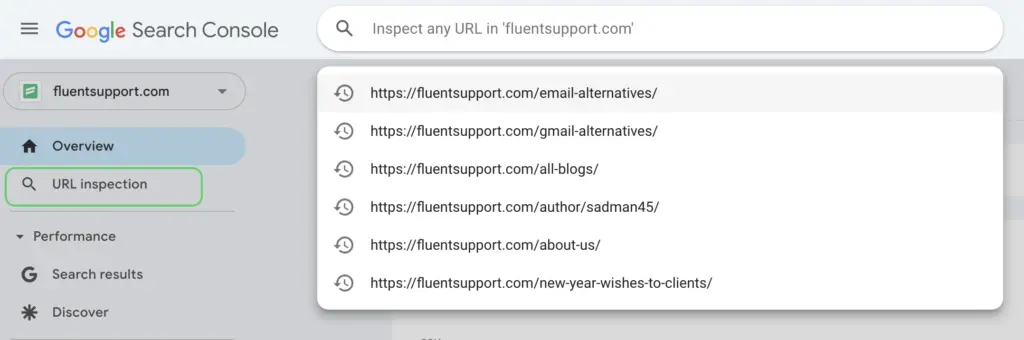
Step 3: The tool will check if your URL is already indexed. If it’s not, you’ll see a “Request Indexing” button. Click it, and you’re done!
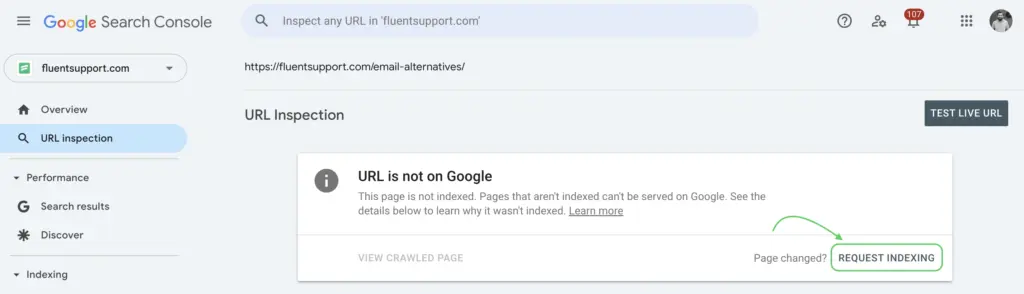
A shout-out for Google Search Console. This inspection tool is super efficient. It lets Google know about your pages almost instantly.
Note: How to sign up for Google Search Console and add your site
First, go to Google Search Console. Then click the “Start Now” button and log in with your Google account. Then, add your website with the URL prefix. Now, it’s time to verify ownership by following one of the provided methods: HTML file, HTML tag, Google Analytics, Google Tag Manager, and Domain name provider.
And done! You can now unlock all the features of Google Search Console (well, well, you have hired a dedicated website assistant).
Method 2: Submit a sitemap through Google Search Console
If the URL Inspection Tool is your one-on-one chat with Google, submitting a sitemap is like sending Google a formal invitation with all your website’s details.
With sitemap submission, you let Google discover multiple URLs at once. This could be a great time saver, especially when managing a large site.
Note: A sitemap is an XML file that informs search engines about all your important pages. It helps Google and other search engine crawlers to find and index your content more efficiently.
To submit a sitemap, follow these instructions:
Step 1: Create a sitemap. If you’re using WordPress, plugins like Yoast SEO or Rank Math can generate one automatically. Or you can create your sitemap with another plugin XML Sitemap Generator for Google.
Again, if you are a non-WordPress user, online sitemap generator tools could be a good option.
Step 2: Locate your sitemap URL. It usually looks something like this: https://yourwebsite.com/sitemap_index.xml.
Step 3: Go to Google Search Console and navigate to the Sitemaps section (it’s in the ‘Indexing’ tab).
Step 4: Paste the sitemap URL into the provided field and hit “Submit.”
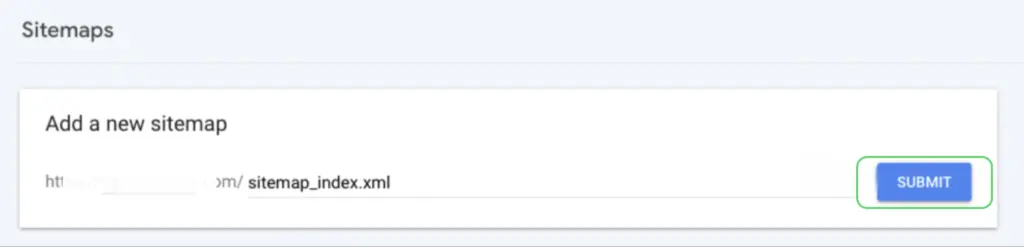
And that’s it!
You’ve handed Google a comprehensive map of your website.
Easy-peasy.
Method 3: Internal Linking from Indexed Pages
Internal links are one of the most underused methods for getting new pages crawled. When you add a link to a new page from an existing, already-indexed page, Googlebot follows that link during its next crawl of the source page and discovers the new URL naturally.
This matters especially for pages with limited external backlinks. A page that exists only in your sitemap or is completely isolated has low crawl priority. Linking to it from a high-traffic or frequently crawled page on your site raises its discoverability significantly.
The best places to add internal links to a new page are your homepage, relevant category pages, high-traffic blog posts on related topics, and any hub pages that aggregate content on the same subject. Use descriptive anchor text that reflects what the new page is actually about.
Method 4: Google Indexing API (For High-Volume or Automated Needs)
The Google Indexing API lets you notify Google programmatically when a URL has been added or removed. It was originally built for job posting and livestream pages, but many site owners use it more broadly for faster indexing of any content type.
Setting it up requires a Google Cloud project, a service account with Search Console owner permissions, and some basic API calls. Tools like Rank Math’s Instant Indexing plugin for WordPress wrap this API into a one-click setup, making it accessible without developer knowledge.
This method is worth considering if you publish large volumes of content regularly and need indexing to happen faster than manual requests allow. For smaller sites or occasional new posts, the URL Inspection Tool and sitemap approach are sufficient.
Why Your Page Still Is Not Indexed After Submission
Submitting a URL does not guarantee indexing. Google makes its own decision about whether a page belongs in the index, based on quality signals, technical factors, and crawl budget. These are the most common reasons a submitted URL fails to get indexed.
The page has a noindex tag
A noindex directive in the page’s meta robots tag or HTTP header tells Google explicitly not to index it. This overrides any submission request. Check your page’s source code for <meta name=”robots” content=”noindex”> or use the URL Inspection Tool to see what Google found during its live test.
The page is blocked by robots.txt
If your robots.txt file disallows Googlebot from crawling the URL or the directory it lives in, Google cannot access the page to index it. Submitting the URL will not override a robots.txt block. Check your robots.txt at yourdomain.com/robots.txt and confirm the page’s path is not listed under Disallow rules.
The content is too thin or duplicated
Google actively filters out pages it considers low-quality, repetitive, or near-duplicate versions of content that already exists in its index. If your page is short, largely templated, or closely mirrors another URL on your site, it may be crawled but not indexed. The URL Inspection Tool will sometimes show this as ‘Crawled, currently not indexed’ in the coverage report.
Canonical tag points to a different URL
A canonical tag signals to Google which URL should be treated as the authoritative version of a page. If your canonical points to a different URL, Google will index that other URL, not the one you submitted. This is common on sites with URL parameters, pagination, or staging-to-production migration issues that were not cleaned up.
Crawl budget limitations
Google allocates a crawl budget to each site based on its authority, server response times, and the quality of pages it has already found. Sites with a large number of low-value pages, slow load times, or frequent crawl errors can exhaust their crawl budget before Google reaches important new content. Keeping your site lean, fast, and technically clean is the long-term fix here.
Best Practices for Submitting URLs to Google
Submitting URLs correctly makes a measurable difference in how quickly and reliably Google indexes your content. These practices keep the process clean and efficient.
Only submit pages worth indexing
Not every page on your site deserves to be in Google’s index. Thank-you pages, account pages, duplicate filtered views, and thin content pages add noise to your crawl budget without contributing any search value. Submit only pages with original, substantive content that you want to appear in search results.
Fix technical issues before submitting
A page submitted with broken links, slow load times, missing canonical tags, or redirect chains is going to have indexing problems regardless of how the submission is made. Run a quick technical check on any page before requesting indexing. The URL Inspection Tool itself surfaces many of these issues in its live test report.
Use HTTPS
Google treats HTTPS as a baseline requirement for trustworthy, rankable pages. If your site still serves pages over HTTP, those pages are at a disadvantage both in indexing priority and in ranking potential. Migrating to HTTPS before submitting URLs removes one more potential barrier.
Do not re-submit the same URL repeatedly
Submitting a URL once adds it to Google’s crawl queue. Submitting it again immediately does not move it higher in that queue or accelerate the process. If a page has not been indexed after a week, the issue is almost certainly a quality or technical problem, not a submission problem. Use the URL Inspection Tool to investigate rather than resubmitting blindly.
Keep pages mobile-friendly
Google uses mobile-first indexing, which means it primarily crawls and indexes the mobile version of your pages. A page that renders poorly on mobile, loads slowly on a phone, or has content differences between mobile and desktop versions will run into indexing and ranking issues. Test your pages with Google’s mobile-friendly test before submitting high-priority URLs.
Wrapping up
The gap between publishing and getting indexed is a real problem. Most of the time it is not a submission problem. It is a quality problem, a technical problem, or a crawl priority problem wearing a submission problem’s mask.
Submit your URLs through Search Console, keep your sitemap updated, link to new pages from existing ones, and make sure every page you submit is technically clean and worth indexing. The URL Inspection Tool will tell you most of what you need to know if something is not moving.
Google indexes what it trusts. Give it a reason to trust your pages first, and the indexing follows.
Start off with a powerful ticketing system that delivers smooth collaboration right out of the box.
Frequently Asked Questions
No. Submitting a URL adds it to Google’s priority crawl queue, but Google still decides whether to index the page based on its quality, technical health, and relevance. Pages that are thin, duplicated, blocked by robots.txt, or marked noindex will not be indexed regardless of submission.
After a manual submission via the URL Inspection Tool, indexing typically happens within a few hours to a few days. In some cases it can take up to a couple of weeks, especially for newer sites with low authority or pages with limited internal links pointing to them.
Yes. The URL Inspection Tool has a daily quota for manual indexing requests. The exact limit is not publicly specified by Google, but users typically see quota warnings after submitting a large number of URLs in a short window. For bulk submissions, the sitemap method or Google Indexing API is more appropriate.
Without Search Console, your primary options are submitting a sitemap hosted on your server that Googlebot can discover, building internal and external links to the page, and relying on natural crawling. Search Console’s URL Inspection Tool is the most reliable manual method, and setting it up is free.
This status means Google found and crawled the page but chose not to add it to the index. The most common reasons are thin or low-quality content, near-duplicate content that already exists elsewhere in the index, or a canonical conflict where Google determined another URL should be the authoritative version. Improving the content quality and resolving any canonical issues is the recommended approach.
Not immediately. If a page has not been indexed after a week, resubmitting it will not change the outcome. The issue is almost always a content quality or technical problem. Use the URL Inspection Tool to run a live test, check the coverage report for specific error reasons, and fix whatever is flagged before submitting again.
Crawling is when Googlebot visits a URL to read its content. Indexing is when Google processes and stores that content in its search database so it can appear in results. A page can be crawled without being indexed if Google determines it does not meet its quality standards or if technical signals prevent inclusion.
Related Articles
Customer Success Team: Roles, Structure, and How to Build One
A customer success team proactively helps customers reach…Tiered Support, Explained: Route Tickets Without Losing Best Customers
Tiered support routes tickets to the right person…




Leave a Reply