

Knowledge Base and Ticketing System: How They Work Together

By Md. Sajid Sadman
June 3, 2026
Last Modified: June 3, 2026


Your support agent opens the queue on Monday to find the same question waiting a dozen times over. Each one needs a near-identical reply, and the whole morning disappears into copy-paste before lunch.
This happens because every small question still becomes a ticket that waits for a human. So your team spends its best hours retyping answers that already live somewhere in the flooded inbox that never seems to empty.
When a ticketing system and a knowledge base work together, that repetitive queue turns into a loop that answers for you.
This blog breaks down how the two tools work together, what happens at each stage, and how to build the setup on WordPress.
TL;DR
How does a knowledge base work with a ticketing system?
They connect through a simple integration, so the knowledge base answers common questions before they become tickets and supports agents on the ones that remain. The ticketing system organizes every request while the knowledge base supplies the answers.
What does each tool actually do?
The ticketing system is reactive and turns emails, chats, and forms into trackable tickets with a clear owner. The knowledge base is proactive and holds searchable articles customers can use on their own.
What is ticket deflection?
It is when the knowledge base answers a customer on the ticket form before they submit, so the ticket is never created and the queue stays clear.
How does the setup help agents?
When a ticket does come through, relevant articles and saved replies appear inside the agent’s workspace, so replies go out faster and stay consistent.
What is the feedback loop?
Closed tickets show which questions keep coming up, so those gaps turn into new articles and weak articles get flagged for a rewrite.
Should you build it on SaaS or WordPress?
SaaS tools like Zendesk or Freshdesk sync out of the box but charge per agent and host your data for you. On WordPress, you pair a help desk with a documentation plugin, keep your data on your own site, and pay a flat license.
What is the payoff?
Fewer repetitive tickets lower your support costs, free your agents to focus on harder issues, and give customers faster answers.
Do you need both tools?
For most growing teams, yes. The knowledge base scales your simple answers, and the ticketing system keeps complex requests organized and accountable.
How does a knowledge base work with a ticketing system?
A knowledge base works with a ticketing system by answering common questions before they become tickets, then supporting agents on the tickets that still come through. The ticketing system captures and organizes every request, while the knowledge base holds the answers that close those requests faster.
The connection runs through a simple integration between your help desk and your documentation. That link lets the knowledge base step in at three points in a ticket’s life, so one tool captures the problem while the other already holds the solution.
Here is how the two work together across those three stages:
- Ticket deflection. As a customer types their issue on the ticket form, the knowledge base suggests matching articles, so simple questions get solved before a ticket is created.
- Agent acceleration. When a ticket does come through, relevant articles and saved replies appear inside the agent’s workspace, so replies go out faster and stay consistent.
- The feedback loop. After tickets close, their patterns reveal content gaps, which become new articles that deflect the next wave of questions.
The two tools, defined simply
Plenty of teams run a help desk and a documentation page side by side and never link them. That gap is exactly where the value gets lost.
The ticketing system
A ticketing system is the reactive side of your support. It pulls in emails, chats, and form submissions, then turns each one into an organized ticket with a clear owner. Because every request lands in one place, nothing slips through and your first response time improves.
It also creates accountability. Each ticket carries a status and an owner, so a request never vanishes into a shared inbox that three people half-read.

The knowledge base
A knowledge base is the proactive side. It holds your FAQs, troubleshooting guides, and tutorials in one searchable library customers can reach any hour, across the whole customer lifecycle.
Think of it this way: this is the self-service layer customers now expect by default. In fact, 67% of customers prefer self-service over speaking with a live agent for minor issues (Zendesk).
Stage one: ticket deflection
Picture a customer landing on your support page right after your software crashes. They open the ticket form and start typing, “screen goes black when I click export.”
As those words land in the subject field, the connected system reads them and surfaces a matching article beside the form. The customer reads it, fixes the problem, and closes the tab before a ticket ever exists.
That is ticket deflection, and it is the cleanest win in support. It costs the customer nothing, keeps your queue clear, and protects the customer experience at the same time. This matters because 81% of customers try to solve problems on their own before contacting support (Harvard Business Review).
The impact compounds during traffic spikes. When a product update triggers a wave of identical questions, deflection absorbs most of them before they reach a single agent.
Stage two: agent acceleration
So what happens when an article is not enough? Some issues, like a billing error or an unusual bug, need a real person.
The ticket gets submitted and lands in your queue. Here is the thing: the knowledge base does not stop working once a human takes over.
Suggested articles inside the ticket
When an agent opens a ticket, the system scans the text and pulls relevant internal docs right into their workspace. That means no hunting through scattered wikis while a customer waits. The answer is already on screen the moment they read the issue.
Saved replies in one click
Saved replies let an agent drop verified, pre-written steps into a response instantly. A reply that used to take fifteen minutes now takes seconds, and every customer gets the same accurate answer. This consistency also helps you hold your service level agreement targets during busy periods.
This also shortens training. A new agent backed by suggested articles and saved replies can resolve tickets correctly in their first week, without memorizing every edge case first.
Stage three: the feedback loop
Support data is usually treated as a record of the past. A connected system treats it as a map for what to document next, which keeps you engaging customers instead of repeating yourself.
Spotting knowledge gaps
When your analytics show a sharp rise in tickets tagged with the same issue, your customers are telling you what to write next. For example, a spike in “v2.1 update error” tickets points straight at the missing article. This is a practical customer feedback loop in action.
The longer this runs, the sharper your library gets. Your documentation starts to mirror the real questions customers ask, not the ones you assumed they would.
Turning solved tickets into articles
An agent cracks a tricky problem that lives in a single email thread. With one click, modern ticketing tools turn that resolved thread into a draft for a new article. The fix becomes reusable instead of disappearing.
Cleaning out weak articles
What about the articles that are quietly failing? A simple thumbs up or thumbs down on each one surfaces the weak spots. When a page gets heavy traffic but low ratings, your team knows it needs a rewrite, which keeps repeat customers from hitting outdated answers.
Building the stack: SaaS vs WordPress
How you build this setup usually comes down to where your data lives and what you want to spend. Both routes give you the same core loop of deflection, agent support, and feedback.
The real difference is ownership. One route rents you a finished system, and the other lets you own the pieces and run them on your own site.
| Aspect | SaaS (Zendesk, Freshdesk) | WordPress (Fluent Support + BetterDocs) |
| Setup | Synced out of the box | Native plugin integration |
| Pricing model | Per agent, per month | Flat plugin license |
| Cost at scale | Climbs with every seat | Stays predictable |
| Data control | Hosted on their cloud | Stays on your own site |
| AI and automation | Often a paid add-on | Built into the plugins |
| Best for | Large cloud-first teams | WordPress businesses |
The SaaS route
Say your team already lives in the cloud and wants the fastest possible start. A hosted, software-as-a-service platform like Zendesk or Freshdesk is built for exactly that.
The ticketing system and knowledge base ship from one vendor, so they sync the moment you switch them on. You get mature automation, reporting, and AI features without touching a single line of code.
The trade-off is cost and control. These platforms charge per agent, per month, so the bill climbs every time you add a seat, and the strongest AI tools often sit behind extra add-ons. Your data also lives on their servers, which matters if you have strict privacy or compliance rules.
For a large, cloud-first team with the budget to match, that trade is often worth it. The convenience is genuine, and so is the recurring spend.
The WordPress route
On WordPress, you assemble the same system from plugins you actually own. The help desk and the documentation plugin run on your own site, under your own hosting.
There are a few popular setups here, so we will look at one that handles the entire loop in a single place. For ticketing, a widely used WordPress help desk is Fluent Support, which is trusted by more than 10,000 businesses and runs right inside your WordPress admin.
It pairs natively with BetterDocs for the knowledge base, though there are other WordPress knowledge base plugins you can swap in if you prefer.
The setup is simple. Once BetterDocs is installed and active, you open Fluent Support’s Global Settings, head to Ticket Form Config, and switch on knowledge base suggestions for the ticket form.
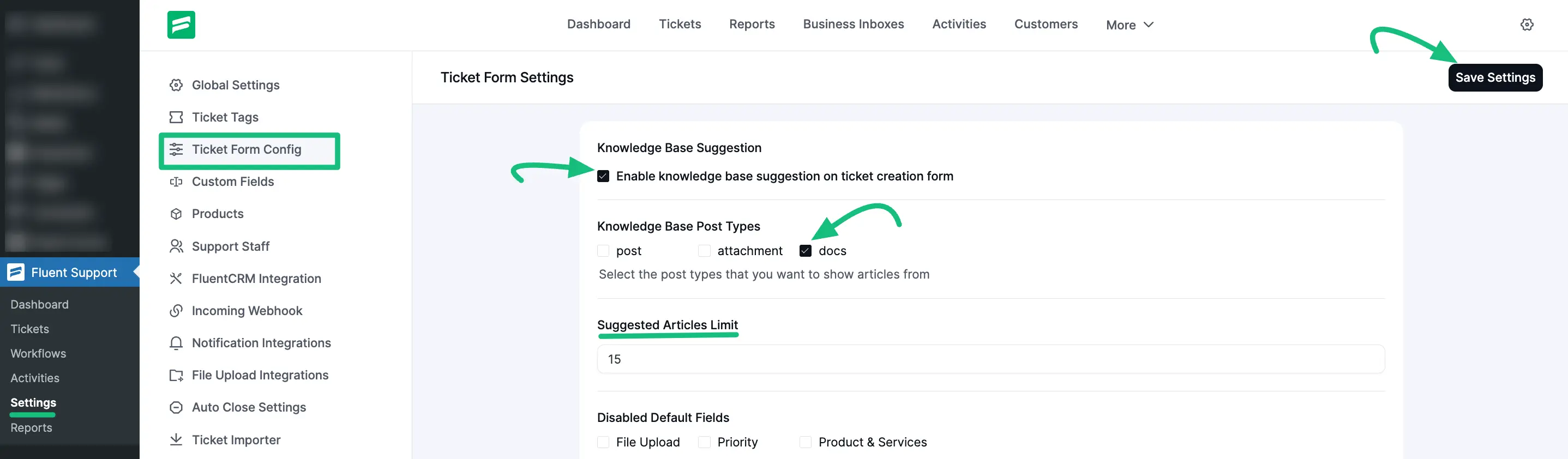
From there, you choose which document types to show and how many articles to suggest.
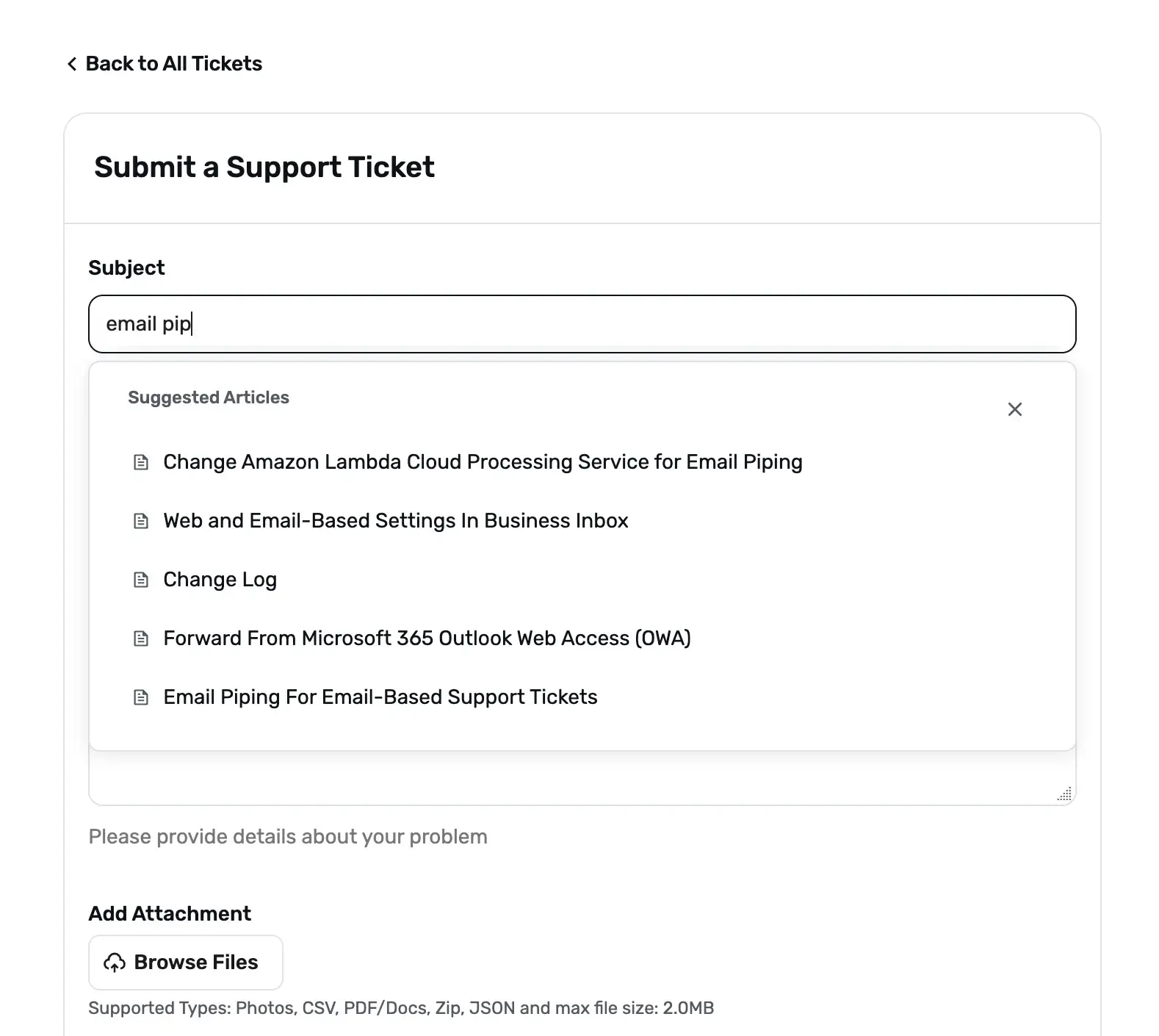
After you save, the moment a customer types keywords into the subject field, matching documentation appears right on the form, which is deflection happening in real time.
Setup aside, the bigger difference between this and a SaaS stack is how you pay for it. You pay a flat plugin license instead of a per-agent fee, so the same plugins serve unlimited tickets and agents while your spend stays predictable.
You also keep full ownership of your data. Every ticket and every article sits in your own WordPress database, not a third-party cloud you cannot see into.
Ready to put this into action? Beyond the BetterDocs pairing, Fluent Support brings automated workflows, collision detection, and OpenAI-powered replies to keep your whole team fast and in sync. Give Fluent Support a try and speed up every response.
Which route should you pick?
So which one is right for you? The honest answer comes down to two questions: how you want the bill to grow, and how much control you need over your data.
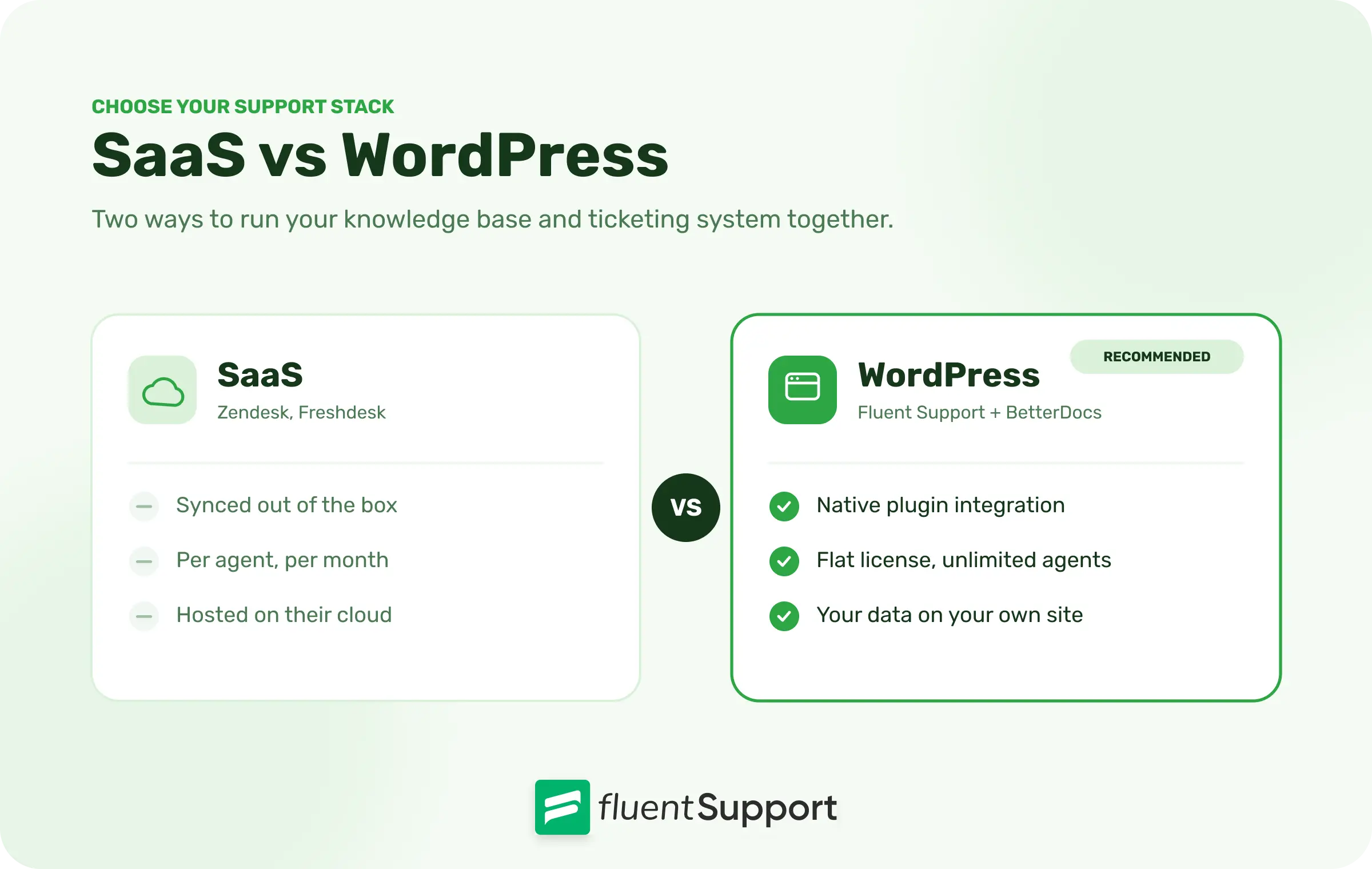
Pick SaaS if you want zero setup, you are comfortable with recurring per-agent costs, and your data sitting off-site is not a concern. It rewards speed over ownership.
Pick WordPress if you already run your site there, you want costs that stay flat as you scale, and you want your support data under your own roof. It rewards ownership over hand-holding.
Wrapping Up
You just walked through how a knowledge base and a ticketing system feed each other across deflection, agent support, and a steady feedback loop. That is the full picture of a support stack that improves itself.
Start small. Connect your documentation to your ticket form first, watch which questions still get through, then write articles for those gaps over the next few weeks.
A support system that gets a little smarter with every answer it gives is the closest thing to free scale your team will ever have.
Start off with a powerful ticketing system that delivers smooth collaboration right out of the box.
FAQ
No. A knowledge base handles repetitive, simple questions, while a ticketing system manages the complex issues that need a human. They work best together, not as substitutes.
Ticket deflection is when a customer solves their problem through a help article before submitting a ticket. The request never reaches your queue, so your team handles fewer repetitive cases.
Fluent Support provides knowledge base suggestions through its native BetterDocs integration. You enable it in the ticket form settings and choose which document types to display.
Results vary by business, but a well-maintained knowledge base noticeably lowers repetitive tickets by deflecting common questions. The exact drop depends on how closely your articles match what customers actually ask.
For most growing teams, yes. The knowledge base scales your simple answers, and the ticketing system keeps complex requests organized and accountable.
Related Articles
Fluent Support 2.4.7: Ticket Filters, 5x Faster Tickets and Smart Customer Search
Fluent Support 2.4.7 brings a Ticket Filters sidebar…Customer Success Best Practices for Small Teams
In this blog, we’ve discussed customer success in…



Add your first comment to this post