

Fluent Support 2.2.0: Internal Notifications, FluentBooking Integration, Public Ticket Numbers and More

By Shahjahan Jewel
May 19, 2026
Last Modified: May 20, 2026


Fluent Support 2.2.0 is one of the most feature-complete releases in several cycles. This update brings a real-time notification system for agents, FluentBooking meeting scheduling from tickets, and public ticket numbers with prefix support. It also ships a native FluentCommunity portal integration and a unified portal destination setting. Read on for the full picture.
Internal Notifications
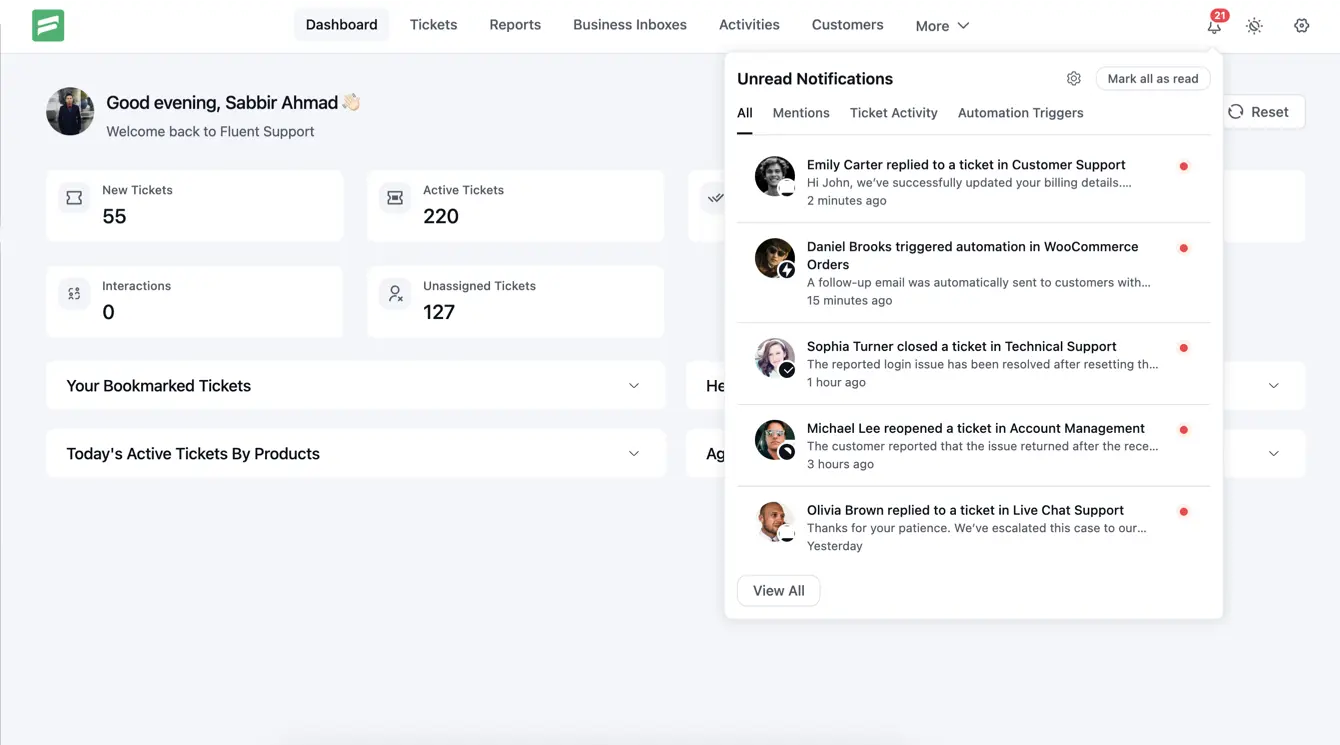
Agents now have a notification bell in the Fluent Support admin header. Enable Internal Notifications, and the bell accumulates an unread count in real time. Click it to open a drawer listing every relevant event since the agent last checked. Your team no longer needs to watch email to track ticket activity — the information lives right inside the support panel.
Notification Events
Six categories of events trigger a notification. Assignment Notifications fire on ticket assignment and reassignment. Customer Reply Notifications fire when a customer responds. Agent Reply Notifications alert the assigned agent when another agent posts a reply or note on their ticket. Ticket Status Notifications cover ticket close and reopen events. Workflow Notifications fire whenever an automation runs — both automatic triggers and manual runs from the ticket view. @Mention notifications fire whenever a reply or internal note tags an agent. These route directly to the tagged agent, not the ticket owner.
Configuration
Every category has its own toggle in Fluent Support → Settings → Internal Notifications. Turn off noisy categories without disabling the entire feature. The Allow Self Notifications toggle controls another common scenario. By default, agents do not receive notifications for their own actions — if Agent A closes a ticket they own, they get no “ticket closed” alert. Enable self-notification only if your workflow specifically requires it.
The master on/off switch lives in Global Settings under the Internal Notifications section. The first time you enable the feature, Fluent Support creates the required database tables (fs_notifications and fs_notification_users) silently in the background. Disable the feature and all notification queries stop immediately — no performance cost when the feature is off.
FluentBooking Integration
Fluent Support 2.2.0 adds a dedicated FluentBooking integration for scheduling meetings directly from a support ticket. The integration ships disabled by default. To activate it, go to Fluent Support → Settings → Global Settings and enable FluentBooking Integration. The toggle appears only when FluentBooking is active on your site. Sites already running a pre-release build keep the toggle enabled, preserving any existing configuration.
Scheduling a Meeting
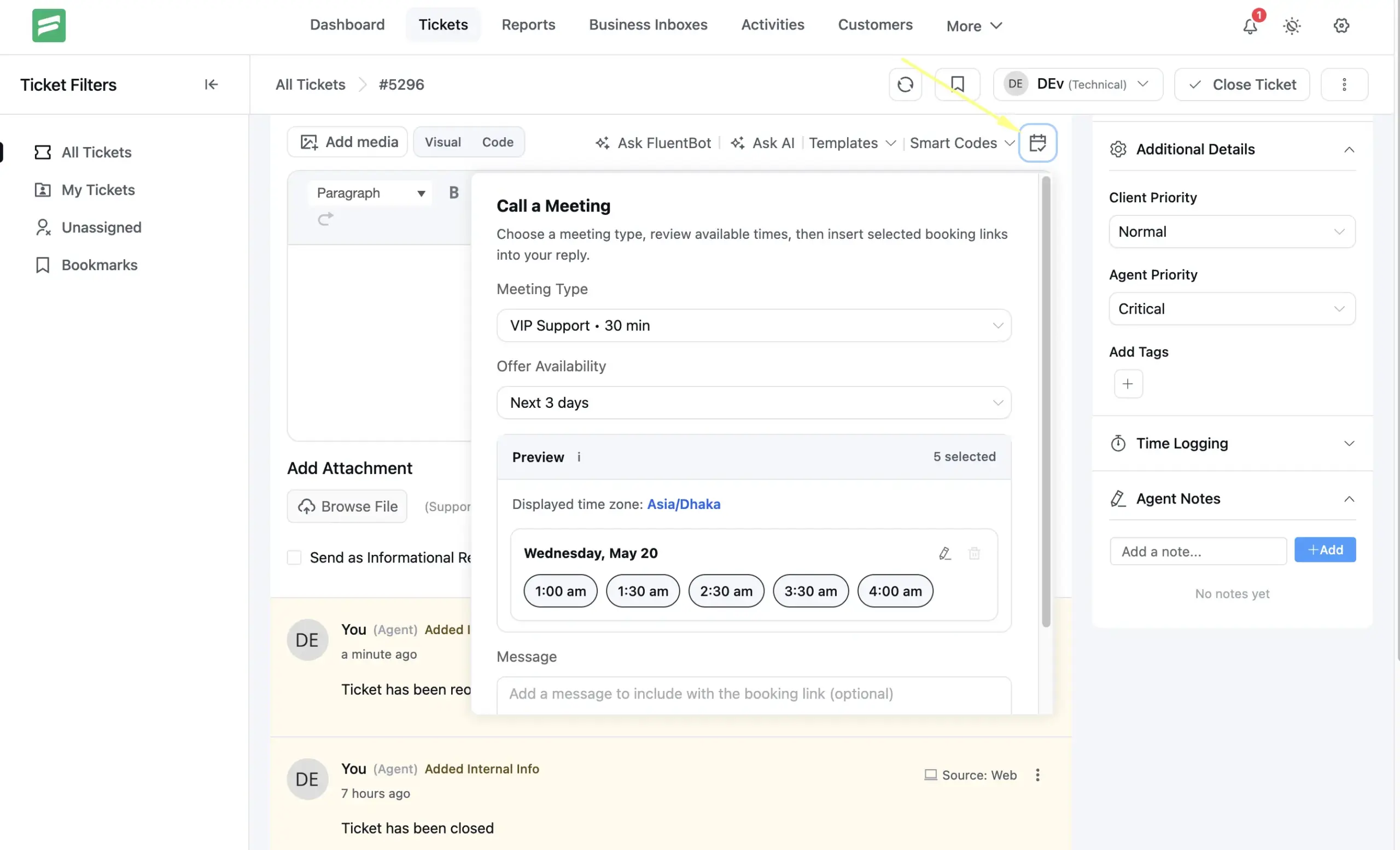
Once enabled, a Call a Meeting button appears in the ticket reply toolbar. Click it to open a popover. Choose a meeting type from your published FluentBooking event types. Then pick an availability range: next 3 days, next 7 days, or specific dates (up to 7 via the date picker). Time slots load grouped by day in the correct timezone. Select individual slots or use the pencil icon to edit any day’s list. The count updates as you go.
Click Insert and the selected slots and booking link drop directly into the reply body. After you send the reply, Fluent Support saves the slots and link in the conversation thread. They remain visible on every reload. The customer follows the link, sees the available times, and books directly from your FluentBooking calendar.
Meeting Tracker
The ticket sidebar gains a Meeting section listing upcoming and past bookings from links in this ticket’s conversation. The primary card displays the next meeting’s status, calendar name, start time, and timezone. Additional upcoming meetings appear behind a count link that opens the full list in FluentBooking. Only agents with ticket management permissions see this widget. The tracker stays visible on every ticket, whether or not a booking exists.
Public Ticket Numbers
Many support teams reference ticket numbers in email subject lines, customer conversations, and internal Slack threads. Until now, Fluent Support only had its internal database ID — not something you’d say on a call. In 2.2.0, you can enable a clean sequential numbering system. Every new ticket gets a short, readable number your whole team can use.
The setup lives in Global Settings. Enable Minimum Ticket Number and two fields appear: the starting number (a helper shows the exact value the next ticket will receive) and an optional Ticket Prefix. Set the minimum to 1000 and the prefix to SUP-, and your next ticket becomes SUP-1000. The sequence always continues from the highest existing number. Duplicates are impossible even if you change the minimum later.
Once enabled, the formatted number appears in the ticket detail view and the Customer Portal ticket list. Email templates can also include it via the {{ticket.display_ticket_number}} smartcode. Existing email templates update automatically — {{ticket.id}} now outputs the formatted number when the feature is on, so nothing breaks. Tickets you created before enabling the feature fall back to their original ID across the UI. Teams needing different prefixes per product can use this filter:
add_filter( 'fluent_support/ticket_prefix', function( $prefix, $ticket, $product_id ) {
    if ( $product_id === 42 ) {
        return 'BILLING-';
    }
    return $prefix;
}, 10, 3 );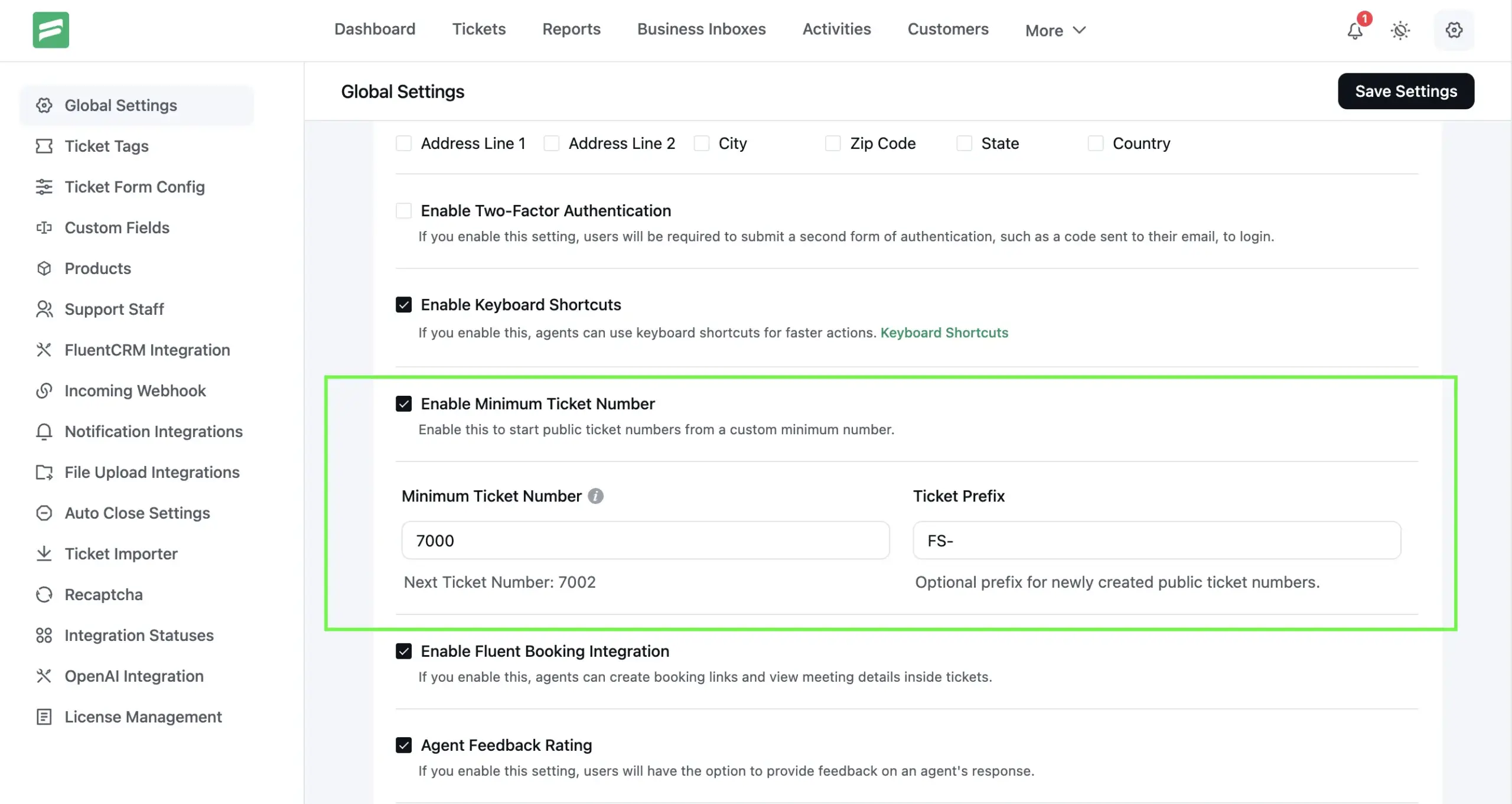
Customer Portal Destination
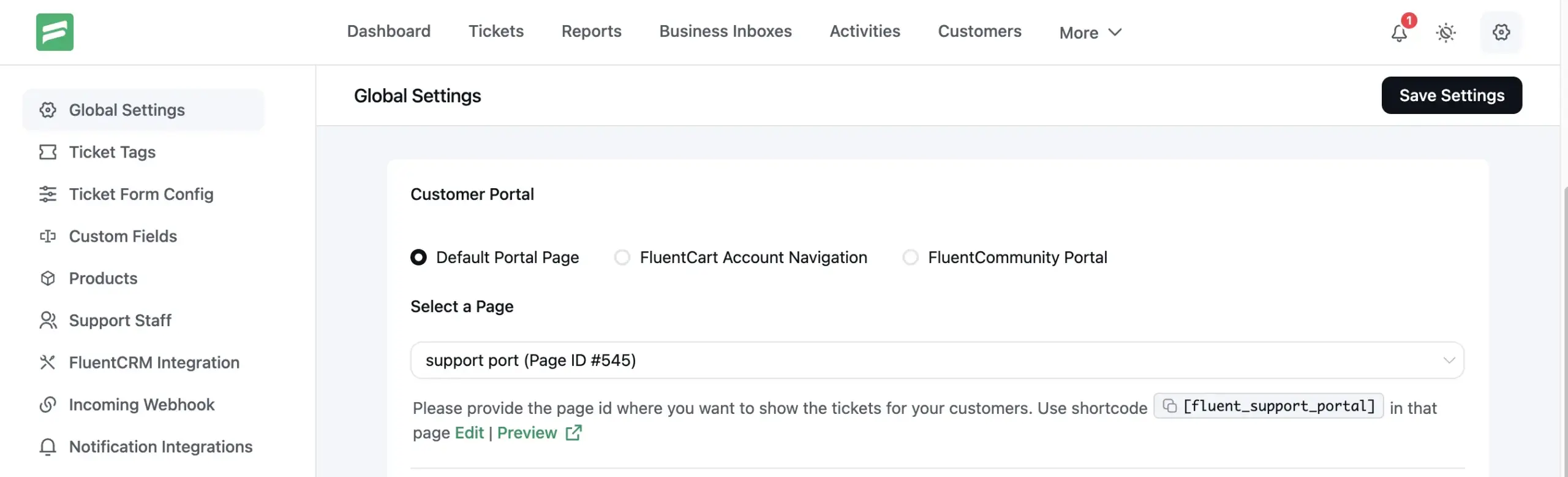
When Fluent Support sends a ticket notification email, it includes a link back to the ticket. Historically, scattered per-integration toggles controlled where that link pointed. In 2.2.0, a single Customer Portal radio group in Global Settings replaces them. The radio group shows options based on active plugins. Default Portal Page always appears. FluentCart Account Navigation requires FluentCart. WooCommerce Account Navigation requires WooCommerce (Fluent Support Pro required). FluentCommunity Portal requires FluentCommunity.
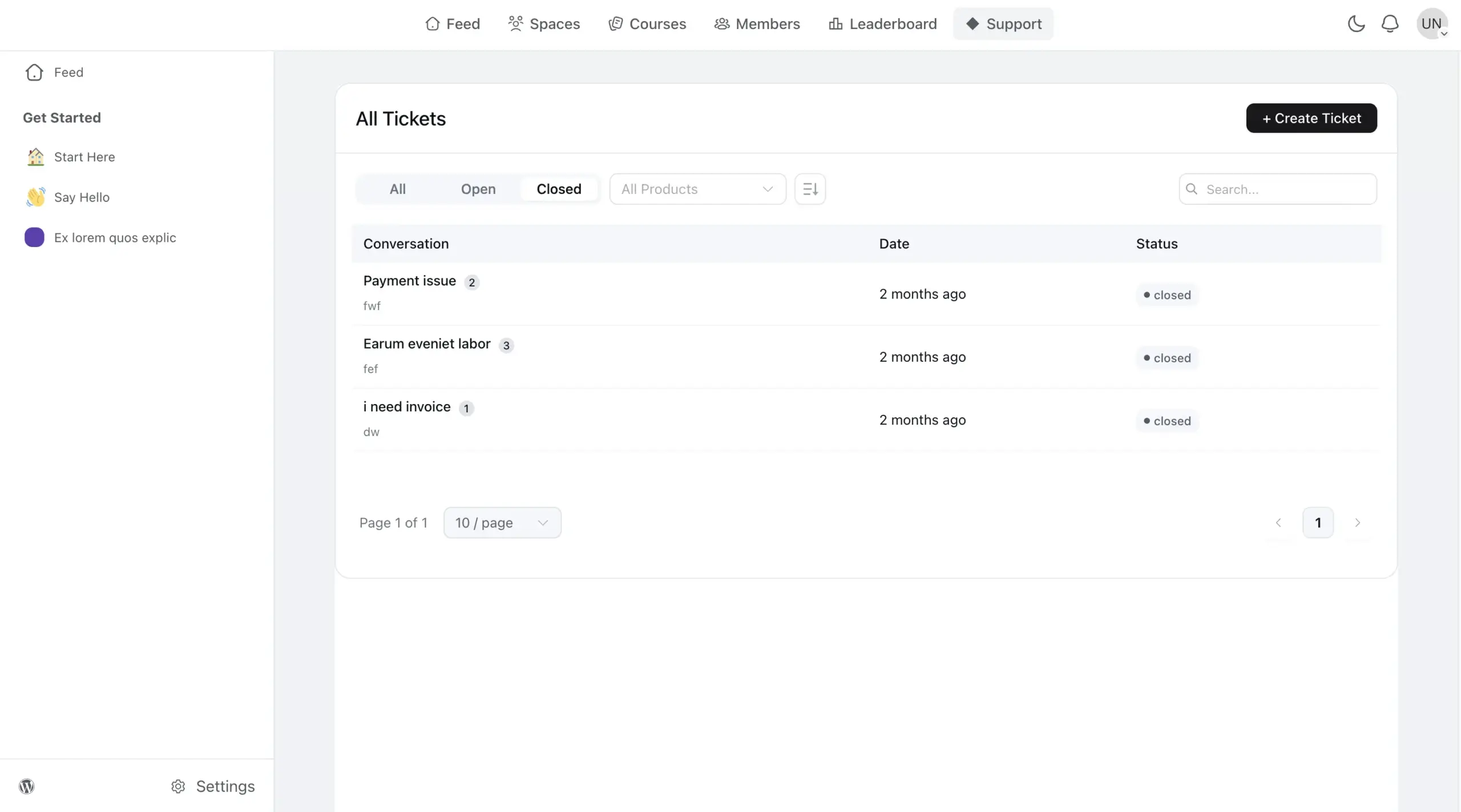
The FluentCommunity option does more than redirect a link — it embeds the Fluent Support customer portal natively inside FluentCommunity. Customers find the portal at the /support/ path in your community URL. The Fluent Support app renders inside the FluentCommunity layout, sharing the same FC sidebar and header. The support menu link stays active throughout. The portal also inherits FluentCommunity’s dark mode, so customers on the dark theme see a consistent experience. Select the FluentCommunity Portal option in Settings. A URL copy button then appears below it with the full portal address for your FluentCommunity menu.
Sites upgrading from 2.1.x migrate automatically. With WooCommerce My Account integration previously active, the setting automatically switches to WooCommerce Account Navigation after upgrading. Sites with no special portal setting land on Default Portal Page.
Improvements and Fixes
Pasted images. The reply editor uploads pasted inline images as attachments. A bug in 2.1.x prevented the signed URL from resolving correctly after you saved the reply. Broken images appeared in the conversation thread on every reload. This release fixes both the signing URL and the attachment persistence.
Content render filters. Developers now have four render-time filters to modify ticket and response content without touching stored data:
fluent_support/ticket_content_before_render
fluent_support/ticket_content_after_render
fluent_support/response_content_before_render
fluent_support/response_content_after_render
Bug Fixes
Admin font leaking outside Fluent Support. The Inter font leaked outside the #fluent_support_app wrapper and applied to the WordPress admin UI. This affected font rendering on Posts, Pages, Plugins, and other standard admin screens. The font now stays correctly scoped to the Fluent Support wrapper.
Dark mode toggle switch colors. Toggle switch controls in Global Settings were invisible or blending into the background in dark mode. This release also corrects radio button fill colors and table action control visibility in dark mode.
Shortcode attribute normalization. Fluent Support now normalizes shortcode attributes to lowercase before processing. This fixes cases where [Fluent_Support_Portal] with uppercase attribute names like MAILBOX="1" did not process correctly.
Closing Thoughts
Fluent Support 2.2.0 gives support teams more visibility inside the tool they already use. Agents no longer need to watch email for ticket activity. The notification bell surfaces what matters to each agent. The FluentBooking integration closes the loop between support and scheduling. Public ticket numbers add a layer of professionalism to every email your team sends. The portal destination setting replaces multiple scattered toggles with one clear choice. The upgrade path from earlier versions is now straightforward.
Update to 2.2.0 from your WordPress dashboard. As always, back up your site before any plugin update. If you have questions or run into anything, reach our support team through the portal. Happy supporting!
Changelog
- Added: Internal Notifications module — agents now receive real-time in-app notifications for @mentions, ticket assignments and reassignments, customer replies, ticket close/reopen events, and Workflow triggers; fully configurable per event category with a self-notification toggle
- Added: FluentBooking integration — schedule meetings from ticket replies by inserting available time slots and a booking link; view upcoming and past bookings in the ticket sidebar; ships disabled by default, enable via Global Settings when FluentBooking is active
- Added: Public ticket numbers with optional prefix support — configurable serial numbers display in email notifications, ticket UI, and Customer Portal; admins can set a minimum ticket number and per-product prefix via the fluent_support/ticket_prefix filter
- Added: FluentCommunity portal integration — embeds the Fluent Support customer portal natively inside FluentCommunity at the /support/ path, using the FC layout (sidebar, header, dark mode) with the support link marked active; enable by selecting FluentCommunity Portal in the portal destination setting
- Improved: Customer portal destination setting — unified radio group in Global Settings replaces scattered per-integration toggles; options include Default Portal Page, FluentCart Account Navigation, WooCommerce Account Navigation (Pro), and FluentCommunity Portal
- Added: fluent_support/ticket_content_before_render, fluent_support/ticket_content_after_render, fluent_support/response_content_before_render, and fluent_support/response_content_after_render filters for developer control over ticket and response content rendering
- Added: Signing Secret support for Slack and Telegram webhooks while maintaining compatibility with existing integrations
- Improved: Attachment handling for agent-created ticket emails and pasted inline images
- Improved: Dark mode visibility for filters, switches, radios, tables, and reply controls
- Refined the ticket reply composer UI for a smoother and more intuitive reply-writing experience
- Fixed: Customer Portal not immediately reflecting ticket status changes from a Workflow action (e.g., auto-close on customer reply)
- Fixed: Fluent Support admin font (Inter) leaking into WordPress admin chrome outside Fluent Support pages
- Fixed: Dark mode toggle switch colors in Global Settings
- Fixed: Global Settings page design inconsistencies
- Fixed: Shortcode attribute not normalizing to lowercase
Related Articles
How to Setup a Support Ticket System in WordPress?
Learn how to set up a support ticket…Fluent Support 2.4.0: Advanced Reports, AI Ticket Audit, and Portal Protection
Fluent Support 2.4.0 rebuilds reporting with a full…




Add your first comment to this post