


Tiered Support, Explained: Route Tickets Without Losing Best Customers

By Md. Ariful Basher
August 21, 2026
Last Modified: August 21, 2026


Tiered support sounds like something only enterprise call centers need. It isn’t. It’s a system for deciding who handles a ticket and how fast, based on how complicated the problem is or how much the customer paid to skip the line. Most support teams already do a rough version of this in their head. Almost nobody writes it down, and even fewer automate it.
Let’s say you run an eCommerce store with two support agents. A password reset email lands in the same queue as a message from a customer whose checkout just broke mid launch. Your best agent spends twenty minutes walking someone through clearing a cache, while the client paying three hundred dollars a month for priority support sits unanswered for six hours. That’s a routing problem, and tiered support is the fix.
TL;DR
- Tiered support means routing tickets by complexity or plan, not treating every message the same
- Most models run Tier 0 (self-service) through Tier 3 (expert escalation)
- The goal isn’t hierarchy for its own sake. It’s getting the right ticket to the right person fast
- On WordPress, Fluent Support builds tiers through workflows tied to what a customer purchased
- A 1% gain in first contact resolution can save a midsize support team close to $286,000 a year, per SQM Group data
- Tiers only work if someone owns the escalation rules. No system does that on its own
- Skip this step and your highest-paying customers wait behind your smallest ones
What Tiered Support Actually Means
Tiered support is a system that sorts every incoming ticket into a level of help based on how hard the problem is or how much the customer paid to skip the line. That’s the whole concept in one sentence.
Everyone still treats it like a call center thing though. Big companies, phone trees, “press 1 for billing.” But why would a two-person business need the same structure as a five hundred seat contact center?
Here’s what’s actually happening: team size has nothing to do with it. What matters is variance. If every ticket you get is roughly the same difficulty, you don’t need tiers. If your inbox ranges from “how do I reset my password” to “your plugin broke my checkout and I’m losing sales right now,” you already have tiers. You just haven’t organized them yet.
Let’s say you sell three support plans: Starter, Pro, and Agency. A Starter customer emails you about a broken shortcode the same afternoon an Agency customer emails because their checkout page is throwing a 500 error during a Black Friday sale.
Same inbox. Wildly different stakes. As you can see, tiered support is just the system that makes sure your most experienced agent sees the second email first, without you manually sorting through fifty tickets to find it.
It’s really a customer segmentation model, the kind you’d normally use for a mailing list, applied to your support inbox instead.
The Levels Most Teams Actually Use
A tiered support model usually runs Tier 0 through Tier 3. Four levels, each one built for a different kind of problem.
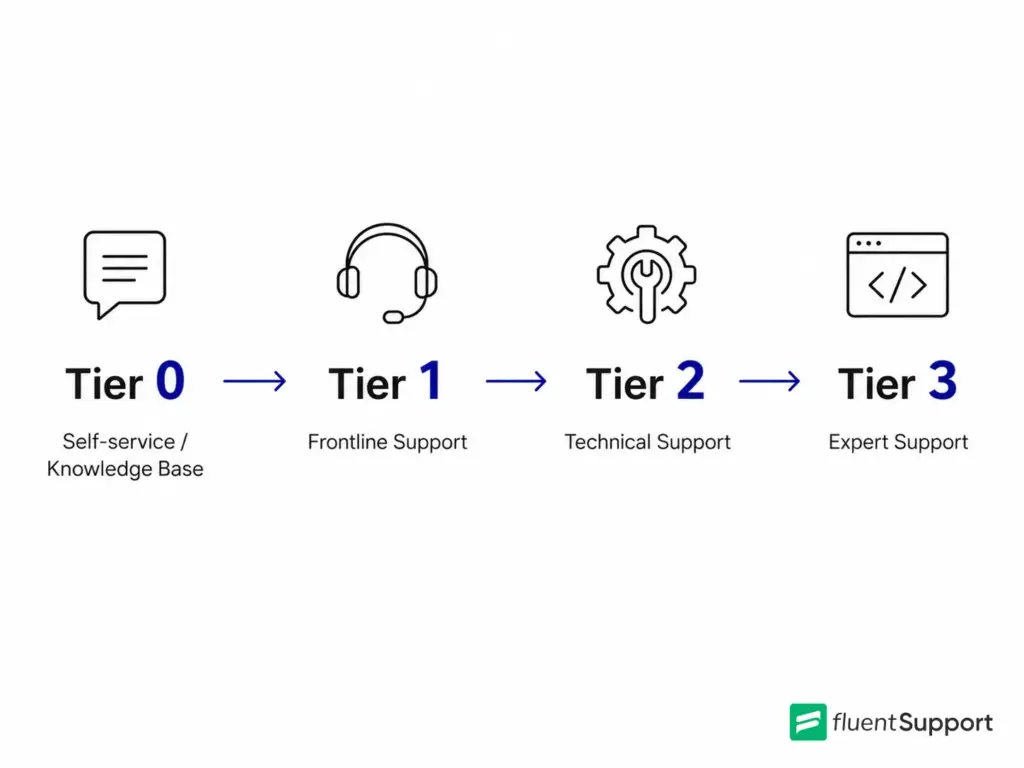
Tier 0. Self-service. FAQs, a knowledge base, maybe a chatbot. Nobody on your team touches these tickets at all.
Tier 1. Frontline. Password resets, basic how-to questions, account access. Fast, repeatable, low skill ceiling.
Tier 2. Technical. Plugin conflicts, configuration problems, the kind of troubleshooting that needs someone who actually knows the codebase, not just the script. The sort of role a tech support specialist grows into over a year or two.
Tier 3. Expert. Developers and senior engineers. The people who fix the bug instead of working around it.
So where does most of the actual value sit? Tier 1, oddly enough. Get more issues resolved on the first contact and you cut the number of tickets bouncing between tiers before they even get there.
Not every business needs all four levels. You might collapse Tier 1 and Tier 2 into “me, on a good day” and Tier 3 into “the developer I hire when I’m stuck.” That’s fine. The labels matter less than the habit of routing by difficulty instead of by arrival time.
Why You Need Tiered Support
Most businesses don’t figure this out until a good customer leaves.
Quietly. Without complaint. Just gone.
They emailed you twice, waited three days, and moved to a competitor who answered in an hour.
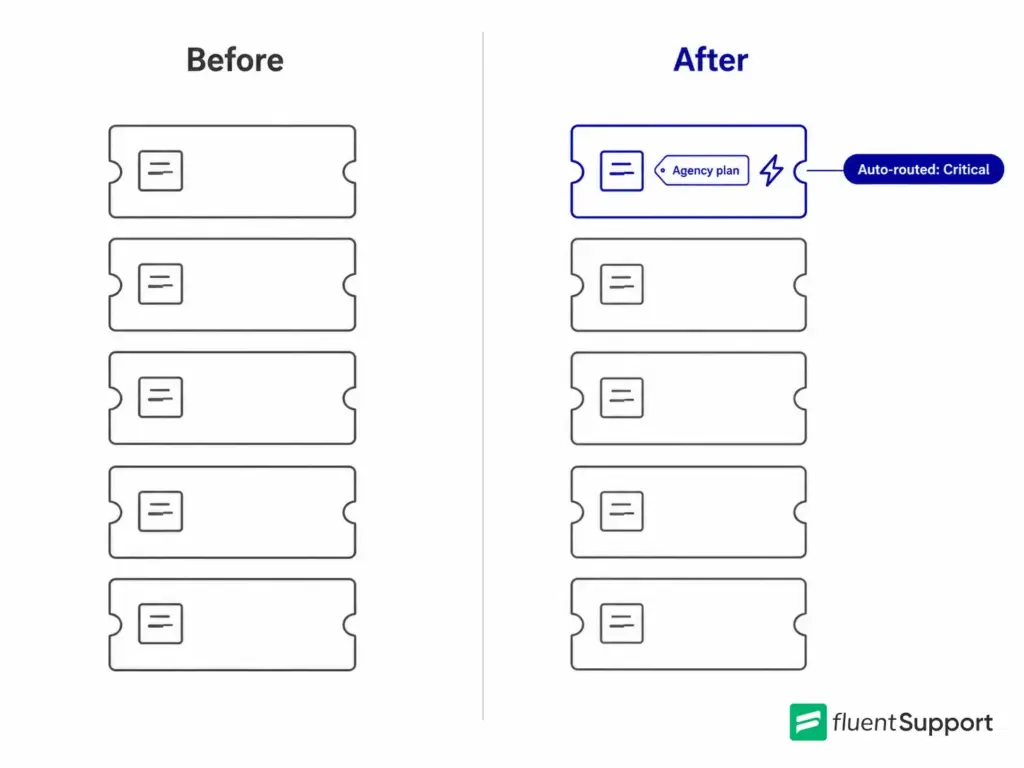
Tickets don’t feel urgent to an agent scrolling a shared inbox. They feel urgent to the person who sent them. Someone locked out of their account for a minute is annoyed. Someone whose store is down during a launch is panicking, and panic doesn’t wait politely in a first-in-first-out queue.
That gap between how a ticket feels to your team and how it feels to your customer is where tiered support earns its keep.
The emotional layer here isn’t a nice to have. A customer who’s excited about a purchase and hits a wall wants to feel like someone noticed the stakes, not like they’re stuck behind a queue that can’t tell “how do I change my password” from “my business is losing money right now.” Getting that right is most of what a customer health score is trying to measure in the first place.
Knowing If It’s Actually Working
Track the same thing a call center tracks: first contact resolution. If most Tier 1 tickets get solved without bouncing to Tier 2, the tiers are doing their job. If Tier 2 and Tier 3 are drowning in tickets that should’ve been closed at Tier 1, the lines are drawn wrong, not the whole system broken.
This is also where escalation paths start to matter. A ticket that’s stuck at the wrong tier for too long needs a clear, predictable way to move up, not a guess about who to forward it to. We’ve gone deeper into building that structure in our piece on customer support ticket escalation, if you want the fuller picture.
SQM Group’s benchmarking, cited in industry research on first call resolution, shows that a 1 percent improvement in first contact resolution can save a midsize call center around $286,000 a year in operating costs. You’re probably not running a call center, but the math scales down the same way.
Fewer bounced tickets means fewer hours spent, and fewer hours spent means a smaller team can cover more customers without burning out. Check the kind of benchmarks laid out in Fluent Support’s customer support statistics roundup to see where your own numbers land.
Building Tiered Support on WordPress
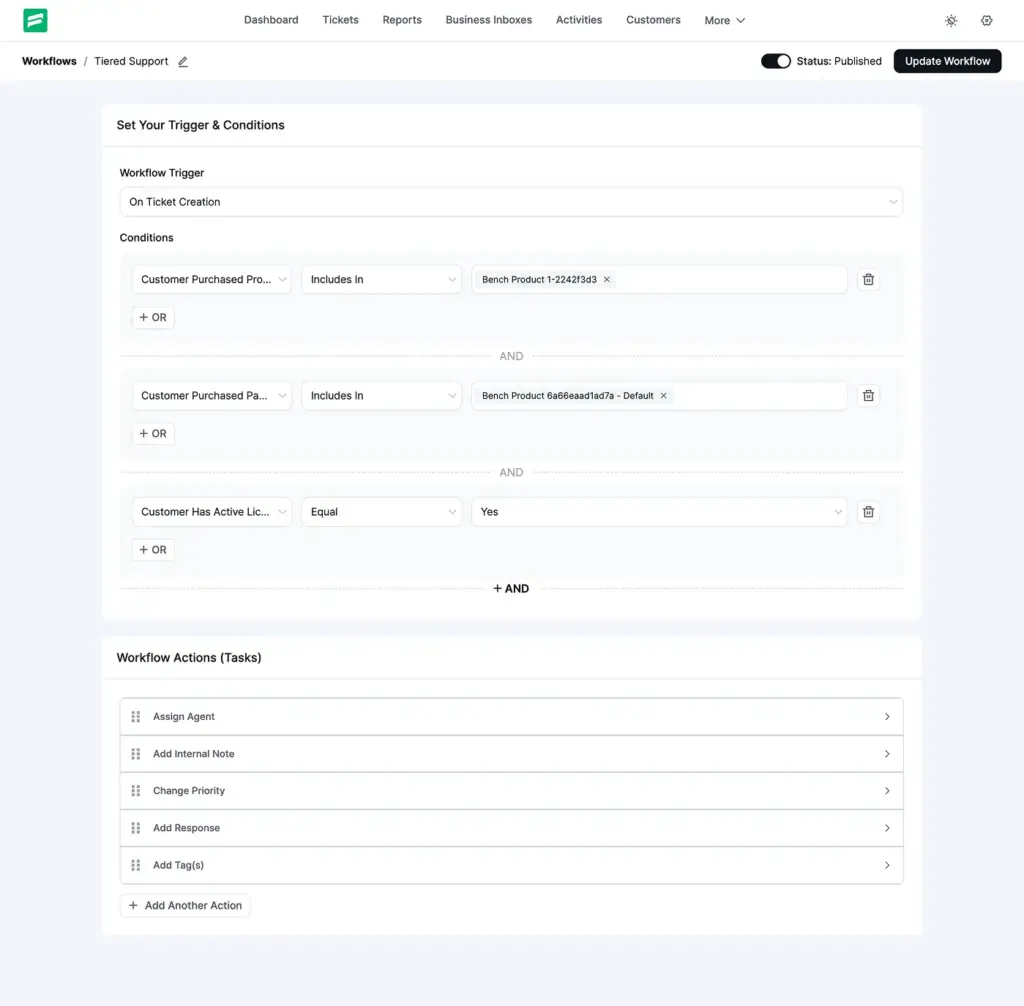
If you’re running support on WordPress, something like Fluent Support handles most of this without a spreadsheet. Tiered support here isn’t a separate ticket type or a dedicated screen. It’s built with workflows, the same automation engine you’d use for anything else, wired up to whatever a customer actually bought through FluentCart or Easy Digital Downloads.
What Decides a Customer’s Tier
Three conditions do the heavy lifting.
Purchased product. Use this when each support plan is its own separate product. Basic is one SKU, Pro is another, Agency is a third.
Purchased package. Use this when Basic, Pro, and Agency are variations of a single product. This one trips people up, because all the variations share the same product ID. The workflow needs to check the variation, not just the product.
Active license. This checks whether the customer’s license is currently valid, not whether they ever bought one. An expired license counts as inactive, full stop.
Product and package conditions look backward, at purchase history. The license condition looks at right now. It matters, especially when someone’s subscription lapsed last month, and they’re emailing today expecting Agency-level treatment.
What Happens Once a Tier Is Identified
Once a workflow matches a customer to a tier, it can fire off a whole chain of actions on its own. Assign the ticket to a specific agent or agent group. Bump the priority to Normal, Medium, or Critical. Add or strip tags. Send a tier-specific first reply. Drop an internal note for whoever touches it next, move the ticket to a different mailbox, or close it outright if it’s a documentation question that doesn’t need a human at all.
Pair this with the AI features of Fluent Support, like ticket summaries and sentiment detection, and a senior agent can glance at a Tier 3 ticket and know the gist before they’ve even opened it.
A Quick Example
Let’s say you run all three plans through one workflow. Here’s how it plays out for four different customers landing in your inbox on the same day:
- Agency package: trigger on ticket creation, check whether the purchase includes the Agency package, assign the ticket to your Account Managers group, bump priority to Critical, tag it vip, and auto-reply that the ticket’s been prioritized with an eight-hour response window.
- Professional package: assign to Senior Support, tag it priority.
- Basic package: assign to General Support, nothing fancier than that.
- No active license: tag it free-tier, and send documentation links back instead of a queue position.
See what happened there. Four different customers, four different experiences, and you didn’t open a spreadsheet once to figure out who gets what.
Where It Falls Short
A few limits are worth knowing before building around this.
You generally need the customer tied to a WordPress user account for purchase history to resolve correctly, so guest checkouts can slip through without a match. FluentCart has to be active for the purchase conditions to even show up in your workflow builder, and license checking specifically needs FluentCart’s licensing capability turned on.
Refunded and cancelled orders don’t count toward a tier; only completed ones do. And if a customer upgraded from Basic to Agency, they technically match both purchase conditions, so you need to order your workflows so the higher tier wins rather than whichever rule happens to fire first. That way, an upgrade never gets treated like a downgrade by accident.
The Bottom Line
Tiered support isn’t complicated once you strip away the call center language built around it. It’s a routing decision, made once and then automated, instead of remade fifty times a day by whoever happens to open the inbox first.
Set the tiers, wire up the rules, and let the system do the sorting you used to do by memory and gut feeling. Get that right, and the customer paying the most for support finally gets treated like it through tiered support.
Start off with a powerful ticketing system that delivers smooth collaboration right out of the box.
Related Articles
How to Setup a Support Ticket System in WordPress?
Learn how to set up a support ticket…Fluent Support 2.4.0: Advanced Reports, AI Ticket Audit, and Portal Protection
Fluent Support 2.4.0 rebuilds reporting with a full…



Add your first comment to this post