

Customer Service Channels Explained: Types, Metrics, and How to Choose

By Md. Sajid Sadman
September 1, 2026
Last Modified: August 31, 2026


Customer service channels are the methods, such as phone, email, helpdesk, live chat, social media, self-service, and SMS, that customers use to reach a business for help.
Most support teams add these one at a time without connecting them. A customer who emails on Monday and gets no reply by Wednesday often repeats the same issue on live chat by Friday, because the two systems never share context.
This blog covers the main channel types, the metrics that show whether a channel is actually working, and a practical process for choosing the right mix for your team.
Key Takeaways
- A customer service channel is any method a customer uses to contact a business for help.
- Phone, email, helpdesk/ticket portal, live chat, social media, self-service, SMS, AI chatbots, video, and community forums make up the main channel types businesses use today.
- Single-channel, multichannel, and omnichannel are three different setups, and most support problems trace back to confusing the second for the third.
- Digital channels scale cheaper than phone, but phone still wins on trust and first-contact resolution for complex issues.
- Metrics like first response time, resolution rate, and cost per contact tell you whether a channel is working better than a general preference survey does.
- Adding a channel without fixing the process behind your existing ones usually makes response times worse, not better.
What Exactly Are Customer Service Channels?
A customer service channel is the specific route a business sets up so customers can reach a real person or system for help, whether that’s a phone line, an email address, a chat widget, or a help center.
Each channel is really built around two things: a communication medium, such as voice, text, or video, and a response expectation, either instant or delayed. Phone and video ask for someone’s full attention right away.
Email and ticketing let a customer step away and check back later. Live chat and social media sit in between, since customers expect a fast reply but tolerate a short wait if they can see someone typing.
This pairing explains why channels that look similar on the surface behave completely differently in practice. Email and SMS are both text-based, but SMS carries an instant-reply expectation while email does not.
Live chat and phone are both real-time, but phone lets an agent handle only one customer while chat lets an agent run several conversations at once. Matching this pairing to real customer behavior, rather than to what competitors offer, separates a working channel setup from a stack of channels nobody uses well.
Single-Channel vs Multichannel vs Omnichannel
These three terms get used interchangeably, but they describe very different setups, and the difference matters more than most channel guides admit.
Single-channel: A business offers exactly one way to get support, usually email or phone. This works for very early-stage businesses but breaks down fast once support volume grows past a handful of tickets a day.
Multichannel: A business offers several channels, but each one runs in its own tool with its own history. A customer who emails and then opens live chat has to explain their issue twice, because the agent on chat cannot see the email thread. Salesforce research found that 56 percent of customers say they often have to repeat or re-explain information to a different representative, which is the multichannel problem in a single number.
Omnichannel: A business offers several channels that share one customer record and one conversation history. An agent handling a live chat can see that the same customer emailed about a related issue two days earlier, without asking the customer to repeat anything. Most of the frustration customers describe with “bad support” traces back to a multichannel setup pretending to be omnichannel.
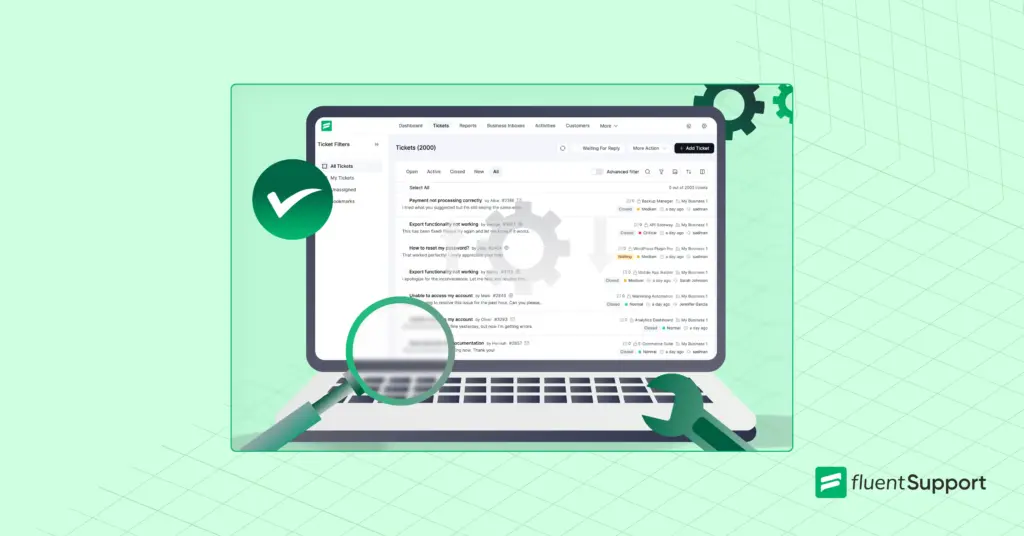
Just a heads up: if your team is still copying details between an email thread and a separate ticket queue every time a customer follows up, that’s the multichannel problem described above, playing out in real time. Fluent Support pulls your email and portal tickets into one shared dashboard, so agents see a customer’s full history without asking them to repeat anything.
Types of Customer Service Channels
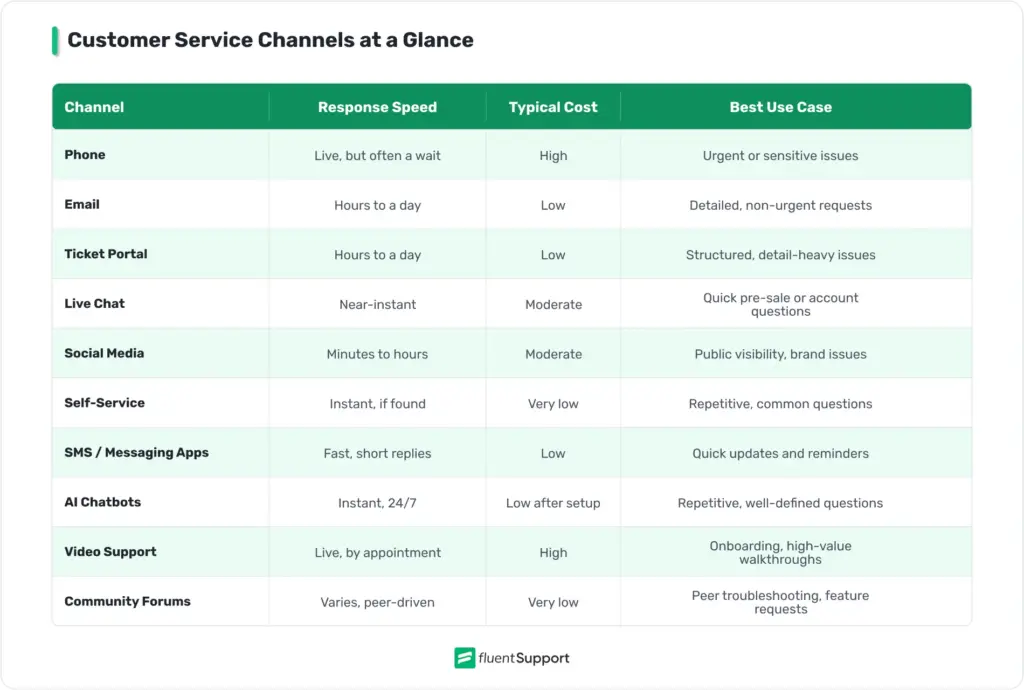
Below are the channel types that make up almost every modern customer service channels list, along with what each one is actually good for, what it costs in staff time, and where it tends to break down.
Phone Support
Phone remains one of the most trusted customer service channels, especially for issues that involve money, account security, or anything that feels urgent to the customer. A voice conversation lets an agent pick up on tone and frustration that text cannot always convey, and it resolves complex problems in a single call more often than other channels do.
The tradeoff is cost and scale. An agent can only handle one call at a time, and staffing a phone line around the clock is expensive. That cost is hard to avoid, since customers tend to escalate to a call the moment a digital channel fails to resolve their issue, which raises the staffing bar for any team that offers phone as a channel.
Best for: billing disputes, account security issues, and any conversation where tone of voice reduces the chance of miscommunication.
Watch out for: long hold times and call queues, which do more reputational damage than simply not offering the channel at all. Businesses often pair phone support with IVR systems to route calls faster, though a poorly designed IVR menu frustrates customers more than it helps.
Email Support
Email is asynchronous, which means customers can send a message whenever it suits them and get a reply later without either side waiting on the line. It also creates a written record, which helps with technical issues that need screenshots, order numbers, or step-by-step instructions.
Its weakness is speed and organization. Email threads can sit unanswered for hours or days if a business does not have a clear process, and a shared inbox makes it easy for messages to get missed or answered twice by different agents. Most teams solve this by running email through a proper ticketing system instead of a shared inbox, since a ticketing system assigns ownership and prevents duplicate replies.
Best for: technical issues with attachments, B2B support that needs a paper trail, and any request that does not need an answer within minutes.
Watch out for: vague subject lines and long reply chains, which make it hard to track first response time accurately without a dedicated tool.
Help Desk / Ticket Portal
A dedicated helpdesk / ticket portal (system) is a web form on your own site where customers submit a request directly, instead of writing a freeform email. It captures structured information, such as order number, product, or issue type, before an agent ever opens the ticket.
This differs from a plain email inbox because the form controls what information comes in. A shared inbox depends on the customer remembering to include the right details, while a portal can require them, which makes routing and prioritization easier from the first message.
Best for: structured issues where specific details cut down on back-and-forth, such as order number, account ID, or product version.
Watch out for: forms with too many required fields. Every extra field before submission adds friction and lowers completion rates.
Live Chat
Live chat sits between phone and email. Customers get a near-instant response without picking up a phone, and agents can handle two or three conversations at once instead of just one. This makes it a strong fit for quick questions during checkout, onboarding, or general troubleshooting.
Live chat works best when it is easy to install and does not require the customer to leave the page they are on. Many WordPress businesses add live chat directly to their site for this reason, since visitors are more likely to ask a question if the chat window is already visible instead of buried behind a contact page.
Best for: pre-sale questions, quick account issues, and situations where a customer is actively on your site and about to abandon a task.
Watch out for: agents juggling too many concurrent chats, which quietly increases average handling time even though each individual reply feels fast.
Social Media Support
Customers increasingly reach out through Instagram DMs, Facebook Messenger, or public comments on X. Some of this is intentional, since customers know a public complaint tends to get a faster response. Some of it is simply habit, because people are already on these platforms daily and would rather message a brand than switch to email.
Social support requires quick monitoring and a careful tone, because replies are often visible to a wider audience and a slow or dismissive response can spread further than the original complaint. It works well for order status questions, general product feedback, and brand reputation management, but it is a poor fit for anything involving personal account details or sensitive information, which should always move to a private channel.
Best for: public brand perception, quick order or shipping questions, and catching complaints before they escalate elsewhere.
Watch out for: treating every platform the same. A comment on X needs a faster public response than a DM on Instagram, and neither should carry account-level detail.
Self-Service and Knowledge Base
Self-service covers FAQs, help center articles, and searchable documentation that let customers solve a problem without contacting anyone. It is one of the most cost-effective channels available, since a single well-written article can answer the same question thousands of times without agent involvement.
The catch is upkeep. A knowledge base only helps if it stays current with the product. Gartner found that while 73 percent of customers try self-service at some point, only 14 percent fully resolve their issue there.
The most common reason customers give up on self-service is that they cannot find content relevant to their specific issue. Outdated articles frustrate customers as much as no article at all, and teams need a habit of reviewing and updating content as features change.
Best for: setup guides, common troubleshooting steps, and policy questions that repeat constantly across your ticket volume.
Watch out for: burying the search bar or organizing articles by internal team structure instead of by what a customer would actually type.
SMS and Messaging Apps
SMS and apps like WhatsApp deliver short, direct updates that customers tend to read quickly, since most people keep notifications on for text messages. This makes the channel useful for order confirmations, appointment reminders, and short back-and-forth exchanges that do not need much context.
It is not built for long or technical conversations. A customer trying to explain a complicated bug over SMS will hit the limits of the format fast. This channel works best as a supplement to email or chat rather than a full replacement.
Best for: shipping updates, appointment reminders, two-factor codes, and short confirmations that do not need a full conversation.
Watch out for: sending too many proactive texts. High-frequency messaging without clear value gets flagged as spam by carriers and ignored by customers.
AI Chatbots
AI chatbots handle repetitive, well-defined questions around the clock without adding headcount. A good bot can pull answers from a knowledge base, check order status, or collect the right details before handing a case to a human agent. This is a major part of AI customer service strategy for growing teams, particularly for questions that repeat dozens of times a week.
Chatbots struggle with nuance, emotion, and anything outside their training data. A poorly configured bot that loops a frustrated customer through the same three answers does more damage than having no bot at all. An easy escalation path to a human agent matters as much as the bot itself.
Best for: order tracking, account lookups, and answering the same handful of questions that make up a large share of your ticket volume.
Watch out for: hiding the option to reach a human. Customers who feel trapped in a bot loop tend to leave angrier than customers who never used the bot.
Video Support
Video calls are less common than the other channels, but they matter for high-touch industries like financial services, healthcare, or technical B2B products, where an agent walking a customer through a screen beats describing steps in text. A video call can also build trust faster than a phone call for sensitive or high-value conversations.
The cost is real. Like phone, an agent can only handle one video call at a time, and video adds bandwidth and scheduling requirements that most support teams do not need for routine issues.
Best for: onboarding walkthroughs, technical troubleshooting that benefits from screen sharing, and high-value account conversations.
Watch out for: offering video by default. It should be an escalation option for specific cases, not a standing channel every agent staffs.
Community Forums
Community forums let customers help each other, share workarounds, and post feature requests where other users can see them. This works particularly well for software products with an engaged user base, since experienced users often answer faster than a support team could, and their answers build a searchable archive over time.
Forums need light moderation from the business to correct wrong answers and step in on issues that require official confirmation. Left unmoderated, a forum can spread outdated advice as easily as it spreads good advice, which undermines trust in the channel over time.
Best for: peer troubleshooting, feature request tracking, and building a searchable archive of real user solutions.
Watch out for: letting incorrect answers sit unmarked. A single wrong pinned answer can generate more repeat tickets than it prevents.
Digital vs Traditional Customer Service Channels
Traditional channels, mainly phone and in-person support, built the foundation of customer service long before the internet existed. They still matter, particularly for older customers and high-stakes issues, but they do not scale well on their own since every conversation ties up one agent for its full duration.
Digital channels, including live chat, email, social media, and AI chatbots, have taken over the bulk of daily support volume because they are cheaper to run and easier to scale. A single support agent can manage several chat conversations or a full inbox of email in the time it takes to handle one phone call.
The split is not as generational as it looks. McKinsey research found that Gen Z customers at one financial services company were 30 to 40 percent more likely to call support than millennials, which cuts against the assumption that younger customers always prefer digital-first support. Phone support tends to stay relevant even in digital-first businesses because some problems are simply easier to explain out loud than to type.
Most businesses today run a mix of both. The practical question is not whether to go fully digital or stay traditional. It is which channels match how your specific customers already prefer to reach you for the specific type of issue they are having, since preference often shifts by issue complexity rather than by age group alone.
Metrics That Show Whether a Channel Is Working
A channel preference survey tells you what customers say they want. Your own numbers tell you what is actually happening. Track these across every channel you offer, not just the ones that feel like they are struggling.
First response time: The time between a customer’s first message and your first reply. Long first response time is one of the fastest ways to lose a customer’s patience, regardless of which channel they used.
Average handling time: The time an agent spends on a single interaction from start to resolution. Tracking average handling time by channel shows you where agents are spending disproportionate time relative to the value of the interaction.
First contact resolution: The percentage of issues solved in a single interaction without a follow-up. Phone and video tend to score highest here, while email and chat often need a second message to fully close an issue.
Customer effort score: A measure of how much work a customer had to do to get their issue resolved. A high customer effort score on a specific channel usually points to a process problem, not a staffing problem.
Cost per contact: The total operating cost of a channel divided by the number of interactions it handles. Self-service and chatbots run far cheaper per interaction than phone, but a low cost per contact means little if the issue is not actually resolved.
Deflection rate: The percentage of customers who solve their issue through self-service instead of contacting an agent. A rising deflection rate usually means your knowledge base content is doing its job.
How to Choose the Right Customer Service Channels
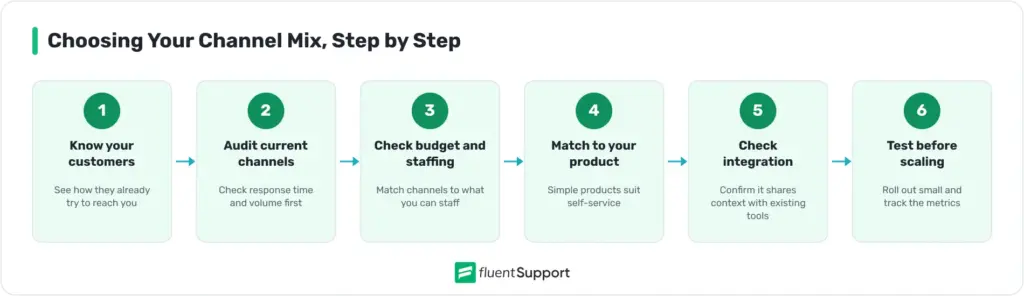
Adding every available channel is rarely the right move for a small or mid-sized team. Here is a practical, six-step process for narrowing the list.
Common Mistakes When Managing Multiple Channels
Even experienced teams fall into a few repeatable traps once they run more than two or three channels.
A Practical Example
A small WordPress plugin business starts with email support alone, handling around 40 tickets a week with a two-day average response time. As the user base grows, customers begin asking pre-sale questions through live chat and reporting bugs through a public forum. The support lead notices that pre-sale questions get answered in minutes through chat, while technical bugs reported by email still take two days to resolve because agents need to gather logs and screenshots before they can even start troubleshooting.
Instead of adding more channels, the team fixes the process behind the two it already has. Chat gets a canned response library for common pre-sale questions, and average handling time on those conversations drops by roughly half.
Email gets connected to a proper ticketing system so bug reports are tagged, assigned, and tracked instead of sitting in a shared inbox. This brings first response time down from two days to under six hours. Ticket volume does not drop, but resolution speed nearly doubles, without a single new channel added.
Wrapping Up
Customer service channels are not a checklist to complete. They are a set of tools that only work when they match how your customers actually behave, share context instead of operating as separate silos, and get measured by real numbers instead of gut feeling.
Start with the channels your customers already use, fix the process and customer service skills behind them, track the metrics that actually reflect resolution instead of just contact, and expand only when the data says it is time.
Start off with a powerful ticketing system that delivers smooth collaboration right out of the box.
FAQs
Most small businesses do well with two to three channels that match where their customers actually reach out, usually email plus one real-time option like live chat or phone.
A channel is a single method of contact, like phone or email. An omnichannel support strategy connects those channels so agents see one shared history no matter which one a customer used.
Self-service and knowledge base content are typically the cheapest, since a single article can resolve the same question repeatedly without agent time, though chatbots come close for well-defined queries.
Phone still matters for urgent or complex issues across every generation, though most routine questions now move through digital channels like chat and email because they are faster to access.
Multichannel means offering several separate channels that do not share data. Omnichannel means those same channels are connected, and an agent can see a customer’s full history regardless of which channel they used.
Compare its first response time, resolution rate, and cost per contact against your other channels. A channel that scores worse on all three while getting similar volume usually needs a process fix before it needs more staff.
Related Articles
Fluent Support 2.4.5: Remote Portal, New Workflow Triggers and more
Fluent Support 2.4.5 lets you run the customer…How to Setup a Support Ticket System in WordPress?
Learn how to set up a support ticket…

Add your first comment to this post