

Customer Service Checklist: A Practical Guide for Support Teams

By Md. Sajid Sadman
September 13, 2026
Last Modified: September 7, 2026


A customer service checklist is a documented set of standards a support team follows on every ticket. It spans response speed, communication, issue handling, and follow-up, so quality does not depend on which agent picks it up.
Very few teams actually have one written down, and the gap shows up fast: one agent confirms a fix before closing while another closes the moment a reply goes out, both convinced they did the job well. The customer sees two different companies.
In this blog, we will break down what a customer service checklist actually covers, why generic versions fall short, and how to build one your team will use every day.
Key Takeaways
- A customer service checklist turns “be helpful” into specific, repeatable actions agents can follow on every ticket
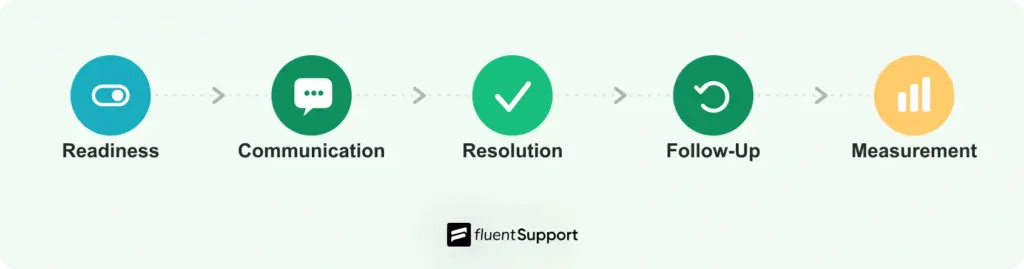
- It works best when split into phases: readiness, communication, issue handling, follow-up, and measurement
- Acknowledging a customer fast matters more than resolving fast, and the two should be tracked separately
- Response targets should be set per channel, since chat, email, phone, and social all carry different expectations
- Escalation only works when the customer never has to repeat themselves during a handoff
- Metrics like first response time and first contact resolution are only useful when tied to specific behaviors, not just watched on a dashboard
- A checklist is a living document that needs review and a simple scoring method, not a poster you print once and forget
What Is a Customer Service Checklist?
In practice, that means writing down the exact behaviors that separate a good ticket from a bad one instead of leaving them to instinct. It covers how fast to respond, how to communicate, how to resolve issues, and how to confirm the customer is actually satisfied before closing a ticket.
A basic version might include a two-minute reply target for live chat, a rule that agents acknowledge a ticket before researching the fix, and a requirement that no ticket closes without the customer confirming the issue is solved. Nothing on that list is complicated on its own. What makes it useful is that it removes guesswork. An agent does not have to decide in the moment whether to acknowledge first or dig into the problem first, because the checklist already answered that question.
The purpose is consistency. Without a checklist, service quality depends entirely on which agent happens to pick up the ticket. With one, every customer gets roughly the same experience regardless of who answers.
Most checklists fall into two categories: a daily checklist agents run through during a shift, and a quality checklist managers use to audit finished tickets. A strong support operation uses both, not just one.
Why Generic Checklists Fall Short
Search for a customer service checklist and you will find dozens of near identical lists: greet warmly, listen actively, stay positive. These are true but too vague to act on.
Telling an agent to “respond quickly” gives them nothing to measure against. Telling them to hit a two-minute reply target on live chat and a four-hour target on email gives them something they can actually check off at the end of a shift.
The other gap is scope. Most templates cover a single conversation from greeting to goodbye. They skip what happens before the ticket even lands (is the knowledge base actually current) and after it closes (did anyone confirm the fix held, and did anyone log what happened for the next agent).
A checklist that only covers the middle of the interaction misses where most service actually breaks down, since a huge share of repeat contacts trace back to a fix that was never verified or a ticket that closed with no notes attached.
The Customer Service Checklist
Run through each section below as a real audit of your current operation, not a read-through. Grab a handful of recent tickets while you go and check whether each item actually happened, since that is a more honest test than asking whether you believe it happens.
If an item is missing or half-built, that is where your next few weeks of work should go.
Readiness and Access
Before a single ticket comes in, the basics need to be in place.
- Channel check: Confirm live chat, email, phone lines, and any social inboxes are actually staffed and working, not just technically connected. A form that submits into an inbox nobody checks is worse than not offering the channel at all, because the customer thinks someone is listening.
- Response targets: Set a specific first response time for each channel. Chat, email, and social do not deserve the same target, and pretending they do just sets your team up to miss it somewhere. The table below is a reasonable starting point if you have not set targets yet.
| Channel | Suggested first response target |
|---|---|
| Live chat | Under 2 minutes |
| Phone | Answer live, or call back within 30 minutes |
| Under 4 business hours | |
| Social media / DM | Under 1 hour |
| Ticket portal / forum | Under 24 hours |
Treat these as a starting point, not a rule. Adjust them against your own ticket volume and staffing, then write down whatever you land on so the target is fixed instead of debated ticket by ticket.
- Knowledge base accuracy: Walk through your top 20 support articles and confirm they match your current product. Outdated documentation creates more tickets than it prevents, since a customer who follows a wrong step usually files a ticket about the new problem it caused.
- Service level agreements: Write down your response and resolution targets as a formal service level agreement so agents and managers are working from the same numbers, not personal guesses. An SLA only helps if someone actually reviews the breach reports, so decide upfront who owns that review and how often it happens.
- Staffing against real traffic: Compare your ticket volume by hour of day against your current shift coverage. Most teams staff evenly across the day, then wonder why response times spike during a predictable lunchtime or evening peak.
Communication Standards
This is where most customer perception actually gets shaped.
- Greeting structure: Every conversation should open with an identification and an offer to help, and close with a clear confirmation that the issue is resolved. The two bookends do more for how professional a company feels than anything said in the middle of the conversation.
- Active listening: Agents should read the full message once before typing a reply, and ask one clarifying question instead of guessing at what the customer meant. A reply that answers the wrong question wastes both sides’ time and reads as if nobody actually read the message.
- Tone consistency: Put your team’s phrasing guidelines in writing: how to say no, how to apologize for a delay, and how to deliver bad news without sounding scripted. Without this, ten different agents produce ten different versions of the same company.
- Channel-appropriate tone: A live chat reply can be short and conversational. An email response to a billing dispute needs more structure and a clearer paper trail. Using the same tone across every channel usually means one of them feels wrong.
- Personalized templates: Canned responses save time on repetitive questions, but every saved reply should get edited with the customer’s specific detail before it goes out. A template pasted without changes reads as exactly what it is, and customers notice when a reply clearly ignored what they actually wrote.
Handling the Issue
Speed and accuracy both matter here, and they are not the same thing.
- Acknowledge before you resolve: A short first reply within minutes, even if the real fix takes hours, buys enormous patience. Silence while you work is the most expensive mistake a support team makes, since the customer has no way to tell the difference between a team that is working on the problem and one that never saw the ticket.
- Root cause first: Gather the full picture before proposing a fix. A quick answer to the wrong problem creates a second ticket and a more frustrated customer, and it also erodes trust faster than a slower but accurate first answer would.
- Clear escalation path: Document exactly which issue types go to which teammate and what information travels with the ticket. Ticket escalation only works if the customer never has to explain their problem twice, so the handoff should carry full ticket history and notes automatically rather than relying on the receiving agent to ask the customer again.
- One owner per ticket: Even when multiple people touch a ticket, one agent should be responsible for making sure it actually gets closed. Shared ownership without a named owner is how tickets quietly sit untouched for days.
- Autonomy within limits: Give agents clear boundaries for what they can resolve on their own versus what needs a supervisor, so decisions do not stall waiting on approval for routine calls like a small refund or a minor account correction.
What This Looks Like on a Real Ticket
A customer emails saying their checkout is failing. A team without a checklist might wait until someone has time to fully investigate before replying at all, sometimes hours later, with the first message doubling as the resolution attempt.
A team following the checklist above sends a short acknowledgment within minutes confirming the report was received and is being looked into, then investigates the root cause before proposing a fix rather than guessing at a generic troubleshooting step.
Once the fix goes out, the agent asks the customer to confirm checkout is working again before closing the ticket, and logs the actual cause in the ticket notes in case the same issue comes up with another customer.
Both teams care about the same customer.
The second team simply had every step decided in advance instead of leaving it to whichever agent happened to be online.
Closing and Follow Up
The ticket is not actually done when the last message goes out.
- Confirm resolution: Ask directly whether the fix worked before marking a ticket closed. A customer who stays quiet is not always a satisfied one, and a ticket closed on silence alone is a common source of tickets that quietly reopen weeks later.
- Log the interaction: Record what happened and how it was solved, in enough detail that a different agent could pick up the thread later without asking the customer to start over. A one-line note saved today can save fifteen minutes of investigation for whoever handles the next similar ticket.
- Send a follow-up: A short check-in a day or two after closing catches fixes that did not actually hold, and tells the customer someone still cares once the ticket count no longer needs them. This does not need to be a formal survey, a single line asking if everything is still working is usually enough.
- Collect feedback beyond surveys: Post-ticket surveys only reach customers who already contacted you. A feedback form or forum open to your wider customer base surfaces issues the quiet majority never bothers to report, which matters because the customers who never file a ticket are often the ones closest to leaving quietly.
Metrics to Review
None of the above means much if nobody checks whether it is working.
- First response and resolution time: Track both separately. First response time is the gap between when a ticket lands and when an agent first replies. Resolution time is the gap between the ticket landing and it actually closing. A fast acknowledgment with a slow fix is a different problem than a slow acknowledgment with a fast fix, and they need different solutions, so averaging them into one number hides which one is actually broken.
- First contact resolution: This is the share of tickets solved without the customer needing to follow up again. According to SQM Group’s benchmarking research across more than 500 contact centers, the industry average first contact resolution rate sits around 70 percent, with only about 5 percent of centers reaching the 80 percent world class threshold. Use that as a rough anchor rather than a hard target, since it varies by industry and channel, and a low number is more useful as a prompt to look at specific ticket types than as a score to chase blindly.
- CSAT trends: Look at the trend line over months, not a single week’s score, and connect drops to a specific cause like a product bug or a staffing gap rather than treating the number as a mystery. A CSAT score with no note attached to a dip is a number nobody will act on.
- Calibration reviews: Have two or three agents grade the same closed ticket independently on a regular basis. Large gaps in scoring mean your service metrics are measuring different things depending on who is grading, which makes every other number on this list less trustworthy until it gets fixed.
Common Mistakes That Break a Checklist
Checklists fail in predictable ways even after teams build them properly.
Just a heads up: if half of the mistakes above sound familiar, it’s rarely a discipline problem. It’s usually that ticket ownership, saved replies, and escalation history are scattered across tools nobody checks consistently. Fluent Support keeps all three in one ticket view, so most of this checklist enforces itself instead of depending on someone remembering to do it.
Building Your Own Checklist
Start with what you already have instead of copying a generic template wholesale.
Keeping the Checklist Current
A checklist is only accurate for as long as your product and team stay the same, which in practice is rarely more than a few months.
Set a recurring review, quarterly is a reasonable default, and treat any major release, a new support channel, or a noticeable shift in ticket volume as a trigger to check the checklist sooner.
The review does not need to be long. Pull the audit scores from the last quarter, ask agents which items feel outdated or unrealistic, and update the document in the same sitting so it does not sit half-revised for another quarter.
Wrapping Up
A customer service checklist only earns its place if your team actually uses it on real tickets, not just reads it once during onboarding.
Pick two or three items from the sections above that your team currently skips, write them down clearly, and give agents a month to build the habit. Come back and add more once those stick. Consistency beats a perfect list nobody follows.
Start off with a powerful ticketing system that delivers smooth collaboration right out of the box.
FAQ
Most versions of this list cover the same sequence: greet the customer, listen to their issue, show empathy, identify the root cause, offer a solution, confirm satisfaction, and follow up. The exact wording varies by source, but the order stays roughly the same across most support frameworks.
This is commonly confused with the retail “10-foot rule,” where staff acknowledge a customer with eye contact or a greeting once within about 10 feet of them. In a support context, it is often used loosely to mean respond within a short, defined window rather than a strict industry standard.
Fast acknowledgment, clear response targets, active listening, honest communication, defined escalation paths, consistent tone, accurate documentation, regular follow-up, tracked metrics, and ongoing agent training consistently rank as the highest impact practices across most support research.
Set response time targets per channel, keep your knowledge base current, train agents on product knowledge, standardize greetings, build a real escalation path, personalize canned responses, confirm resolution before closing, follow up after tickets close, review metrics regularly, and protect your team from burnout.
Patience, clear communication, empathy, product knowledge, problem solving ability, adaptability across channels, and the composure to stay calm during a tense conversation are the traits that show up most often across hiring guides and training material.
Short enough that an agent can scan it during a shift, usually 15 to 25 items split across a few clear phases. A checklist that reads like a manual will get opened once and ignored after that.
The phases stay the same, but the specifics change. Phone needs a clear opening script and hold etiquette, while chat needs faster reply targets and shorter message length. Keep one shared checklist with a few channel-specific notes rather than maintaining separate documents for each.
Yes, several checklist and productivity tools offer free downloadable templates in PDF or Word format. Use them as a starting point, then edit the items to match your actual channels and response targets rather than adopting one unedited.
Related Articles
Fluent Support 2.4.7: Ticket Filters, 5x Faster Tickets and Smart Customer Search
Fluent Support 2.4.7 brings a Ticket Filters sidebar…Customer Success Best Practices for Small Teams
In this blog, we’ve discussed customer success in…


Add your first comment to this post