

Personalized Customer Experience: What It Is and How to Build It

By Md. Sajid Sadman
September 7, 2026
Last Modified: September 2, 2026


A personalized customer experience is when a business shapes what a customer sees, hears, and receives based on that specific person’s data, history, and behavior, instead of giving everyone the same generic version.
A customer who bought an espresso machine last month and gets a follow-up email about descaling tablets, not a blanket sale on kitchenware, is experiencing exactly that.
Most businesses now try some version of this, but the gap between doing it well and doing it badly is wide enough to lose a customer either way.
This blog covers what a personalized customer experience actually requires
- the core components behind it
- how CRM systems and AI make it possible at scale
- what it looks like across different business types
- the metrics that prove it is working
- and a practical process for building one without overreaching on customer data.
Alright, let’s get started.
Key Takeaways
- A personalized customer experience tailors interactions to an individual’s data, preferences, and history instead of using one generic version for everyone.
- It depends on four things working together: unified data, real-time context, cross-channel consistency, and human judgment.
- CRM systems are what make personalization operational, since they give every team the same view of a customer instead of scattered records.
- Generic personalization, like just inserting a first name, is not the same as contextual personalization based on real behavior.
- Over-collecting or misusing customer data is the fastest way to turn personalization into something that feels invasive rather than helpful.
- Personalization should be measured with real metrics, like repeat contact rate and customer effort score, not just assumed to be working because a project shipped.
What Exactly Is a Personalized Customer Experience?
A personalized customer experience is the result of a business using what it actually knows about a customer, such as past purchases, support history, or stated preferences, to shape the next interaction that customer has with them.
It shows up as a pattern across marketing emails, product recommendations, support conversations, and even the content a returning website visitor sees first, rather than as a single feature on its own.
The distinction that matters most is between surface-level personalization and contextual personalization. Surface-level personalization means inserting a customer’s name into a subject line while sending everyone the same offer underneath it. Contextual personalization means the offer itself, the channel it arrives on, and the timing all change based on what that specific customer has actually done.
The first one is decoration. The second one is the thing customers actually respond to, because it requires the business to have paid attention. A customer can tell within one interaction which version they are getting, and that first impression tends to set their expectation for every interaction after it.
A personalized customer experience is the result of a business using what it actually knows about a customer, such as past purchases, support history, or stated preferences, to shape the next interaction that customer has with them. It shows up as a pattern across marketing emails, product recommendations, support conversations, and even the content a returning website visitor sees first, rather than as a single feature on its own.
The distinction that matters most is between surface-level personalization and contextual personalization. Surface-level personalization means inserting a customer’s name into a subject line while sending everyone the same offer underneath it. Contextual personalization means the offer itself, the channel it arrives on, and the timing all change based on what that specific customer has actually done.
The first one is decoration. The second one is the thing customers actually respond to, because it requires the business to have paid attention. A customer can tell within one interaction which version they are getting, and that first impression tends to set their expectation for every interaction after it.
Why Personalized Technology Is Vital in Customer Experience
Personalized technology matters because doing this manually does not scale past a small handful of customers.
A support agent can remember a regular caller’s preferences. No team can hold that same context for ten thousand customers across email, chat, and social media without software tracking it for them, and the moment a business grows past what one person can remember, personalization either becomes systematic or it quietly disappears.
McKinsey research found that personalization most often drives a 10 to 15 percent revenue lift, with company-specific results ranging from 5 to 25 percent depending on sector and execution.
The same research found that companies growing faster than their peers generate 40 percent more of their revenue from personalization, and that 71 percent of consumers expect personalized interactions while 76 percent get frustrated when they do not get one.
That expectation gap is why personalized technology stopped being optional.
A business without it works against what most of its customers now assume will happen by default, and every generic interaction it sends becomes a small, repeated reminder that it does not know who it is talking to.
Core Components of a Personalized Experience
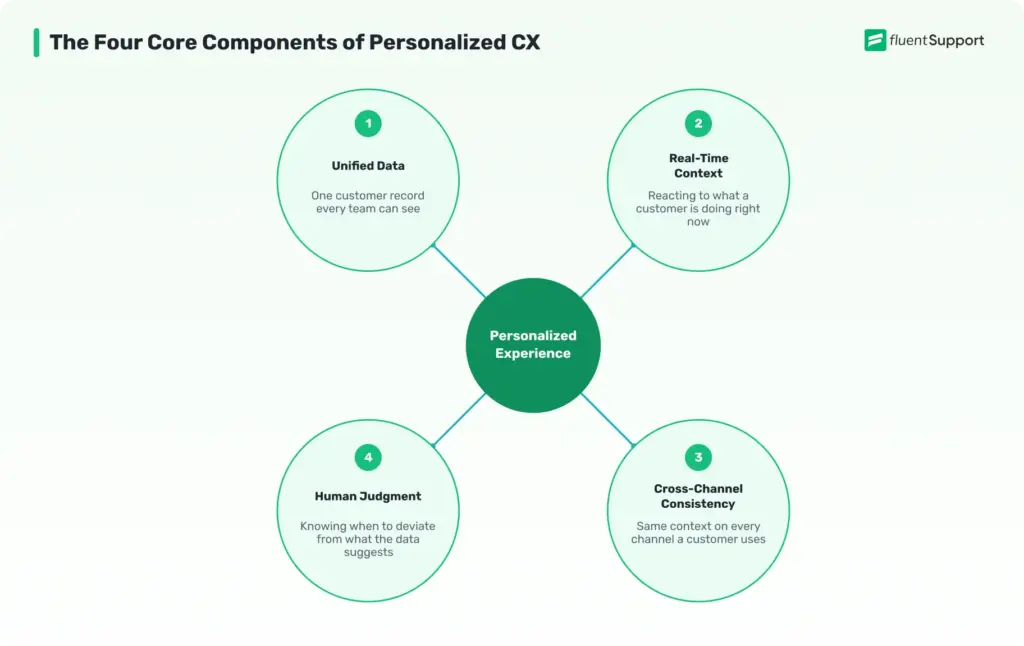
Personalization works as four separate capabilities that have to function together, not as one single tool, and most personalization failures trace back to one of these being missing rather than the whole strategy being wrong.
Unified Customer Data
Unified data means every team, whether marketing, sales, or support, is working from the same customer record instead of separate spreadsheets or disconnected tools.
Without this, a support agent has no way of knowing a customer already complained about the same issue to a different channel last week.
A customer database that consolidates purchase history, support tickets, and communication preferences into one profile is the foundation everything else depends on. Skipping this step and jumping straight to personalized marketing usually just produces personalization that contradicts itself across channels.
What this looks like in practice: a returning customer’s email address pulls up their last three orders, their preferred contact channel, and any open support ticket, all in one screen, instead of an agent searching four separate tools to piece the same picture together.
Just a heads up: if your support agents still have no way of seeing a customer’s past tickets before replying, that’s the unified data gap described above, playing out in your own inbox. Fluent Support keeps every ticket and email tied to one customer record. An agent opening a new conversation already sees what that person asked before.
Real-Time Context
Real-time context means reacting to what a customer is doing right now, not just what they did months ago. A customer browsing a specific product category today is a better signal than a purchase from six months back, and stale data produces recommendations that feel out of date the moment a customer sees them.
This is where automation earns its place. Rules-based systems and AI customer service tools can react to a live signal within seconds, something no manual process can consistently match once volume grows past a small team.
The tradeoff is that real-time context needs continuous data flow, not a nightly batch update. A recommendation engine that only refreshes once a day will still show a customer the item they already bought yesterday, which undercuts the entire point of reacting in real time.
Consistency Across Channels
Consistency means a customer does not have to repeat themselves when they move from email to live chat to a phone call. This is the same problem that shows up in fragmented support systems, and personalization inherits it directly. If channels do not share the same customer record, personalization on one channel actively contradicts what happens on another.
An omnichannel support setup is what keeps recommendations and support context consistent regardless of where a customer chooses to show up.
The failure mode here is subtle. A customer gets a perfectly timed personalized email, clicks through, then reaches a support agent who has no idea the email ever existed.
The inconsistency actively signals that the personalization was automated marketing rather than genuine attentiveness, on top of simply failing to add value.
Human Judgment
Data can tell a business what a customer bought. It cannot always tell them what a customer actually needs right now, especially in a support conversation involving frustration or an unusual situation. Human judgment is still what decides when to deviate from what the data suggests.
The strongest personalization strategies treat automation as the thing that surfaces context quickly, while a person or a well-trained system still makes the final call on tone and next steps. A customer who just had a bad experience does not want a cheerful upsell recommendation, even if the data technically supports one, and knowing when to suppress a personalized suggestion is as important as knowing when to show it.
How CRM Enables Personalized Customer Experience
A CRM system enables personalization by giving a business one continuously updated record of who a customer is, what they have bought, and every interaction they have had with support or sales. Without that central record, personalization depends on individual employees remembering details, which breaks down the moment volume grows or someone leaves the team.
A well-run CRM process does three specific things for personalization. It tracks behavior over time instead of only capturing a single transaction. It makes that history visible to whichever team is handling the current interaction.
It also flags patterns, such as a customer who buys every quarter or one whose support tickets keep escalating, that a human would likely miss while managing dozens of other accounts. A CRM that surfaces “this customer has contacted support three times this month” automatically is doing something no individual agent could reliably catch on their own, since each of those three contacts might have gone to a different person.
The result is that a sales rep, a support agent, and a marketing email can all reflect the same understanding of a customer, instead of three different guesses. This is also where most small businesses underinvest. A CRM bought and never fully populated with support history behaves like a filing cabinet nobody put the files in.
Personalization Across Different Business Types
Personalization does not look the same everywhere. The mechanism is identical, unified data driving a tailored interaction, but what gets personalized changes by business model.
SaaS and software
Personalization shows up in onboarding flows and feature suggestions. A user who only touches three features out of twenty gets nudged toward the ones relevant to their actual usage pattern, not a generic tour of everything the product does.
Ecommerce and retail
Personalization centers on product discovery and post-purchase follow-up. A browsing history that shows repeated visits to one product category is a stronger signal than a single purchase from a year ago, and the recommendation should update as that behavior shifts.
Service and support-heavy businesses
Personalization is less about recommendations and more about context. A support team that already knows a customer’s plan, past tickets, and technical setup resolves issues faster because nobody has to ask the customer to re-explain their environment from scratch.
B2B and account-based businesses
Personalization operates at the account level as much as the individual level. A single company account might have five different contacts, and personalization means knowing which contact handles billing versus which one handles technical questions, not treating all five as interchangeable.
How to Create a Personalized Customer Experience
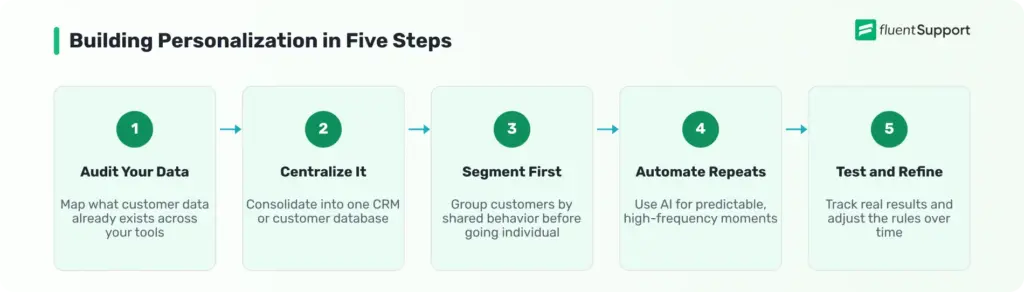
Building personalization from scratch works best as a sequence rather than everything launching at once.
Audit your current data
Find out what customer data already exists across your tools before buying anything new. Most businesses have more usable data sitting in disconnected systems, a support inbox, a spreadsheet of past orders, a CRM nobody updates consistently, than they realize. List every place customer information currently lives before deciding what is missing.
Centralize it in one place
Consolidate that data into a CRM or customer database so every team pulls from the same source instead of maintaining separate versions. This step alone resolves a large share of the inconsistency customers notice, since most personalization failures are really data fragmentation failures wearing a different name.
Segment before you personalize individually
Group customers by shared behavior first, such as purchase frequency, product category, or support volume. This produces a usable starting point faster than trying to build one-to-one personalization on day one, and it gives you a way to test messaging on a group before committing to fully individualized rules.
Automate the moments that repeat
Use automation and AI for high-frequency, predictable moments like order updates or common support questions, where consistency matters more than a human touch. Save human attention for the interactions where judgment actually changes the outcome.
Test and refine with real feedback
Track how customers respond and adjust. Personalization that was accurate six months ago drifts out of date as customer behavior changes. Treat the rules behind it as something to revisit on a schedule, not a one-time setup.
Personalized Customer Experience Examples
Personalization shows up differently depending on where it happens in the customer journey.
Product recommendations:
An online retailer suggesting items based on a customer’s actual browsing and purchase history, not just their broad product category, is the most common form most people encounter daily. The difference between a good and bad version of this is specificity.
A customer who bought running shoes seeing more running shoes is generic. The same customer seeing replacement laces after the typical wear cycle for that shoe model is contextual.
Proactive support:
A proactive support message that reaches a customer before they have to ask, such as flagging a delayed shipment before they contact support about it, turns personalization into something that saves the customer effort instead of just marketing to them.
This is often the highest-value form of personalization because it removes work from the customer’s side entirely.
Contextual support replies:
A support agent who can see a customer already tried a troubleshooting step, because the system logged it, does not ask them to repeat it. That single detail is often what separates a five-minute resolution from a frustrating back and forth, and it costs nothing extra to deliver once the data is already unified.
Milestone-based outreach:
Recognizing an account anniversary, a renewal date, or a usage pattern with a relevant message, rather than a generic promotional blast, is personalization built on timing rather than just data. A renewal reminder sent two weeks before expiration reads as helpful. The same message sent to every customer regardless of their actual renewal date reads as a form letter.
Common Personalization Mistakes
Personalization fails in a handful of predictable ways, and most of them come from moving faster than the data supports.
Metrics to Measure Personalization Success
Personalization should be measured the same way any other initiative is, with numbers that show whether it is actually working rather than just shipped.
A Practical Example
A small online course platform starts with a single weekly email blast sent to every subscriber, regardless of which course they bought or how far they had progressed. Open rates sit around 18 percent, and unsubscribe requests average four or five a week.
The team centralizes purchase and progress data into one system and splits the audience into three segments based on course category and completion stage instead of sending one email to everyone. Beginners who have not started a course get a getting-started nudge.
Customers halfway through get a message tied to their specific next module. Customers who finished get a recommendation for a related course rather than a repeat of one they already own.
Open rates rise to around 31 percent within two months, and unsubscribe requests drop to roughly one a week. No new headcount was added. The change came entirely from routing the same message differently based on data the business already had sitting in its order system.
Wrapping Up
A personalized customer experience depends on unified data, real-time context, consistency across every channel, and enough human judgment to know when to deviate from what the data suggests, built into the process rather than layered on top of it. Businesses that get the foundation right, starting with a single customer record instead of scattered systems, end up with personalization that customers actually notice for the right reasons instead of the wrong ones.
Start off with a powerful ticketing system that delivers smooth collaboration right out of the box.
FAQs
Personalization is done by the business using customer data to shape an experience automatically. Customization is done by the customer themselves, choosing settings or preferences directly.
No. Small businesses often personalize more naturally because a single CRM and a smaller customer base make unified data easier to maintain than it is for a large enterprise juggling disconnected systems.
Less than most businesses assume. Purchase history, support history, and stated preferences cover most personalization use cases without needing invasive tracking.
No. Simple segmentation and CRM-based rules can deliver meaningful personalization. AI becomes valuable at higher volume, where reacting to real-time behavior manually is no longer realistic.
Simple wins, like segmented email content instead of one blanket message, can show measurable change within a few weeks. Deeper personalization, like real-time behavioral triggers, usually takes longer because it depends on enough accumulated data to be reliable.
Rising repeat contact rates or customers correcting information a business should already know are the clearest signals. Both mean the data behind the personalization is not actually reaching the people using it.
Related Articles
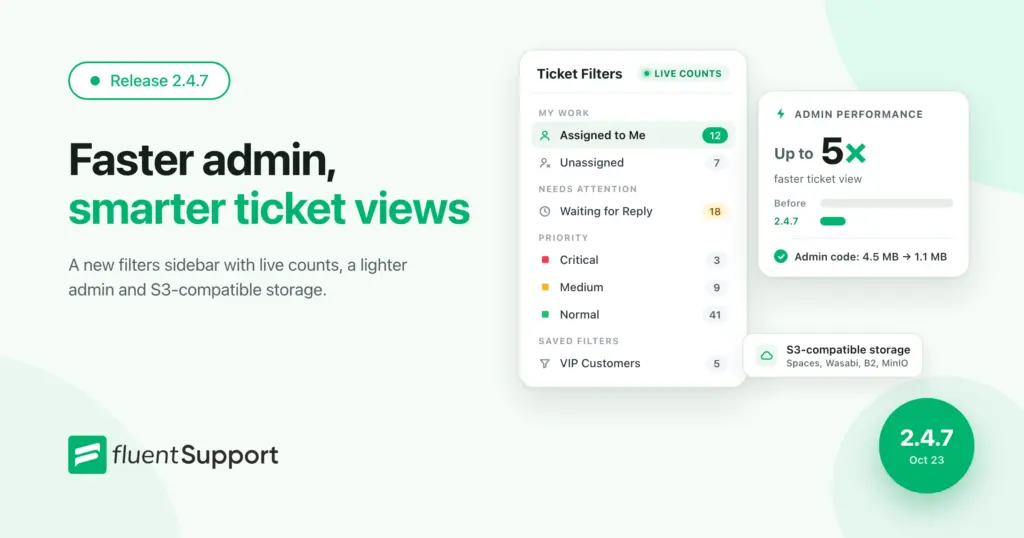
Fluent Support 2.4.7: Ticket Filters, 5x Faster Tickets and Smart Customer Search
Fluent Support 2.4.7 brings a Ticket Filters sidebar…Customer Success Best Practices for Small Teams
In this blog, we’ve discussed customer success in…


Add your first comment to this post