

Customer Service Communication: Essentials You Need to Know

By Md. Sajid Sadman
February 11, 2026
Last Modified: February 11, 2026


Customer service communication is how information moves between customers and support teams.
It happens in emails, live chats, phone calls, and help tickets. Every interaction either builds trust or chips away at it.
Here’s what we’ve learned after years of building and fixing support teams: the difference between good communication and poor communication rarely comes down to the people on your team. Usually, it’s the system underneath that’s either helping them succeed or setting them up to fail.
This blog walks through how customer service communication actually works in practice, where it typically breaks down, and what you can do to strengthen it across your entire operation.
TL;DR
What is customer service communication?
Customer service communication is how information moves between customers and support teams. It includes external communication (customer-facing interactions like emails, chats, and calls) and internal communication (how agents share context with each other and with other departments like billing, engineering, or product teams). Both types work together. When internal communication breaks down, customers feel it even though they never see what’s happening behind the scenes.
How does communication flow in customer service?
Communication flows through three main paths: customer to agent (the initial inquiry where context and urgency need to be understood), agent to agent (handoffs during shift changes, escalations, or when specialized knowledge is needed), and agent to other departments (when support needs help from billing, technical teams, or product). Each handoff introduces risk. If information doesn’t transfer cleanly, context gets lost and customers end up repeating themselves or waiting without updates.
Why does customer service communication break down?
Communication breaks down when context gets lost between channels (customers switch from chat to email to phone and have to restart each time), when agents give inconsistent answers because policies aren’t documented clearly, when customers don’t receive proactive updates during long resolution times, or when internal teams don’t communicate well with each other. These aren’t people problems. They’re system problems caused by missing infrastructure.
What are the core elements of effective communication?
Effective communication requires four things: clarity over speed (explaining what’s happening is more valuable than fast but vague responses), context sharing across touchpoints (every agent should see the full customer history), consistent tone and language (team-wide standards for common situations without sounding robotic), and proactive updates (reaching out before customers have to ask what’s happening). These elements create a system, not just good individual interactions.
How can you improve customer service communication?
Improve communication by setting clear response standards (define expected response times and when to send progress updates), using shared communication tools (centralize all channels so agents see complete context), documenting customer context after every interaction (so the next agent doesn’t start from scratch), creating internal communication protocols (clear processes for how cases move between teams), and training agents on clarity (explaining things simply matters more than just being empathetic). Strong communication comes from building the right systems and infrastructure, not just motivating individual agents to try harder.
What customer service communication actually means?
At its core, customer service communication is the exchange of information between customers and support teams while resolving issues or answering questions.
Now, most people hear that and immediately think of customer-facing interactions. Emails, chats, phone calls. The stuff customers see and hear.
That’s part of it, absolutely. But it’s only half the picture.
In reality, there are two types of communication happening at the same time, and both need to work together for support to function well. Let us break them down.
1. External communication (customer-facing)
This is the part everyone thinks about first.
It’s the direct interactions between your team and your customers. The replies you send, the calls you take, the messages you type in a chat window.
Customers come into these interactions expecting three things: clarity, speed, and consistency.
They want to understand what’s happening with their issue. They want answers as quickly as possible. And they want those answers to make sense no matter who they’re talking to on your team.
When external communication is clear and consistent, customers relax. They trust that you know what you’re doing. When it’s vague, contradictory, or slow, they get anxious. And that anxiety often turns into frustration pretty quickly.
But here’s the thing: external communication is only as strong as what’s happening behind the scenes.
2. Internal communication (team-to-team)
Internal communication is everything that happens out of the customer’s view.
It’s how agents share information with each other when handing off a case. It’s how your support team communicates with billing when there’s a payment issue, or with engineering when there’s a bug report, or with product when a customer asks for a feature that doesn’t exist yet.
Customers never see this part directly. But they absolutely feel it.
Think about it this way: if an agent doesn’t know what the previous agent already tried, the customer ends up repeating themselves. If your support team can’t get a clear answer from another department, the customer sits in limbo waiting for someone to figure it out.
Internal communication directly shapes the external experience, even though it’s invisible to the customer.
So when we talk about improving customer service communication, we are really talking about both layers. Because when one breaks down, the whole system starts to wobble.
How communication flows in customer service?
Customer service communication isn’t just a single conversation between a customer and one agent.
In most support environments, it’s actually a series of handoffs, updates, and information transfers. Understanding how that flow works helps you spot where things tend to go wrong.
Information typically moves through three paths:
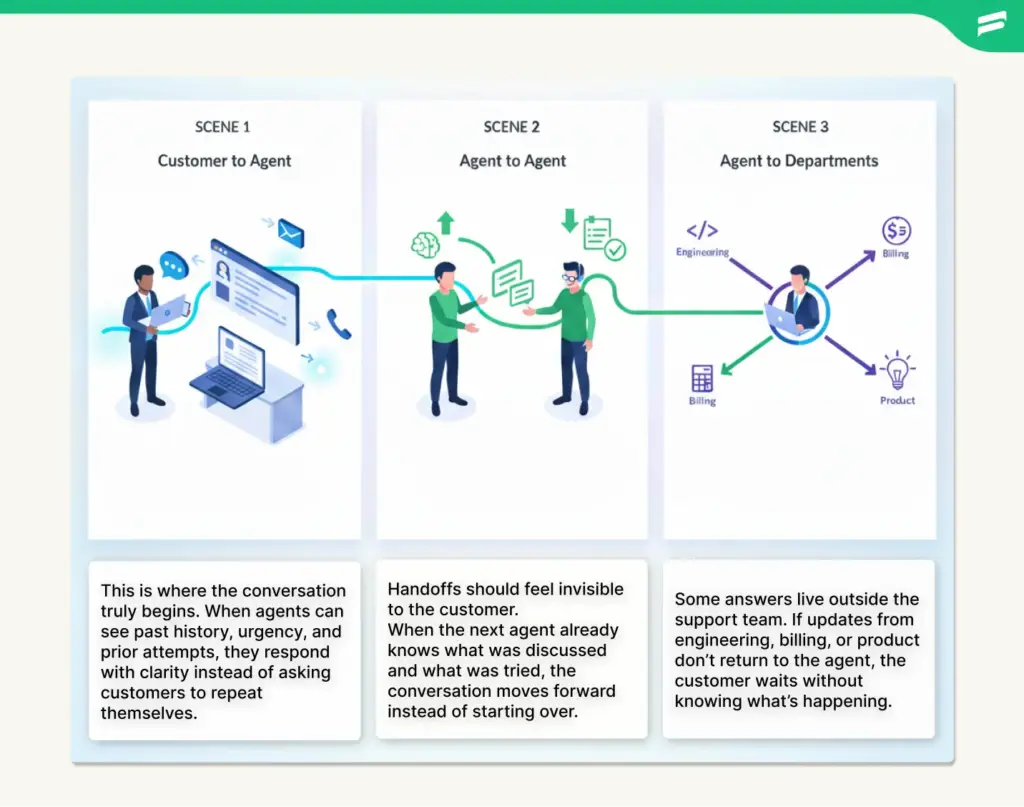
Let me walk you through how each one works and where breakdowns usually happen.
Scene 1: Customer to agent

This is where everything starts. A customer reaches out with a question, a complaint, or a problem they need help solving.
The agent’s job at this stage is to understand three critical things: what the customer actually needs, what’s already been done (if anything), and how urgent the situation is.
Context is everything here. If this customer already contacted support twice about the same issue, the agent needs to know that upfront. Otherwise, they’re starting the conversation from scratch while the customer is already two steps into frustration.
When agents have that context available, conversations move faster and feel more personalized. When they don’t, customers feel like they’re talking to a company that doesn’t pay attention.
That frustration is completely avoidable, by the way. It’s just a matter of having the right systems in place.
Scene 2: Agent to agent

Cases move between agents more often than most people realize.
Shift changes happen. Escalations happen. Sometimes an issue needs specialized knowledge that the first agent doesn’t have, so it gets passed to someone with deeper expertise.
Here’s a common scenario: a customer starts a conversation on live chat with an agent who handles general questions. But the issue turns out to be technical, so the agent escalates it to someone on the technical support team.
If that handoff is clean, the second agent already knows what the first agent discussed and what troubleshooting steps were already attempted. The customer doesn’t have to explain the problem all over again.
But if the handoff is messy, if information doesn’t transfer clearly, the second agent ends up asking the same questions the first agent already asked. From the customer’s perspective, it feels like no one’s actually listening.
Good internal communication makes these handoffs invisible. The customer just experiences one continuous conversation, even if three different people touched the case.
Scene 3: Agent to other departments

Support teams rarely operate in complete isolation.
Billing issues require input from the finance team. Bug reports need to go to engineering. Feature requests get routed to product teams for consideration.
These cross-department handoffs are where communication tends to fall apart most frequently, in our experience.
Here’s a scenario we’ve seen play out dozens of times: A customer reports a bug. The support agent documents it thoroughly and sends it over to engineering. Engineering identifies the issue, fixes it, and deploys the update. But they forget to loop support back in. The agent doesn’t know the bug is resolved, so the customer never gets a final update.
The problem got fixed. The communication loop didn’t close.
Each handoff introduces a potential failure point. If information doesn’t flow cleanly between teams, someone ends up in the dark. And usually, that someone is the customer.
Why customer service communication breaks down?
We’ve worked with plenty of support teams over the years where the agents genuinely cared about doing good work. They were patient, empathetic, knowledgeable. All the things you’d want.
And yet, communication still broke down on a regular basis.
The issue almost never turned out to be the people. It was the systems they were working within. Let’s explain what we mean by walking through the most common breakdowns we’ve encountered.
Missing context between channels
Customers don’t think in channels. They think in problems.
They’ll start a conversation on live chat because it’s convenient. When they don’t hear back quickly enough, they’ll send an email. If that doesn’t resolve things, they’ll pick up the phone and call.
From their perspective, it’s all one issue. But if your systems treat each channel as separate, every new touchpoint feels like starting over.
The customer has to re-explain the problem to each agent. They have to repeat what they’ve already tried. It’s exhausting for them, and it’s inefficient for your team.
This happens when your communication tools aren’t connected. Chat conversations live in one system, emails in another, phone call logs somewhere else entirely. No single agent has visibility into the full story.
The result? Customers feel like they’re talking to a company that doesn’t communicate internally. Which, to be fair, is exactly what’s happening.
Inconsistent messaging across the team
Customers notice when different agents give different answers to the same question.
One agent says refunds take three to five business days. Another says seven to ten. A third agent hedges and says it depends on the payment method.
Now, all of those answers might technically be correct depending on the specific circumstances. But from the customer’s perspective, it just looks like your team doesn’t know what they’re doing.
Inconsistency like this usually stems from a lack of clear documentation. When company policies aren’t written down in an accessible place, agents fill in the gaps with their best guess.
That’s how you end up with five different agents giving five slightly different versions of the same policy. And that’s how customers lose trust in what you’re telling them.
Delayed responses without explanation
Silence is worse than a slow resolution. I’ve seen this pattern play out over and over again.
When customers don’t hear anything for hours or even days, they assume they’ve been forgotten. They send follow-up emails asking for updates. They escalate to managers. Some just give up and take their business elsewhere.
Here’s the frustrating part: often, the agent is actively working on the issue during that silence. They’ve escalated it internally, they’re waiting on input from another team, they’re troubleshooting in the background.
But the customer doesn’t know any of that. All they know is that no one’s talking to them.
A simple proactive update can completely change that experience. Even if you don’t have a final answer yet, just letting the customer know you’re still working on it makes a real difference.
It’s such a small thing, but most teams don’t build it into their workflow. So customers sit in silence wondering if anyone remembers they exist.
Lack of internal communication
Sometimes agents end up working in silos without even realizing it.
One agent resolves an issue and closes the ticket. Another agent, not seeing that resolution, reopens the case and tries a different approach. The customer gets two conflicting messages and has no idea which one to trust.
Or an agent escalates something to another department and then… nothing. They don’t hear back. They don’t know if the issue is being worked on, if it got lost, or if it’s already been resolved.
This breakdown happens when there’s no shared system for tracking progress across the team. Agents can’t see what their teammates are doing, so they accidentally duplicate work or contradict each other.
What ties all these breakdowns together is that they’re not about effort or attitude. They’re about infrastructure. When the systems aren’t there to support good communication, even the best-intentioned teams will struggle.
Just a heads up: These breakdowns happen when customer information lives in disconnected systems.
The ticketing system, Fluent Support centralizes everything in WordPress. Agents see the full conversation history across all channels. Internal notes keep teams aligned. Customers don’t repeat themselves, and nothing gets lost in handoffs.
If you’re managing support in WordPress, Fluent Support keeps communication connected.
Core elements of effective customer service communication
Strong communication in customer service isn’t really about being polite or friendly, though those things certainly don’t hurt.
It’s about being clear, consistent, and complete. Let us walk you through what that actually looks like when it’s working well.
Clarity over speed
Everyone wants fast responses. we get it. Customers want their issues resolved quickly, and teams are often measured on how fast they close tickets.
But here’s what I’ve observed: a fast response that doesn’t actually answer the question just creates more work for everyone.
I’ve seen agents rush to send something — anything — just to hit a response time goal. They’ll type out something vague like “We’re looking into this” and fire it off.
That doesn’t help the customer. They still don’t know what’s happening, when to expect an update, or whether anyone actually understands their problem.
A slightly slower response that takes the time to explain things clearly is almost always more valuable.
For example, instead of “We’re looking into it,” try something like: “I’ve escalated this to our technical team. They’re reviewing it now, and I’ll have an update for you within 24 hours.”
That takes maybe fifteen extra seconds to write. But it tells the customer exactly what’s happening and sets a clear expectation for the next step.
Clarity reduces follow-up questions. It gives customers confidence that their issue is being handled. Speed without clarity just creates noise.
Context sharing across touchpoints
Every agent who interacts with a customer should be able to see the full conversation history before they respond.
This seems incredibly obvious when you say it out loud. But you’d be surprised how many teams struggle with it.
When a customer switches from chat to email, the email agent should already know what happened in the chat. The customer shouldn’t have to start the whole story over from the beginning.
But that only works if your tools support it. If chat, email, and phone are managed in completely separate systems with no integration, there’s no easy way to connect those dots.
From the customer’s perspective, it feels like your team doesn’t talk to each other. And frankly, from a systems perspective, they don’t.
Centralized communication solves this problem. When all channels feed into one shared platform, agents can pick up exactly where the last person left off. The customer experiences one continuous conversation, even if they’ve switched channels three times.
That continuity matters more than most teams realize.
Consistent tone and language
Your team doesn’t need to sound like robots reading from a script. But they should sound aligned.
What we mean by that is having shared standards for how your team communicates in common situations. How do you apologize when something goes wrong? How do you set expectations when a resolution is going to take longer than usual? How do you say no to a customer request without sounding dismissive?
Let us give you a concrete example. Say a customer asks for a refund outside your normal policy window.
One agent might respond with: “We can’t do that.”
Another agent might say: “We can’t offer a refund after 30 days, but I’d be happy to help you troubleshoot the issue or explore other options that might work better for you.”
Both agents are ultimately saying no. But the second response sounds collaborative instead of dismissive. It acknowledges the customer’s request and offers an alternative path forward.
Consistency like this doesn’t come from forcing everyone to use the exact same words. It comes from clear documentation and good training. You’re giving your team guidelines that help them stay aligned while still sounding human and responsive to each individual situation.
Proactive updates
Customers shouldn’t have to chase you down for information about their own issue.
If a resolution is taking longer than expected, reach out and update them before they have to ask. Even if you don’t have a final answer yet.
Something as simple as: “I wanted to give you a quick update. Our technical team is still working on this. I don’t have a resolution yet, but I’ll follow up again by end of day tomorrow even if it’s not fully resolved.”
That message takes thirty seconds to write. But it prevents the customer from sending three follow-up emails wondering if their case fell through the cracks.
Proactive communication reduces customer anxiety. It also cuts down on the unnecessary back-and-forth that clogs up your queue.
What I’ve found is that these four elements — clarity, context sharing, consistency, and proactive updates — don’t just make individual interactions better. They create a system that delivers good communication consistently, regardless of which agent is handling the case.
How to Improve customer service Communication
Improving communication isn’t about rallying your team to try harder or care more.
In most cases, the people on your support team are already trying hard. What they need are systems that make good communication easier and more consistent.
Let us walk through the changes that actually move the needle.
Set clear response standards
Your team needs to know what’s expected of them. Ambiguity creates inconsistency.
Start by defining response times for each communication channel. Live chat might require a response within two minutes. Email might be four hours. Phone calls get answered immediately or returned within a specific timeframe.
But don’t stop there. Also define when agents should send progress updates, especially for issues that take longer than usual to resolve.
For instance, you might set a standard that says: if a case is still open after 24 hours, the agent sends an update to the customer even if they don’t have a final resolution yet.
These standards eliminate guesswork. Agents know exactly what’s required, and customers know what to expect from your team.
The key is making these standards realistic. Don’t promise two-hour response times if your team can’t actually deliver that consistently. Better to set a reasonable standard and exceed it than to set an aggressive one and miss it regularly.
Use shared communication tools
If your team is juggling separate tools for email, chat, phone, and social media, communication is going to stay fragmented. There’s just no way around it.
Centralizing everything into one platform changes the game. A good CRM or helpdesk system pulls all your communication channels together and gives every agent a complete view of each customer’s history.
But here’s the piece that often gets overlooked: internal notes are just as important as the customer-facing messages.
Agents need a way to leave context for each other without cluttering up the actual conversation with the customer. Something like: “Checked with billing team. Refund processed on 2/3. Customer should see it in their account within 3-5 business days.”
When the next agent opens that ticket, they know exactly what’s already been done. They’re not starting from zero.
This kind of internal documentation is what allows your team to function as a team rather than a collection of individuals all working separately.
Document customer context
Agents should make it a habit to log what happened after every meaningful interaction.
Not just “talked to customer,” which tells the next person nothing. Actual useful details. What was the issue? What steps did you take? What’s the next action that needs to happen?
Good documentation means the next agent doesn’t waste time re-diagnosing a problem that’s already been diagnosed. They can pick up right where you left off and keep moving forward.
This becomes especially critical for recurring issues. If a customer contacts you three times about the same problem, the third agent should be able to see what the first two agents tried. That way, they’re not suggesting the same solutions that already failed.
I’ve found that teams resist this at first because it feels like extra work. And it is, initially. But the time you invest in documenting one interaction saves far more time down the line when someone else needs to pick up that case.
Create internal communication protocols
Define how cases should move between teams when handoffs are necessary.
If a support agent needs to escalate something to engineering, what information should they include in that handoff? How long should they wait before following up? Who’s responsible for updating the customer during the escalation?
Having clear protocols eliminates the confusion that tends to happen at these transition points.
Here’s an example protocol that works well: when a bug report gets escalated to engineering, the original support agent remains the primary point of contact for the customer. Engineering fixes the issue and updates the support agent. The support agent then updates the customer with the resolution.
The customer isn’t bounced between departments. They have one person keeping them informed throughout the entire process.
You can use tagging systems, assignment rules, or shared communication channels to make sure information flows smoothly during these handoffs. The specific mechanism matters less than having a clear, documented process that everyone follows.
Train on clarity, not just empathy
Empathy is valuable, don’t get us wrong. But clarity is what actually helps customers solve their problems.
Your agents need practice explaining complex things in simple, accessible language. That means taking technical issues and breaking them down into terms that make sense to someone without specialized knowledge.
Let’s say there’s a technical issue that caused a service outage. The agent doesn’t need to explain the specific technical root cause involving server configurations and database timeouts. They need to say something like: “A server issue caused the outage earlier today. Our technical team identified and fixed it, and everything’s back online now.”
That’s clear. That’s useful. That’s what the customer actually needs to know.
During training, give your agents practice scenarios and ask them to explain the situation as if they’re talking to someone with zero technical background. Focus on what the customer needs to understand, not everything they could possibly know.
What I’ve learned is that good systems create the conditions for consistent communication. When you build the right infrastructure, individual agents don’t have to reinvent the wheel every time they respond to a customer.
Wrapping up
Here’s what we keep coming back to: customer service communication isn’t really about what you say. It’s about whether your systems make good communication possible.
You can hire great people and train them well. But if the infrastructure isn’t there, communication will still break down. Context gets lost between channels. Handoffs aren’t documented. Teams can’t communicate internally. Customers end up waiting or repeating themselves.
Those are system problems, not people problems. And systems can be fixed.
Start small. Centralize your communication so agents see the full history. Set clear response standards. Document handoffs properly. These aren’t massive changes, but they make a real difference.
Better communication leads to faster resolutions. Faster resolutions mean fewer escalations. Your team gets breathing room to focus on customers who actually need help.
You don’t need to fix everything at once. Just start building systems that support consistency. Consistency builds trust.
If your team is struggling with communication, don’t assume you need to replace people. Look at the infrastructure first. Look at how information actually moves. That’s usually where you’ll find the answer.
Good communication doesn’t happen by accident. It happens because you built something that makes it possible.
Start off with a powerful ticketing system that delivers smooth collaboration right out of the box.
Related Articles
Customer Service Philosophy: Examples & Downloadable Template
Customer service philosophy is a documented set of…How IKEA Turned AI ‘Failures’ Into €1.3 Billion in Revenue
IKEA’s Billie chatbot handled 47% of call centre…







Leave a Reply