


Customer Support Strategy: How to Build One That Works

By Md. Sajid Sadman
April 27, 2026
Last Modified: May 5, 2026


Most support teams are not struggling because they lack effort. They are struggling because effort alone is not a strategy.
Having a support team and having a support strategy are two different things. One is a resource. The other is a system. Without the system, teams default to reactive mode and hope it is good enough.
It rarely is. Teams that feel overwhelmed are almost never understaffed. They are under-structured.
This guide covers what a customer support strategy actually is, why so many fail before they are fully in place, and how to build one that holds up when volume climbs and expectations do not lower.
TL;DR
What is a customer support strategy?
A customer support strategy is a structured plan that defines how your team handles, responds to, and continuously improves every customer interaction. It connects your people, processes, channels, tools, and metrics into a system that works consistently, even under pressure.
Why do most support strategies fail?
Most strategies fail because they start with tools instead of processes, lack alignment across internal teams, blur the line between reactive and proactive support, or treat ticket data as a performance number rather than a source of business intelligence.
What are the core pillars every strategy needs?
The five pillars are people, process, channels, tools, and metrics. Each needs to function independently and connect to the others. A gap in any one pillar weakens the overall structure.
What is the right sequence for building a strategy?
Start with your vision, then map the customer journey, audit current performance, build the process layer, set up self-service, configure tools, train the team, and establish a feedback loop for ongoing improvement. The sequence is important because each step depends on the one before it.
What metrics tell you the strategy is working?
Track First Contact Resolution, CSAT, Average Handle Time, Customer Effort Score, ticket deflection rate, and escalation rate. The most important thing is to read them together. No single metric tells the full story.
What Is a Customer Support Strategy?
A customer support strategy is a structured plan that defines how your team handles, responds to, and learns from every customer interaction. It covers the people involved, the processes they follow, the channels they operate on, and the metrics used to measure whether the whole system is working.
A strong strategy does not just describe how support is delivered. It connects support to broader business goals, routes customer feedback into product and content decisions, and gives agents a clear framework for handling situations they have not seen before.
The core components of a customer support strategy include:
These components are not a checklist. They are interdependent. A gap in one weakens the others. Teams that only address tooling without touching process, or that set KPIs without agent training to hit them, end up with a strategy that looks complete on paper but breaks under pressure.
Why Most Customer Support Strategies Fail
Most support strategies fail not because they are poorly written, but because they are never fully implemented. There are four recurring patterns that teams typically struggle with.
They start with tools instead of processes
The most common mistake is buying software before defining how support should work. A helpdesk does not create a strategy. It automates one. If your processes are unclear before you implement a tool, the tool inherits all the same confusion.
They have no internal alignment
Support does not operate in isolation. When product teams are not aware of what issues are spiking, or when marketing is sending campaigns that generate tickets the support team is not briefed on, the strategy fractures. Good customer service collaboration across teams directly affects resolution time and agent confidence.
They treat reactive and proactive support as the same thing
Reactive support resolves problems that have already occurred. Proactive support anticipates them. Both belong in a strategy, but they require different resources, different triggers, and different measurement frameworks. Mixing them under a single process produces inconsistent results.
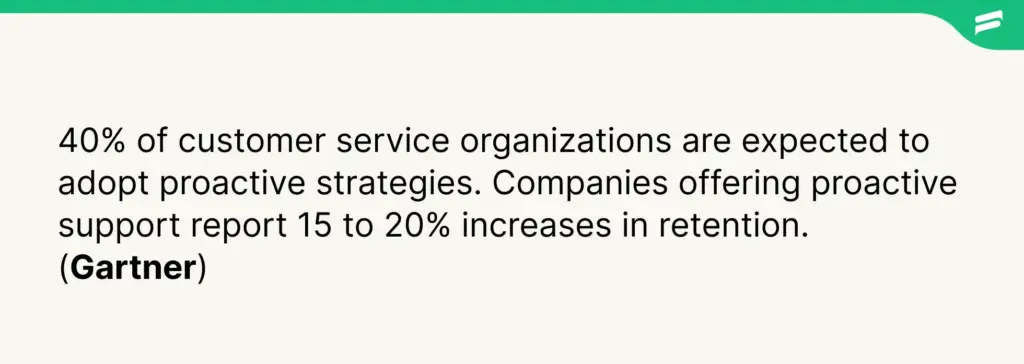
That gap does not close on its own.
They do not use ticket data as a strategic input
Your support queue is one of the richest sources of product intelligence in your business. Patterns in ticket categories, recurring complaint clusters, and language customers use to describe problems all contain information that product and content teams need. Teams that only use ticket data to measure resolution speed are leaving most of its value on the table.
The Core Pillars of a Customer Support Strategy
A customer support strategy is built on five interconnected pillars. Each one has to function on its own and connect cleanly to the others.
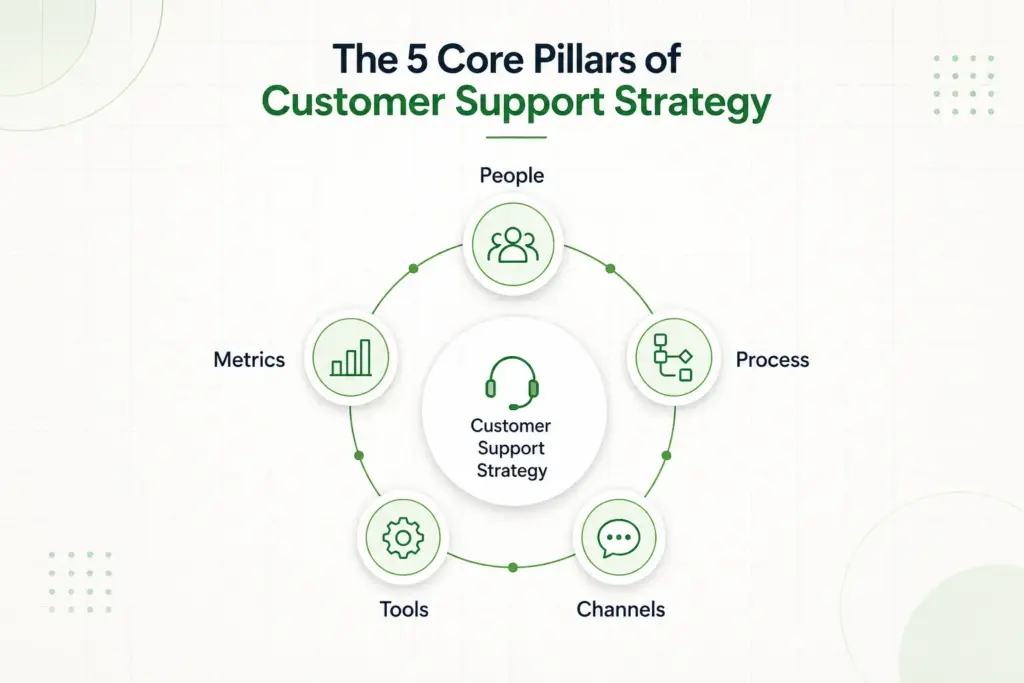
People
This covers your team structure, hiring criteria, training programs, and escalation ownership. Who handles what, at which tier, and when they escalate should be explicit, not assumed. Agents who operate without clear role definitions tend to over-escalate or under-escalate, both of which damage the customer experience and team morale.
Process
Process defines how tickets move from open to resolved. This includes triage rules, response templates, escalation paths, SLA definitions, and the protocol for handling edge cases. The goal is to make consistent behaviour the default, not the exception. Teams that rely on individual judgment for every ticket create inconsistent customer experiences at scale.
Channels
Channel strategy is about knowing where your customers want to reach you and being genuinely effective there, rather than distributing attention too thinly across too many channels. Omnichannel coverage sounds comprehensive. It can easily become a liability if your team lacks the capacity to maintain quality across all of them simultaneously.
The data is useful context here. 41% of customers prefer live chat over other channels, compared to 23% who prefer email. (GoTo)
Channel prioritization should follow actual customer behaviour, not assumptions about what a modern support team should offer. Customer expectations also vary significantly across generations, which affects which channels matter most for your specific audience.
Tools
Tools exist to make your processes faster and more consistent, not to replace them. A helpdesk plugin, a knowledge base, automation rules, and solid email management practices are the typical toolset for small to mid-sized support teams. The selection should follow from your process design, not precede it.
Just a heads up: Fluent Support is a WordPress helpdesk plugin built to handle ticket management, agent assignment, automated responses, and support reporting from a single dashboard. It fits neatly into the tooling layer of a support strategy for teams running on WordPress.
Metrics
Metrics give your strategy a feedback mechanism. Without measurement, a strategy has no way to self-correct. The right metrics are specific, actionable, and tied to customer outcomes rather than just operational throughput. Tracking ticket volume is useful. Understanding why that volume is rising or falling is strategic.
How to Build Your Customer Support Strategy Step by Step
Building a support strategy is a sequenced process. The order matters because each step creates the foundation for the next.
Step 1: Define your support vision
Start with a single sentence that describes what excellent support looks like for your specific customers. Not a mission statement. A practical description. Something like: “Customers get accurate answers in under four hours, with zero need to repeat their issue.” That sentence becomes the benchmark every other decision in the strategy is held against.
Step 2: Map the customer journey and touchpoints
Identify every stage at which a customer might need support. Understanding the full customer lifecycle helps you spot where friction is most likely to occur, from pre-purchase questions through onboarding, active use, billing, and potential cancellation. This audit typically reveals gaps that were never visible inside the inbox.
Step 3: Audit your current support performance
Before building forward, understand where you currently are. Pull three months of ticket data. Look at volume by category, average resolution time, escalation rate, and CSAT scores. Identify the top five recurring issues. Benchmarking your performance against broader customer support statistics can also help you understand where your team sits relative to industry norms.
Step 4: Build your process layer
Document the handling path for every common ticket type. Define SLA targets for first response and resolution. Create an escalation matrix that specifies who handles what level of complexity. Write response templates for your highest-volume scenarios. The process layer is what separates a support team from a support strategy.
Step 5: Set up self-service infrastructure
A knowledge base reduces ticket volume by allowing customers to resolve common issues independently. 80% of high-performing service organisations offer a self-service option, compared to just 56% of lower-performing teams. (Salesforce)
Build your knowledge base around the recurring issues you identified in the audit. Start with the top ten and expand from there.
Step 6: Choose and configure your tools
With your process defined, you now know what your tools need to do. Configure your helpdesk to mirror your triage logic. Set up automation for repetitive tasks like acknowledgment emails and ticket routing. Ensure your tools give agents the context they need, including customer history and relevant documentation, before they respond.
Step 7: Train your team against the strategy
Training that references the actual strategy is more effective than generic customer service training. Agents should understand the vision, know the process, and practice handling the edge cases documented in your escalation matrix. This applies to new hires too. A structured customer onboarding process for agents, not just customers, significantly reduces time-to-competency.
Step 8: Establish your feedback loop
The strategy is not complete when it is documented. It becomes functional when it has a mechanism for improvement. Schedule monthly reviews of your core KPIs. A structured customer feedback loop routes ticket insights to product and content teams on a regular cadence. Treat every spike in ticket volume as a signal, not just a workload problem.
How to Measure If Your Strategy Is Working
Measurement gives your strategy the ability to improve itself. These are the metrics that matter most and what each one actually tells you.
- First Contact Resolution (FCR): The percentage of tickets resolved in a single interaction. A low FCR points to either knowledge gaps in your team or unclear processes. Top-performing contact centres maintain FCR rates above 70%. (SQM Group) Read more about the companion metric first response time, which measures how quickly the first reply reaches the customer.
- Customer Satisfaction Score (CSAT): Direct feedback on individual interactions. Useful for spotting agents who need coaching and interactions that need process redesign. CSAT scores above 75% are typical among top-performing support teams. Tracking customer health score alongside CSAT gives you a broader view of how customers feel about the overall relationship, not just individual tickets.
- Average Handle Time (AHT): How long it takes to resolve a ticket. Track this alongside CSAT, not in isolation. A low AHT with a low CSAT suggests speed is coming at the cost of quality.
- Customer Effort Score (CES): Measures how much work the customer had to do to get their issue resolved. High effort correlates with churn, regardless of whether the issue was technically resolved.
- Ticket deflection rate: The proportion of potential tickets resolved through self-service before they reach an agent. A rising deflection rate is a sign your knowledge base and automation are doing their job.
- Escalation rate: How often tickets move up the support tier. A consistently high escalation rate usually points to a gap in frontline training or documentation, not a complexity problem.
Wrapping Up
A support strategy is not a document you write once and file away. It is a working system that needs revisiting when your product changes, ticket patterns shift, or your team scales.
The teams that get this right are not the ones with the most sophisticated tools. They are the ones who defined how support should work before defaulting to reactive mode. Start with what you can document today. Your vision, your top recurring ticket types, and one clear escalation path. That is already more than most teams have written down. From there, good customer engagement practices will naturally follow.
The structure comes first. Everything else follows from it.
Start off with a powerful ticketing system that delivers smooth collaboration right out of the box.
FAQ
A customer support strategy is a structured plan that defines how your team handles, responds to, and learns from customer interactions. It covers your people, processes, channels, tools, and the metrics used to track performance and drive improvement.
The terms are often used interchangeably, but customer support typically refers to reactive assistance after a customer encounters a problem, while customer service is a broader term covering the entire customer relationship. A customer support strategy is one component of a wider customer service strategy.
Start by defining your support vision, mapping the customer journey, and auditing your current performance. Then build your process layer, establish self-service infrastructure, configure your tools, train your team, and set up a regular feedback loop. The sequence matters. Tools should follow process, not precede it.
The core components are: a defined support vision, clear channel coverage, documented response processes and escalation paths, agent training standards, self-service resources, the right tooling, and a set of KPIs with a mechanism for regular review.
The most important metrics are First Contact Resolution (FCR), Customer Satisfaction Score (CSAT), Average Handle Time (AHT), Customer Effort Score (CES), ticket deflection rate, and escalation rate. Track AHT and CSAT together. Speed without quality does not produce good outcomes.
Reactive support addresses problems after customers report them. Proactive support anticipates issues before customers reach out, through things like outbound notifications, onboarding guidance, and triggered follow-ups. Both belong in a strategy, but they require separate process design and distinct measurement frameworks.
The most common failure modes are: starting with tools before defining processes, lacking internal alignment between support, product, and marketing teams, treating reactive and proactive support as the same function, and not using ticket data as a strategic input into the broader business.
Related Articles
26 Best Ticketing System Software in 2026
The best ticketing system software in 2026 includes…Fluent Support 2.4.5: Remote Portal, New Workflow Triggers and more
Fluent Support 2.4.5 lets you run the customer…



Add your first comment to this post