


What Is an IT Helpdesk? How It Works, and Setup for Small Teams

By Md. Ariful Basher
November 26, 2026
Last Modified: November 26, 2026


An IT helpdesk is the single place your team goes when tech breaks: a locked account, a dead laptop, a VPN that won’t connect. It logs every request as a ticket, fixes what it can and passes the rest to someone who can. Most people assume you need a big IT department to run one. Or do you?
Let’s say you run operations at a 25-person design studio. It’s Monday, 9:04 a.m., and you already have three Slack DMs about Wi-Fi, an email titled “URGENT pls” with no details, and a new hire who still can’t log in to anything. Nothing is tracked. Nobody knows which problem came first, and the printer issue you fixed last week is back.
As you can see, every request landed somewhere different and none of them left a trace. So the same fixes keep costing the same hours. We dig deep on this topic, keep reading.
TL;DR
- An IT helpdesk is the first point of contact for staff with tech problems and requests.
- It runs on tickets: every request gets logged, prioritised, assigned and closed.
- Password resets and access issues eat a big share of the queue, so self-service pays off fast.
- Support usually runs in tiers: Level 1 fixes the common stuff, Levels 2 and 3 take the hard cases.
- A good ticket form saves more time than a fast technician.
- Priorities and response targets keep “urgent” from meaning everything.
- A small team can run a real helpdesk with one front door, one ticket tool and a short list of rules.
What is an IT helpdesk?
An IT helpdesk is the team, person or system that receives, tracks and resolves technology problems and requests for the people it supports. That’s the whole definition, and what matters more is what lands on its desk every day.
Most of it is boring and repetitive.
Gartner figures put password resets at 30% to 50% of all IT service desk calls, which tells you where a small team’s hours actually go.
The day-to-day work falls into four buckets:
- Account and access: password resets, multi-factor authentication, permission changes.
- Troubleshooting: laptops, email, Wi-Fi, printers, the VPN.
- Service requests and incidents: planned asks like “set up the new hire” next to unplanned breakages like “the shared drive is down.”
- Self-service: a self-service portal with guides and FAQs, so people can fix the common stuff without waiting.
Those two words in the third bucket matter more than they look. A service request is something someone wants; an incident is something that broke. Mixing them in one pile is how the new laptop order sits behind a server outage for a day.
How an IT helpdesk works, from request to closed ticket
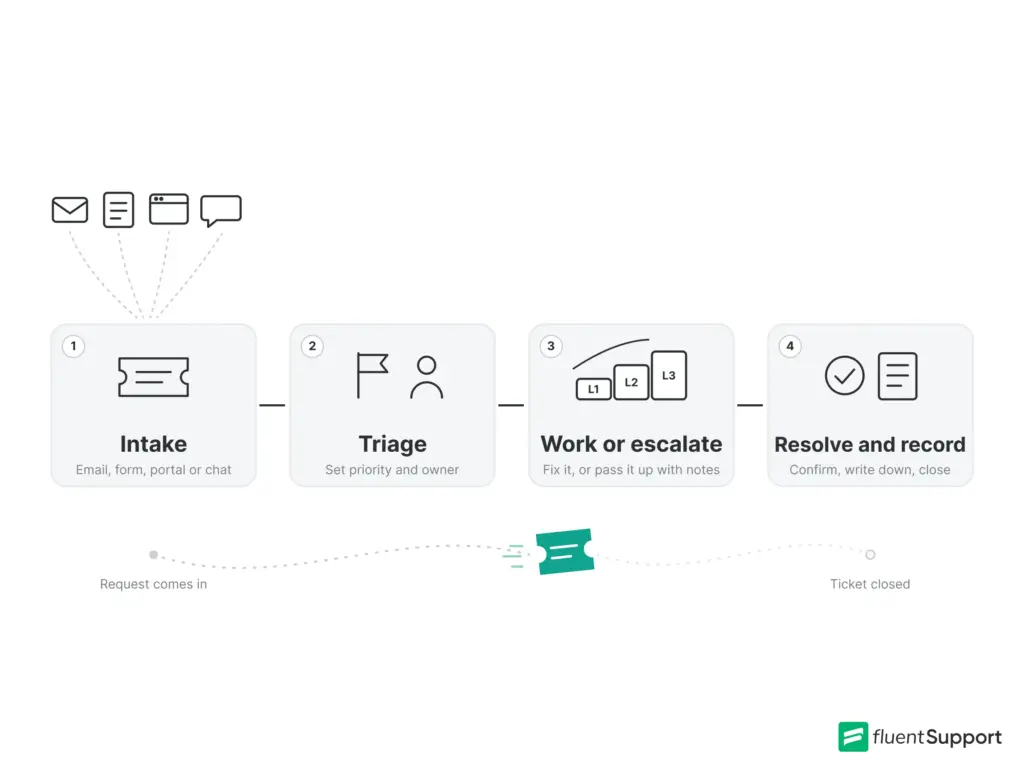
Here’s what’s happening behind a working helpdesk. Every request becomes a ticket, and the ticket moves through the same four stages no matter how small the team is. That’s the core job of a helpdesk ticketing system.
- Intake: the request arrives by email, a web form, a portal or chat, and becomes a tracked ticket with a number.
- Triage: someone checks what it is, how many people it hits and how urgent it is, then sets a priority and an owner.
- Work or escalate: the owner fixes it, or passes it up with clear notes so nobody starts from zero.
- Resolve and record: the fix gets confirmed with the person, written down and the ticket closes.
Stage four is the one teams skip. Close it properly, and the next person who hits that problem finds the answer already written. We have discussed about tiers of agents in IT in the upcoming section, keep reading.
What makes a good IT support ticket?
Most tickets fail before anyone reads them. Let’s say someone sends “Laptop broken pls help.” That one line forces three rounds of questions before work even starts. A good IT support ticket answers those questions upfront.
The fields that earn their place on an intake form:
- What happened: the symptom, in plain words.
- Who it affects: just me, my team, or the whole office.
- What changed: a new update, a move, a new device.
- What you tried: restart, other browser, other network.
- Screenshot or error text: copied, not retyped.
People hate long forms, so keep it short, keep it plain and keep it to these five fields, with two of them optional.
Here’s how a good one can look:
Subject: Can’t connect to the VPN since this morning
What happened: The VPN app says “Authentication failed” right after I enter my password.
Who it affects: Just me. Two teammates on the same VPN are connected fine.
What changed: My laptop installed updates and restarted last night.
What you tried: Restarted the laptop, re-typed my password, tried my phone hotspot.
Error text: “Authentication failed (error 691)”
A technician can start on that ticket right away, with no questions to send back. And if it has to move up a level, the same details keep support ticket escalation smooth, so the next person picks up right where you left off.
One clean handoff is the goal here.
IT helpdesk support tiers: Level 1, 2 and 3
Support tiers sort problems by how much skill they need, so simple fixes stay cheap and hard cases reach the right person. Most teams run a tiered support model with three levels:
- Level 1 support: first contact. Password resets, account unlocks, common how-to questions, logging and routing.
- Level 2: deeper troubleshooting, user and device administration, anything Level 1 couldn’t close.
- Level 3: specialist work on servers, networks, security and the systems themselves.
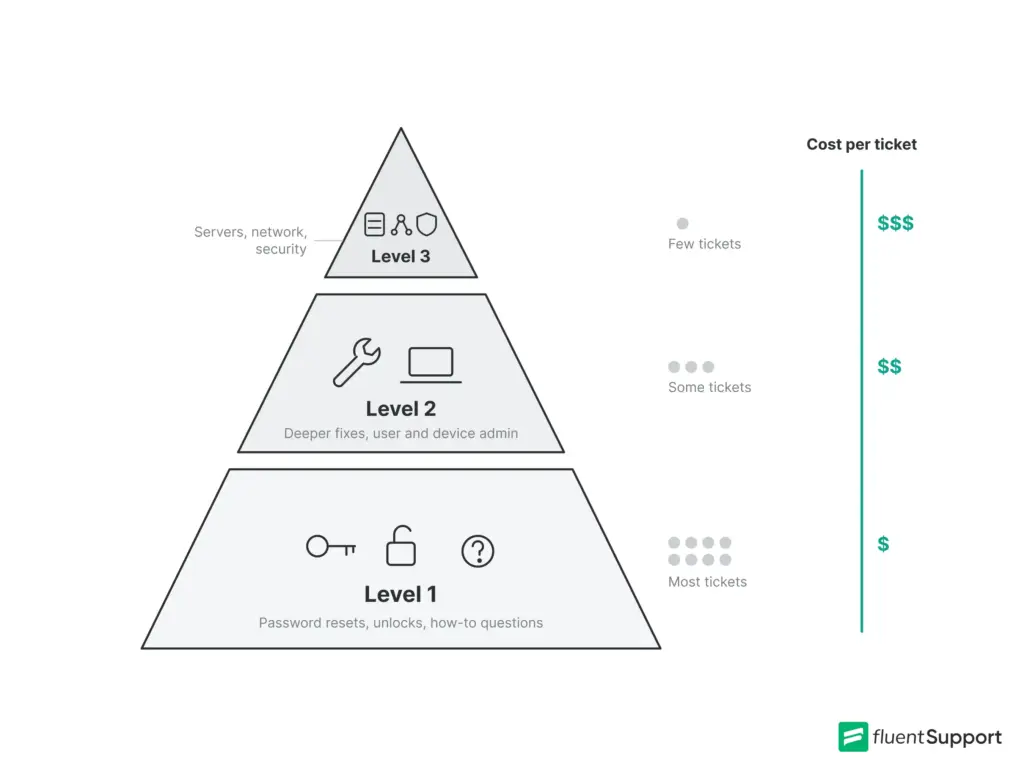
Why bother with levels at all? Mostly, it comes down to cost. HDI’s 2017 benchmark put the average North American service desk cost per ticket at $15.56, and desktop support tickets cost noticeably more once a technician has to travel to a desk. Every ticket solved at the first level is a ticket that never gets expensive.
But in a small company, the tiers work like hats. The same person might wear the Level 1 hat at 9 a.m. and the Level 3 hat at noon, with an outside contractor holding the real Level 3 keys. And that still works, as long as you write down who handles what, so escalation becomes a decision.
If you’re here for the career side: Level 1 is the classic entry point into IT, and plenty of sysadmins started by resetting passwords. We have discussed on how build ticket categories, so keep reading.
Internal, external and hybrid help desks
Not every help desk serves the same people. The setup changes depending on who’s asking.
- Internal help desk: supports your own staff, keeps daily work moving. This is what most people mean by an IT helpdesk.
- External help desk: supports customers using your product or service.
- Hybrid help desk: your own team handles the basics, and an outside provider covers after-hours or specialist work.
Now, managed service providers sit in an interesting spot. They run an external help desk that does internal IT work for several client companies at once, which makes clean ticket separation by client a must.
Help desk vs IT service desk: is there a difference?
In the UK, you’ll mostly see “IT service desk.” For the US, “help desk” wins. In daily use, the two often mean the same thing.
But the formal difference comes from IT service management frameworks. A help desk focuses on fixing problems as they come in. An IT service desk takes a wider view: it also handles service requests, changes and the bigger picture of how IT gets delivered across the company.
If you log requests, separate incidents from requests and track how fast you respond, you’re already running something close to a service desk. The label can wait, but the habits can’t.
How to build ticket categories and SLAs for an internal IT helpdesk
This is where things break for most first-time helpdesks. Here’s the thing: everyone marks their ticket urgent. The CEO’s monitor flicker jumps the queue ahead of the payroll system being down. As you can see, the job title got priority over the actual impact.
So what’s the best way to build ticket categories and SLAs for an internal IT helpdesk? Keep both small, and build them from the tickets you already get. Categories tell you what kind of problem it is. Priorities and SLAs tell you how fast it needs an answer.
Start with five or six ticket categories
Pull last month’s requests from email and chat, then group them by what broke. Most small teams land on a list like this:
- Access and accounts: passwords, MFA, permissions.
- Hardware: laptops, monitors, printers, phones.
- Software and apps: installs, licences, app errors.
- Network: Wi-Fi, VPN, shared drives.
- Requests: new hires, leavers, equipment orders.
- Security: phishing reports, lost devices.
Give each ticket one category only, and add an “Other” bucket you check once a month; if it keeps growing, it’s hiding a category you haven’t named yet. Then tie each category to an owner. That way, a phishing report goes straight to whoever wears the Level 3 hat.
Then set priorities and SLAs
A service level agreement (SLA) is a promise about how fast a ticket gets a response and a fix. Inside a company it’s an agreement with your own staff, and it works the same way as a customer contract. The simplest way to set it is a two-question priority check:
| Many people affected | One person affected | |
|---|---|---|
| Work is blocked | P1: respond within 30 minutes | P2: respond within 2 hours |
| Work can continue | P3: respond within 1 business day | P4: respond within 3 business days |
See what we did here: two questions and four levels leave no room for everything to be urgent.
Treat those numbers as a starting point. Pick targets your team can actually hit for a month, then tighten them. An SLA in a support ticket system only helps if the tool shows how long each ticket has waited. That way, nobody has to keep score in their head.
And response targets change behaviour on the other side too. Once people see that a P4 still gets answered in three days, they stop sending “URGENT” on everything.
Signs you’ve outgrown email and chat
Most businesses don’t figure this out until a request falls through the cracks and someone important notices. Email and Slack work fine for five people. Past that, a few signals show up:
- The same question gets answered over and over.
- Nobody can say how many open requests there are.
- Requests vanish when one person goes on holiday.
- “Did anyone pick this up?” becomes a daily message.
- You can’t tell which problems keep coming back.
So if you spot two or more of these, it’s time for real tickets.
How to set up an IT helpdesk for a small team
Now, you don’t need an enterprise suite to start. You need one front door, one place to track work and a few written rules. If WordPress is already your home base, you can set up a support ticket system in WordPress on the site you have.
- Pick one front door. Use a support email, a form or a portal, and point every other channel there.
- Choose your IT help desk software. Look for ticket tracking, priorities, assignment, internal notes and a home for your guides. Cloud tools are quick to start; a self-hosted help desk management system keeps internal data on your own server.
- Define categories and priorities. Use the six categories and the priority grid above, and adjust them after the first month.
- Write your top ten fixes. Turn the most repeated tickets into short guides, password resets first. That way, the biggest slice of the queue starts fixing itself.
- Agree response targets. Share them with staff so expectations match.
- Review once a month. Look at what came in, what took longest and what keeps repeating.
If your company already runs on WordPress, something like Fluent Support turns that site into a ticket desk with no outside SaaS connection needed. The free version gives you unlimited tickets and agents, a portal people submit to, and priorities, with all the data sitting in your own WordPress database. Pro adds email piping, custom fields, saved replies and automatic workflows for routing. Keep reading next part is vital for you.
Install free, Fluent Support.
Ready to provide the best and fastest customer support.
IT helpdesk FAQs
What does an IT helpdesk do?
It’s the first stop for staff with tech problems. It resets passwords, fixes devices and access issues, handles requests like new hire setups, and keeps guides so people can help themselves. Every request gets logged as a ticket, then fixed or passed up to someone with the right skills.
IT help desk or IT helpdesk?
Both are correct. Google shows the same results page for both spellings, with “IT Service Desk” all over the UK version. So pick one and stay consistent.
Is IT helpdesk a good career?
For many people, it’s the front door into IT. You touch almost every system a company runs, and you learn fast how real users break things. And plenty of sysadmins, network engineers and security folks started at Level 1.
Is IT helpdesk a stressful job?
It can be. Monday mornings, outages and a queue full of “URGENT” tickets wear anyone down. But clear priorities, written response targets and a good ticket form take a lot of that pressure off.
How do you prepare for an IT helpdesk interview?
Expect scenario questions. Let’s say the interviewer asks, “A user can’t connect to Wi-Fi. What do you check first?” They’re testing the order of your steps more than the fix, so talk through them out loud, say when you’d escalate, and show how you’d keep a frustrated user calm.
What’s the difference between an incident and a service request?
An incident is something that broke, like the shared drive going down. A service request is something someone needs, like a new laptop or access to a folder. Keeping them apart stops planned work from blocking urgent fixes.
Does a small business need a helpdesk?
Once more than a handful of people send IT requests, yes. You don’t need a department, just one front door, a ticket tool and a few rules. That way, nothing depends on one person’s memory.
What software does a helpdesk team use?
At minimum, a ticketing tool with priorities, assignment and a place for guides, which is where most small teams should start. Bigger teams add asset management, remote access and full ITSM suites. You can add those later, once the queue starts asking for them. Either way, the Fluent Support helpdesk plugin is the right tool to start.
Can you outsource IT support?
Yes. Many companies run a hybrid setup, where staff handle the basics and a managed service provider covers specialist work or after-hours support. Just keep every ticket in one place, so you can still see what’s open.
Start with the tickets that repeat
Remember that 30% to 50% share of password resets? Most IT work is the same small problems, again and again. A small team that tracks them, sorts them and writes the fixes down gets that time back, and a clear IT helpdesk turns daily chaos into a queue you can finish. Every team, however small, needs one.
Start off with a powerful ticketing system that delivers smooth collaboration right out of the box.
Related Articles
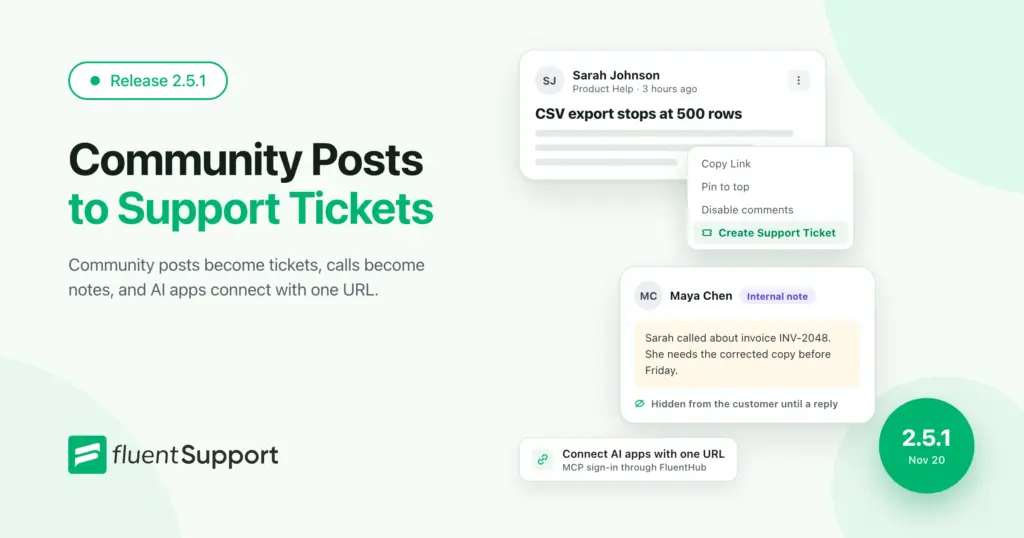
Fluent Support 2.5.1: FluentCommunity Tickets, Logged Calls and One-URL MCP
Fluent Support 2.5.1 turns FluentCommunity posts and comments…





Add your first comment to this post