
HTTP Error 521: What It Means and How to Fix It Fast

By Uttam Kumar Dash
May 13, 2026
Last Modified: May 13, 2026


Your site is live, Cloudflare is active, and then out of nowhere visitors see a blank page that reads “Web server is down.” No warning. No obvious reason. Just a broken connection and lost traffic.
HTTP error 521 is one of those errors that catches site owners off guard because everything on the surface looks fine. Cloudflare is up. Your domain is resolving. But somewhere between the CDN and your origin server, something went wrong.
In this blog, we will cover what HTTP error 521 actually means, what causes it, how to fix it step by step, and how to prevent it from coming back.
TL;DR
- HTTP error 521 means Cloudflare reached your server but the server refused the connection
- The problem is always on the origin server side, not Cloudflare’s
- Common causes: server is offline, firewall blocking Cloudflare IPs, wrong SSL/TLS settings, or incorrect port binding
- Fixes include allowlisting Cloudflare IPs, checking server status, and aligning your SSL mode
- Site visitors cannot fix this themselves, it requires action from the site owner or host
What Is HTTP Error 521?
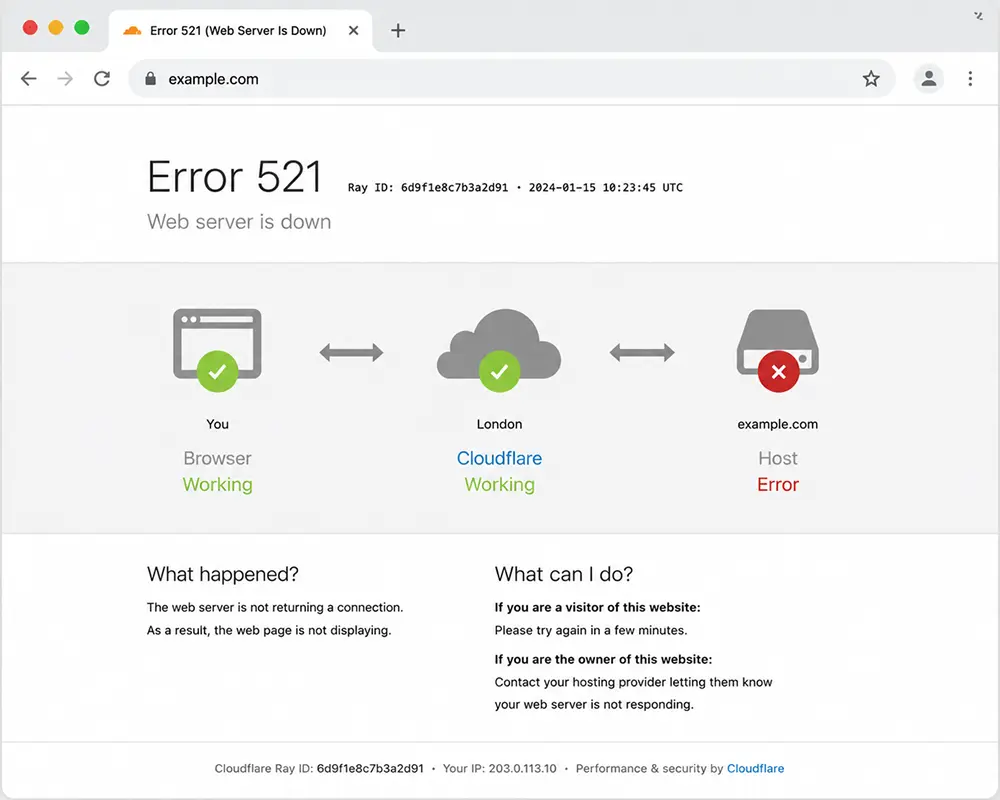
HTTP error 521 is a Cloudflare-specific status code that appears when Cloudflare successfully receives a visitor’s request but cannot establish a TCP connection to your origin web server. The server actively refuses the connection rather than simply timing out.
According to Cloudflare’s official documentation, “the two most common causes are an offlined origin web server application and blocked Cloudflare requests.” The error message visitors see typically reads: “Error 521: Web server is down.”
The key distinction here matters. HTTP error 521 is not a Cloudflare failure. Cloudflare is doing its job. The issue sits on your hosting side, which is why your host may tell you “everything looks fine” when you contact them while Cloudflare is still proxying the requests.
How Cloudflare Works (And Why 521 Happens)
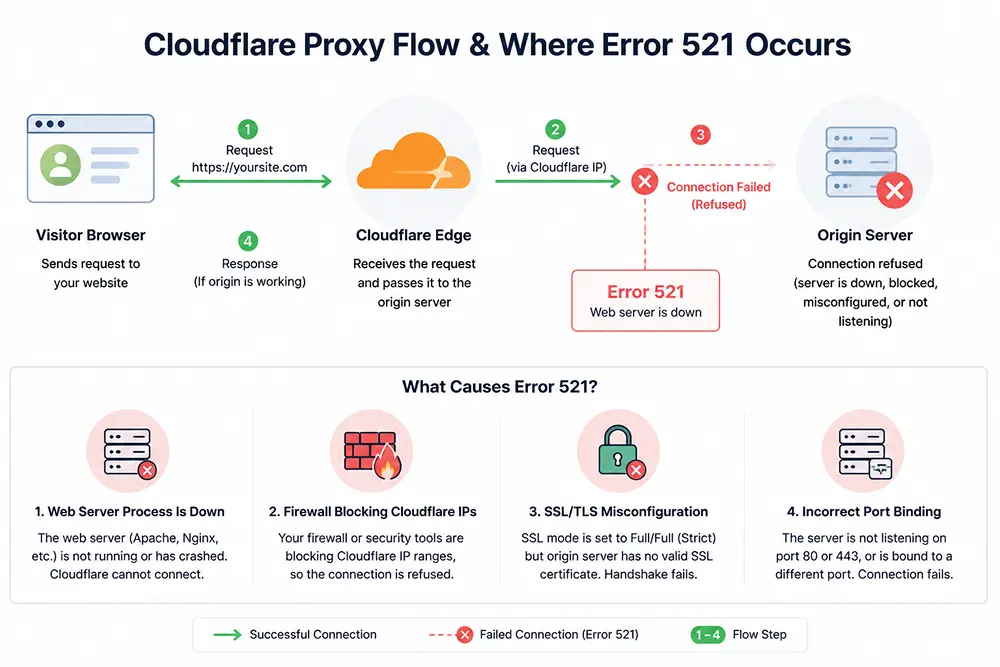
Cloudflare operates as a reverse proxy. When a visitor requests your site, they connect to Cloudflare’s edge servers first. Cloudflare then forwards that request to your origin server and returns the response to the visitor.
In a working setup, this happens in milliseconds. With error 521, the handshake breaks at the second step. Cloudflare tries to open a connection on port 80 (HTTP) or port 443 (HTTPS) and gets a “connection refused” response. The origin server is essentially saying no.
This matters for business owners beyond the technical details. Downtime carries real financial cost. According to a Gartner study cited by Atlassian’s incident management research, “the average cost of IT downtime is $5,600 per minute.” For ecommerce stores or SaaS products, even a few minutes of HTTP 521 errors can mean lost orders and damaged customer trust.
What Causes HTTP Error 521?
Understanding the cause narrows down your fix quickly. There are four primary culprits.
Your web server process is down. Apache, Nginx, or whatever web server software you use may have crashed or stopped. The physical server machine itself could still be running, but if the application process stopped, Cloudflare has nothing to connect to.
A firewall is blocking Cloudflare IPs. Because Cloudflare proxies all traffic through its own IP ranges, your origin server receives requests from Cloudflare IPs rather than individual visitor IPs. Security tools like Fail2Ban, iptables, or server-level firewalls can mistakenly flag these as suspicious and block them. As confirmed in Cloudflare’s community troubleshooting tip, “this is one of the most frequently seen causes of error 521.”
SSL/TLS misconfiguration. If your Cloudflare SSL mode is set to Full or Full (Strict) but your origin server has no valid SSL certificate installed, Cloudflare cannot complete a secure handshake. The connection gets refused before any content is served.
Incorrect port binding. Your server may not be listening on port 80 or 443. Cloudflare expects these standard ports. If your web server process is bound to a different port or not bound at all, the connection fails at the TCP layer.
How to Fix HTTP Error 521: Step by Step
1. Check Whether Your Web Server Is Running
Start with the basics. SSH into your server and run a status check on your web server process.
For Nginx:
systemctl status nginx
For Apache:
systemctl status apache2
If the service shows as inactive or failed, restart it:
systemctl restart nginx
You can also use the curl command to test a direct connection to your server’s IP address, bypassing Cloudflare entirely.
If the server responds directly but not through Cloudflare, the problem points toward firewall or configuration issues rather than the server being fully offline.
2. Allowlist Cloudflare IP Addresses
Cloudflare publishes its complete list of IP ranges at cloudflare.com/ips. You need to ensure that all of these addresses are explicitly permitted in your firewall rules.
In your .htaccess file for Apache, add allow from directives for each Cloudflare IP range. For iptables on Linux, use the appropriate accept rules. If you use a hosting control panel like cPanel or a security tool like Fail2Ban, check the whitelist or allowlist settings there.
This step resolves the majority of HTTP 521 errors, particularly those that appear intermittently or only under certain traffic conditions.
3. Align Your SSL/TLS Settings
In your Cloudflare dashboard, go to the SSL/TLS section and check which encryption mode is active.
- Flexible: Cloudflare connects to your origin over HTTP. No certificate is required on the origin server.
- Full: Cloudflare connects over HTTPS. A certificate must be installed on the origin, but it can be self-signed.
- Full (Strict): Requires a valid, trusted certificate on the origin server, either from a certificate authority or a Cloudflare Origin Certificate.
If you are using Full or Full (Strict) without a valid certificate on your origin, the SSL handshake will fail and trigger error 521. Either install a certificate or change the SSL mode to match your actual server setup.
Cloudflare’s free Origin Certificates, available directly through the SSL/TLS section of your dashboard under “Origin Server,” are the cleanest fix for most shared hosting or VPS environments.
4. Confirm Port Binding
Your server must be actively listening on the port Cloudflare expects. For Flexible SSL mode, that is port 80. For Full or Full (Strict), that is port 443.
Run the following command to check what your server is listening on:
netstat -tlnp | grep -E ’80|443′
If neither port shows your web server process in the output, the binding is missing or the process has crashed.
5. Review Server Error Logs
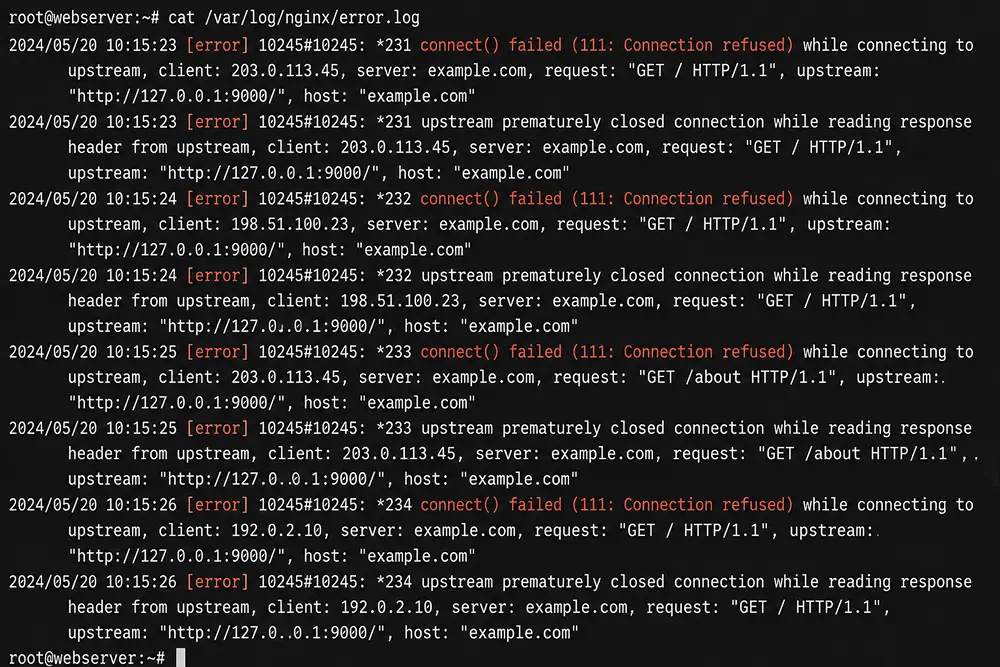
When the cause is not immediately obvious, your server logs usually reveal it. For Nginx, check /var/log/nginx/error.log. For Apache, check /var/log/apache2/error.log. Look for connection refusals, crash reports, or resource exhaustion messages around the time the error first appeared.
6. Temporarily Disable Cloudflare to Isolate the Problem
If you need to confirm whether the issue lies with your Cloudflare configuration or the origin server itself, pause Cloudflare from the Overview section of your dashboard. Once paused, traffic goes directly to your origin. If the site loads normally, the issue is in your Cloudflare settings. If it still fails, the origin server needs direct attention.
HTTP Error 521 in Specific Environments
Ubuntu servers: The fix usually involves verifying whether Nginx or Apache is running via systemctl status, then reviewing iptables rules to confirm Cloudflare IP ranges are not being blocked at the OS level.
Nginx setups: Pay close attention to the listen directives in your Nginx configuration files. If the server block is only configured to listen on a non-standard port, Cloudflare’s connection attempts on 80 or 443 will be refused every time.
WordPress sites: Security plugins like Wordfence can build firewall rules that inadvertently block Cloudflare’s proxy IPs. Temporarily deactivating security plugins and retesting can confirm whether this is the cause. Resource-heavy plugins can also push the server into overload, causing it to stop accepting new connections entirely.
Firestick and streaming apps (Tivimate, Mihon, etc.): When users report HTTP 521 on these platforms, the error is originating from the content server those apps connect to. The app itself is not at fault. There is nothing the end user can do. The server operator on the other side needs to resolve it.
How This Connects to Customer Support Workflows
HTTP error 521 is not only a technical problem. For businesses selling products or services online, server downtime directly affects customer experience and trust.
When users hit error 521, they reach out through email, social media, and support channels looking for answers. Having a reliable support ticket system means those reports get captured and routed to the right team quickly. Without one, messages get buried in inboxes and the problem lingers longer than it should.
A solid customer service workflow should include a step for outage communication. When your site goes down, customers need a timely and clear message. Proactive communication during downtime is one of the most effective ways to preserve trust while the technical fix is in progress. Fluent Support’s guide on proactive customer support covers this in more depth.
Related server errors like 502 Bad Gateway and HTTP error 503 share overlapping diagnostic steps with 521, so having your support team familiar with this category of errors reduces resolution time across the board.
How to Prevent HTTP Error 521 from Recurring
Once you resolve the immediate issue, a few habits keep it from returning.
Set up uptime monitoring using a tool like UptimeRobot so you get alerted the moment your server becomes unreachable, rather than hearing about it from customers first. Always keep Cloudflare’s full IP list allowlisted and review your firewall rules whenever you install new security software or change hosting configurations.
If your site handles regular traffic spikes, consider upgrading your hosting plan before you hit the resource limits that cause web server processes to crash under load. Keeping your SSL certificates renewed and your Cloudflare SSL mode consistently aligned with your origin setup eliminates one of the most avoidable causes of recurring 521 errors.
Wrapping Up
HTTP error 521 points to one specific breakdown: Cloudflare tried to reach your origin server, and the server refused the connection.
The root cause is almost always one of four things, a stopped web server process, Cloudflare IPs being blocked by a firewall, an SSL configuration mismatch, or a port binding issue.
Work through the fixes in order. Start with server status, move to firewall rules, then SSL settings, then port binding. Check your server error logs at any stage if the cause remains unclear.
For visitors who encounter this error, there is no client-side workaround. The resolution sits entirely with the site owner or hosting provider.
Want a system that makes ticket handling this smooth? Fluent Support brings structure and clarity to every request so your team always knows exactly what to do next. See how it works.
Frequently Asked Questions
What is HTTP error 521 Cloudflare?
It is a status code Cloudflare returns when its edge servers cannot establish a TCP connection to your origin server. The server is actively refusing the connection rather than timing out or being unreachable on the network.
How do I fix error 521 on my web server?
Start by confirming your web server process (Nginx or Apache) is running. Then verify that all Cloudflare IP ranges listed at cloudflare.com/ips are not blocked by your firewall. Finally, check that your Cloudflare SSL/TLS mode matches your origin server’s certificate configuration.
What does HTTP 521 mean on Mihon or Tivimate?
On streaming or manga reader apps, error 521 means the content server those apps connect to is experiencing an origin server refusal of Cloudflare’s connection. The app itself is not the cause. Only the server operator can resolve it.
Can error 521 hurt my SEO?
Yes. If search engine crawlers consistently encounter 521 errors, it signals that the site is unreliable. Extended downtime can lead to ranking drops. Fixing the error promptly and using uptime monitoring to catch future occurrences protects both rankings and user trust.
What is the difference between error 521 and error 522?
HTTP error 521 means the connection was actively refused by the origin server the moment Cloudflare attempted it. Error 522 means the connection was initiated but the origin server failed to respond within Cloudflare’s timeout window. Both point to origin server problems but represent different failure modes at the network level.
What does “Web server is down error code 521 Nginx” mean?
This refers specifically to Nginx as the web server process that has stopped or refused the incoming connection. The fix typically involves restarting the Nginx service with systemctl restart nginx and checking your Nginx configuration for correct port binding on port 80 or 443.
Related Articles
WordPress Debug Mode: How to Enable WP_DEBUG and Read the Debug Log (Step by Step)
Enable WordPress debug mode, log PHP errors safely,…Retail Customer Service: What It Takes to Turn Shoppers Into Repeat Customers
Retail customer service is the support a retailer…






Leave a Reply