


Email or Help Desk Software: Why Not Both?

By Rasel Siddiqe
July 14, 2026
Last Modified: July 13, 2026


Your support inbox hit a wall this week. Two agents replied to the same customer. One message sat unread for three days. A refund request slipped behind a newsletter reply, and nobody noticed until the customer asked again. If that sounds like your Monday, the problem is not your team. The problem is the tool.
A shared email account works fine for the first handful of requests. It stops working the moment two people need to answer, track, and follow up on the same messages. This is where email help desk software comes in. By the end of this post you will know what it does and how it turns plain emails into tracked tickets. You will also know how to pick the right one without paying per agent. You can keep your same support address and still fix the mess behind it.
TL;DR
What is Email Help Desk Software?
Email help desk software is a tool that collects customer emails from one or more support addresses and turns each one into a ticket you can track, assign, and close. Instead of a flat list of messages, you get a system with status, ownership, history, and reporting. Your customers still email you the same way. Your team gets structure behind the scenes.
The difference shows up in the details. A plain inbox tells you a message arrived. An email ticketing system tells you who owns the request and how long it has been open. It also shows what was said before and whether the reply broke your response target. That context is what stops requests from falling through the cracks.
Why does a Shared Inbox Stop Working as You Grow?
A shared inbox stops working because it was never built for teams. Everyone sees the same pile of messages, but nobody owns any single one. There is no status, no assignment, and no record of who replied. Once you pass a few dozen requests a week, the gaps turn into missed replies and duplicate answers.
The numbers back this up. Average response time for a customer service email is 12 hours and 10 minutes, according to the SuperOffice Customer Service Benchmark Report. That same report found that 46% of customers expect a reply within 4 hours. A shared inbox gives you no way to see that gap, let alone close it. You cannot fix a response time you cannot measure.
Three problems show up again and again. Agents collide on the same email and send conflicting replies. Urgent issues sink below low-priority ones because every message looks the same. And no one can report on volume, speed, or workload, so planning turns into guesswork. If you want a deeper look at where the line sits, this breakdown of the difference between a shared inbox and a ticketing system walks through it.
How does Help Desk Software turn Emails into Tickets?
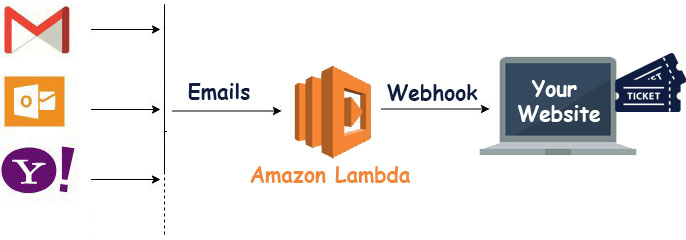
Help desk software turns email into tickets through a process called email piping. The tool connects to your support address, reads new messages as they arrive, and creates a ticket for each one with the sender, subject, and full message attached. Replies from your team go back to the customer as normal email, so nothing changes on their side.
Here is the flow in plain terms. A customer emails [email protected]. The software pulls that message in and opens a ticket. The ticket gets a status, lands in a queue, and can be assigned to an agent or a team. Every reply, note, and status change stays on that one record. When the issue is done, the ticket closes and the history stays searchable.
The setup is simpler than it sounds. You point your support address at the help desk, either through forwarding or direct piping, and the software handles the rest. If you want the mechanics, this guide on email piping covers how mail flows in, and this one on how to forward customer emails into tickets shows the forwarding route step by step.
What Features Matter in an Email Support Ticket System?
The features that matter in an email support ticket system are the ones that save time on every ticket, not the ones with the longest label. Focus on ticket status and assignment, internal notes, canned replies, automation rules, and reporting. Those five cover the daily work of a support team and remove most of the friction a shared inbox creates.
Ticket status, ownership, and collision detection
Status and ownership answer the two questions a shared inbox cannot: is this being handled, and by whom. Collision detection adds a live warning when two agents open the same ticket, so you stop sending double replies. These basics remove the most common source of embarrassing support moments.
Canned replies and automation
You answer the same questions all day. Saved replies let you drop a vetted answer in one click, and canned responses keep the tone consistent across the team. Automation goes further by tagging, routing, and assigning tickets on rules you set once, which is the core of any real workflow automation setup.
Reporting and response targets
You cannot improve what you never measure. Good reporting shows ticket volume, agent workload, and how often you hit your target reply window. Tracking your first response time turns a vague sense of “we’re slow” into a number you can actually move.
What Should a Small Business Look for in an Email Helpdesk?
A small business should look for flat pricing, fast setup, and data it controls. Many tools charge per agent, so the bill climbs every time you add a teammate. A growing team needs a tool that grows with it without punishing you for hiring. Setup should take an afternoon, not a project plan.
Price is where the two models split hardest. SaaS help desks bill per agent per month, which turns a five-person team into a recurring cost that scales the wrong way. A self-hosted tool with unlimited agents removes that math entirely. Weighing options at your size, this list of the best ticketing systems for small business is a useful starting point. The right email help desk software for a small business is one you can afford to grow into.
How does Fluent Support Handle Email Inside WordPress?
Fluent Support handles email support as a self-hosted helpdesk that lives inside your WordPress site. It pipes your support addresses into tickets, gives you unlimited tickets and unlimited agents on every paid plan, and keeps all customer data on your own server instead of a third-party platform. There is no per-agent fee, so adding staff never raises the bill.
The daily toolset covers the work end to end. You get business inboxes for addresses like support@ and billing@, internal notes, collision detection, saved replies, and rule-based workflows. On Pro plans, AI support features can draft a reply, summarize a long thread, and read the sentiment of a message before an agent opens it. Because it sits in WordPress, it connects to tools you may already run, like FluentCRM for customer data and WooCommerce for order context. More than 10,000 businesses run it today, per its repository.
Can You Switch from Email to a Help Desk without Losing History?
Yes, you can switch without losing your old tickets. The fear of leaving years of history trapped in an old tool is the most common reason teams stall on the move. A good help desk imports that history for you, so past conversations come along instead of getting left behind. You keep the record and start fresh on structure.
Fluent Support builds this in as a three-step process: install the plugin, enter your source credentials, and import your tickets. It pulls history from SaaS tools like Zendesk, Freshdesk, and Help Scout, plus WordPress plugins such as Support Candy, JS Help Desk, and Awesome Support. There is no code and no CSV wrangling. You can read the full path on the help desk migration page.
Wrapping Up!
You started this post with an inbox that hides more than it shows. Now you know the fix. Email help desk software captures every message as a ticket, gives each one an owner and a status, and hands you the reports to see where time goes. Your customers keep emailing the same address, and your team finally gets the structure behind it.
The next step is small. Pick a support address, decide what a “resolved” ticket looks like for your team, and try a tool that keeps your data and your agents on your terms. If you want that inside WordPress with unlimited agents and no per-agent pricing, see what Fluent Support can do and start turning email chaos into tracked, closable tickets.
Related Articles
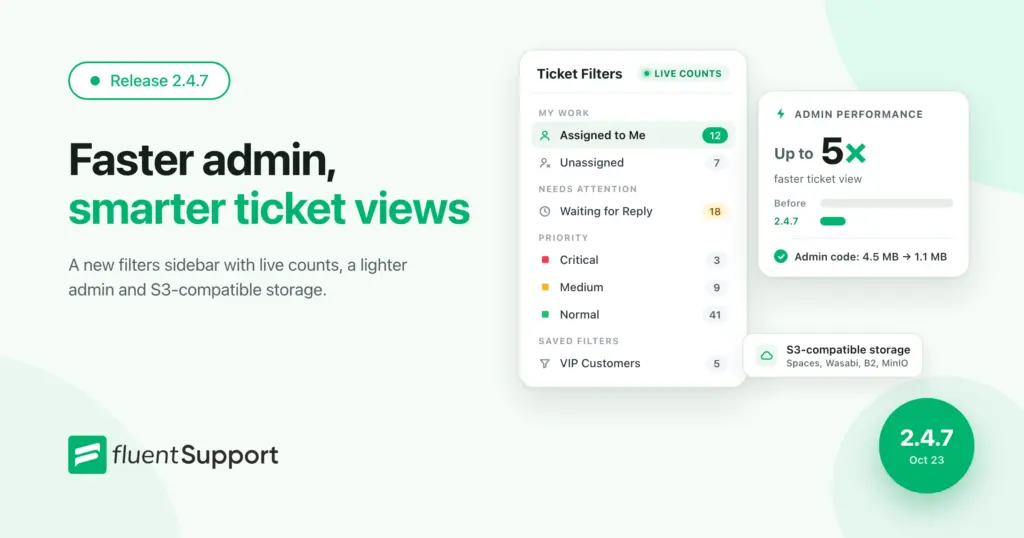
Fluent Support 2.4.7: Ticket Filters, 5x Faster Tickets and Smart Customer Search
Fluent Support 2.4.7 brings a Ticket Filters sidebar…Customer Success Best Practices for Small Teams
In this blog, we’ve discussed customer success in…



Add your first comment to this post