

Help Desk Software Wiki [Explained]

By Uttam Kumar Dash
March 10, 2026
Last Modified: March 10, 2026


Support teams deal with the same problems every single day. A customer cannot access their account. An order confirmation never arrived. A plugin stopped working after an update. Without a system to capture and share solutions, agents solve the same issue a hundred times over, each time from scratch.
This is the exact problem a help desk software wiki solves. It turns one-time resolutions into permanent team knowledge. Tickets stop repeating. Agents stop reinventing answers. Support becomes faster and more consistent.
In this blog, we will explain what a help desk software wiki is, how it differs from a knowledge base, why your team needs one, which tools combine ticketing with wiki functionality, and how to build a practical setup on WordPress without expensive enterprise software.
TL;DR
- A help desk software wiki is an internal documentation system storing troubleshooting guides and support procedures for agents
- It differs from a customer knowledge base in audience and purpose
- Support teams use it to reduce repeated tickets, speed up resolution, and onboard agents faster
- Enterprise tools like ServiceNow and Freshservice include this but cost significantly more
- Fluent Support paired with BetterDocs gives WordPress teams a working help desk wiki setup at a much lower cost
- BetterDocs suggests related articles inside the ticket form when customers or support agents type keywords in the subject field
What is a help desk software wiki?
A help desk software wiki is a centralized, editable documentation system used by support teams to store internal knowledge. This includes troubleshooting guides, step-by-step resolution procedures, onboarding materials, and answers to recurring customer issues.
Unlike a static document, a wiki lets multiple team members create, update, and search content collaboratively. It lives alongside the ticketing system so agents can reference it during live support interactions.
A typical help desk wiki contains pages on product setup, common error fixes, escalation procedures, internal policies, and new agent training materials. When an agent solves a problem, that solution gets documented so every future agent can resolve the same issue in minutes.
Help desk wiki vs. knowledge base: what is the difference?
These two terms get used interchangeably, but they serve different audiences.
Help desk wiki
A help desk wiki is written by support agents for support agents. It contains internal procedures, troubleshooting scripts, and operational guides that customers never see. The goal is to help the support team work faster and more consistently.
Knowledge base
A knowledge base is customer-facing. It contains FAQs, how-to guides, and product documentation that customers use to solve problems on their own without submitting a ticket.
| Feature | Help desk wiki | Knowledge base |
| Primary audience | Support agents | Customers |
| Content type | Internal SOPs, troubleshooting scripts | FAQs, product guides |
| Access | Internal only | Public or semi-public |
| Goal | Faster agent resolution | Customer self-service |
Many modern help desk systems now combine both. Agents get their internal wiki. Customers get a searchable knowledge base. Both serve the same documentation infrastructure.
Why support teams need a help desk wiki
Support teams waste enormous time solving problems they have already solved before. Without documentation, every agent effectively starts from zero on familiar issues. IT communities on Reddit consistently describe this frustration. Teams have ticketing but no documented solutions, so tribal knowledge stays locked in individual agents’ heads.
A help desk wiki addresses this at the root.
1. Faster issue resolution
When an agent receives a ticket about a failed order email, they open the wiki, pull up the relevant page, follow the steps, and close the ticket. What might take fifteen minutes becomes a two-minute resolution.
2. Consistent support answers
Without documentation, five agents give five different answers to the same question. A wiki standardizes the response so customer service quality stays reliable across the entire team.
3. Easier agent onboarding
New hires can search for solutions immediately rather than shadowing senior agents for weeks. A structured wiki cuts ramp-up time significantly and helps agents become productive faster.
4. Reduced ticket volume
When the wiki connects to a customer-facing knowledge base, customers find answers themselves. The support team handles fewer routine tickets and focuses on higher-complexity issues.
How a help desk wiki works in a real support workflow
A customer submits a ticket: “My order confirmation email never arrived.”
The agent opens the internal wiki and searches for “order confirmation email.” They find a troubleshooting page with four steps: check the spam folder, verify the email address on file, check delivery logs, and test with a different address. The agent follows the steps, resolves the issue in under five minutes, and closes the ticket.
If a customer-facing knowledge base article exists on the same topic, the agent shares the link so the customer can self-serve next time. Without the wiki, the agent might ask colleagues, search logs without structure, or send multiple back-and-forth messages.
The wiki removes all that friction. This is the core value of combining a solid support ticket system with well-maintained documentation. Tickets capture the problem. The wiki contains the solution.
Tools that combine ticketing and wiki functionality
Several enterprise platforms bundle ticketing and wiki into a single system. They are powerful but expensive and complex to manage.
- ServiceNow is a comprehensive ITSM platform with ticketing, a knowledge base, asset management, and workflow tools. It targets large enterprises and is priced accordingly. Most small teams find it far more than they need.
- Jira Service Management paired with Confluence creates a combined ticketing and wiki environment. It is widely used but requires managing two separate products with separate billing.
- GLPI is a popular open-source option with ticketing, inventory management, and a built-in knowledge base. For self-hosted and budget-conscious IT teams, it is a frequently recommended starting point.
The pattern across all these tools is the same. Full-featured ITSM platforms are either expensive, complex to administer, or both. Small and mid-sized teams are better served by a lighter alternative.
Building a help desk wiki on WordPress without expensive software
If you run a WordPress-based business, you can build a fully functional help desk wiki setup using tools already built for your environment. You do not need an enterprise ITSM subscription.
The approach is to combine a dedicated ticketing plugin with a documentation plugin. The ticketing layer handles incoming customer issues. The documentation layer stores the solutions. Agents use both during every support interaction.
| Feature | Enterprise ITSM | WordPress setup |
| Ticketing | Included | Fluent Support |
| Wiki / knowledge base | Included | BetterDocs |
| Cost | High annual contracts | Affordable annual license |
| Setup time | Weeks | Hours |
| Customization | Vendor-limited | Fully flexible |
This two-layer setup covers the core workflows most support teams actually need, without the overhead of features they will never use.
How Fluent Support handles the ticketing layer
Fluent Support is a WordPress-native help desk plugin that manages ticket submission, agent assignment, canned responses, and multi-inbox management from inside your WordPress dashboard.
For a help desk wiki setup, Fluent Support handles the ticket side entirely. Customers submit tickets through a branded portal. Agents manage and reply to tickets from a clean interface. The workflow automation engine handles routing and escalation using trigger-based rules with conditions and predefined actions.
Fluent Support also supports ticket tagging for categorizing issues by type, which makes it easier to locate the relevant documentation for any incoming request. Internal notes allow agents to add context visible only to the team. Saved replies let agents insert pre-written responses for recurring issues without retyping.
Fluent Support integrates directly with BetterDocs, which is where the wiki and knowledge base component lives.
How BetterDocs adds the wiki and knowledge base layer
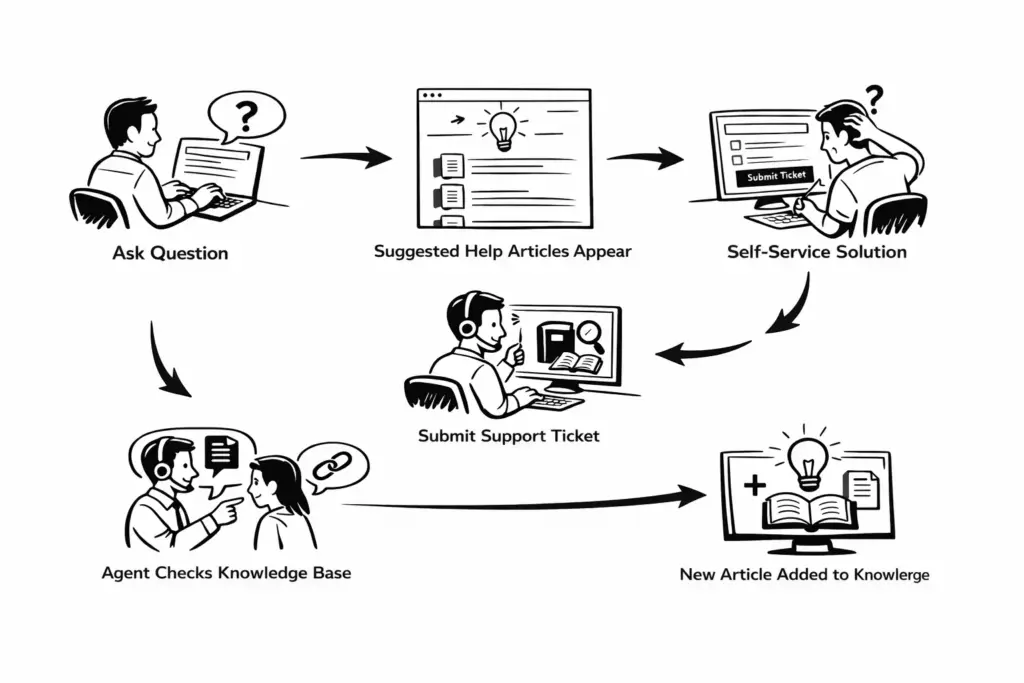
The Fluent Support and BetterDocs integration connects your documentation directly to the ticket submission form. Your documentation can be public for customers or private for your support team.
When a customer types keywords in the subject field of a support ticket, BetterDocs suggests related articles from the knowledge base in real time. If the customer finds the answer there, the issue is solved and a ticket may not be submitted.
BetterDocs is built as a knowledge base, but the same system can serve two roles. Public articles act as the customer help center. Documentation that is restricted to specific user roles becomes internal resources for the support team. In that case the knowledge base functions as a support wiki.
Support agents can access both types of documentation. They can share public articles with customers during a ticket. They can also check private documentation that contains troubleshooting steps, internal procedures, and resolution guides.
You can control which articles appear in the suggestions and how many are shown. Everything is configured inside WordPress without custom development.
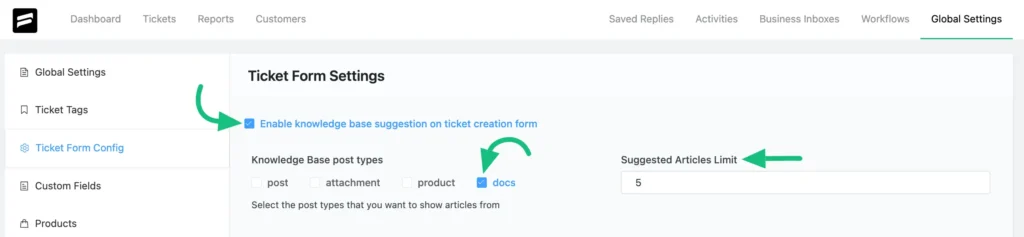
Over time, the documentation grows through real support cases. The customer support workflow improves continuously without adding headcount.
Best practices for building and maintaining a help desk wiki
1. Write for the agent, not the general reader
Every wiki article should answer one specific question: what does an agent need to do to resolve this issue? Keep writing direct and procedural. Remove background context the agent does not need mid-ticket.
2. Use screenshots generously
Text descriptions of UI steps are slow to follow under pressure. Screenshots and annotated images allow agents to match what they see on screen with what the wiki describes. This cuts resolution time on unfamiliar issues significantly.
3. Tag articles by issue type and product area
Good tagging makes articles findable in seconds. Align your ticket tags in Fluent Support with your BetterDocs article categories so agents can move from ticket to relevant documentation in one search.
4. Update documentation as soon as a process changes
A wiki with outdated procedures is worse than no wiki at all. Assign a team member the responsibility of reviewing and updating articles whenever a product update, policy change, or new resolution method is introduced.
5. Link documentation articles inside ticket replies
When an agent uses a wiki article to resolve a ticket, they should paste the relevant customer-facing article into the reply. This reduces repeat tickets from the same customer and builds long-term self-service habits.
6. Review which searches return no results
Searches that return nothing reveal gaps in your documentation. BetterDocs analytics surface these consistently. Fill those gaps regularly to keep the wiki useful for both agents and customers.
Why this setup works for small and growing teams
The case for WordPress over enterprise ITSM comes down to cost, flexibility, and setup speed. Enterprise platforms require significant budget, long onboarding periods, and lock teams into vendor configurations.
Fluent Support and BetterDocs give teams a working setup they can configure in a day. There are no per-agent fees that compound as the team grows. The automation built into Fluent Support handles repetitive routing and assignment tasks without manual effort. Proactive support through BetterDocs article suggestions means a portion of issues never become tickets at all.
Teams that start with even twenty to thirty well-written articles covering their most common issues see improvement in first response time and a drop in repeat tickets almost immediately.
For businesses already running WordPress, there is no reason to pay enterprise ITSM prices to get this result.
Want a system that makes ticket handling this smooth? Fluent Support brings structure and clarity to every request so your team always knows exactly what to do next. See how it works.
Wrapping up
A help desk software wiki is not a nice-to-have. It is the system that turns individual problem-solving into shared organizational knowledge. Tickets document the problems. The wiki documents the solutions. Together they create a support operation that gets smarter with every interaction.
For WordPress teams, Fluent Support for ticketing and BetterDocs for documentation deliver everything needed to build this system without the cost or complexity of enterprise ITSM platforms. Start with your ten most common support issues. Write an article for each. Connect both tools. You will see the difference in your ticket queue within the first week.
save you money?
Related Articles
How to Reduce Customer Churn Rate: A Complete Guide
Customer churn rate is the percentage of customers…What Is Customer Profiling and Why Does It Matter More Than You Think
Most businesses collect customer data. Very few actually…







Leave a Reply